- Quick Links
- Highlights
- MFA
- SSO
- Adaptive authentication
- Related Products
- ADManager Plus Active Directory Management & Reporting
- ADAudit Plus Real-time Active Directory Auditing and UBA
- ADSelfService Plus Identity security with adaptive MFA, SSPR, and SSO
- Exchange Reporter Plus Exchange Server Auditing & Reporting
- EventLog Analyzer Real-time Log Analysis & Reporting
- M365 Manager Plus Microsoft 365 Management & Reporting Tool
- DataSecurity Plus File server auditing & data discovery
- RecoveryManager Plus Enterprise backup and recovery tool
- SharePoint Manager Plus SharePoint Reporting and Auditing
- Identity360 A cloud-native identity platform for workforce IAM
- AD360 Integrated Identity & Access Management
- Log360 (On-Premise | Cloud) Comprehensive SIEM and UEBA
- AD Free Tools Active Directory FREE Tools
Outlook on the web makes mailboxes accessible from any browser. Without MFA, a stolen password may be enough for an attacker to access the account. Verizon’s 2025 Data Breach Investigations Report found that credential abuse accounted for 22% of breaches, reinforcing why OWA and Exchange Admin Center logins should not rely on an AD password alone.
On-premises OWA authenticates against Active Directory alone, and Microsoft Entra ID does not cover on-premises Exchange without complex cloud proxy architectures or hybrid migrations. ManageEngine Identity Access closes that gap: You manage MFA policy from the Identity Access cloud console, and it's enforced right at the OWA and Exchange Admin Center (EAC) login, so a valid AD password opens nothing without a second factor.
MFA for OWA and the Exchange Admin Center
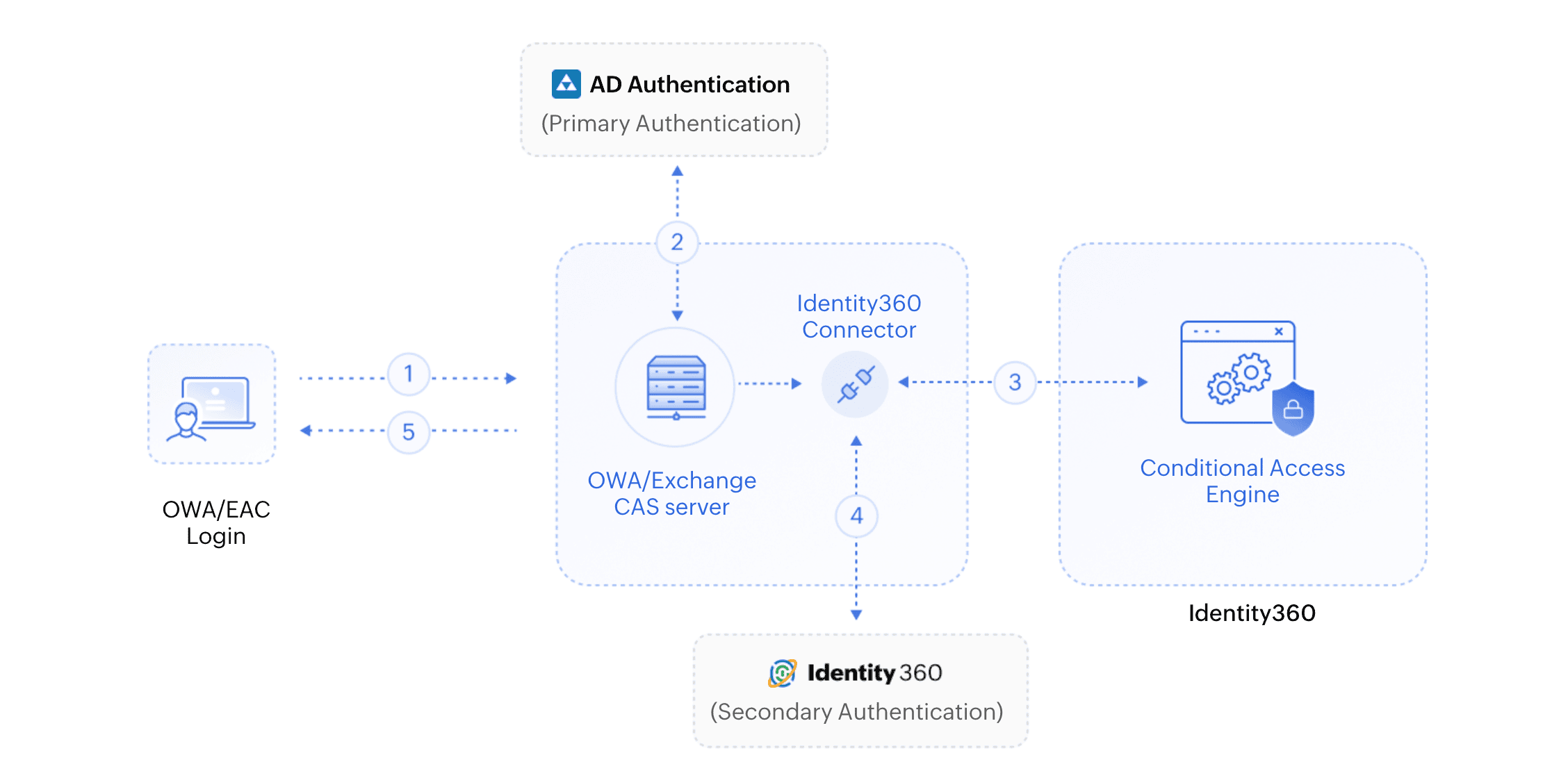
Identity Access adds a second authentication step to OWA and Exchange Admin Center (EAC) logins for on-premises Exchange, covering the OWA and other IIS-based Exchange applications on your Client Access Server (CAS). A connector installed on that server coordinates the check with your Identity Access instance: Once Exchange validates the AD password, the connector requests MFA over HTTPS, Identity Access performs the secondary authentication, and only a successful result lets the login proceed. The same applies to the EAC, so administrator sign-ins are protected alongside end users and a valid AD password produces no mailbox access on its own.
How OWA MFA works in Identity Access
- The user attempts to log in to OWA or the Exchange Admin Center.
- When primary AD authentication succeeds, the Identity Access connector triggers an HTTPS request for MFA with the Identity Access server.
- Identity Access performs the secondary authentication, evaluating any conditional access policy and sends the result back to the connector.
- If the user completes all the required factors, they're logged in to OWA or the Exchange Admin Center; if any factor fails, access is denied.
A full authenticator set for OWA logins
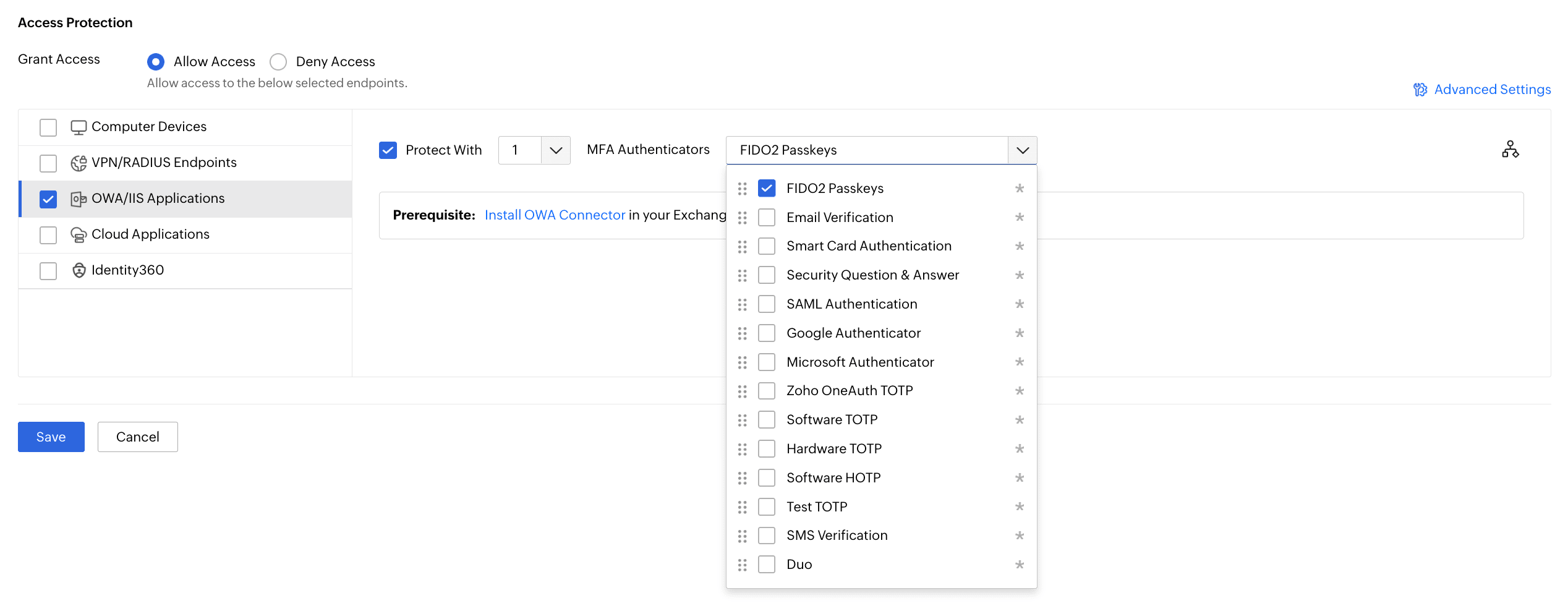
OWA MFA is only as useful as the factors behind it. Identity Access brings authenticators across all three factor categories to the OWA login, so you can require a light factor for routine access and a phishing-resistant one for administrators or sensitive mailboxes.
TOTP authenticator app integration
Time-based one-time passcodes work with Zoho OneAuth, Google Authenticator, and Microsoft Authenticator, plus custom software and hardware TOTP tokens. Push notification approval offers a tap-to-approve alternative with nothing to type, and email and SMS OTP cover users without an app installed.
Biometric and FIDO2 passkey authentication
For phishing-resistant, passwordless verification, Identity Access supports FIDO2 passkeys and biometric authentication like fingerprint and Face ID on the enrolled device, plus hardware security keys such as YubiKey. A FIDO2 passkey binds a private key to the device and the origin, so a credential phished on a look-alike OWA page can't complete the login. This is the factor to require for privileged and admin accounts.
Rounding out the set are smart card authentication, Duo Security, RSA SecurID, hardware TOTP tokens, and RADIUS-based authentication, so you can reuse an existing token investment where one already exists.
Applying and managing OWA MFA in Identity Access
Extend Active Directory authentication
For on-premises Exchange, Active Directory remains the source of user accounts, mailbox access, and permissions. Exchange validates the user’s AD credentials, after which the Identity Access connector initiates MFA and sends the authentication request to Identity Access. This adds a second factor without changing how Exchange is managed. Users already enrolled in Identity Access can reuse their factors across protected applications.
Apply adaptive conditional access
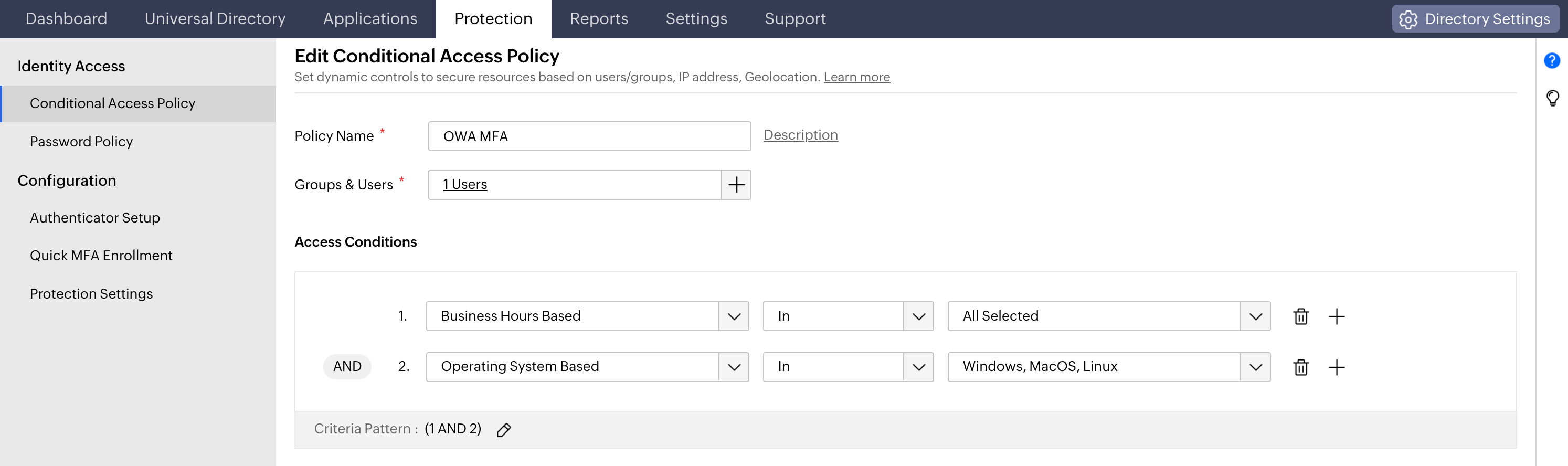
Challenging every OWA login identically punishes the low-risk majority and pushes users toward workarounds. Identity Access applies adaptive, risk-based conditional access to each OWA session instead, reading source IP, device, browser, geolocation, time of access, and business hours. It then chooses a proportionate outcome by allowing access with a single factor, requiring standard MFA, or stepping up to a phishing-resistant factor.
Create OWA access policies
Define trusted conditions, choose the required authentication response, and apply the policy to specific directory groups. Sensitive groups, such as administrators or finance teams, can be assigned stricter requirements.
Prevent legacy protocol bypass
POP3, IMAP, SMTP AUTH, and older EWS connections may bypass browser-based MFA because they authenticate directly with passwords. Identity Access rejects requests without a valid authentication token. Disabling unused legacy protocols in Exchange further reduces this risk.
Simplify auditing
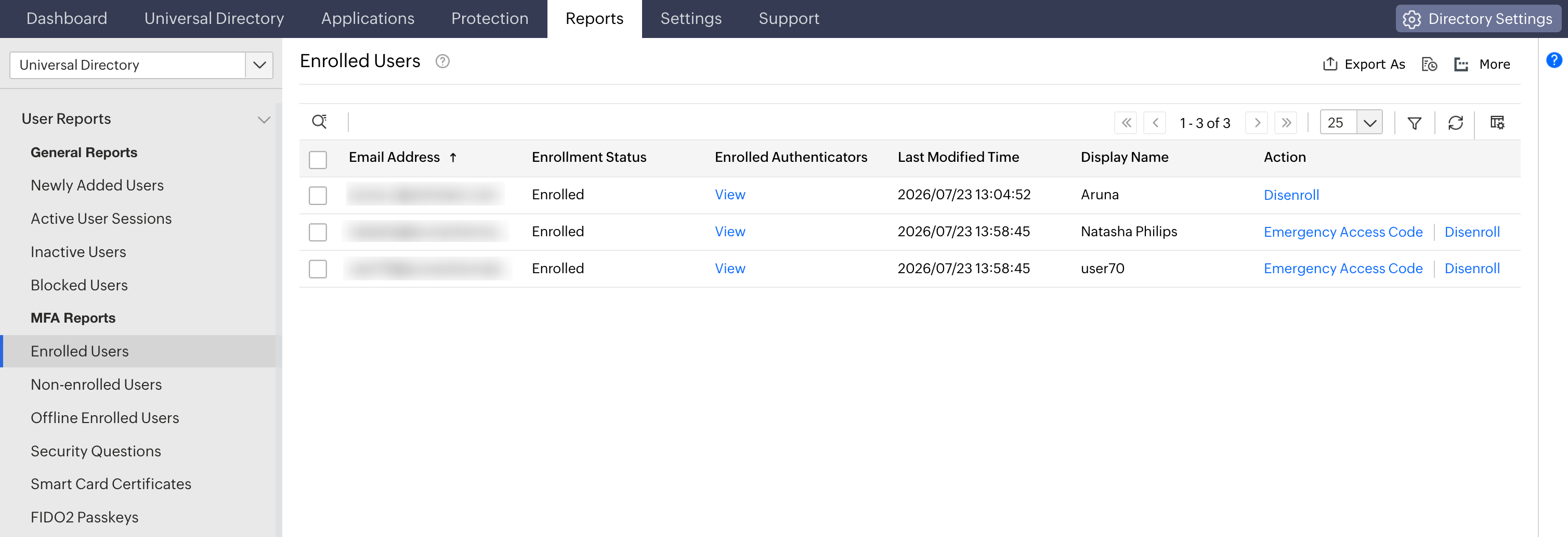
MFA reports track enrollment, security questions, FIDO2 passkeys, and more with scheduling and export options for audits.
Benefits of Identity Access MFA for OWA
- Stops mailbox takeover at the login: A stolen or phished AD password can't open OWA or the EAC on its own, shutting down the credential attacks that lead to business email compromise.
- Adaptive access with less friction: Trusted logins pass with a single factor; risky ones are stepped up or blocked, so security tightens without slowing the routine majority.
- Phishing-resistant access: Protect executive and high-value mailboxes with FIDO2 passkeys and security keys that resist real-time phishing attacks.
- Makes audits straightforward: Built-in MFA reports help support evidence auditors expect for NIST, PCI DSS, HIPAA, and the GDPR.
Frequently asked questions
MFA for OWA adds a verified second factor after the AD username and password, so a stolen password can't open a mailbox alone. On-premises OWA has no native MFA so it's added with a solution like Identity Access, which requires a factor such as a FIDO2 passkey or TOTP code at the IIS layer before a session is created.
Authentication in OWA is how Exchange verifies a user before granting mailbox access in the browser, by default, AD credentials. Identity Access adds a second authentication step so login needs both the AD password and a verified factor.
If OWA is internet-facing, yes. It's a standing target for password spraying, credential stuffing, and phishing proxies, and Entra ID conditional access doesn't reach on-premises Exchange. Enforcing MFA on OWA with Identity Access closes that gap and help support the MFA baseline under NIST, PCI DSS, and HIPAA.
Install the Identity Access connector on the Exchange Client Access Server and connect it to your Identity Access instance. Configure the factors and any conditional access policies, then enroll users. OWA and EAC logins then require the second factor after AD authentication.
Other features
Passwordless authentication
Replace passwords with FIDO2 security keys and platform biometrics, removing the credential most often phished and replayed.
SSO
Give users one-click entry to every cloud application using a single set of credentials.
Conditional access policy
Evaluate every access request against user, device, IP address, geolocation, time, and operating system, then allow, deny, or challenge it accordingly.
Device authentication
Authenticate Windows, macOS, and Linux machines on cloud without Active Directory or Entra ID.
Machine MFA
Verify identity at the Windows, macOS, and Linux login screen on both domain-joined and cloud-joined machines.
MFA for enterprise apps
Set MFA and access rules for each application on its own terms, so that critical applications carry a stronger challenge and routine ones stay quick.