The risks of not automating your certificate management
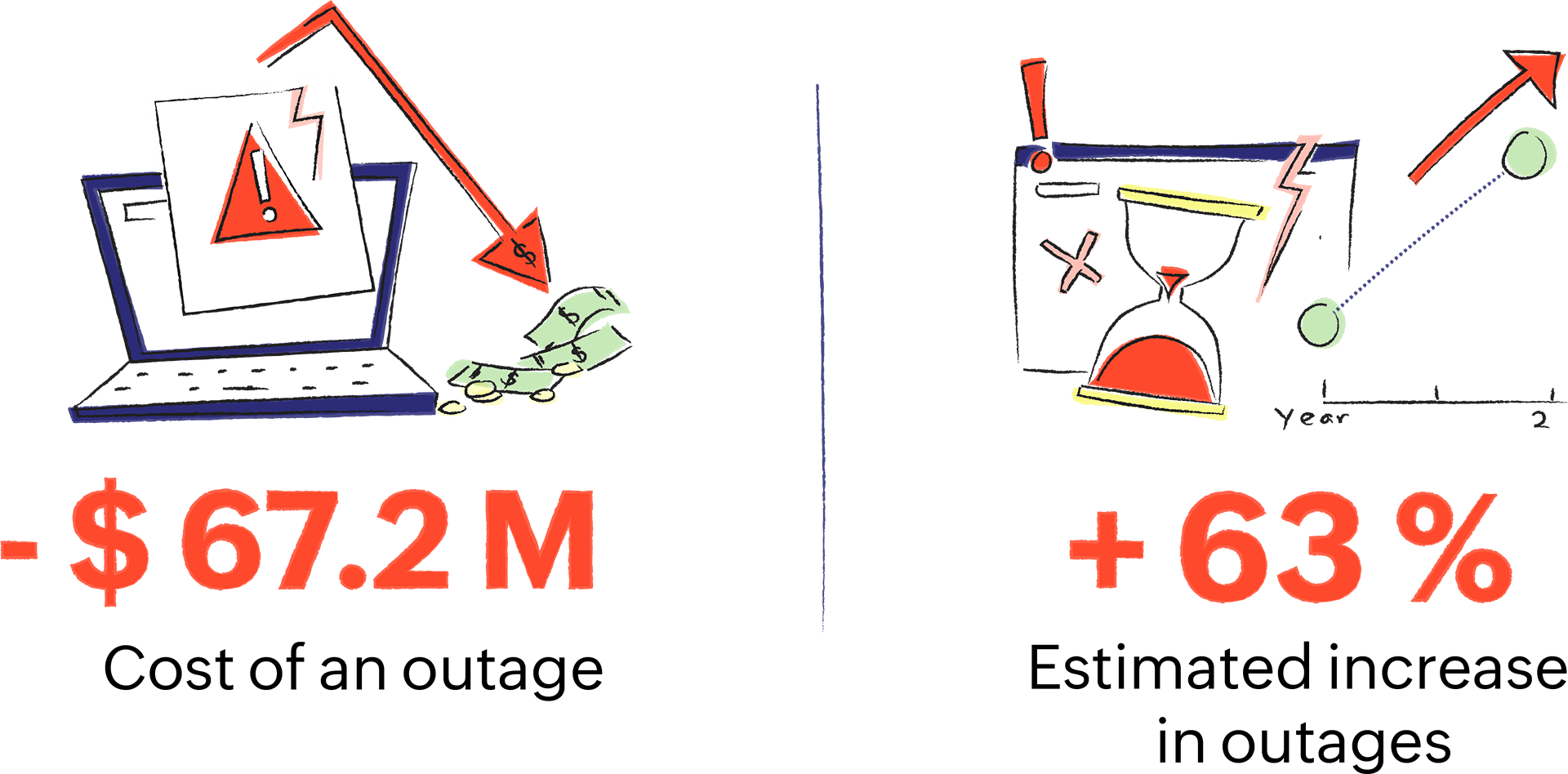
An outage or downtime costs a company an average of $67.2 million* over a period of two years, and it's estimated that expiry-related outages will increase by 63% in the next 24 months. Leveraging an automation tool can help organizations mitigate outages and the ensuing damage.
Cost, complexities, and the additional effort required to set up the process prevent organizations from automating their PKI certificate management. A free, standardized mechanism like the Automated Certificate Management Environment (ACME) protocol can automate certificate life cycle management (CLM), eliminate gaps in the visibility of certificate management, and curb the costly consequences of an expired certificate.
The ACME protocol
Automated Certificate Management Environment (ACME) is a communications protocol that automates the issuance, installation, renewal, and revocation of PKI certificates without any human intervention. ACME automates the interaction between the certificate authority (CA) and the web server or device that hosts PKI certificates.
ACME versions
Originally created by the Internet Security Research Group exclusively for its own certificate service, Let's Encrypt, ACME was used to issue domain-validated (DV) SSL/TLS certificates. Now, multiple CAs are increasingly adopting the ACME protocol to issue different types of certificates such as extended-validated (EV) and organization-validated (OV).
ACME version 1, which was released in 2016 (and deprecated in 2021), supported only DV certificates but not wildcard SSL/TLS certificates. The updated ACME version 2, which was released in March 2018, supports wildcard certificates and comes with intensive security checks for DV certificates.
The advantages of using the ACME protocol
- 01.
No licensing fee; open-source tool
- 02.
Requires minimal integration time; easy to set up and use
- 03.
Saves time, cost, and labor-intensive manual effort for an organization
- 04.
Prevents MITM attacks and security risks due to outages
- 05.
Directly reaches out to the CA, eliminating long waiting queues
- 06.
No human intervention is required
- 07.
Consistently enhanced by the open-source community
- 08.
Agile and scalable
- 09.
Quickly replaces compromised certificates with new ones
- 10.
Easily switches to a different CA when disaster strikes
How does the ACME protocol work?
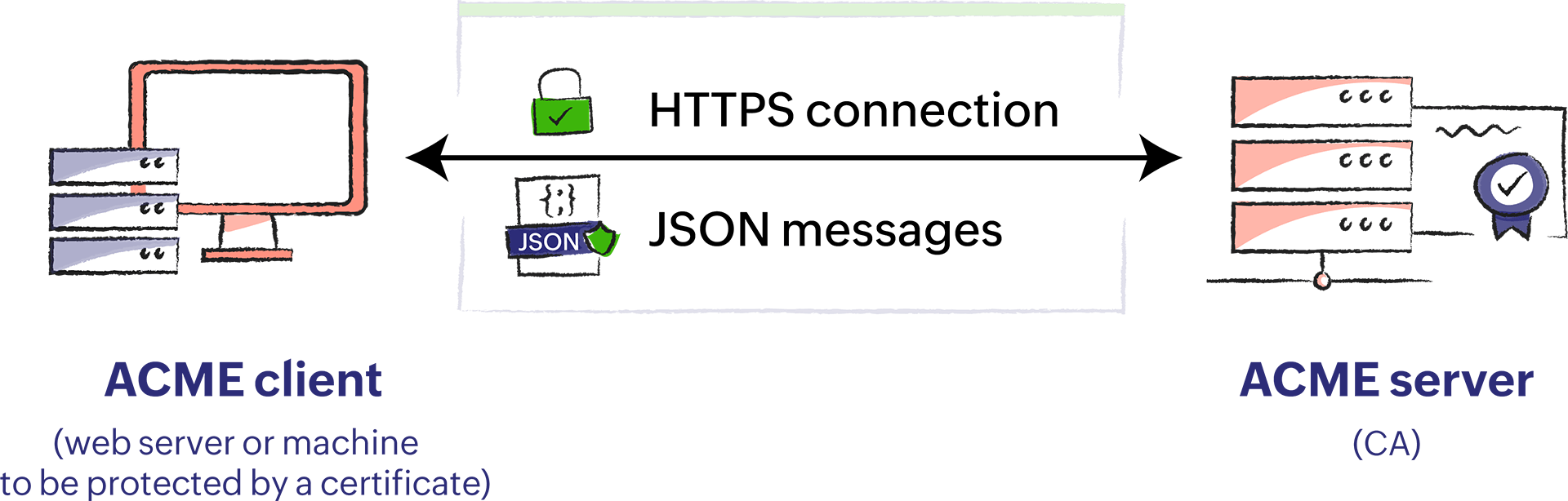
ACME follows a client-server architecture where they communicate with each other securely over encrypted HTTPS connections using JSON messages.
Client
An ACME client (also known as an ACME agent) runs on any web server or machine where the PKI certificate needs to be deployed. It acts on behalf of the web server it's installed on to send certificate issuance, renewal, and revocation requests.
Server
An ACME server runs on a CA, such as Let's Encrypt or Sectigo, and responds to the requests made by the ACME client.
How to set up an ACME client-server architecture
Like any client-server architecture, the ACME server responds to and executes the certificate requests (issuance, renewal, revocation) made by the ACME client. One of the first steps for a user to get started is to choose the client that needs to be installed.
Although there is a slew of clients available, it's recommended to get started with Certbot—an ACME client that's easy to use and works on many operating systems. It's a free, open-source tool that renews certificates every 60 days.
Before automating PKI certificate management, the client and server must be set up thoroughly. Since the ACME server accepts requests only from authorized clients, it's necessary to ensure that the client is authenticated to issue requests. Thus, to prove its authenticity, the ACME client needs to complete the challenges put forth by the ACME server.
ACME challenges
There are two types of ACME challenges: HTTP and DNS. They can be completed rapidly in less than 15 seconds.
HTTP
When the ACME client sends a request to the CA (ACME server), the CA sends back a token to be installed on the client. The client creates a file with that token and appends it with a thumbprint of the authorization key. After installing the file, the client informs the CA. The ACME server retrieves and validates the file, thus completing the challenge.
DNS
The DNS challenge is similar to the HTTP challenge, but it requires an additional verification factor. In addition to installing the file with the token, the ACME client needs to place a given value in the TXT record of the DNS space. Once the challenge is completed, the server performs a DNS lookup and retrieves the TXT record.
Configuring the ACME client
After choosing the ACME client, the next step is to configure it on the server or machine that needs to be secured by a PKI certificate. Outlined as follows, the entire configuration takes less than 10 minutes:
- After deciding on the domain, choose the desired CA from the list of ACME-supporting CAs.
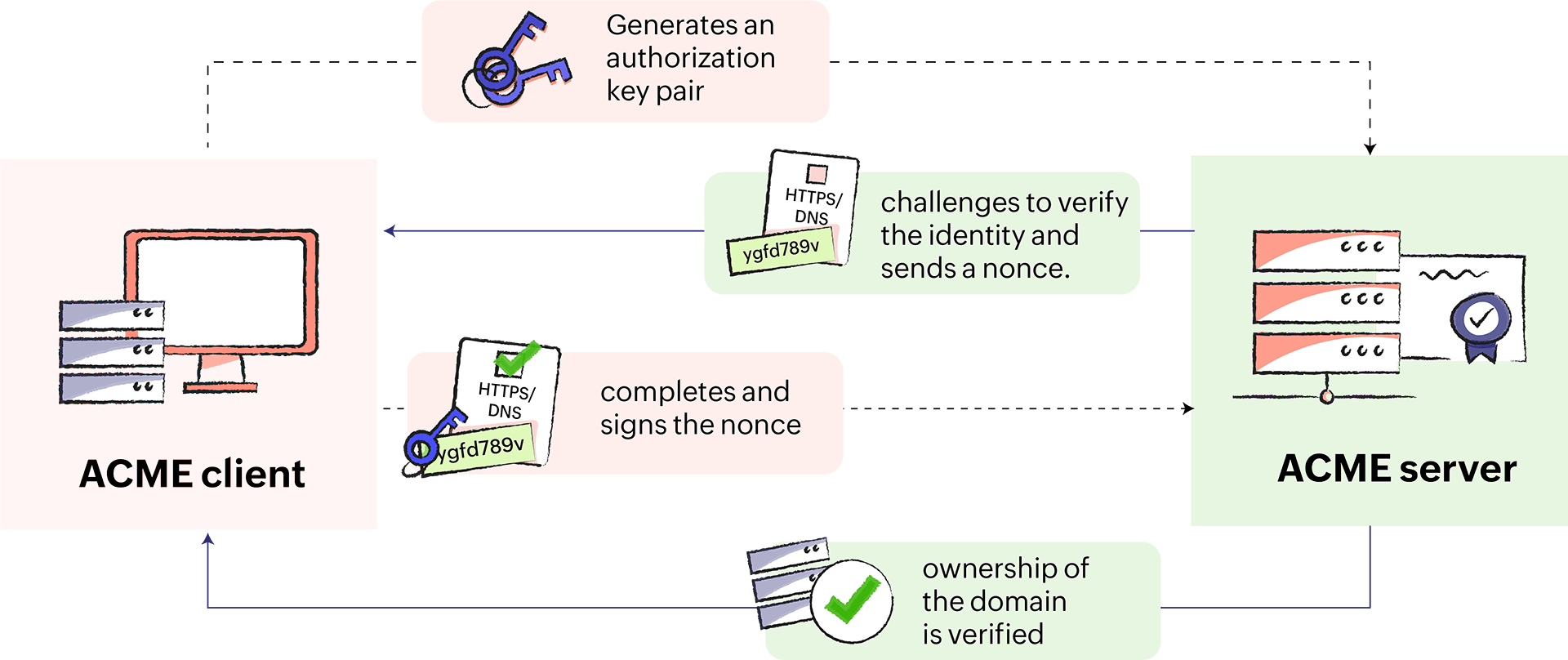
- The ACME client contacts the CA (ACME server) and generates an authorization key pair.
- The CA issues challenges (HTTP or DNS) for the client to verify its identity. It also sends a nonce (randomly generated numbers).
- After completing the challenges, the client signs the nonce with the private key it generated.
- The ownership of the domain is verified, and the client-server setup is accomplished.
- Configure the frequency at which the ACME client should contact the CA to renew certificates.
- Now, the ACME client can act on behalf of the domain to perform automated certificate issuance, renewal, and revocation.
How the ACME client requests certificate issuance and renewal
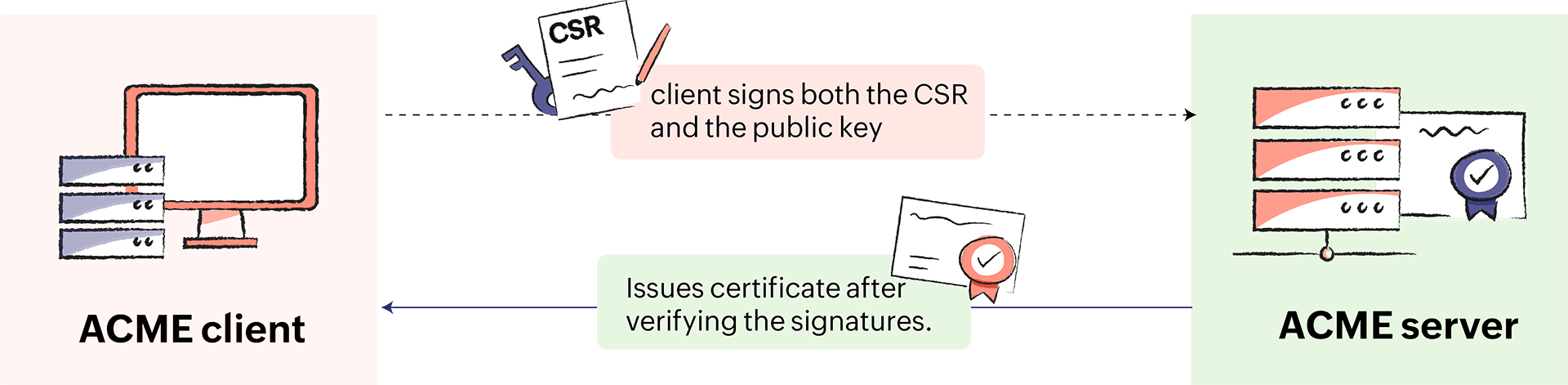
- The ACME client generates a Certificate Signing Request (CSR) for the domain.
- The ACME client signs both the CSR and the public key generated with its very own private key.
- The CA issues the required certificate after verifying the signatures.
- The ACME client installs the certificate on the domain server.
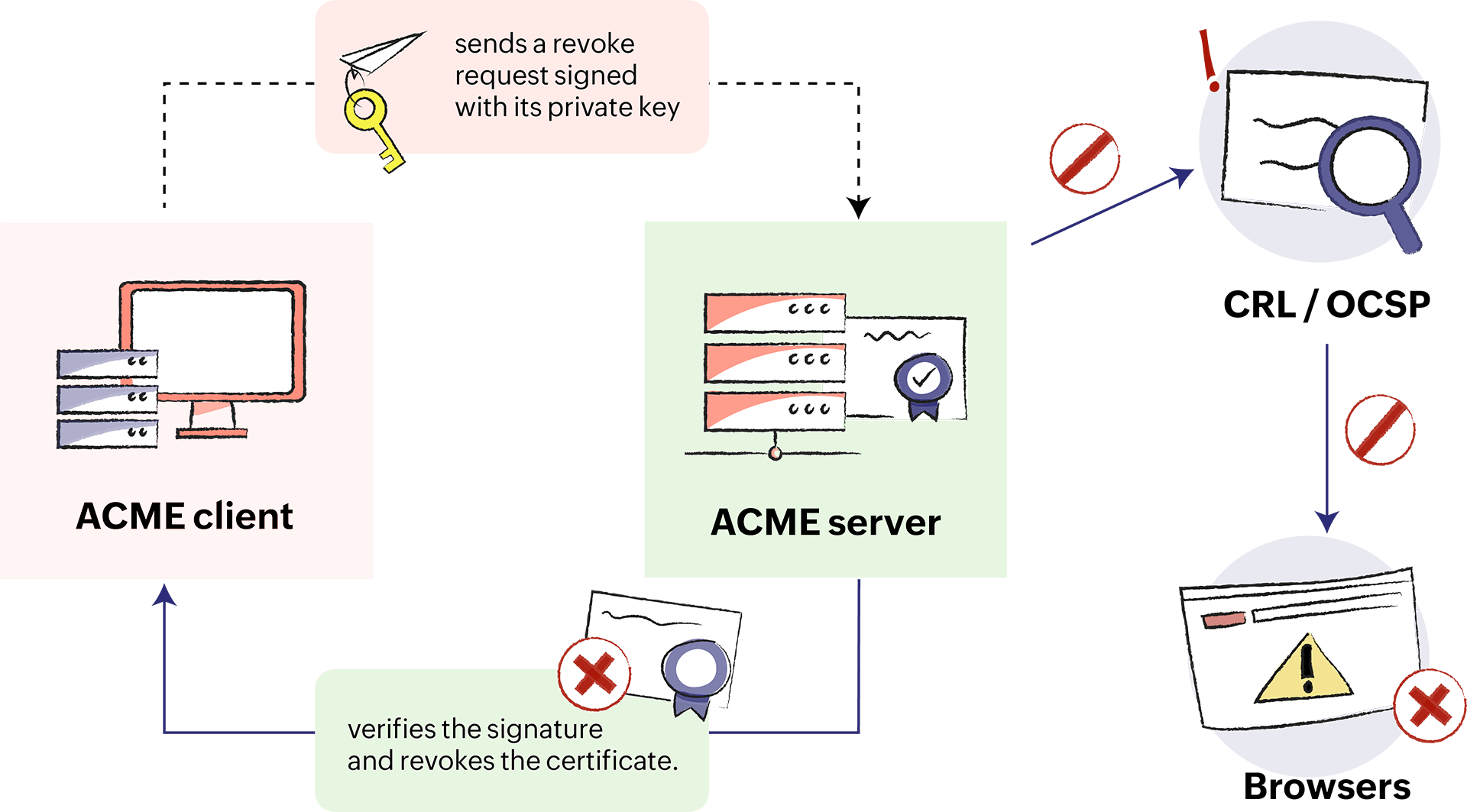
How the ACME client requests certificate revocation
- The ACME client sends a revoke request signed with its private key.
- The CA verifies the signature and revokes the certificate.
- The CA sends information to the standard revocation channels so that the revoked certificate is not accepted by browsers.
Automate your certificate life cycle management with Key Manager Plus
Get started with automated certificate life cycle management using Key Manager Plus. Key Manager Plus directly integrates with third-party CAs such as Let's Encrypt, Bypass Go SSL, and ZeroSSL, using Automated Certificate Management Environment (ACME) protocol and acts like an ACME client. Download the 30-day, free trial version—no credit card required.