

Cloud misconfiguration refers to incorrect settings or security oversights in cloud environments that leave systems vulnerable to unauthorized access, data leaks, or cyberattacks. These errors can occur in storage permissions, API security, network access controls, or encryption settings.
On this page
Cloud misconfiguration refers to errors or security oversights in setting up cloud resources, such as improperly configured access controls and unsecured storage buckets, which can unintentionally expose an enterprise's data or services to vulnerabilities, unauthorized access, and other cyberattacks. Misconfigurations are one of the leading causes of security breaches in cloud environments and often arise due to human error, a lack of security awareness, or the complexity of managing cloud infrastructure.
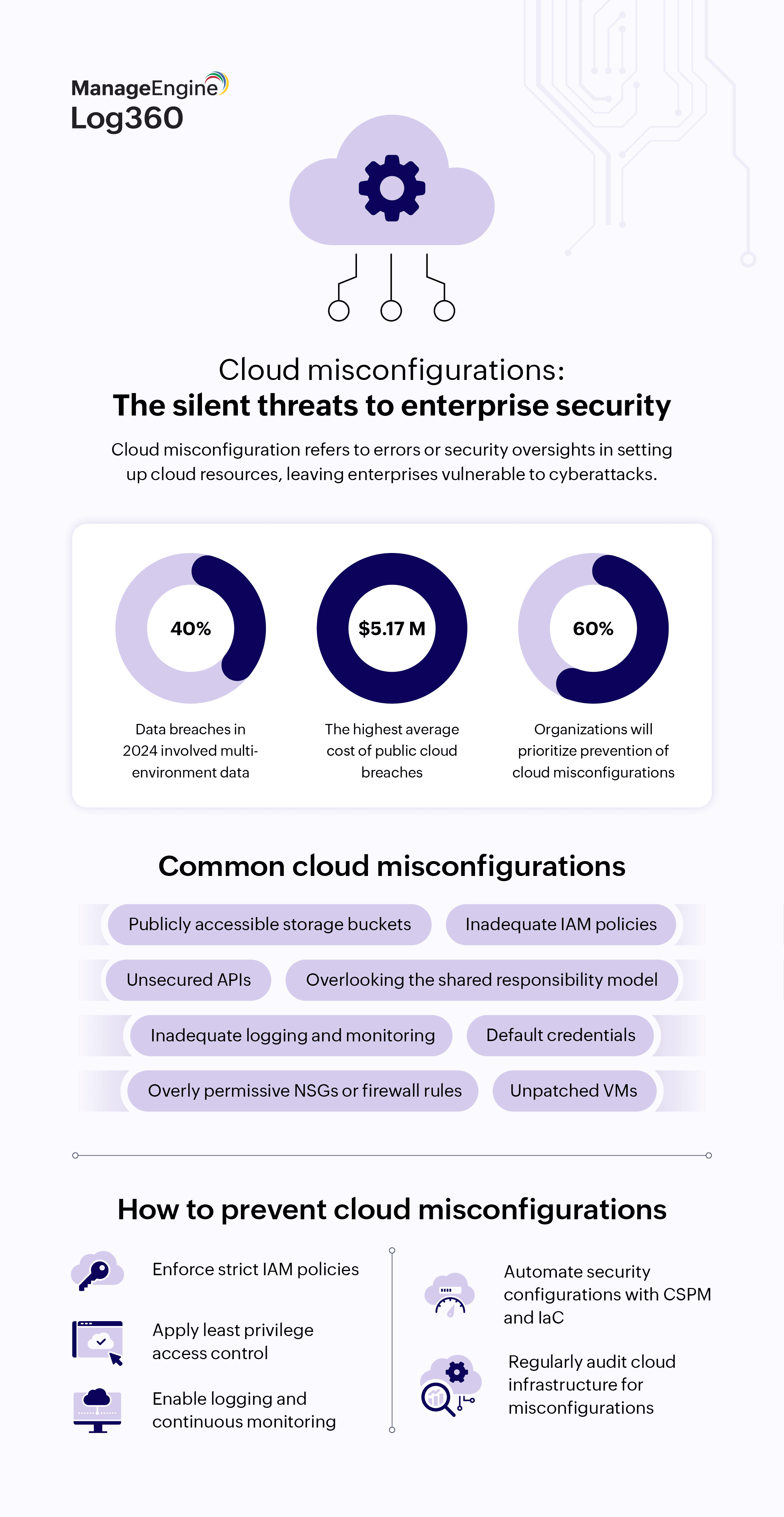
Gartner predicted that in 2025, 99% of cloud security issues will be due to human error (the customer's fault), emphasizing the need for user awareness and secure configurations. Additionally, with 40% of data breaches in 2024 involving data spanning multiple environments, and with public cloud breaches costing an average of $5.17 million, enterprises (about 60% by 2026) are increasingly prioritizing the prevention of cloud misconfigurations as a part of their cloud security strategy.
What are the security risks associated with cloud misconfigurations?
- Unauthorized access: Poor access controls can allow attackers to infiltrate cloud environments and exfiltrate sensitive data. Almost 99% of cloud users and services have excessive permissions, increasing the attack surface.
- Data breaches and leaks: Misconfigured databases, storage permissions, and APIs can expose confidential data. These leaks often go unnoticed until a third party discovers them or an attacker exposes them publicly in their attempt to sell the stolen data or tarnish the reputation of the victim organization.
- Account takeover and privilege escalation: Weak IAM settings allow attackers to hijack accounts and escalate privileges, leading to more severe breaches.
- Service disruptions: Attackers can exploit misconfigurations to disrupt operations, manipulate cloud services, or launch denial-of-service attacks by overwhelming the organization's cloud services with traffic.
- Regulatory compliance violations: Failing to secure cloud assets properly can lead to noncompliance with the GDPR, HIPAA, and other data protection regulations, resulting in hefty fines, reputational damage, and legal consequences.
What are the common cloud misconfigurations that affect enterprise security?
- Unsecured storage buckets: Misconfigured storage buckets in cloud environments, such as Amazon Simple Storage Service or Google Cloud Storage, often lack proper access controls or encryption settings.
- Mitigation strategy: Enterprises should regularly audit and enforce access controls, implement encryption at rest and in transit, and monitor for unauthorized access or the exposure of sensitive data stored in these buckets.
- Inadequate IAM policies: Weak IAM policies can grant excessive permissions to users, roles, or service accounts, leading to unauthorized access and privilege escalation.
- Mitigation strategy: Enterprises should enforce the principle of least privilege, regularly review and update IAM policies, implement multi-factor authentication (MFA), and monitor IAM activity logs for suspicious or anomalous behavior.
- Exposed database instances: Misconfigured database instances, such as in Amazon Relational Database Service or Azure SQL Database, may lack proper network security controls or authentication mechanisms. Exposing databases or storage containers to the public internet without proper authentication or encryption leaves sensitive information vulnerable to interception and exploitation.
- Mitigation strategy: Enterprises should ensure that database instances are not publicly accessible, implement network segmentation, enable encryption for data at rest and in transit, and monitor database logs for unusual activities or access attempts.
- Overly permissive network security groups (NSGs) or firewall rules: Inadequately configured NSGs or firewall rules may allow unrestricted and unauthorized inbound or outbound traffic to access cloud resources, increasing the attack surface.
- Mitigation strategy: Enterprises should regularly review and tighten NSG rules, limit access based on business requirements, implement network monitoring and intrusion detection systems (IDSs), and deploy web application firewalls to protect against common web-based attacks.
- Unpatched or outdated virtual machines (VMs) and containers: Failure to patch or apply security updates to cloud instances, VMs, and containers can leave them vulnerable to known exploits and malware attacks.
- Mitigation strategy: Enterprises should implement automated patch management processes, conduct vulnerability assessments and scans, monitor for unpatched systems, and promptly remediate security vulnerabilities to mitigate the risk of exploitation.
- Misconfigured cloud logging and monitoring tools: Inadequate logging and monitoring configurations will limit visibility into cloud activities and security events. Failure to enable or properly configure cloud audit logs in AWS CloudTrail, Azure Monitor, or other tools further hinders threat detection and incident response capabilities.
- Mitigation strategy: Enterprises should enable comprehensive logging for cloud services and applications, configure log aggregation and analysis tools, establish alerting mechanisms for security incidents, and conduct regular security audits and reviews of log data.
- Overlooking the shared responsibility model: Misunderstandings regarding the shared responsibility model may result in gaps in security coverage, with organizations assuming that cloud service providers are responsible for certain security measures that are, in fact, their own responsibility, leading to blind spots or misconfigurations.
- Mitigation strategy: Enterprises should clarify security responsibilities with cloud providers; conduct security training, regular audits, and policy enforcement; and align with industry best practices to prevent misconfigurations.
- Improperly configured authentication mechanisms: A lack of MFA, weak password policies, the use of default credentials after deployment, and other weak or misconfigured authentication mechanisms can provide attackers with easy entry points, increasing the risks of unauthorized access and account takeover.
- Mitigation strategy: Enterprises should disable the use of default credentials, enforce MFA, implement strong password policies, automate security checks, monitor authentication logs, review security settings regularly, and detect anomalous logins using UEBA-integrated SIEM solutions to enhance authentication security.
How to prevent and detect cloud misconfigurations
To prevent and detect misconfigurations, enterprises should begin by enabling continuous (real- time) monitoring of their cloud environments. This will help them identify security vulnerabilities and anomalies and address them before they escalate. Apart from this, their strategy should also include:
- Cloud security posture management (CSPM) tools: CSPM solutions continuously monitor cloud environments for misconfigurations, unauthorized access, and compliance violations. These tools scan cloud infrastructure for issues like unrestricted public access, excessive permissions, and unencrypted data storage. They provide automated remediation recommendations and integrate with security workflows to reduce risks.
- IAM analysis: Regular audits of IAM settings help you detect excessive permissions, exposed credentials, and unnecessary access rights. Tools like AWS IAM Access Analyzer, Entra ID Protection, and Google Cloud IAM policy analysis can identify risky configurations and prevent privilege escalation attacks.
- Cloud logging and alerting: Enabling and monitoring logs from cloud providers, such as AWS CloudTrail, Azure Monitor, or Google Cloud Audit Logs, helps enterprises detect anomalies such as unauthorized access attempts, unusual data transfers, or changes to security settings. Enterprises should ensure these logs are imported into their SIEM solution for correlation and threat analysis.
- Continuous configuration scanning: Automated scanning tools, such as AWS Config, Azure Security Center, and Google Cloud Security Command Center, can continuously evaluate cloud configurations against industry best practices, compliance frameworks, and internal policies. Tools like AWS CloudFormation Guard help you detect configuration drift and maintain consistency.
- Network traffic monitoring: Network security monitoring tools analyze inbound and outbound traffic to detect unusual patterns, such as unauthorized API calls, lateral movement, or data exfiltration attempts. Cloud-native tools like Amazon GuardDuty and Google Cloud IDS help you detect and respond to network-based threats.
- Security benchmarking and compliance audits: Using frameworks like the CIS Benchmarks, the NIST Cybersecurity Framework, and ISO/IEC 27001 helps enterprises detect and remediate misconfigurations proactively. Compliance scans identify deviations from best practices so enterprises can ensure that their cloud environments meet regulatory requirements.
- Automated policy enforcement: Enterprises can enforce security policies through Infrastructure as Code (IaC) tools like Terraform and AWS CloudFormation, which define security configurations in code and prevent deviations. Policy as Code tools such as Open Policy Agent and AWS Config rules allow enterprises to enforce compliance automatically.
Best practices for CISOs
Cloud misconfigurations pose an increasing risk to enterprise security, requiring CISOs to drive a proactive, security-focused approach. Here are some best practices that CISOs can adopt to help enterprises reduce vulnerabilities and securely harness the benefits of cloud technologies:
1. Adopt a security-first mindset in DevOps
- Implement security configuration checks during the build stage to avoid misconfigurations before deployment.
- Integrate security into CI/CD pipelines to enforce compliance across development teams.
2. Adopt Zero Trust architecture and enforce least privilege access
- Implement MFA for all cloud resources.
- Conduct penetration testing and security assessments to uncover vulnerabilities.
- Implement the Zero Trust model that continuously validates users and devices before granting access to resources.
- Limit user and system permissions to only what is necessary for specific tasks.
- Regularly review IAM policies and remove unused credentials.
3. Automate configuration management
- Use cloud-native security automation tools to detect and remediate misconfigurations in real time.
- Deploy IaC tools with predefined security policies to ensure consistency.
4. Monitor and audit cloud environments continuously
- Enable detailed logging and security monitoring tools to detect anomalies.
- Conduct regular security assessments to identify and fix misconfigurations before attackers exploit them and to ensure adherence to security policies.
5. Ensure multi-cloud and hybrid cloud security
- Standardize security policies across all cloud platforms, including AWS, Azure, and Google Cloud.
- Use security solutions that provide visibility across hybrid and multi-cloud environments.
6. Provide comprehensive training
- Train employees on secure cloud deployment practices and the risks of misconfigurations.
- Foster a culture of security awareness within your organization.
Frequently asked questions
- Human error, such as improper setup or oversight
- Default security settings left unchanged
- Rushed deployments without security reviews
- A lack of visibility into cloud assets
- Unpatched vulnerabilities in cloud infrastructure
- Poorly implemented access controls and permissions
- Overly permissive storage settings
Yes, organizations can use IaC tools to define security settings programmatically. Tools like AWS Config, Azure Policy, and Google Cloud Security Command Center help maintain consistent configurations and prevent human error.
- Large-scale data breaches
- Financial losses due to regulatory fines or legal action
- Reputational damage that erodes customer trust
- Operational downtime caused by service disruptions
Under the shared responsibility model, cloud providers secure the underlying infrastructure, while customers must secure their data, applications, and configurations. It is the organization's duty to prevent and mitigate misconfigurations.
No, they can occur in any cloud environment, including public, private, and hybrid setups. However, public clouds are often more at risk due to their scalable, widely accessible nature, which increases the attack surface.
Related solutions
ManageEngine AD360 is a unified IAM solution that can help manage employees' digital identities. Implement the principles of least privilege with AD360.
To learn more,
Sign up for a personalized demoManageEngine Log360 is a unified SIEM solution which can help prevent cloud misconfigurations. Secure multi-cloud infrastructure with Log360.
To learn more,
Sign up for a personalized demoThis content has been reviewed and approved by Ram Vaidyanathan, IT security and technology consultant at ManageEngine.