

- Free Edition
- Quick Links
- Highlights
- Exchange Online
- Exchange Online Management
- Exchange Online Reports
- Exchange Online Auditing
- Exchange Online Monitoring
- Shared Mailbox Management
- Mailbox Usage Reports
- Exchange Online Mailbox Auditing
- Shared Mailbox Reports
- Exchange Online Delegation
- Mailbox Size Reports
- Mail Traffic Reports
- Non-owner Mailbox Access Report
- Public Folder Reports
- OWA Reports
- Mailbox Content Reports
- Entra ID
- Entra ID Management
- Entra ID Reports
- Entra ID Monitoring
- Entra ID Auditing
- User Management
- Contact Reports
- Security Group Reports
- License Reports
- Entra ID Delegation
- Microsoft 365 User Provisioning
- User Reports
- Distribution Group Reports
- Group Reports
- Inactive Exchange Users
- Entra ID User Auditing
- Entra ID Group Auditing
- Entra ID Logon Auditing
- Microsoft Teams
- OneDrive for Business
- SharePoint Online
- Security and compliance
- Other Features
- Related Products
- ADManager Plus Active Directory Management & Reporting
- ADAudit Plus Hybrid AD, cloud, and file auditing and security
- ADSelfService Plus Identity security with MFA, SSO, and SSPR
- Exchange Reporter Plus Exchange Server Auditing & Reporting
- M365 Security Plus Microsoft 365 Auditing and Alerting
- EventLog Analyzer Real-time Log Analysis & Reporting
- SharePoint Manager Plus SharePoint Reporting and Auditing
- DataSecurity Plus File server auditing & data discovery
- RecoveryManager Plus Enterprise backup and recovery tool
- AD360 Integrated Identity & Access Management
- Log360 (On-Premise | Cloud) Comprehensive SIEM and UEBA
- AD Free Tools Active Directory FREE Tools
While Microsoft's Entra ID is a powerful identity service, managing it exclusively through the native interface or Graph PowerShell presents significant challenges. Admins often grapple with time-consuming scripting for bulk operations, a lack of granular delegation capabilities, and the absence of a unified console for all management tasks. This approach leads to inefficiencies, potential security loopholes from delayed deprovisioning, and a steep learning curve for new team members. For organizations needing to handle recurring tasks, bulk management, and a centralized, script-free approach to managing their Entra ID environment, a third-party solution is essential.
M365 Manager Plus is a comprehensive Entra ID (formerly Azure AD) management tool that bypasses these limitations. It provides a centralized, no-code interface that handles complex management tasks securely and efficiently, without having to rely on Graph PowerShell scripts.
With M365 Manager Plus, simplify and strengthen your Entra ID management on these fronts:
Microsoft 365 user management
M365 Manager Plus simplifies user administration by consolidating all essential tasks into a single, intuitive dashboard. This Entra ID management solution eliminates the need for complex native solutions and subscriptions such as Power Automate for advanced user management, allowing you to streamline user lifecycle management.
User lifecycle management
With M365 Manager Plus as your Entra user management tool, you can create new users using customizable templates that preconfigure all necessary properties, license assignments, and group memberships, ensuring consistency. Their permissions and group memberships can be modified in bulk, reducing manual errors. You can even automate routine life cycle tasks like user creation, updates, and deprovisioning with automation policies. This helps keep your Entra ID environment accurate, secure, and low maintenance.

MFA and other user settings
Strengthen your security posture with simplified user attribute management. You can enforce and manage MFA for users in bulk, perform seamless password resets, and instantly revoke active sign-in sessions for accounts flagged as potentially compromised. M365 Manager Plus provides a full range of user management features, ranging from bulk modification of user properties, contact information, to smaller details like manager assignments, all from one place.

Guest users and contacts
Efficiently manage your external collaborators and directory contacts without complex scripts. M365 Manager Plus allows you to create, modify, and delete guest user accounts and mail contacts in bulk. It simplifies the process of updating contact information, ensuring collaboration with external partners is handled securely.

Microsoft 365 group management
Managing Entra ID groups can be cumbersome, often requiring complex PowerShell commands for bulk modifications. M365 Manager Plus transforms this process by providing a centralized, GUI-based platform to administer all your security, distribution, and Microsoft 365 groups with ease.
Manage all group types
M365 Manager Plus offers full support for all group types, including security, mail-enabled security, distribution, dynamic, and Microsoft 365 groups. You can perform bulk creation using CSV files, modify group settings, and delete multiple groups simultaneously, significantly reducing the time spent on routine group maintenance tasks.

Group membership
Effortlessly manage group memberships with just a few clicks. M365 Manager Plus allows you to add or remove members from multiple groups at once, a task that is tedious to do in the Entra Admin Center. This granular control ensures that user access rights are always up to date, aligning with the principle of least privilege and strengthening your security framework.

Modify group permissions and more
Delegate and manage groups with precision. You can easily modify group owners, configure Send As and Send on Behalf permissions for mail-enabled groups, and also other settings such as custom attributes without the need for any scripting knowledge.

Microsoft 365 license management
Optimize your license spending and eliminate wastage with the intelligent license management features in M365 Manager Plus. It provides clear visibility into your license usage and helps you reclaim unused licenses, avoiding unnecessary spending on inactive accounts and optimizing your IT budget.
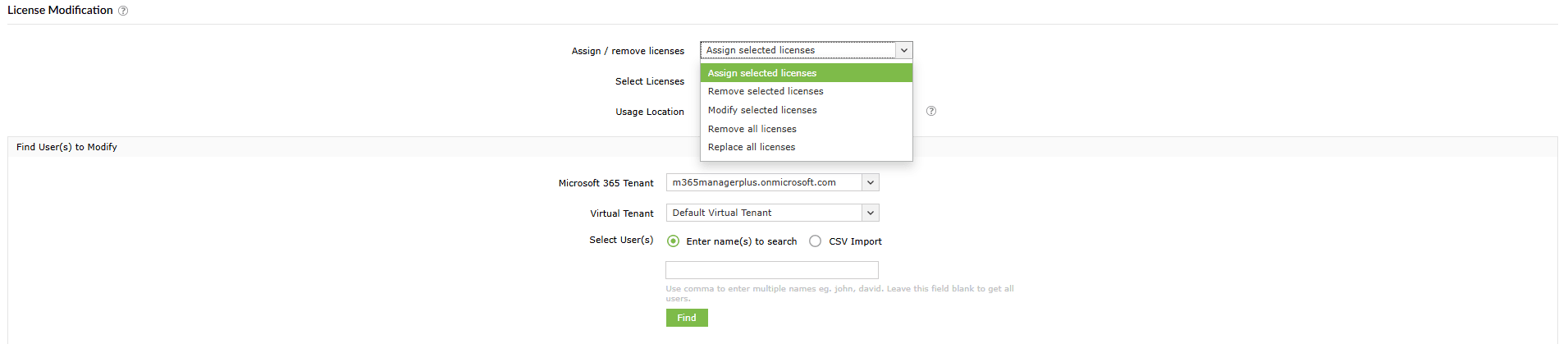
Assign, remove, and modify licenses for users in bulk based on their department, role, or other attributes. You can also automate Microsoft 365 license assignments based on group membership, ensuring new users are productive from day one and licenses are automatically revoked upon off-boarding.
Unique features of Entra ID management tool
M365 Manager Plus equips your IT teams with advanced features that go beyond the native Entra Admin Center, making it more efficient and the better solution for managing your Entra ID environment. These include:
Bulk modifications
Save time and effort by making bulk modifications to users, groups, and licenses. Our intuitive interface makes it easy to make changes to your Entra ID environment, and our bulk management features ensure that your changes are applied quickly and accurately.
Script-free management
Skip Graph PowerShell and manage everything, including bulk user and group updates, license assignments, and more, through a simple web console. Even complex Entra ID tasks can be handled easily by any technician, with no scripting required.
Multi-tenant management
M365 Manager Plus simplifies multi-tenant Entra ID management. With a single console, you can perform actions across multiple tenants and apply consistent templates and rules to all of them, without having multiple consoles and logins open.
Other Entra ID capabilities offered by M365 Manager Plus
Alongside Entra ID management features, M365 Manager Plus also offers a range of other Entra ID capabilities, including:
- Entra ID reporting: Gain insights into your Entra ID environment with ready-to-use reports.
- Entra ID auditing: Track changes to your Entra ID environment and ensure that your security policies are being enforced.
- Entra ID monitoring: Monitor your Entra ID environment for security threats and receive real-time alerts when suspicious activity is detected.