Optimize IT Resources with OpManager’s Capacity Planning Dashboard
A new, comprehensive Capacity Planning dashboard is now available to provide deeper insights into device and interface utilization. This dashboard includes key widgets such as the Overall Utilization Summary, Forecast Recommendation Alerts, and Device/Interface Trend Insights. These components work together to deliver a clear, data-driven view of resource usage, helping IT teams proactively manage capacity, optimize performance, and plan infrastructure upgrades, enabling smarter resource management and planning.
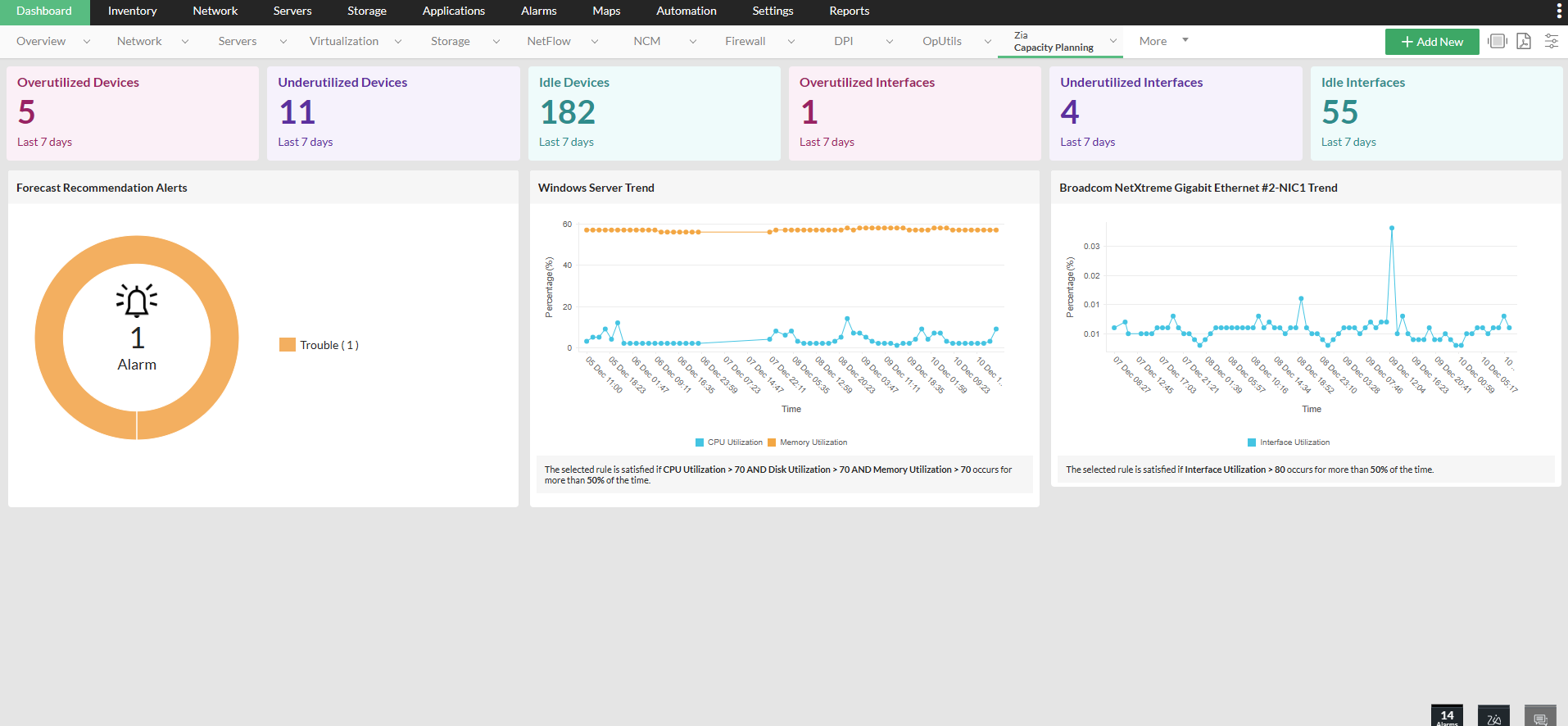
Dashboard Overview
Overall Utilization Summary
Located at the top of the dashboard, this section presents a high-level summary of device and interface utilization:
- Overutilized: Devices consistently breaching upper threshold limits.
- Underutilized: Devices operating below optimal usage.
- Idle: Assets with little to no activity over a defined period.
This summary offers a quick at-a-glance view to assess the current health of your resources and identify areas that need attention.
Forecast Recommendation Alerts
This section features dynamic widgets that:
- Trigger proactive alerts when devices are projected to breach utilization thresholds.
- Offer AI-based recommendations for resource optimization, such as capacity upgrades, load redistribution, or retirement of underused assets.
These alerts help you stay ahead of potential issues and make informed decisions in advance.
Device/Interface Trend Widget
Dive deeper with this detailed widget that displays historical and trend data for individual devices or interfaces:
- Select specific devices or interfaces.
- Apply predefined rules (e.g., overutilization, idle time).
- View usage patterns over customizable time periods.
This helps identify recurring issues or capacity bottlenecks, enabling precise planning and proactive adjustments.
- Rules configured within reports will be available for selection in the edit widget, allowing users to choose from a predefined list of existing rules.
- By default, each category—such as overutilized, underutilized, or idle devices and interfaces—comes with a predefined rule. Customers also have the flexibility to create custom rules tailored to their environment, specifying their own definitions for overutilization or underutilization.
- Rule creation functionality is not supported directly in the dashboard.
- To create a custom rule: Go to Reports > Capacity Planning Reports > select any report from the list view > click the filter icon > open the Rules drop-down > select Add New..
Find Your Way to the Capacity Planning Dashboard in No Time
Navigate to the Capacity Planning dashboard via the Zia tab of Dashboards for a detailed overview of all components and valuable insights.
Why It Matters
- Optimize asset usage: Quickly pinpoint over- or underutilized assets to maximize ROI.
- Upgrade planning: Forecast future capacity needs with trend-based projections.
- Efficient resource allocation: Reassign or retire idle assets to reduce waste and streamline operations.
Key Practices to Optimize Capacity Planning
- Regularly review the Overall Utilization Summary to monitor infrastructure health.
- Configure threshold rules appropriately for your environment to ensure accurate alerts.
- Use historical data in the trend widget to validate upgrade needs or downsizing opportunities.