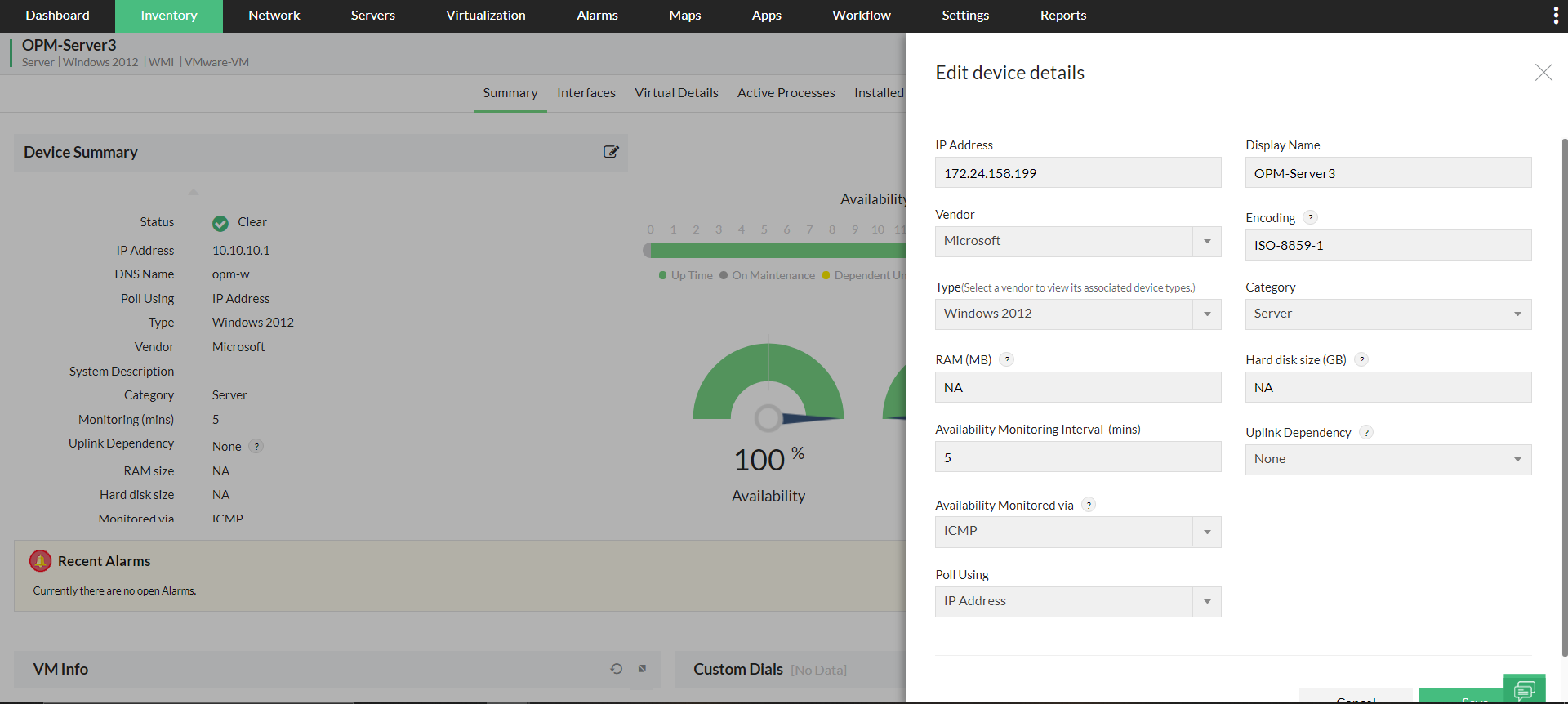
Device Summary - Device Snapshot Page
The Device Summary section in the Device Snapshot page provides collective inventory information (such as IP address, MAC address, DNS name, etc) that allows you to differentiate it from the other devices discovered in OpManager.
The table below gives detailed description of the various fields listed under Device Summary section.
| Name of the field | Description |
| Status | The current health status of the device. The major severity of all alarms concerned with the device (availability, thresholds, service down, etc) is displayed. The available severities are Clear, Attention, Trouble, and Critical. |
| IP Address | The IP address of this device |
| DNS Name | The DNS name of this device. |
| Poll Using | Information on whether the device is polled using IP address or DNS name. This can be configured in bulk from the Monitor Settings page. Poll using DNS option is most preferred in a DHCP environment. |
| Type | The type or model of this device (Windows 8, ESX server, Cisco 2800, etc) |
| Category | The category of this device (Desktop, Domain Controller, Server, Router, RAID, etc) |
| Firmware Version | The current version of the firmware that runs in the device. This information will be available only for storage devices. |
| Uplink Dependency | Denotes the uplink dependency status. i.e, the core/parent device to which this device is connected. Setting UpLink Dependency avoids alerts from being generated by the child device when the parent is down. When the parent device is down, the availability monitoring will be paused for this device and the device state will be marked as 'Dependent Unavailable'. |
| Vendor | The vendor name of this device |
| Manufacturer | The manufacturer of this device.** |
| Model | The model of this specific device |
| System Description | The hardware and software description of this device such as information on the processor type, windows version, etc. |
| Monitoring via | The protocol used to monitor the availability of the device (ICMP, TCP and SNMP) |
| Monitoring Interval | The monitoring interval of this device in minutes. This denotes how frequent the device is checked for its availability. |
| RAM size | The RAM size of this device |
| Hard disk Size | The hard disk size of this device |
| Credentials | The credentials (SNMP, WMI, etc) that are associated with this device. Credentials help in accessing the device for its proper classification during discovery and also helps in data collection and monitoring. |
| Hardware Monitoring | Tells if hardware monitoring is enabled or disabled for this device. You can also enable/disable it by clicking on the respective option next to the sign. Enabling hardware monitoring will fetch detailed information on the various hardware sensors available in the device and also generate alarms specific to hardware components. |
| Service Tag | This attribute defines the service tag of a system provided by the manufacturer. This is used to access information about the technical specification and warranty of the device.** |
| Serial Number | The serial number of this device.** |
| Operating System | The name and version of the OS that this device is functioning on. This information will be fetched only if the Hardware monitoring is enabled for this device.** |
| Flow Monitoring | Enabled only if you have the Add-on NetFlow Analyzer module and this device is added in it for Flow monitoring. |
| GPS Coordinates | The GPS coordinates of this device. This field is generally available for devices that are plotted on the Zoho/Google Maps in OpManager. |
| System Location | The physical location of this device in your office.*** |
| System Contact Person | Name of the contact person for this specific device. This will help you in reaching out to the service person or network admin.*** |
| Last SysUp Time | This field will be available only for devices that are down and gives information on when the device was UP for the last time. |
| Configuration Management | Enabled, if NCM Add-on module is available and the device is added to NCM |
| OS Version | The current version of the OS running in the device. This information is fetched from the NCM module. |
| End of Support Date | The date on which device support ends for this particular devices. This information is fetched from the NCM module. |
| Login Details | The logged-in protocol of the device. This information is fetched from the NCM module. |
| Syslog Change Detection | Information on real-time change detection in the device via SysLog. This is fetched from the NCM module. |
| Product Description | Basic product description of that particular device. This information is fetched only if Storage monitoring add-on is enabled. |
| Serial No | Serial number of that particular device that is fetched from Storage monitoring. |
Note:
** Data for the fields marked with this symbol are fetched only if hardware monitoring is enabled for the devices.
*** These properties are fetched from the NCM module (if enabled).
You can also edit the inventory information by clicking on the 'Edit' option.