

- Free Edition
- Quick Links
- Active Directory Auditing
- Active Directory auditor
- Active Directory monitoring
- Account lockout analyzer
- Login monitoring software
- Active Directory change notifier
- User logon audit reports
- AD logon logoff tracker
- User logon failure auditing
- Login history tracking tool
- AD change auditor
- Insider threat detection software
- Permissions change auditing
- Entra ID reporting
- Privileged user monitoring
- User behavior analytics tool
- Active Directory security monitoring
- Group Policy auditing tool
- GPO change auditor
- Entra ID auditing
- Audit user account management
- OU change auditor
- Audit group membership changes
- Active Directory auditing and reporting tool
- GPO reporting tool
- Remote desktop monitoring software
- PowerShell logging and auditing
- Azure password protection auditing
- Azure sign-in risk detection
- File Server Auditing
- Windows Server Auditing
- Employee Tracking
- Workstations Auditing
- Compliance Auditing
- Other features
- SIEM Integration
- Windows DNS - Schema Auditing
- Windows security event log monitoring
- SIEM audit solution
- Schedule Active Directory change reports
- Reports from Archived Data
- Aggregated summary reports
- AD new/old attribute changes
- Audit trail
- Audit Active Directory LAPS
- Scheduled Reports & Alerts
- Account lockout examiner
- Industry
- Documents
- Success Stories
- Related Products
- Log360 (On-Premise | Cloud) Comprehensive SIEM and UEBA
- ADManager Plus Active Directory Management & Reporting
- ADAudit Plus Real-time Active Directory Auditing and UBA
- ADSelfService Plus Identity security with MFA, SSO, and SSPR
- DataSecurity Plus File server auditing & data discovery
- Exchange Reporter Plus Exchange Server Auditing & Reporting
- M365 Manager Plus Microsoft 365 Management & Reporting Tool
- RecoveryManager Plus Enterprise backup and recovery tool
- SharePoint Manager Plus SharePoint Reporting and Auditing
- AD360 Integrated Identity & Access Management
- AD Free Tools Active Directory FREE Tools
Pinpoint the lockout source instantly
The Account Lockout Analyzer identifies the exact Windows component that caused each lockout (scheduled task, mapped drive, service account, etc) alongside the originating machine name and IP address.
Alert and respond automatically
When a lockout alert fires, ADAudit Plus can auto-create a ticket in ServiceNow, Jira, ManageEngine Service Desk Plus, and other ticketing systems and notify the responsible team by email or SMS.
Detect lockout spikes before they escalate
Machine learning baselines establish your domain's normal lockout rate. When activity exceeds that baseline, the Unusual Volume of Lockout report fires an alert so your team can act before users are broadly affected.
Extend lockout visibility to Microsoft Entra ID
The Account Locked Out Users report in the Cloud Directory tab surfaces Microsoft Entra ID (previously known as Azure AD) lockouts alongside on-premises AD events, giving hybrid teams one investigation console instead of two.
Build compliance-ready lockout audit trails
Pre-configured compliance reports for SOX, HIPAA, PCI DSS, GDPR, and other frameworks capture the complete lockout record your auditors require.
Track logon attempts by locked-out accounts
The Logon Attempts by Locked Out Users report captures every authentication attempt made after a lockout event, useful for identifying whether a user is simply trying to log back in or an attacker is continuing to probe a disabled account.
What is an account lockout examiner?
An account lockout examiner is a diagnostic tool that identifies why an AD user account was locked out and what triggered the lockout event. When a lockout occurs, Windows records Event ID 4740 on the domain controller (DC) that processed the authentication failure, and that record only identifies the DC that logged the event, not the Windows component or process that submitted the bad credential. Resolving the lockout without knowing the source means either guessing or manually correlating logs across every DC in the domain.
ADAudit Plus includes a dedicated Account Lockout Analyzer that goes further. It surfaces the
originating machine, IP address, and logon history for each lockout event, and identifies the
specific Windows component responsible. The result is a complete investigation chain from the lockout event to the root cause, without opening a single Event Viewer window.
What causes AD account lockouts
Account lockouts in AD occur when an account accumulates failed authentication attempts that exceed the threshold set in your account lockout policy. The threshold itself is straightforward; the cause of the failed authentications rarely is.
The most common sources of unintentional lockouts are:
- Scheduled tasks running under a user account whose password was changed without updating the task credentials
- Mapped network drives authenticating with a cached credential that no longer matches the current password
- Service accounts configured with a hard-coded password across multiple systems, where a password change on one system was not propagated to the others
- Concurrent sessions from users logged into multiple workstations when a password change occurs mid-session
Identify the root cause of every lockout
The Account Lockout Analyzer report in ADAudit Plus is the primary investigation tool for individual lockout events. When an account is locked out, the report pulls together everything needed to identify the cause, without requiring you to log into individual DCs or run manual PowerShell queries.
For each lockout event, the Account Lockout Analyzer surfaces:
- The originating machine name and IP address that submitted the bad credential
- The specific Windows component responsible for the authentication attempt: scheduled task, mapped drive, service account, etc
- The DC that recorded the lockout event
- A logon history for the account, showing recent successful and failed authentications across the domain
You can trace a lockout from the event timestamp back to the specific process or device that caused it, then go directly to that machine to fix the underlying credential without touching anything else.
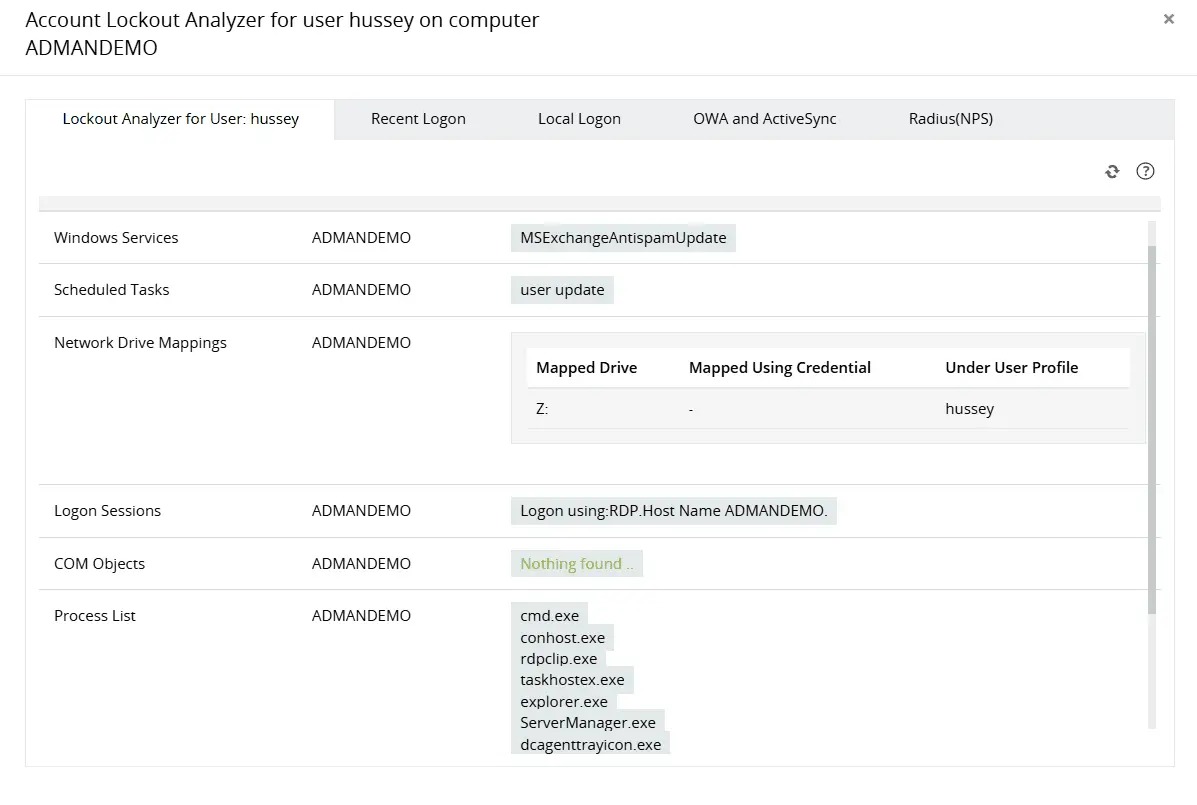
Identify the primary source of continuous AD account lockouts by analyzing multiple components, including network drive mappings, process lists, applications, and more.
Obtain more perspective into locked out user accounts by analyzing recent logon details.
Track every lockout across the domain
The Recently Locked Out Users report gives you a consolidated view of every lockout event across your domain, with the originating machine and source detail available per record. When multiple accounts are locking out in a short window, this report surfaces the pattern, whether the source is a single misconfigured machine affecting several users or a distributed authentication failure pointing to something more serious.
- View all lockout events across all DCs from a single screen
- Sort and filter by locked account, originating machine, or lockout time to isolate patterns
- Access the full logon history for any locked account directly from the report without navigating elsewhere
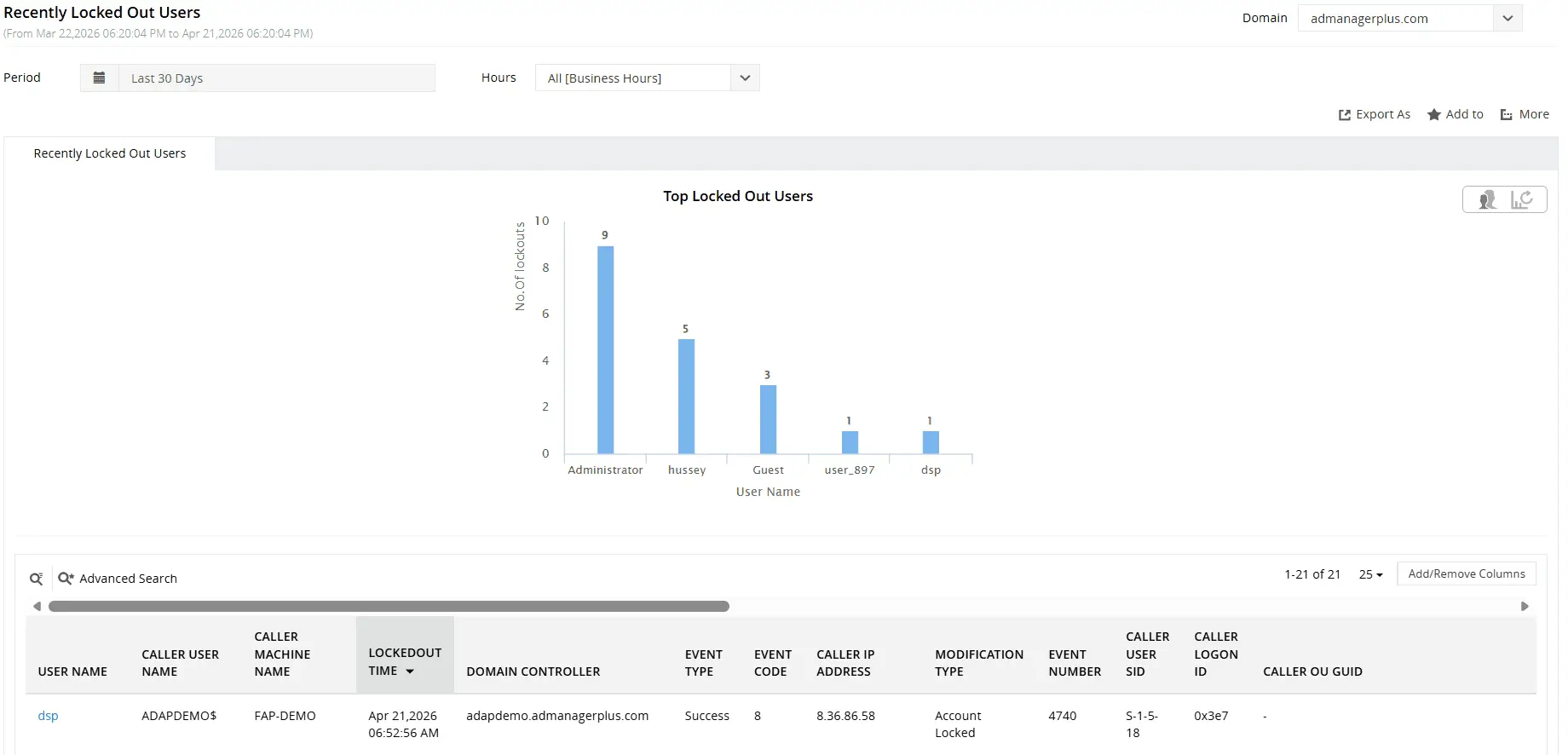
Find recently locked out AD user accounts and their relevant details including when, from where, and by whom.
Detect lockout anomalies using UBA
In practice, a spike at 9 AM Monday after a forced password reset rollout looks very different from a spike at 2 AM targeting fifteen accounts across three OUs. The Unusual Lockout Activity Time report flags the latter automatically, so your team isn't sifting through volume alone — they're looking at time, distribution, and pattern.
Two reports in the Analytics tab focus on lockout anomalies:
- Unusual Volume of Lockout: flags when the number of lockout events across the domain in a given window exceeds the learned baseline, triggering an alert before the volume becomes a visible service disruption
- Unusual Lockout Activity Time: flags lockouts occurring at times that fall outside your domain's normal lockout pattern, such as a cluster of lockouts in the early morning hours when your environment normally shows none When either report fires, you have a starting point for an investigation, not just a notification that something happened.
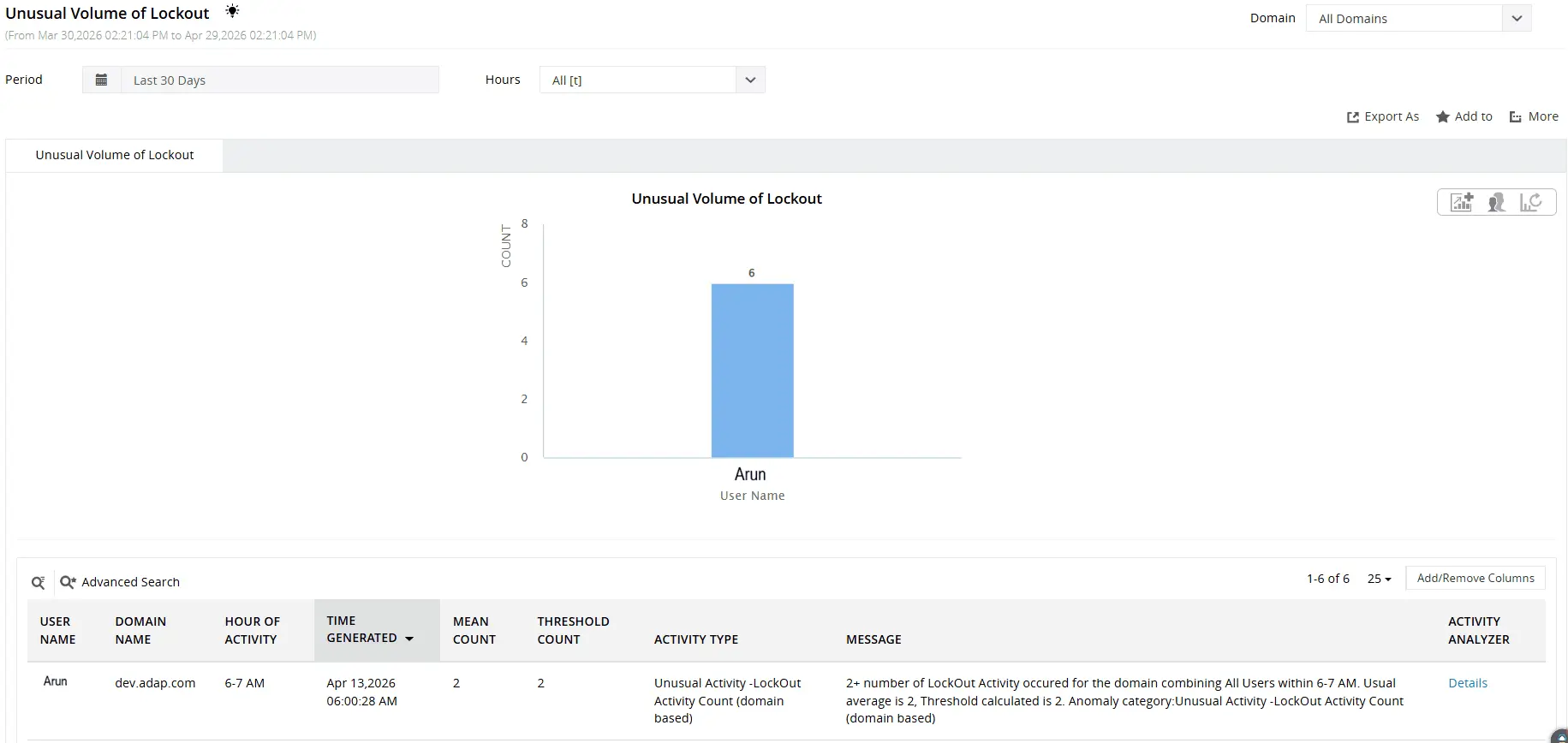
Identify users with unusually high volume of account lockouts.
Track lockout activity across hybrid environments
For environments running both on-premises AD and Microsoft Entra ID, lockouts can originate from either directory or from the interaction between them. Cached Entra ID credentials submitted to on-premises resources, legacy authentication protocols that bypass modern authentication flows, and hybrid user accounts synchronised via Microsoft Entra Connect all create lockout scenarios that neither AD nor Entra ID reports on its own.
ADAudit Plus surfaces Entra ID lockout events in the Cloud Directory tab alongside on-premises AD lockout data. The Hybrid Logon Activity report correlates sign-in events for hybrid users across both directories, so when a lockout affects a synchronised account, you can see the full authentication picture from a single console rather than switching between the Azure portal and your AD management tools.
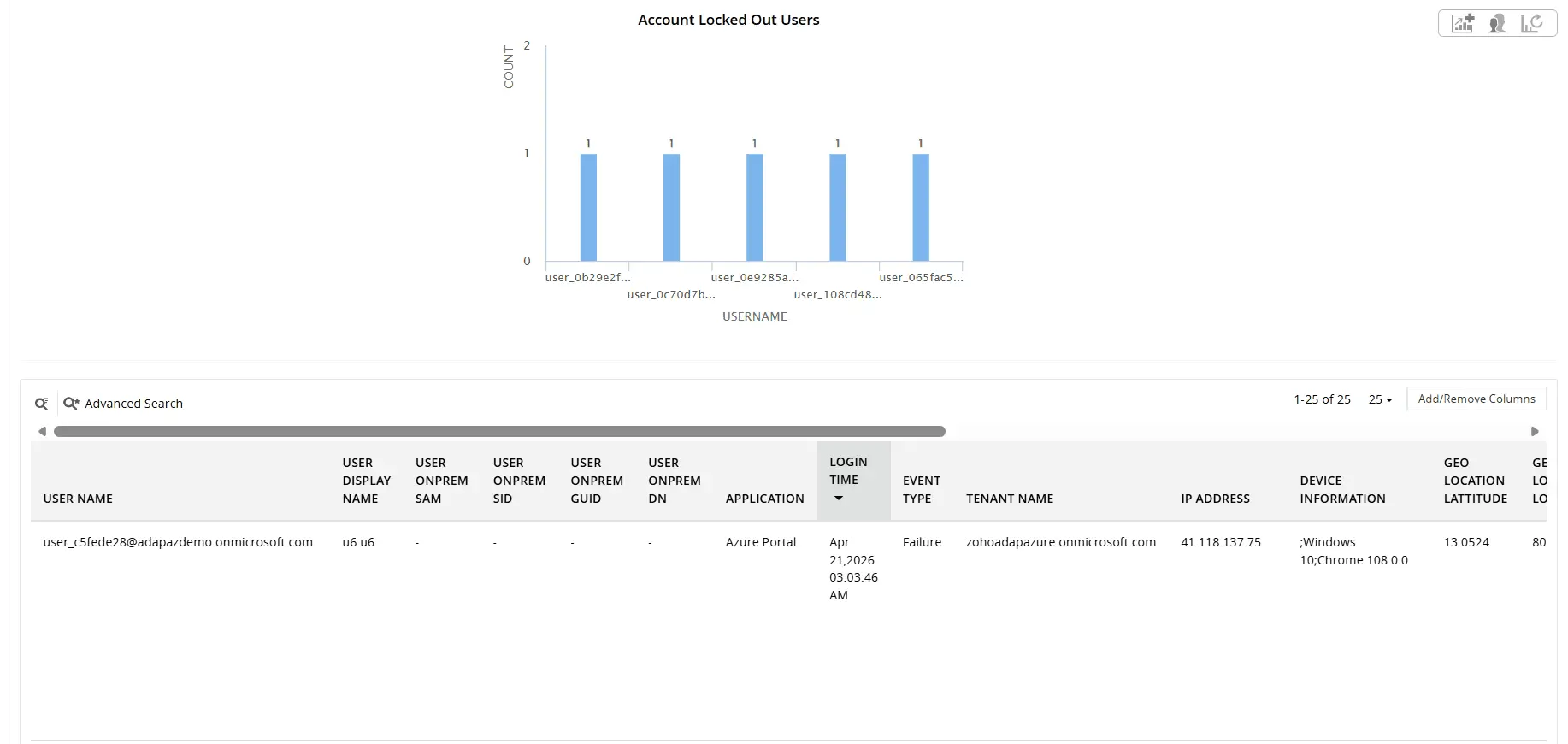
Find locked out Entra ID user accounts and their relevant details including User Principal Name, On-prem SID, caller IP, and more
Get real-time alerts on account lockout events
ADAudit Plus ships with pre-configured alert profiles for the lockout events that matter most. Every alert is outcome focused: when it fires, the team that needs to act already has the information required to do so.
Key lockout alerts that can be configured include:
- When an account lockout event is recorded, your help desk receives an immediate notification with the locked account name and source machine, so the ticket is raised and the fix is underway before the user calls in
- When a disabled account attempts to log on, your security team is alerted in real time; a disabled account authenticating is either a misconfigured service or a threat actor testing a known account
- When the Unusual Volume of Lockout UBA threshold is breached, your security team is notified immediately, so a lockout wave is investigated as a potential attack from the first event rather than hours later
Alert delivery supports email and SMS, and every alert can be configured with a custom threshold so high volume environments only escalate events that actually require action.
Meet compliance requirements with lockout audit trails
Compliance frameworks that govern access control and security monitoring require monitoring, logging, and review of authentication events, which includes account lockouts. ADAudit Plus includes pre-configured compliance report sets for SOX, HIPAA, PCI DSS, GDPR, FISMA, GLBA, and ISO 27001.
For recurring compliance requests, custom report profiles remove the manual effort of rebuilding the same query each time. You save a combination of specific accounts or OUs, the relevant audit actions (lockout, failed logon, account unlock), and any filters your compliance team specifies, then that profile runs on a schedule and delivers the output by email. A quarterly access review that previously required a manual data pull becomes a scheduled report that arrives in the auditor's inbox automatically.
Report exports are available in CSV, PDF, HTML, and XLSX formats, and every report includes the full who, what, when, and where detail needed to satisfy an audit request without supplementary documentation.
Why native tools fall short
Windows records account lockout events in the Security event log on each domain controller, and Event ID 4740 is the specific record for a lockout. Finding the lockout source using native tools requires manually correlating the security event logs across every DC in the domain. The DC that locked the account is not necessarily the one that received the bad credential. Specific limitations of the native approach:
- Security event logs are stored locally on each domain controller. There's no built-in mechanism to search across all DCs simultaneously; you log into each one individually or write PowerShell to aggregate the data
- Event ID 4740 records the DC that processed the lockout and the machine that submitted the bad credential. It does not identify the Windows component on that machine responsible for the authentication attempt; the distinction between a scheduled task, a mapped drive, and a browser session is invisible from the event log alone
- PowerShell scripts can aggregate 4740 events across DCs, but they produce raw event data. Correlating those events with recent logon history, identifying patterns across multiple accounts, and detecting a lockout spike that exceeds a baseline all require additional scripting or manual analysis
- Native tools like LockoutStatus.exe and ALTools.exe have no baseline concept. If ten accounts lock out in five minutes, there's no built-in mechanism to flag this as anomalous relative to your environment's historical pattern; you find out when users call the help desk
ADAudit Plus centralizes lockout data collection from all domain controllers automatically, surfaces the root cause without additional scripting, applies machine learning to detect anomalous lockout patterns, and provides a direct path from a lockout event to the process or device that caused it, all from a single console.
4 compelling reasons to choose ADAudit Plus
Widely recognized
ADAudit Plus has been recognized as a Gartner Peer Insights Customers' Choice for Security Incident & Event Management (SIEM) for four consecutive years.
Easy deployment
Go from downloading ADAudit Plus to receiving predefined reports and alerts in under 30 minutes, without any professional help.
Competitive pricing
ADAudit Plus is licensed per-server, unlike other IT auditors which are licensed per-user. With per-server licensing, even with a growing number of users each year, you can continue to ingest log data without additional costs.
Unified visibility
ADAudit Plus consolidates auditing, security, and compliance across Active Directory, Entra ID, Windows servers, workstations, and file servers into a single pane of glass, eliminating the need to juggle multiple tools.
Frequently asked questions
When a user account is locked out, Windows records Event ID 4740 in the security event log of the DC that processed the authentication failure. That event includes the name of the machine that submitted the bad credential, but it doesn't identify which application or process on that machine caused the failure. Finding the source requires checking the security event logs across all domain controllers, because the DC that recorded the lockout is not necessarily the one that received the bad credential, then investigating the originating machine to identify the responsible Windows component.
ADAudit Plus automates this through the Account Lockout Analyzer, which aggregates lockout events from all domain controllers and identifies the specific Windows component responsible (scheduled task, mapped drive, service account, etc) alongside the originating machine name and IP address.
AD applies the account lockout policy configured in your Default Domain Policy (or a fine-grained password policy for specific groups). When an account accumulates failed attempts equal to the threshold within the observation window, it is locked. Both the window duration and lockout duration are configurable in Group Policy, and lockout events are recorded on the DC that processed the final failed attempt.
The lockout itself is straightforward. The complication is that failed authentication attempts can come from sources other than a user mistyping a password: services, scheduled tasks, mobile devices, and mapped drives all authenticate using stored credentials, and any of them can trigger a lockout if the stored credential is outdated.
The lockout threshold is set by your account lockout policy, which you configure through Group Policy. Most organizations configure a threshold between three and ten failed attempts within a defined observation window.
ADAudit Plus tracks Account Lockout Policy Changes in real time, so any modification to the threshold or observation window is captured with the before-and-after values and the identity of whoever made the change.