To enable NTLM-based single sign-on
Prerequisites
- ADAudit Plus uses Jespa for NTMLv2 SSO authentication. In builds 7082 and above, the Jespa JAR file has to be downloaded and added to ADAudit Plus' lib folder before enabling NTMLv2 SSO. To do this:
- Download the latest Jespa JAR file.
- Extract the downloaded ZIP file, and move the JAR files to <Installation_folder>\ManageEngine\ADAudit Plus\lib, and restart ADAudit Plus.
If you are running build 7081 or earlier and have NTLMv2 SSO enabled, you can continue using this feature without making any changes.
- Add the domain users in ADAudit Plus under Technician Settings (Admin tab > Administration > Technicians > Technicians tab).

- Log in to the ADAudit Plus web console.
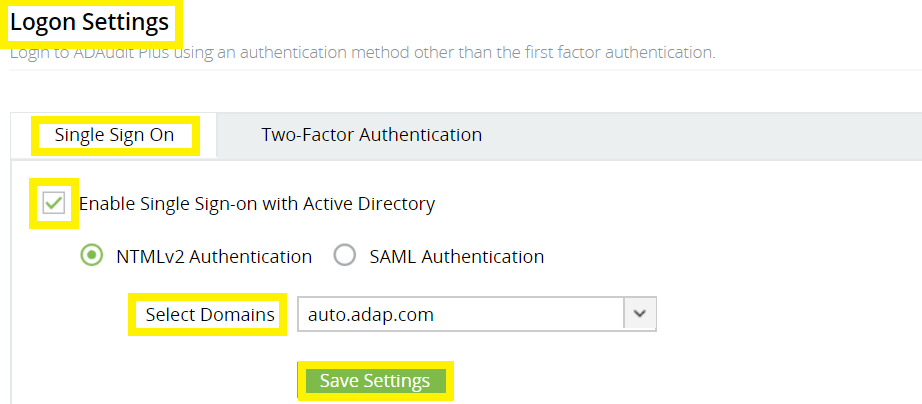
- Navigate to Admin → Administration → Logon Settings.
- Check the Enable Single Sign-On box.
- Select the domains from the Select Domains drop-down. These are the domains that contain the user accounts used to access ADAudit Plus.
- Click Save Settings.
Note: If ADAudit Plus is installed as a service, ensure that ADAudit Plus is run using a service account with admin privileges:
- Click Start → Run → Type services.msc.
- Locate the ManageEngine ADAudit Plus service.
- Right-click on the service, and select Properties → Log On → This account.
- Check if suitable credentials are used. If not, enter suitable credentials.
Don't see what you're looking for?
-
Visit our community
Post your questions in the forum.
-
Request additional resources
Send us your requirements.
-
Need implementation assistance?
Try OnboardPro

