

- Free Edition
- Quick Links
- Active Directory Auditing
- Active Directory auditor
- Active Directory monitoring
- Account lockout analyzer
- Login monitoring software
- Active Directory change notifier
- User logon audit reports
- AD logon logoff tracker
- User logon failure auditing
- Login history tracking tool
- AD change auditor
- Insider threat detection software
- Permissions change auditing
- Entra ID reporting
- Privileged user monitoring
- User behavior analytics tool
- Active Directory security monitoring
- Group Policy auditing tool
- GPO change auditor
- Entra ID auditing
- Audit user account management
- OU change auditor
- Audit group membership changes
- Active Directory auditing and reporting tool
- GPO reporting tool
- Remote desktop monitoring software
- PowerShell logging and auditing
- Azure password protection auditing
- Azure sign-in risk detection
- File Server Auditing
- Windows Server Auditing
- Employee Tracking
- Workstations Auditing
- Compliance Auditing
- Other features
- SIEM Integration
- Windows DNS - Schema Auditing
- Windows security event log monitoring
- SIEM audit solution
- Schedule Active Directory change reports
- Reports from Archived Data
- Aggregated summary reports
- AD new/old attribute changes
- Audit trail
- Audit Active Directory LAPS
- Scheduled Reports & Alerts
- Account lockout examiner
- Industry
- Documents
- Success Stories
- Related Products
- Log360 (On-Premise | Cloud) Comprehensive SIEM and UEBA
- ADManager Plus Active Directory Management & Reporting
- EventLog Analyzer Real-time Log Analysis & Reporting
- ADSelfService Plus Identity security with MFA, SSO, and SSPR
- DataSecurity Plus File server auditing & data discovery
- Exchange Reporter Plus Exchange Server Auditing & Reporting
- M365 Manager Plus Microsoft 365 Management & Reporting Tool
- RecoveryManager Plus Enterprise backup and recovery tool
- SharePoint Manager Plus SharePoint Reporting and Auditing
- AD360 Integrated Identity & Access Management
- AD Free Tools Active Directory FREE Tools
Windows event ID 4625: Failed logon
- What is event ID 4625?
- Why monitor?
- Common causes
- How to view it
- Event details to investigate
- Related events
- ADAudit Plus
- FAQ
Summary
- Event ID 4625 documents every failed attempt at logging on to a computer and is recorded on the computer where the logon attempt was made.
- It can be viewed using Event Viewer and can be found under Windows Logs > Security.
- Common causes include mistyped usernames or passwords, services or tasks using old passwords, and locked-out, disabled, or expired accounts. Brute-force or credential stuffing attacks can also produce many 4625 entries in a short period.
- It is an important event that you need to audit to meet the various security, operational, and compliance requirements of an IT environment.
- Event details to investigate include the Logon Type (how the logon occurred), Failure Information Status (the reason for the logon failure), Source Network Address (the IP address of the computer), Security ID (the security identifier (SID) of the account), and Account Name (the logon name of the account).
What is event ID 4625?
Event ID 4625 (viewed in Windows Event Viewer) documents every failed attempt at logging on to a computer. This event is generated on the computer where the logon attempt was made, and it is logged in the Windows security log.
Event ID 4625 is available in Windows Vista, Windows Server 2008, and later versions of Windows. In Windows Server 2003 and earlier versions, failed logons were recorded under event IDs 529–537 and 539, the legacy equivalents of event ID 4625.
Why monitor event ID 4625?
Security requirements
- To detect possible brute-force, dictionary, and other password guessing attacks, which can produce a sudden spike in failed logons
- To detect abnormal and possibly malicious activity, like attempts to log on using disabled accounts, outside normal working hours, or from unexpected IP addresses
- To identify failed logon attempts targeting privileged accounts, service accounts, and critical servers that may need immediate investigation
- To support incident investigations by identifying the accounts targeted, when the attempts occurred, where they originated, and why they failed
Operational requirements
- To identify services, scheduled tasks, and mapped network drives that continue to use old passwords after an account password change
- To establish a baseline of normal failed logon activity and facilitate decision-making on the Account lockout threshold policy setting, which determines the number of failed logon attempts that causes an account to be locked
Compliance requirements
- To provide auditors with records of failed logons, including the time, account involved, and reason for the failure
- To show that access restrictions are working, like blocking logon attempts using disabled accounts or outside permitted hours
5 common causes
- An incorrect password or username: A user simply mistyped their credentials.
- Outdated stored credentials: A background service, batch task, or mapped network drive is using an old password after a recent account password change.
- A locked-out account: The account has exceeded the maximum number of failed attempts and is temporarily locked out.
- A disabled or expired account: An attempt was made to sign in to an account that an administrator disabled or that has passed its expiration date.
- Brute-force or other password guessing attacks: Automated scripts are repeatedly guessing passwords, which produces a high volume of 4625 entries in a short window.
How to view event ID 4625 in 3 steps
- Open Event Viewer and navigate to Windows Logs > Security.
- Click Filter Current Log, enter 4625 in the Includes/Excludes Event IDs field, and click OK.
- Double-click an event to view its details (Fig. 1).
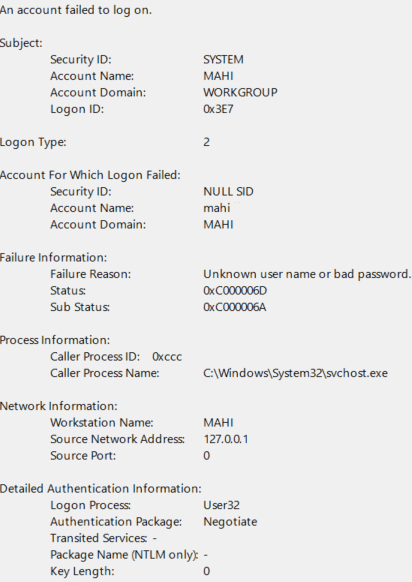
5 event details to investigate
1. Logon Type
It describes how a logon occurs on a computer. There are 12 different Logon Types. The six most common ones are below:
| Logon Type | Title | Logon occurs |
|---|---|---|
| 2 | Interactive | Via a computer's console |
| 3 | Network | When a resource (a shared folder, for example) is accessed from a computer on the network |
| 4 | Batch | When a scheduled task runs as a specified account |
| 5 | Service | When a service runs as a specified account |
| 10 | RemoteInteractive | Via a remote session |
| 11 | CachedInteractive | Via cached domain credentials, such as when a user logs on to their computer when away from the network |
2. Failure Information Status and Sub Status
These are codes that pinpoint the reason for logon failures. Of the many different codes, the 10 most common ones are below:
| Code | Logon failed because of |
|---|---|
| 0xC0000064 | A wrong username |
| 0xC000006A | A wrong user password |
| 0xC0000234 | A locked-out user account being used |
| 0xC0000072 | A disabled user account being used |
| 0xC000006F | Occurring outside authorized hours |
| 0xC0000070 | Occurring from an unauthorized workstation |
| 0xC0000193 | An expired user account being used |
| 0xC0000071 | An expired password being used |
| 0xC0000133 | Time synchronization being missing between clocks on the domain controller and other computer |
| 0xC000015B | The user not being granted the requested Logon Type at the computer |
| Event field | Description | Helps track |
|---|---|---|
| 3. Source Network Address | The IP address of the computer from which the logon attempt originated | Logon attempts from outside your internal IP range |
| 4. Security ID | The SID of the account | Logons from an account that should never be used, such as an expired or disabled one |
| 5. Account Name | The logon name of the account | Logons from accounts that don't comply with your company's naming conventions (applicable only if you have a specific naming convention in place) |
Related event IDs
| Event ID | Description |
|---|---|
| Event ID 4624: An account was successfully logged on. | This event records every successful attempt to log on to the computer. It includes critical information about the Logon Type (e.g., interactive, batch, network, or service), SID, username, network information, and more. |
| Event ID 4634: An account was logged off. | This event signals the end of a logon session. |
| Event ID 4647: User initiated logoff. | This event, like event 4634, signals that a user has logged off; however, this particular event indicates that the logon was interactive or RemoteInteractive (Remote Desktop). |
| Event ID 4648: A logon was attempted using explicit credentials. | This event is logged when a process attempts a logon by explicitly supplying credentials other than those of the already logged-on user. |
Overcome the limitations of native auditing with ADAudit Plus
- Centralized auditing: Event logs that contain audit data are not replicated, so manually reviewing logs on each computer is impractical. While Windows Event Forwarding enables log aggregation, setting it up involves technical complexity. ADAudit Plus simplifies the process by aggregating logs from all computers in a central console.
- Threat mitigation: Windows Task Scheduler can send alerts about specific event IDs but cannot detect unusual patterns like multiple failed logons followed by a successful one—a telltale sign of a brute-force attack. ADAudit Plus leverages correlation and machine learning to detect such patterns in real time.
- Compliance reporting: Windows event logs often lack complete context. For example, to calculate the duration of a logon session, you need to correlate logon event ID 4624 with the logoff-initiated event ID 4647 using the Logon ID event field. PowerShell can help but isn't practical for real-time auditing at scale. ADAudit Plus provides a consolidated audit trail of all changes and helps organizations meet compliance requirements.
FAQ
No. To log event ID 4625, you must configure the Audit Logon subcategory under Advanced Audit Policy Configuration.
The Authentication Package field in event ID 4625 names the protocol used by the Local Security Authority to handle the failed logon request. The common authentication packages are Kerberos and NTLM.