

- Free Edition
- Quick Links
- Active Directory Auditing
- Active Directory auditor
- Active Directory monitoring
- Account lockout analyzer
- Login monitoring software
- Active Directory change notifier
- User logon audit reports
- AD logon logoff tracker
- User logon failure auditing
- Login history tracking tool
- AD change auditor
- Insider threat detection software
- Permissions change auditing
- Entra ID reporting
- Privileged user monitoring
- User behavior analytics tool
- Active Directory security monitoring
- Group Policy auditing tool
- GPO change auditor
- Entra ID auditing
- Audit user account management
- OU change auditor
- Audit group membership changes
- Active Directory auditing and reporting tool
- GPO reporting tool
- Remote desktop monitoring software
- PowerShell logging and auditing
- Azure password protection auditing
- Azure sign-in risk detection
- File Server Auditing
- Windows Server Auditing
- Employee Tracking
- Workstations Auditing
- Compliance Auditing
- Other features
- SIEM Integration
- Windows DNS - Schema Auditing
- Windows security event log monitoring
- SIEM audit solution
- Schedule Active Directory change reports
- Reports from Archived Data
- Aggregated summary reports
- AD new/old attribute changes
- Audit trail
- Audit Active Directory LAPS
- Scheduled Reports & Alerts
- Account lockout examiner
- Industry
- Documents
- Success Stories
- Related Products
- Log360 (On-Premise | Cloud) Comprehensive SIEM and UEBA
- ADManager Plus Active Directory Management & Reporting
- EventLog Analyzer Real-time Log Analysis & Reporting
- ADSelfService Plus Identity security with MFA, SSO, and SSPR
- DataSecurity Plus File server auditing & data discovery
- Exchange Reporter Plus Exchange Server Auditing & Reporting
- M365 Manager Plus Microsoft 365 Management & Reporting Tool
- RecoveryManager Plus Enterprise backup and recovery tool
- SharePoint Manager Plus SharePoint Reporting and Auditing
- AD360 Integrated Identity & Access Management
- AD Free Tools Active Directory FREE Tools
Windows Event ID 4742 - A computer account was changed
Introduction
There may be times when event ID 4742 doesn’t show any changes, i.e. all Changed Attributes appear as “-”. This usually happens when a change is made to an attribute that is not listed in the event, like the discretionary access control list (DACL). In this case, there is no way to determine which attribute was changed.
Description of the event fields.
Figure 1. Event ID 4742 — General tab under Event Properties.
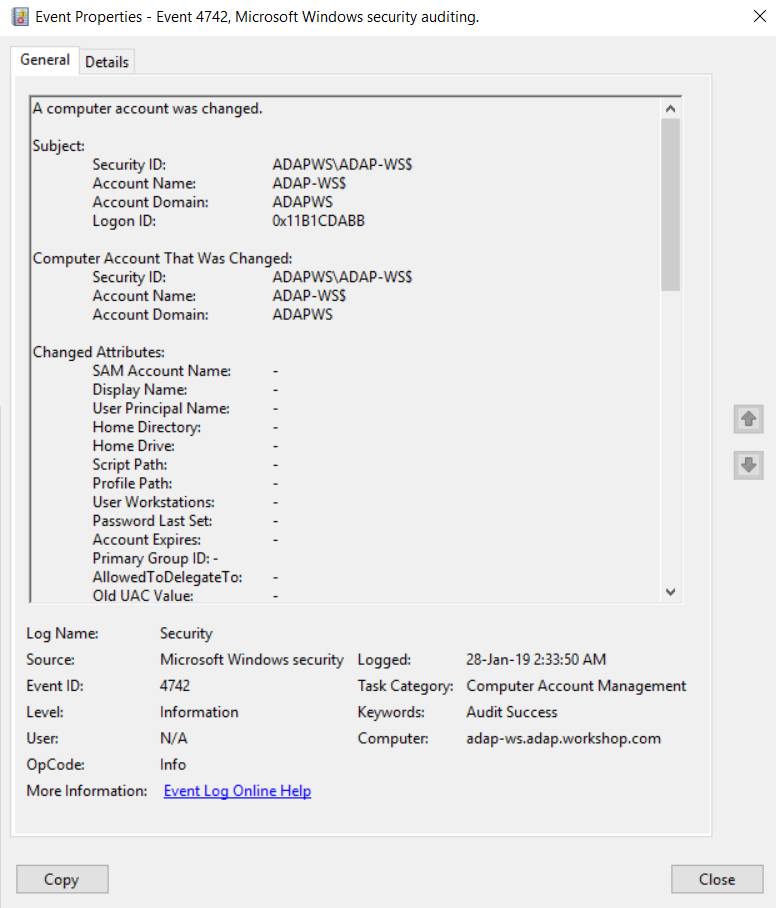
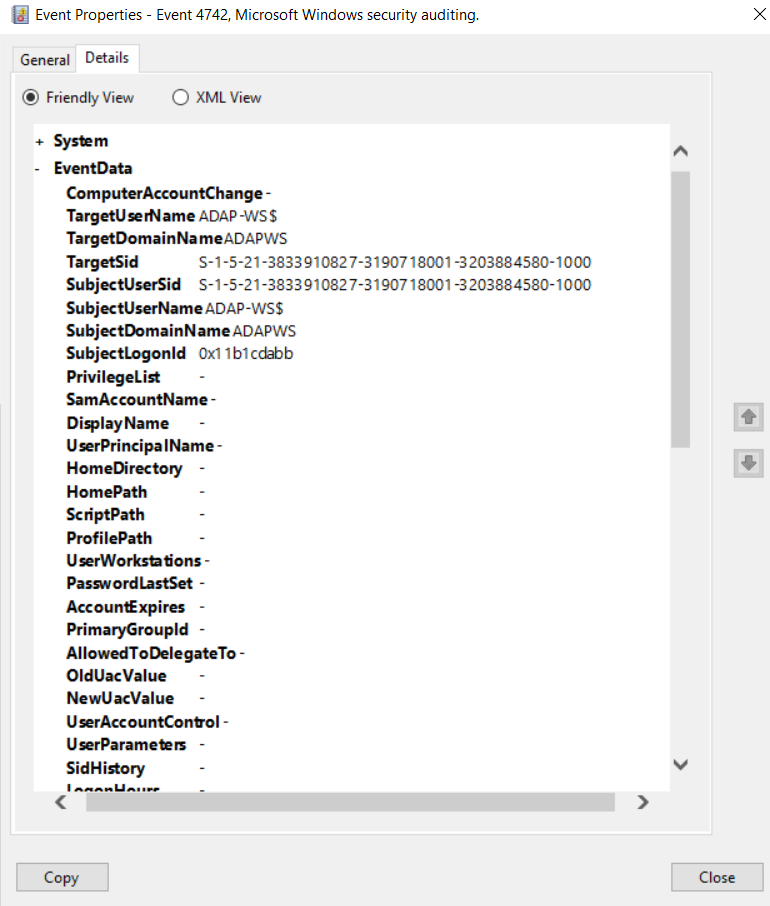
Figure 2. Event ID 4742 — Details tab under Event Properties.
Subject: This is the account that attempted to make a change to a computer account.
Security ID: The SID of the account that made an attempt to change a computer account.
Account Name: The name of the account that made an attempt to change a computer account.
Account Domain: The Subject's domain name. Formats could vary to include the NETBIOS name, the lowercase full domain name, or the uppercase full domain name.
Logon ID: The logon ID helps you correlate this event with recent events that might contain the same logon ID (e.g. event ID 4624).
Computer Account That Was Changed: This is the computer account that was changed.
Security ID: The SID of the computer account that was modified.
Account Name: The name of the account that was modified.
Account Domain: The domain name of the computer account that was changed. Formats could vary to include the NETBIOS name, the lowercase full domain name, or the uppercase full domain name.
Changed Attributes: If the value of an attribute of a computer
object was changed,
you will see the new value here.
SAM Account Name: The pre-Windows 2000 logon name.
Display Name: Usually a combination of the user's first name, middle initial, and last name. This attribute is optional for computer objects and is typically not preset.
User Principal Name: The internet-style login name for the account, based on the Internet standard RFC 822. By convention this should map to the account's email address.This attribute is optional for computer objects and is typically not preset.
Home Directory: The user's home directory. This attribute is optional for computer objects and is
typically not preset.
If the homeDrive attribute is set and specifies a drive letter, the
homeDirectory should be a Universal Naming Convention (UNC) path and the path
must be a network UNC of the form \\Server\Share\Directory.
Home Drive: The drive letter to which to map the UNC path specified by the account's homeDirectory attribute. This attribute is optional for computer objects and is typically not preset.
Script Path: The path of the account’s logon script. This attribute is optional for computer objects and is typically not preset.
Profile Path: A path to the account's profile. This attribute is optional for computer objects and is typically not preset.
User Workstations:The list of NetBIOS or DNS names of the computers from which the user can log on. Each computer name is separated by a comma. This attribute is optional for computer objects and is typically not preset.
Password Last Set: The last time the account’s password was modified. For example, after manually resetting a computer account's password or automatically resetting it (for computer objects, passwords are reset every 30 days by default).
Account Expires: The date the account will expire. This attribute is optional for computer objects and is typically not preset.
Primary Group ID: The Relative Identifier (RID) of a computer object's primary group.
AllowedToDelegateTo: The list of Service Principal Names (SPNs) to which this account can present delegated credentials.
Old UAC Value: This specifies the flags that control password, lockout, disable/enable, script, etc. for the computer account. It contains the previous value of the computer object's userAccountControl attribute.
New UAC Value: If the value of userAccountControl attribute of the computer object was changed, you will see the new value here.
User Account Control: The list of changes in the userAccountControl attribute.
User Parameters: If you change any setting using Active Directory Users and Computers management
console in the Dial-in tab of a user account's properties, you will see
SID History: This contains the previous SIDs used for the object if the object was moved from another
domain.
Note: Whenever an object is moved from one domain to another, a new SID is created and
becomes the objectSID.
Logon Hours:The hours during which the account is allowed to log on to the domain. This attribute is optional for computer objects and is typically not preset.
DNS Host Name: The name of the computer account as registered in DNS.
Service Principal Names:The list of SPNs registered for the computer account. If the value of the computer object's servicePrincipalName attribute was changed, you will see the new value here.
Additional information.
Privileges: The list of user privileges used during the operation.
Monitoring event ID 4742.
- Monitor event ID 4742 when Computer Account That Was Changed/Security ID corresponds to high-value accounts, including database servers, domain controllers, and administration workstations. To monitor your AD environment for privilege abuse.
- Monitor changes to AllowedToDelegateTo to identify any change to the list of services that the account delegates authority to. This way avoids unauthorized access to applications and thereby reduces the attack surface.
- Monitor frequent changes to pwdLastSet—the default setting is once a month for computer accounts. Frequent changes may indicate an anomaly or attack.
- If you set the SMARTCARD_REQUIRED flag in userAccountControl for the computer account, then the sAMAccountType of the computer account will be changed to NORMAL_USER_ACCOUNT (i.e. the computer account will "become” a user account and you will get “4738: A user account was changed” instead of 4742 for this computer account). Attackers can exploit this to fly under the radar even if you have alerting set up for computer accounts within your network. The actions that this account performs also won't show up in the user account records, as generally most tools omit fetching change events for subject/account names ending with $.
- It is strongly recommended that you avoid changing any user-related settings manually for computer objects, and monitor userAccountControl for every change.
The need for an auditing solution.
Auditing solutions like ADAudit Plus offer real-time monitoring, user and entity behavior analytics, and reports; together these features help secure your AD environment.
Real-time monitoring around the clock.
Although you can attach a task to the security log and ask Windows to send you an email, you will only get an email whenever that particular event ID is generated. Windows also lacks the ability to apply more granular filters that are required to meet security recommendations.
For example, Windows can send you an email every time event ID 4742 is generated, but it can't tell the difference between regular and high-value accounts. Receiving alerts specifically for high-value accounts reduces the chance of missing out on critical notifications amongst a heap of false-positive alerts.
With a tool like ADAudit Plus, not only can you apply granular filters to focus on real threats, you can receive alerts in real time via SMS, too.
User and entity behavior analytics (UEBA).
Leverage advanced statistical analysis and machine learning techniques to detect anomalous behavior within your network.
Compliance-ready reports.
Meet various compliance standards, such as SOX, HIPAA, PCI, FISMA, GLBA, and the GDPR with out-of-the-box compliance reports.