

- Free Edition
- Quick Links
- Active Directory Auditing
- Active Directory auditor
- Active Directory monitoring
- Account lockout analyzer
- Login monitoring software
- Active Directory change notifier
- User logon audit reports
- AD logon logoff tracker
- User logon failure auditing
- Login history tracking tool
- AD change auditor
- Insider threat detection software
- Permissions change auditing
- Entra ID reporting
- Privileged user monitoring
- User behavior analytics tool
- Active Directory security monitoring
- Group Policy auditing tool
- GPO change auditor
- Entra ID auditing
- Audit user account management
- OU change auditor
- Audit group membership changes
- Active Directory auditing and reporting tool
- GPO reporting tool
- Remote desktop monitoring software
- PowerShell logging and auditing
- Azure password protection auditing
- Azure sign-in risk detection
- File Server Auditing
- Windows Server Auditing
- Employee Tracking
- Workstations Auditing
- Compliance Auditing
- Other features
- SIEM Integration
- Windows DNS - Schema Auditing
- Windows security event log monitoring
- SIEM audit solution
- Schedule Active Directory change reports
- Reports from Archived Data
- Aggregated summary reports
- AD new/old attribute changes
- Audit trail
- Audit Active Directory LAPS
- Scheduled Reports & Alerts
- Account lockout examiner
- Industry
- Documents
- Success Stories
- Related Products
- Log360 (On-Premise | Cloud) Comprehensive SIEM and UEBA
- ADManager Plus Active Directory Management & Reporting
- ADAudit Plus Real-time Active Directory Auditing and UBA
- ADSelfService Plus Identity security with MFA, SSO, and SSPR
- DataSecurity Plus File server auditing & data discovery
- Exchange Reporter Plus Exchange Server Auditing & Reporting
- M365 Manager Plus Microsoft 365 Management & Reporting Tool
- RecoveryManager Plus Enterprise backup and recovery tool
- SharePoint Manager Plus SharePoint Reporting and Auditing
- AD360 Integrated Identity & Access Management
- AD Free Tools Active Directory FREE Tools
AD logon and logoff auditing with ADAudit Plus
Track logon activity across every tier
Monitor successful and failed logons across domain controllers (DCs), member servers, and workstations from a single console. Every event includes the originating machine, IP address, and DC that recorded it.
Resolve account lockouts instantly
The Account Lockout Analyzer traces every lockout to its source without requiring you to log into individual machines.
Extend auditing to RDP and remote access
Capture Remote Desktop Services connections and disconnections, including RD Gateway sessions, with session start time, source IP, and user identity for remote access events.
Audit logon activity in hybrid environments
Correlate on-premises AD logons with Microsoft Entra ID (previously known as Azure AD) sign-ins in a single view.
Detect anomalous logons and threats
Use user behavior analytics (UBA) driven baselines to detect unusual logons and the Attack Surface Analyzer to identify attacks such as Kerberoasting, Golden Ticket, etc.
Meet compliance requirements out of the box
Pre-configured report sets map logon audit data directly to SOX, HIPAA, PCI-DSS, FISMA, GLBA, GDPR, and ISO 27001 controls, ready for auditors without manual formatting.
What is AD logon/logoff auditing?
Every logon event in your AD environment generates security log entries on a DC and on the involved machine. Without a centralized solution, those entries sit on individual machines, inaccessible for correlation, trending, or investigation without manual effort across multiple systems.
ADAudit Plus collects and correlates logon and logoff data from across your environment in real time, presenting it in pre-configured reports that answer the questions your security team and auditors actually ask. From a single console, you can trace any user's logon history, investigate a lockout to its source, or identify a spike in failures that native tools would never surface.
Key logon/logoff audit data captured by ADAudit Plus
| Audit area | What ADAudit Plus captures |
|---|---|
| DC authentication and logon | All successful and failed authentication and logon events on each DC. |
| Workstation logons | Interactive and network logon events on workstations, including first and last logon times. |
| Member server logons | Logon activity on member servers, including local and remote sessions. |
| Account lockouts | Lockout events with originating machine, IP address, and root cause via the Account Lockout Analyzer. |
| Logon failures | Failed attempts with failure reason: bad password, bad username, disabled account, or policy violation. |
| User work hours | Active hours per user per day across all workstations. |
| Concurrent sessions | Users authenticated on more than one machine simultaneously. |
| Currently active sessions | A real-time view of every user with an active logon at the time of report generation. |
| RDP and remote access | Remote Desktop Services connections and RD Gateway sessions. |
| RADIUS/NPS authentication | Failed and successful Network Policy Server authentication attempts. |
| ADFS authentication events | Successful and failed ADFS authentication attempts, including extranet lockout events. |
| Entra ID sign-ins | Successful and failed Entra ID sign-ins, including legacy authentication attempts, risk detections, and Conditional Access outcomes. |
Monitor user logon activity across your environment
ADAudit Plus organizes logon activity by the tier where the event occurred, so you can investigate a specific server without wading through domain-wide noise, or pull a consolidated view when you need it. Authentication events from every DC are aggregated centrally, so you can see activity across all DCs in one place without searching logs on each machine individually.
- Trace every logon to the DC that processed it, including the source IP and client hostname.
- Member server logon activity is captured separately, covering both interactive and remote sessions.
- The Currently Logged On Users report shows every user with an active session at the time you run it.
- Users logged into multiple computers surfaces accounts with concurrent sessions on more than one machine, a signal for shared credentials or compromised accounts.
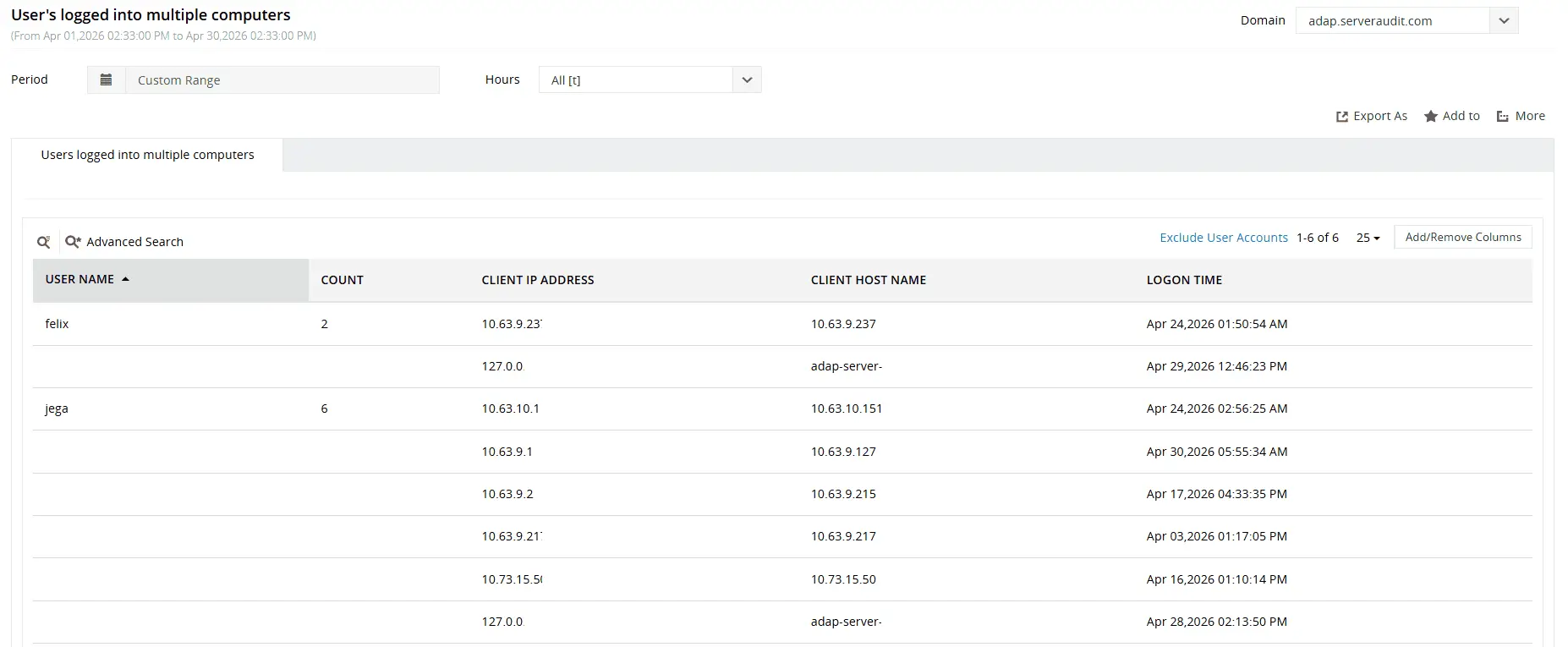
Spot accounts with active or recent sessions across multiple machines, including the machine names, logon times, and source IP addresses for each session.
Investigate account lockouts with root cause analysis
The Account Lockout Analyzer in ADAudit Plus traces every lockout to its originating machine and IP address, identifying the specific process holding stale credentials: a scheduled task, a mapped network drive, or a service.
- Identify the exact machine that generated the lockout without logging into individual DCs.
- The full logon history for the affected account is available alongside the lockout event, giving you context on whether the activity was genuine or suspicious.
- Repeated lockouts for the same account or from the same source are visible in trend form, surfacing patterns that point to an ongoing attack.
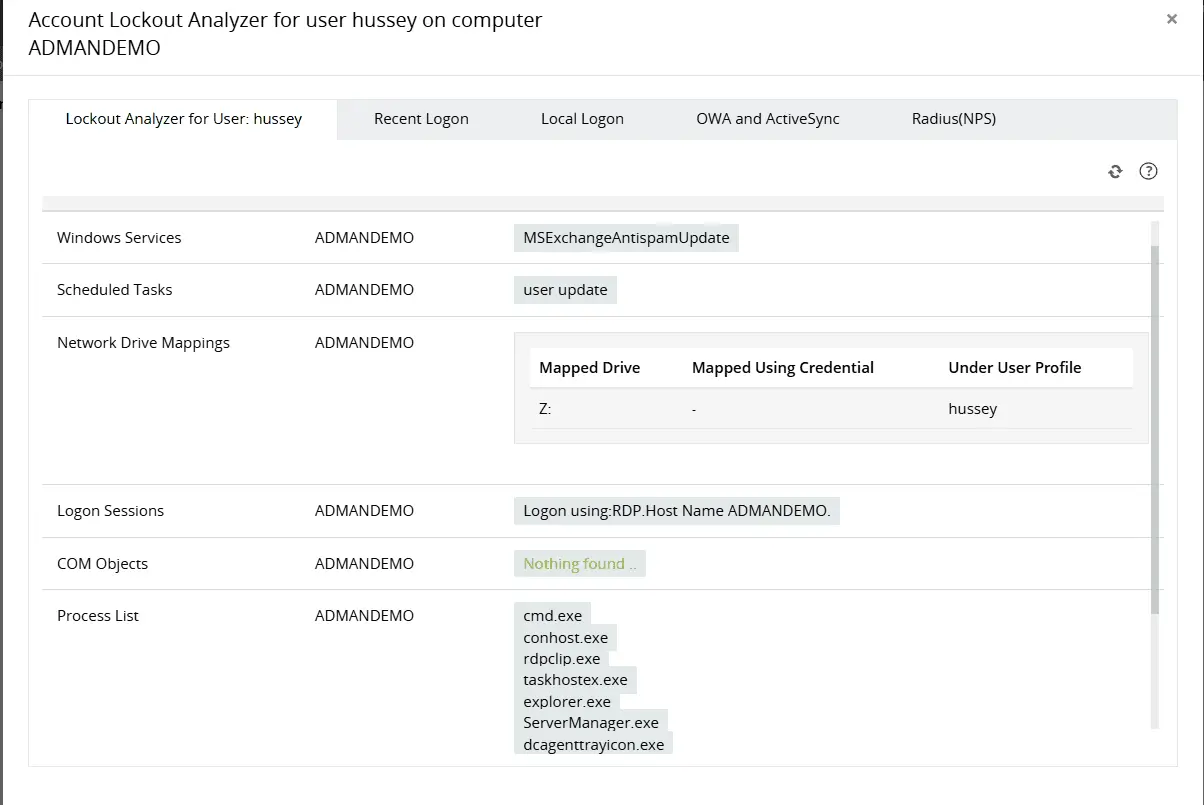
Identify the root cause of recurring AD account lockouts by analyzing components such as network drive mappings, process lists, applications, and more.
Detect anomalies with UBA and threats with Attack Surface Analyzer
Detect 25+ AD attacks in real time, including brute-force, password spray, pass-the-hash, pass-the-ticket, Golden Ticket attacks, and Kerberoasting, using the Attack Surface Analyzer.
ADAudit Plus also uses machine learning-driven UBA to establish behavioral baselines for each user based on logon times, frequently accessed machines, and authentication activity, automatically flagging deviations without manual threshold configuration.
- Unusual Logon Activity Time identifies logons outside a user's typical working hours.
- First Time Host Accessed by User flags logons to previously unaccessed machines, helping detect lateral movement or new work locations.
- Unusual Volume of Logon Failure detects spikes in failed authentication attempts beyond a user's normal baseline, helping identify brute-force attacks or credential compromise.
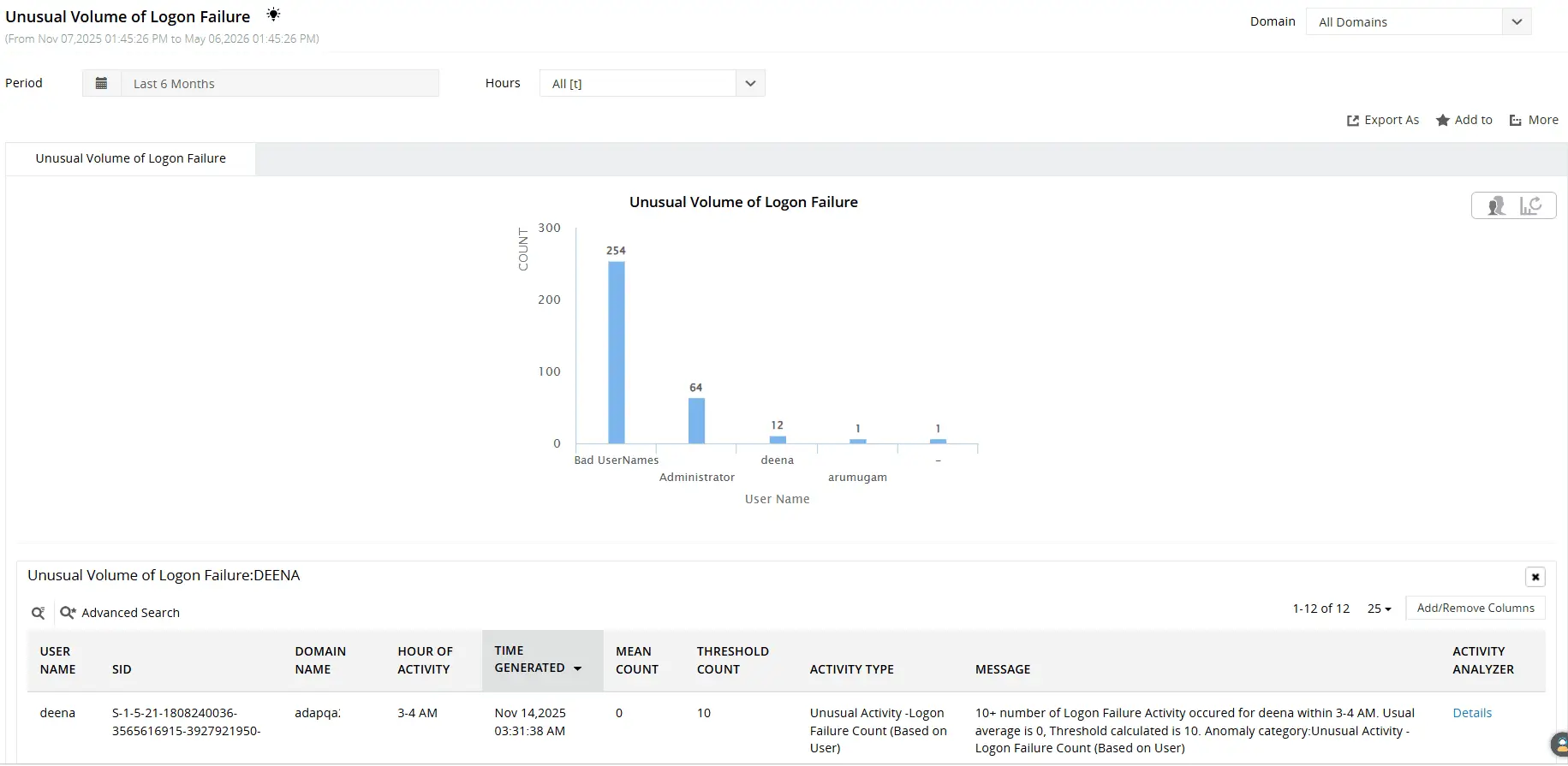
Leverage machine learning to detect unusual logon failure volumes, abnormal logon activity times, first-time host access, and more.
Extend logon and logoff auditing to hybrid and cloud environments
Many environments run a mix of on-premises AD and Microsoft Entra ID. Which directory authenticates a user depends on which resource they are accessing, and a complete logon audit must cover both. ADAudit Plus provides a correlated view of on-premises AD and Entra ID activity from a single console, covering hybrid logon activity in one report.
- Entra ID sign-in events include geo-location, device information, MFA status, and Conditional Access result for every authentication attempt.
- Legacy authentication sign-ins are captured in a dedicated report, giving visibility into the authentication methods that carry the highest cloud identity risk.
- Risk detections from Entra ID Identity Protection are surfaced in ADAudit Plus reports: impossible travel, sign-ins from anonymized IP addresses, and sign-ins using leaked credentials.
- Conditional Access policy changes are tracked alongside sign-in data, so a policy modification and the first sign-in affected by it are both visible in context.
Meet compliance requirements with logon and logoff audit reports
Logon and logoff data sits at the center of most IT compliance frameworks. Access reviews, privilege monitoring, and audit trail requirements under SOX, HIPAA, PCI-DSS, FISMA, GLBA, GDPR, and ISO 27001 all depend on a complete and queryable record of who accessed systems and when.
ADAudit Plus ships with pre-configured compliance report sets for all seven of these standards. Each report set maps directly to the relevant control requirements, so you can pull a HIPAA-ready access report or a SOX logon audit without building it from scratch before each audit cycle.
Custom report profiles extend this further. You can combine specific users, logon event types, and time-range filters into a saved profile that runs on demand or on a schedule, delivering the right report to the right person without manual intervention each time.
Why native tools fall short for logon auditing
Windows generates detailed logon audit data, but accessing and acting on it through native tools requires significant manual effort.
- Security event logs are stored locally on each DC. There is no built-in mechanism to correlate logon events across multiple DCs from a single interface.
- Event Viewer provides no fine-tuned alerting capability. You can search logs retrospectively, but there is no native way to be notified when failure volumes spike or an account locks out on a specific machine.
- PowerShell can query event logs remotely, but building and maintaining scripts for cross-DC correlation, failure trending, and lockout root cause analysis requires ongoing scripting effort and domain expertise.
- Log retention in the Windows Security event log is limited by the configured maximum log size. On busy DCs, events can roll over in hours, making forensic investigation of incidents days or weeks old impractical.
ADAudit Plus addresses all of these gaps with centralized collection, real-time alerting, pre-configured reports, and the Account Lockout Analyzer, all from a single console.
4 compelling reasons to choose ADAudit Plus
Widely recognized
ADAudit Plus has been recognized as a Gartner Peer Insights Customers' Choice for Security Incident & Event Management (SIEM) for four consecutive years.
Easy deployment
Go from downloading ADAudit Plus to receiving predefined reports and alerts in under 30 minutes, without any professional help.
Competitive pricing
ADAudit Plus is licensed per-server, unlike other IT auditors which are licensed per-user. With per-server licensing, even with a growing number of users each year, you can continue to ingest log data without additional costs.
Unified visibility
ADAudit Plus consolidates auditing, security, and compliance across Active Directory, Entra ID, Windows servers, workstations, and file servers into a single pane of glass, eliminating the need to juggle multiple tools.
Frequently asked questions
ADAudit Plus captures successful and failed logons with detailed failure reasons, account lockouts with root-cause analysis, session duration and logoff events, Remote Desktop sessions, RADIUS/NPS and ADFS authentication events, and replay attack detections. In hybrid environments, it also audits Microsoft Entra ID sign-in events, including MFA status and Conditional Access outcomes.
Yes. ADAudit Plus supports role-based access delegation, allowing managers to securely view read-only reports for their teams. With delegated credentials, managers can access reports directly from the ADAudit Plus console without depending on IT to generate or share them.
ADAudit Plus lets you schedule pre-built and custom logon and logoff reports for automatic delivery on a daily, weekly, or monthly basis. Reports can be exported in PDF, CSV, HTML, or XLSX formats and emailed to designated recipients, covering logon activity, failure summaries, etc.