# APM Insight .NET Core Agent Configuration Options
This page should help you tune the configuration for APM Insight .NET Core agent configuration profile. The .NET Core agent configuration profile enables you to set threshold values for key parameters and web transactions. These settings can be configured in the **apminsight.conf** file or from the [web client](https://www.manageengine.com/products/applications_manager/help/apm-insight-agent-configuration-profile.html). Make sure that this file is present in the folder where you have deployed the APM Insight agent.
## Editing the configuration settings
These settings can be configured using the edit option available in the web client.
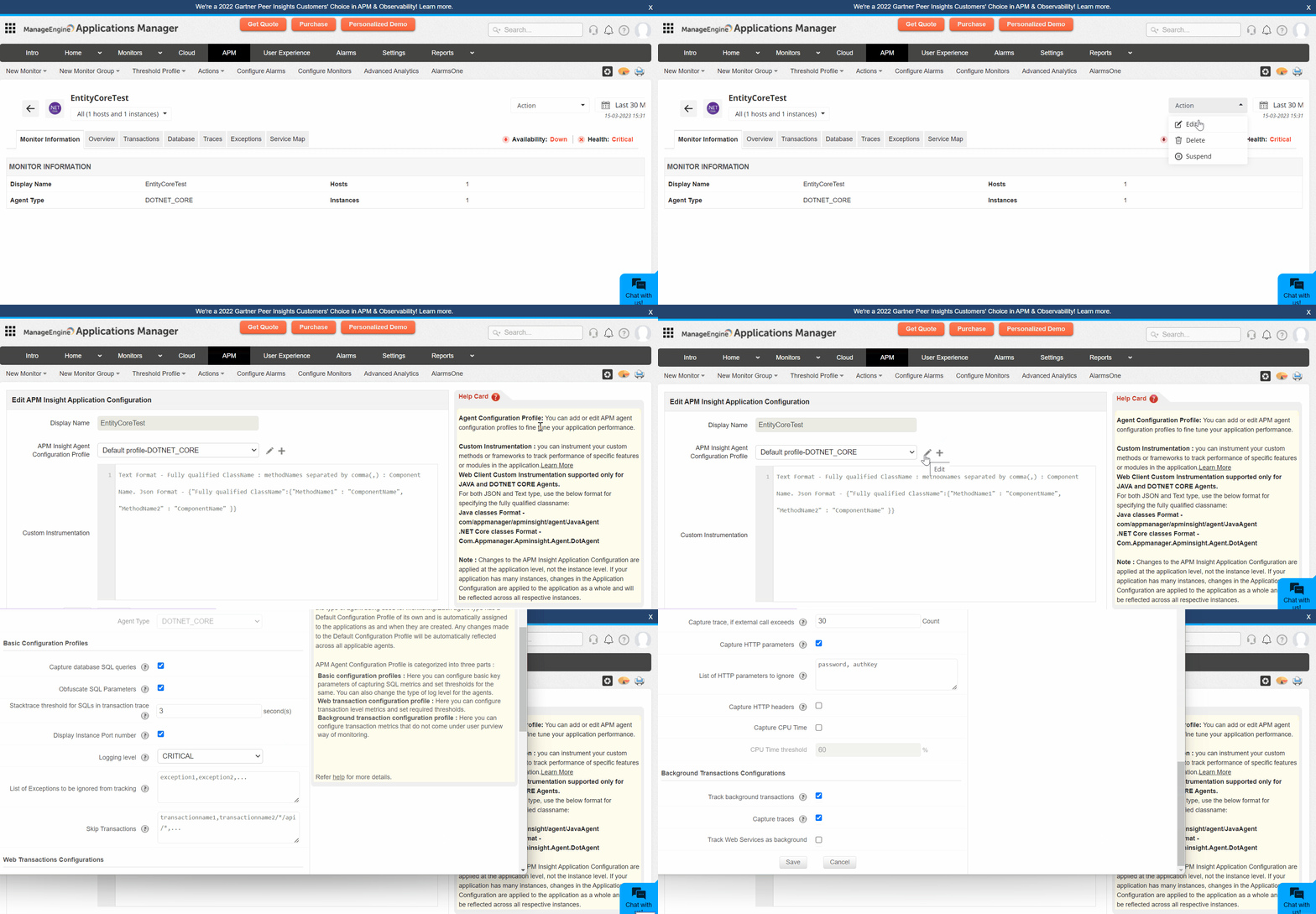
- [Basic configuration profiles](https://www.manageengine.com/products/applications_manager/help/apm-insight-dotnet-core-agent-configuration.html#basic)
- [Web transaction configurations](https://www.manageengine.com/products/applications_manager/help/apm-insight-dotnet-core-agent-configuration.html#webtransaction)
- [Background transactions configurations](https://www.manageengine.com/products/applications_manager/help/apm-insight-dotnet-core-agent-configuration.html#bgtransaction)
- [Configurations available only in apminsight.conf file](https://www.manageengine.com/products/applications_manager/help/apm-insight-dotnet-core-agent-configuration.html#apminsightConfig)
**Note:** '*' indicates that the highlighted default value applies for versions above Applications Manager v16470.
## Basic configuration profiles
| Name | Key | Description | Default value |
|---|---|---|---|
| Capture database SQL Queries | **sql.capture.enabled** | - Enabling this option will listen to all SQL Queries which gets executed.
- If this option is disabled, no Database Metrics will be collected. | True |
| Obfuscate SQL Parameters | **transaction.trace.sql.parametrize** | - Enabling this option will parameterize all SQL Queries in Slow Transaction Traces. (if sql.capture.enabled set to true & transaction.trace.enabled set to true)
- Disabling this option will give you the real query (with parameters).
**Note:** It is recommended to enable this option if there are queries getting executed using confidential parameters like credit card number, passwords, etc. | True |
| Stacktrace threshold for SQLs in transaction trace | **transaction.trace.sql.stacktrace.threshold** | - Enabling this option will collect the stacktrace whenever any sql query is executed above the threshold time value. | 3(seconds) |
| Display Instance Port number | **show.instance.port.number** | - Port number of application instances will be shown, if this option is enabled. | True |
| Logging level | **apminsight.log.level** | - The log level at which the APM Insight agent should record information.
- Supported levels are SEVERE,WARNING, INFO and FINE. | CRITICAL |
| List of exceptions to be skipped from tracking | **exceptions.ignore** | - Enter the list of exceptions that need not be tracked. | None |
| Skip Transactions | **transaction.skip.patterns** | - Provide regex patterns or transaction names that can be skipped from tracking. Multiple entries should be comma separated values. | None |
| Normalize DB Operation Names | | - Replaces alphanumeric values in the DB operation names with a question mark (*), if enabled. | False |
| List of URL Extensions to be Skipped from Tracking | | - Web transactions of the specified URL patterns will be skipped while tracking
- Use comma(,) to separate multiple entries Example: transaction.skip.listening=*.jpeg, will skip listening to transactions ending with .jpeg | .css, .js, .gif, .jpg, .jpeg, .bmp, .png, .ico, .woff, .properties.jsf, .ttf, .woff2, .otf, .svg, .webp, .json, .js.map, .swf, .conf, .properties, *.yml |
### Web Transactions Configurations:
| Name | Key | Description | Default value |
|---|---|---|---|
| Apdex Threshold | **apdex.threshold** | - Application Performance Index (simply called Apdex) is measurement of an Application's Performance ranging from 0 to 1.
- Detailed information about Apdex can be found at [www.apdex.org](http://www.apdex.org/)
- If any transaction response time scores values below the apdex.threshold value, the transaction is labeled as Satisfied.
- If any transaction response time scores above four times the apdex.threshold, the transaction is labeled as Frustrated.
- If it is exactly equal to apdex.threshold or in between satisfied and frustrated threshold value it is labeled as Tolerating. | 0.5 (seconds) |
| Sampling factor | **transaction.tracking.request.interval** | - Sampling factor helps in tracking sampled transactions.
- If set to 5, APM Insight tracks only 1 in 5 requests of the same kind | 5(requests) or 10(requests)* |
| Enable transaction tracing | **transaction.trace.enabled** | - Enabling this option will construct Trace for Slow Transactions.
- You can view the traces collected in APM Insight Page by selecting Traces tab. | True |
| Transaction tracing threshold | **transaction.trace.threshold** | - Trace of any transaction whose response time scoring above the specified threshold value will be collected, provided if transaction.trace.enabled is set to true. | 2(seconds) or 5(seconds)* |
| Capture trace if external calls exceeds | **component.trace.threshold** | - Trace snapshot will be taken for all HTTP request(s) which has total external components (like MYSQL, MEMCACHED, etc) call count equal or higher than the configured number. | 30 (Count) |
| Capture HTTP parameters? | **webtransaction.trace.input.params.record** | - Enabling this option captures parameters of all GET & POST web requests
- To skip capturing specific parameters use webtransaction.trace.input.params.ignore key
- Captured parameters can be viewed by selecting the required transaction in Traces tab | False |
| List of HTTP parameters to ignore | **webtransaction.trace.input.params.ignore** | - To skip capturing specific web request parameters like password, PIN or any confidential values, specify those parameter names for this key
- Use comma(,) to separate multiple entries. Values specified for this key are case-sensitive
- If no value is specified, all request parameters will be recorded | password, authKey |
| Capture CPU Time? | **cputime.capture.enabled** | - Record CPU time for every HTTP request, if enabled. | False |
| CPU Time threshold | **cputime.threshold** | - CPU time will get collected whenever any transaction CPU consumes above this threshold value. | 60% |
### Background Transactions Configurations:
| Name | Key | Description | Default value |
|---|---|---|---|
| Track background transactions | **bgtransaction.tracking.enabled** | - Enabling this option, APM Insight agent starts tracking background transactions
- All transactions other than HTTP are considered as background transactions | True |
| Capture traces | **bgtransaction.trace.enabled** | - Enabling this option, the agent collects traces for slow background transactions, provided bgtransaction.tracking.enabled is set to true | True |
| Track Web Services as background | **bgtransaction.enable.web.services** | - Enabling this option will collect background web service transaction | False |
| Track Web Services as background | **bgtransaction.enable.web.services** | - Enabling this option will collect background web service transaction | False |
| Transaction Trace Threshold | | - Traces will be collected for background transactions whose response time have crossed the specified threshold value, provided bgtransaction.trace.enabled is set to true | 2 (seconds) |
| Sampling Factor | | - Sampling factor for background transactions
- If value is set to 1, agent tracks every transaction. If value is set to n, agent tracks 1 in n transactions of same kind | 5 (Request) |
## Configurations available only in *apminsight.conf* file
Certain configuration files cannot be modified from the client. These settings can be configured in **apminsight.conf** file.
| Name | Key | Description | Default value |
|---|---|---|---|
| Application Name | **application.name** | - Specify the desired Application's Name to show in Applications Manager.
- If there are multiple instances of your application and you would like to group them, then specify the same application name in all installed APM Insight Agent Configuration files.
Example: myonlineshopping.com | True |
| Capture traces | **license.key** | - The API Key for the corresponding user.
- This will be available in the APM Insight home page, after login.
- Copy and Paste the Key as value for this parameter.
- This key is user specific. Do not share with anyone else. | none |
| Configure Proxy | **behind.proxy** | - Specify whether the Agent installed Application Server is under a proxy network.
- If set True, Proxy credential information should be given in order to send the metric data from the agent to Applications Manager.
- If behind.proxy is set to true, specify values for the following keys:
- proxy.server.host: Host name of the proxy server
- proxy.server.port: Proxy server's port
- proxy.auth.username: User name of the proxy server
- proxy.auth.password: password for the proxy server | False |
| APM Directory path | **apminsight.log.dir** | - Directory path where the APM Insight log should be stored.
- Use forward slash(/) as path separator
- example: D:/apminsight/
- Defaults to the directory where APM Insight agent jar is installed if commented or mentioned incorrectly or unable to create the configured directory.
- It can be found in the apminsight.conf and it will be commented by default.
- To make changes with this parameter sample usage for both windows and Linux need to defined as follows: **Windows:** D:/Tomcat/APMInsight/logs **Linux:** /home/apps/APM/APMInsight/logs | |