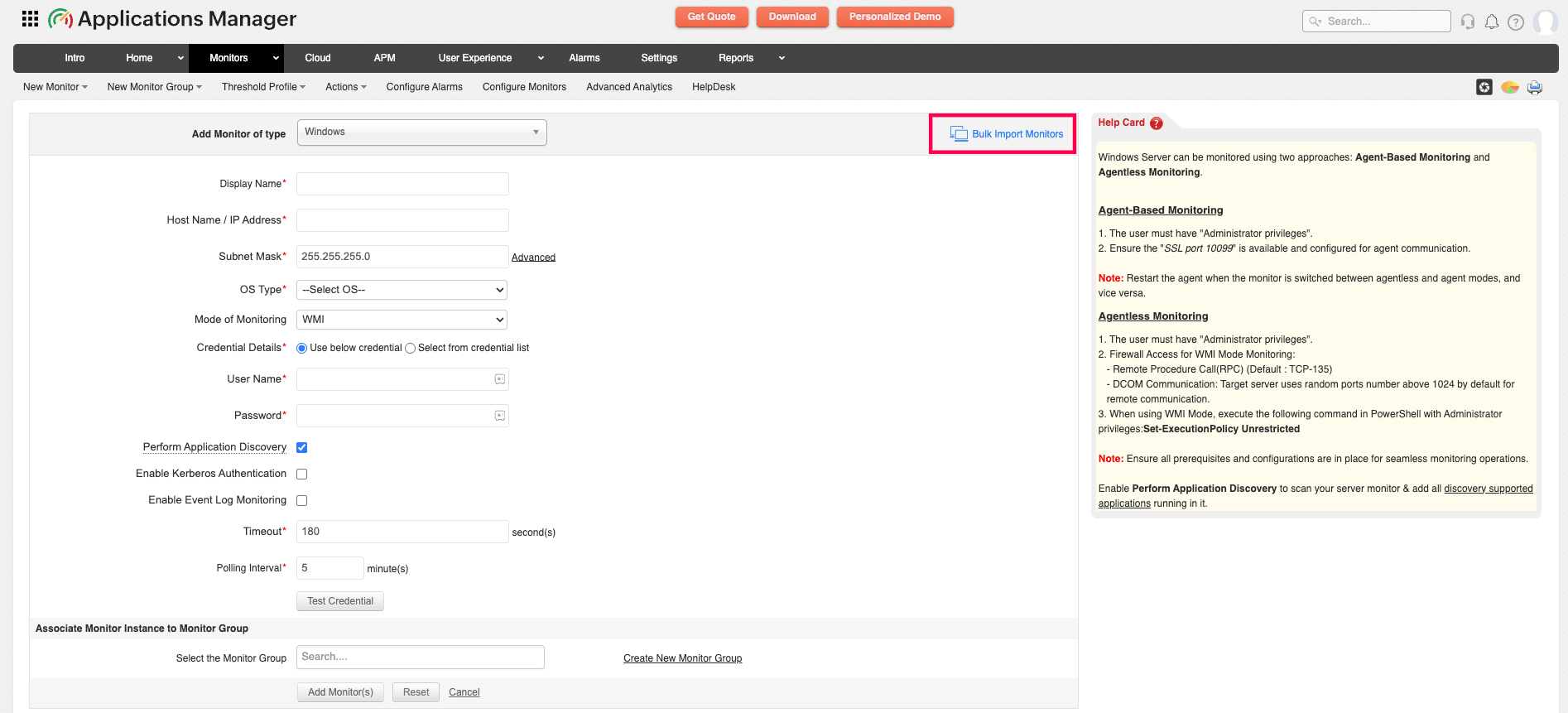
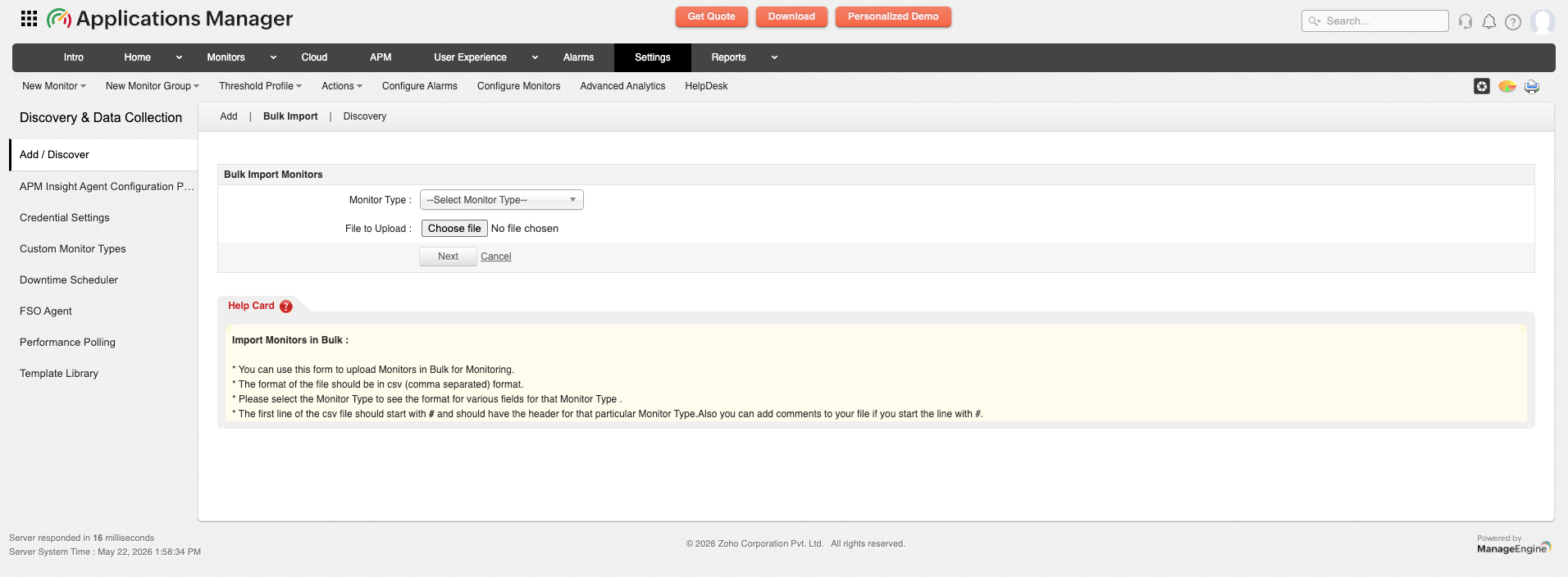
| Application Servers |
| Apache Geronimo Server | Format for the Bulk Import CSV file : #Header: DisplayName, Host Name / IP Address, JMX Port, JMX UserName, JMX Password, JNDI Path, credentialID, MonitorGroupID, PollInterval
View sample CSV file | Download CSV file |
| DOTNET | Format for the Bulk Import CSV file : #Header: DisplayName, HostName, SubNetMask, UserName, Password, credentialID, MonitorGroupID, PollInterval
View sample CSV file | Download CSV file |
| GlassFish | Format for the Bulk Import CSV file : #Header: DisplayName, HostName, Port, UserName, Password, credentialID, JNDIPath, MonitorGroupID, PollInterval
View sample CSV file | Download CSV file |
| Java Runtime | Format for the Bulk Import CSV file : #Header: DisplayName, HostName, Port, JNDIName, JMXUrl, UserName, Password, credentialID, MonitorGroupID, PollInterval
View sample CSV file | Download CSV file |
| JBoss server | Format for the Bulk Import CSV file : #Header: DisplayName, Host Name / IP Address, JBoss Version, Port, Is Domain, SSL is enabled, User Name, Password, credentialID, Enable Filter, Filter Condition, App Servers to Monitor, MonitorGroupID, PollInterval
**MonitorGroupID, PollInterval entries are optional * JBoss Version can have the following values : 3.2.x or 4.x or 4.0.1 or 4.0.2.
View sample CSV file | Download CSV file |
| Jetty Server | Format for the Bulk Import CSV file : #Header: DisplayName, HostName, Port, UserName, Password, JNDIPath, credentialID, MonitorGroupID, PollInterval
View sample CSV file | Download CSV file |
| Microsoft .NET | Format for the Bulk Import CSV file : #Header: DisplayName, HostName, SubNetMask, UserName, Password, credentialID, MonitorGroupID, PollInterval
* MonitorGroupID, PollInterval are optional fields. * UserName and Password should be the credentials of user with Administrator privileges. View sample CSV file | Download CSV file |
| Oracle Application Server | Format for the Bulk Import CSV file : #Header: DisplayName, HostName, SubNetMask, Port, MonitorGroupID, PollInterval, OracleASVersion
**MonitorGroupID, PollInterval entries are optional
View sample CSV file | Download CSV file |
| Resin | Format for the Bulk Import CSV file : #Header: DisplayName, HostName, Port, UserName, Password, JNDIPath, credentialID, MonitorGroupID, PollInterval
View sample CSV file | Download CSV file |
| SilverStream | Format for the Bulk Import CSV file : #Header: DisplayName, HostName, Port, MonitorGroupID, PollInterval
View sample CSV file | Download CSV file |
| Tomcat Server | Format for the Bulk Import CSV file : #Header: DisplayName, Host Name / IP Address, Port, SSL is enabled, Tomcat Version, User Name, Password, credentialID, Tomcat Manager Application URI, MonitorGroupID, PollInterval
**MonitorGroupID, PollInterval entries are optional
* Tomcat Version can have the following values : 3.x or 4.x or 5.x or 6.x.
View sample CSV file | Download CSV file |
| VMWare VFabric tc Server | Format for the Bulk Import CSV file : #Header: DisplayName, Host Name, Port, User Name, Password, credentialID, JNDIPath, MonitorGroupID, PollInterval
View sample CSV file | Download CSV file |
| Weblogic Server | Format for the Bulk Import CSV file : #Header: DisplayName, HostName, SubNetMask, Port, WeblogicVersion, Username, Password, credentialID, MonitorGroupID, Discover Clusters and Servers, PollInterval
**MonitorGroupID, PollInterval entries are optional
* WeblogicVersion can have the following values: 7.0 or 8.1, 9.x, 10.x, or 12.x .
View sample CSV file | Download CSV file |
| WebSphere Server | Format for the Bulk Import CSV file : #Header: DisplayName, Host Name / IP Address, Subnet Mask, Port, WebSphere Version, SOAP Connector Port, User Name, Password, credentialID, Deployment Mode, Network Deployer Host, Network Deployer SOAP Port, MonitorGroupID, Do not resolve DNS name, SSL is enabled, Global Security is enabled, Enable Filter, Filter Condition, App Servers to Monitor, PollInterval
**MonitorGroupID, PollInterval entries are optional
* Each monitor's information should be given in the order of the fields specified in the Header.
* WebsphereVersion can have the following values : 5.x or 6.x
* DeploymentMode can have the following values: BASE or ND.
View sample CSV file | Download CSV file |
| ERP |
| Microsoft Dynamics AX | Format for the Bulk Import CSV file : #Header: DisplayName, AX Host Name, Version, AX Services, Username, Password, credentialID, Enable Kerberos Authentication, Remote SQL Server, SQL Server Host Name, SQL Server Credential Details, SQL Server Username, SQL Server Password, MonitorGroupID, PollInterval
View sample CSV file | Download CSV file |
| Microsoft Dynamics CRM | Format for the Bulk Import CSV file : #Header: DisplayName, CRM Host Name, Version, credentialID, UserName, Password, Enable Kerberos Authentication, Enable Event Log Monitoring, MonitorGroupID, PollInterval
View sample CSV file | Download CSV file |
| Oracle EBS | Format for the Bulk Import CSV file : #Header: DisplayName, HostName, Port, EBS Version, User name, Password, credentialID, SSL Enabled, Instance Name(Service Name), Concurrent Request Filter, MonitorGroupID, PollInterval
View sample CSV file | Download CSV file |
| SAP Business One | Format for the Bulk Import CSV file : #Header: DisplayName, Host Name / IP Address, Port, User Name, Password, credentialID, MonitorGroupID, PollInterval, Timeout(in minutes)
View sample CSV file | Download CSV file |
| Siebel Enterprise Server | Format for the Bulk Import CSV file : #Header: DisplayName, HostName/IP Address, Operating System, Prompt, UserName, Password, Gateway Server, Enterprise Server, Siebel Administrator, Siebel Admin Password, Installation Directory, MonitorGroupID, PollInterval
View sample CSV file | Download CSV file |
| Services |
| Active Directory | Format for the Bulk Import CSV file : #Header: DisplayName, HostName, Use CredSSP Authentication, UserName, Password, Enable Kerberos Authentication, Timeout, MonitorGroupID, PollInterval
View sample CSV file | Download CSV file |
| Apache Spark Master | Format for the Bulk Import CSV file : #Header: DisplayName, Host Name / IP Address, Port, SSL is enabled, DiscoverAllNodes, credentialID, Authentication is enabled, UserName, Password, MonitorGroupID, PollInterval
View sample CSV file | Download CSV file |
| Apache Zookeeper | Format for the Bulk Import CSV file : #Header: DisplayName, HostName / IP Address, JMX Port, credentialID, Is Authentication required, UserName, Password, MonitorGroupID, Polling Interval
View sample CSV file | Download CSV file |
| Ceph Storage | Format for the Bulk Import CSV file : #Header: DisplayName, HostName/IP Address, Mode of Monitoring, Prompt, UserName, Private Key, Passphrase, Password, Timeout(in Seconds), Public Key Authentication(Supported for SSH2 only), credentialID, MonitorGroupID, PollInterval, Port
View sample CSV file | Download CSV file |
| DNS Monitor | Format for the Bulk Import CSV file : #Header: DisplayName, Target Address, Lookup Address, Timeout, Record Type, Search Field, Search Value, MonitorGroupID, PollInterval, Run on server, Run on agent
View sample CSV file | Download CSV file |
| FTP/SFTP Monitor | Format for the Bulk Import CSV file : #Header: DisplayName, Target Address, credentialID, User Name, Password, Port No, Timeout, Is Secured, Download File, Show availability down when download fails, Remote Source File Name, Local Destination File Name, Upload File, Show availability down when upload fails, Local Source File Name, Remote Destination File Name, MonitorGroupID, PollInterval
View sample CSV file | Download CSV file |
| Hadoop | Format for the Bulk Import CSV file : #Header: DisplayName, Mode Of Monitoring, Version, NameNode Host, NameNode JMX Port, NameNode Web Port, NameNodeSSLEnabled, NameNodeWebAuthType, NameNodeUserName, NameNodePassWord, NameNode JNDIPath, JobTracker/ResourceManager Host, JobTracker/ResourceManager JMX Port, JobTracker/ResourceManager Web Port, JobTrackerSSLEnabled, JobTrackerWebAuthType, JobTrackerUserName, JobTrackerPassWord, JobTracker/ResourceManager JNDIPath, MonitorGroupID, PollInterval
* NameNode and JobTracker/ResourceManager must be added using the same mode View sample CSV file | Download CSV file |
| Hazelcast | Format for the Bulk Import CSV file : #Header: DisplayName, HostName, JMX Port, Additional JMX Port, credentialID, PollInterval, UserName, Password, JNDIPath, MonitorGroupID
View sample CSV file | Download CSV file |
| Istio | Format for the Bulk Import CSV file : #Header: DisplayName, Cluster Host Name/IP Address, Public Key Authentication (Supported for SSH2 only), User Name, Password, Private Key, Passphrase, Prompt, Namespace, SSH Port, credentialID, Timeout, MonitorGroupID, PollInterval
View sample CSV file | Download CSV file |
| LDAP Server | Format for the Bulk Import CSV file : #Header: DisplayName, LDAP Server, LDAP Server Port, credentialID, UserName, Password, Search Base, Search Filter, Matching Attribute, Filter Condition, Search Result, Timeout, Is Secured, MonitorGroupID, PollInterval, Run on server, Run on agent
View sample CSV file | Download CSV file |
| Network Policy Server (RADIUS Server) | Format for the Bulk Import CSV file : #Header: DisplayName, HostName, UserName, Password, Roles, Enable Kerberos Authentication, MonitorGroupID, PollInterval, credentialID
View sample CSV file | Download CSV file |
| Ping Monitor | Format for the Bulk Import CSV file : #Header: DisplayName, HostName / IP Address, Timeout, MonitorGroupID, PollInterval
View sample CSV file | Download CSV file |
| Ping Monitor(EUM) | Format for the Bulk Import CSV file : #Header: DisplayName, HostName / IP Address, Timeout, MonitorGroupID, PollInterval, Run on server, Run on agent
View sample CSV file | Download CSV file |
| Service Monitoring | Format for the Bulk Import CSV file : #Header: DisplayName, HostName, SubNetMask, Port, CommandtoExecute, MatchContent, PollInterval
View sample CSV file | Download CSV file |
| Telnet | Format for the Bulk Import CSV file : #Header: DisplayName, Host Name / IP Address, Port, Timeout(in Seconds), MonitorGroupID, PollInterval
View sample CSV file | Download CSV file |
| UDP Port | Format for the Bulk Import CSV file : #Header: DisplayName, Host Name / IP Address, Port, Timeout(in Seconds), Command to Execute, Match Content, MonitorGroupID, PollInterval
View sample CSV file | Download CSV file |
| Middleware/Portal |
| Apache Active MQ | Format for the Bulk Import CSV file : #Header: DisplayName, HostName, JMX Port, credentialID, PollInterval, UserName, Password, JNDIPath, MonitorGroupID, Failover is enabled, Failover HostName, Failover JMX Port
View sample CSV file | Download CSV file |
| Apache Kafka | Format for the Bulk Import CSV file : #Header: DisplayName, HostName, JMX Port, credentialID, PollInterval, UserName, Password, JNDIPath, MonitorGroupID
View sample CSV file | Download CSV file |
| IBM App Connect Enterprise | Format for the Bulk Import CSV file : #Header: DisplayName, Type, Host Name, Port, AddContainers, MonitorGroupID, PollInterval
View sample CSV file | Download CSV file |
| IBM App Connect Enterprise Servers | Format for the Bulk Import CSV file : #Header: DisplayName, Type, Host Name, Port, AddContainers, MonitorGroupID, PollInterval
View sample CSV file | Download CSV file |
| IBM Websphere | Format for the Bulk Import CSV file : #Header: DisplayName, Queue Manager, Host Name, Listener Port, CCSID, Server Connection Channel, MonitorGroupID, PollInterval
View sample CSV file | Download CSV file |
| IBM Websphere MQ | Format for the Bulk Import CSV file : #Header: DisplayName, Queue Manager, Host Name, Listener Port, CCSID, Server Connection Channel, SSL Enabled, SSL Cipher Spec, Authentication Enabled, Timezone, User Name, Password, Filter System Objects, System Objects to Monitor, Discover Message Broker, Version10.x and Above, Broker Port, Broker Authentication Enabled, Broker User Name, Broker Password, MonitorGroupID, PollInterval
View sample CSV file | Download CSV file |
| Microsoft BizTalk | Format for the Bulk Import CSV file : #Header: DisplayName, credentialID, HostName, Version, UserName, Password, Enable Kerberos Authentication, Use Powershell, Use CredSSP Authentication, Database Server, Database Name, MonitorGroupID, PollInterval
View sample CSV file | Download CSV file |
| Microsoft MQ (MSMQ) | Format for the Bulk Import CSV file : #Header: DisplayName, HostName, UserName, Password, Mode Of Monitoring, credentialID, Timeout, MonitorGroupID, PollInterval
View sample CSV file | Download CSV file |
| Microsoft Skype for Business | Format for the Bulk Import CSV file : #Header: DisplayName, HostName, UserName, Password, Enable Kerberos Authentication, Version, Roles, MonitorGroupID, PollInterval, credentialID
View sample CSV file | Download CSV file |
| MS Office SharePoint | Format for the Bulk Import CSV file : #Header: DisplayName, HostName, UserName, Password, credentialID, Version, Mode Of Monitoring, Use CredSSP Authentication, Installation Type, Features, Timeout, MonitorGroupID, PollInterval
View sample CSV file | Download CSV file |
| Oracle Tuxedo | Format for the Bulk Import CSV file : #Header: DisplayName, HostName/IP Address, Port, Community String, Timeout, credentialID, MonitorGroupID, PollInterval
View sample CSV file | Download CSV file |
| RabbitMQ | Format for the Bulk Import CSV file : #Header: DisplayName, Host Name, Port, credentialID, SSL is enabled, User Name, Password, Monitor Specific Parameter(s), Discovery Filter Regex, MonitorGroupID, PollInterval
View sample CSV file | Download CSV file |
| WebLogic Integration | Format for the Bulk Import CSV file : #Header: DisplayName, HostName, SubNetMask, Port, WeblogicVersion, Username, Password, credentialID, MonitorGroupID, Discover Clusters and Servers, PollInterval
**MonitorGroupID, PollInterval entries are optional
* WeblogicIntegrationVersion can have the following values: 8.x .
View sample CSV file | Download CSV file |
| Database Servers |
| CouchBase | Format for the Bulk Import of CSV file : #Header: DisplayName, HostName, Port, MonitorGroupID, PollInterval, Username, Password, credentialID
**MonitorGroupID, PollInterval entries are optional.
View sample CSV file | Download CSV file |
| DamengDB | Format for the Bulk Import CSV file : #Header: DisplayName, Host Name / IP Address, Port, User Name, Password, credentialID, Timeout, PollInterval, MonitorGroupID
View sample CSV file | Download CSV file |
| DB2 | Format for the Bulk Import CSV file : #Header: DisplayName, HostName, SubNetMask, Port, SSL, Username, Password, credentialID, DatabaseName, MonitorGroupID, PollInterval
View sample CSV file | Download CSV file |
| DB2 for i | Format for the Bulk Import CSV file : #Header: DisplayName, Host Name / IP Address, credentialID, PollInterval, User Name, Password, Subnet Mask, Do not resolve DNS name, MonitorGroupID
View sample CSV file | Download CSV file |
| Informix | Format for the Bulk Import CSV file : #Header: DisplayName, Host Name / IP Address, Port, Database Server, UserName, Password, DB Locale, credentialID, MonitorGroupID, PollInterval
View sample CSV file | Download CSV file |
| Memcached | Format for the Bulk Import CSV file : #Header: DisplayName, HostName / IP Address, Port, Enable transaction test, MonitorGroupID, PollInterval
View sample CSV file | Download CSV file |
| MS SQL | Format for the Bulk Import CSV file : #Header: DisplayName, HostName, SubNetMask, Port, UserName, Password, credentialID, InstanceName, MonitorGroupID, PollInterval, encryption, EnableKerberosAuthentication, driverType
**MonitorGroupID, PollInterval entries are optional
* If you want to connect using Named Instance, specify the field InstanceName.If not, please leave this field empty.
View sample CSV file | Download CSV file |
| MySQL | Format for the Bulk Import CSV file : #Header: DisplayName, HostName, SubNetMask, Port, ForceSSL, Username, Password, credentialID, DatabaseName, MonitorGroupID, PollInterval
**MonitorGroupID, PollInterval entries are optional
* Each monitor's information should be given in the order of the fields specified in the Header.
View sample CSV file | Download CSV file |
| Neo4j | Format for the Bulk Import CSV file : #Header: DisplayName, HostName, Port, credentialID, PollInterval, UserName, Password, MonitorGroupID
View sample CSV file | Download CSV file |
| Oracle | Format for the Bulk Import CSV file : #Header: DisplayName, HostName, SubNetMask, Port, UserName, Password, InstanceName, MonitorGroupID, PollInterval
**MonitorGroupID, PollInterval entries are optional
View sample CSV file | Download CSV file |
| PostgreSQL | Format for the Bulk Import CSV file : #Header: DisplayName, HostName, Port, UserName, Password, credentialID, DBname, MonitorGroupID, SSL is enabled, PollInterval
View sample CSV file | Download CSV file |
| SAP MaxDB | Format for the Bulk Import CSV file : #Header: DisplayName, Host Name / IP Address, Port, credentialID, User Name, Password, Database Name, Timeout(in minutes), MonitorGroupID, PollInterval
View sample CSV file | Download CSV file |
| Sybase ASE | Format for the Bulk Import CSV file : #Header: DisplayName, Host Name / IP Address, Subnet Mask, Do not resolve DNS name, Port, User Name, Password, credentialID, Database Name, MonitorGroupID, PollInterval, Connect Using JConnect
**MonitorGroupID, PollInterval entries are optional
View sample CSV file | Download CSV file |
| Sybase Replication | Format for the Bulk Import CSV file : #Header: DisplayName, Host Name / IP Address, Subnet Mask, Port, User Name, Password, credentialID, Database Name, MonitorGroupID, PollInterval
View sample CSV file | Download CSV file |
| Mail Servers |
| Exchange Server | Format for the Bulk Import CSV file : #Header: DisplayName, Host Name / IP Address, Version, Exchange 2019 Role, Exchange 2016 Role, Exchange 2013 Role, Exchange 2010 Role, Exchange 2007 Role, Exchange 2019 Mailbox Services, Exchange 2019 Edge Services, Exchange 2016 Mailbox Services, Exchange 2016 Edge Services, Exchange 2013 Mailbox Services, Exchange 2013 Client Access Services, Exchange 2013 Edge Services, Exchange 2010 Mailbox Services, Exchange 2010 Client Access Services, Exchange 2010 Hub Transport Services, Exchange 2010 Edge Services, Exchange 2010 Unified Services, Exchange 2007 Mailbox Services, Exchange 2007 Client Access Services, Exchange 2007 Hub Transport Services, Exchange 2007 Edge Transport Services, Exchange 2007 Unified Messaging Services, Exchange 2003/below Services, User Name, Password, Mode Of Monitoring, Customize ConnectionURI, Connection URI, Use CredSSP Authentication, Timeout, credentialID, MonitorGroupID, PollInterval
View sample CSV file | Download CSV file |
| Mail Server | Format for the Bulk Import CSV file : #Header: DisplayName HostName / IP Address Is Secure Connection(SSL) Enable TLS SMTP Port Email ID SMTP Server requires Authentication SMTP UserName SMTP Password Enable POP/IMAP Monitoring Select Mail Fetching Server POP/IMAP Host Is Secure Connection(SSL) Enable TLS Port UserName Password Mail Subject Timeout MonitorGroup PollInterval Run on server Run on agent
View sample CSV file | Download CSV file |
| Cloud Apps |
| Amazon | Format for the Bulk Import CSV file : #Header: DisplayName, Amazon Services, Access Key ID, Secret Access Key, Account Type, Global Regions, China Regions, Gov Cloud Regions, Child Discovery, Advanced Settings, Action on Deleted Resources, Regex to filter EC2 instances name, Stop Discovery, Services to Stop Discovery, MonitorGroupID, PollInterval
View sample CSV file | Download CSV file |
| Google Cloud Platform | Format for the Bulk Import CSV file : #Header: DisplayName, GCP Services, Project ID, OAuth Provider, Advanced Settings, Action on Deleted Resources, Stop Discovery, Services to Stop Discovery, MonitorGroupID, PollInterval
View sample CSV file | Download CSV file |
| Microsoft Azure | Format for the Bulk Import CSV file : #Header: DisplayName, Subscription Id, Azure Services, Account Type, Discovery Mode, User Email, Password, Directory (tenant) ID, Application (client) ID, Client Secret Value (Application Key), OAuth Provider, Child Monitor Discovery, Discovery Filter Regex, Advanced Settings, Associate to Monitor Group, Alert on Resources Creation and Deletion, Set health severity as, Raise alerts when Resources are, Action on Deleted Resources, Services to Stop Discovery, Retry data collection API, Timeout, Discovery Interval, MonitorGroupID, PollInterval
View sample CSV file | Download CSV file |
| Oracle Cloud | Format for the Bulk Import CSV file : #Header: DisplayName, Tenancy OCID, User OCID, Services, PEM File Path, Fingerprint, Subscribed regions, Stop discovery, Compartments to monitor, Action on terminated resources, Services to exclude, Advanced Settings, MonitorGroupID, PollInterval
**MonitorGroupID, PollInterval entries are optional
View sample CSV file | Download CSV file |
| Web Server/Services |
| Apache Solr | Format for the Bulk Import CSV file : #Header: DisplayName, Host Name / IP Address, Port, SSL is enabled, credentialID, Authentication is enabled, UserName, Password, MonitorGroupID, PollInterval
View sample CSV file | Download CSV file |
| Elasticsearch Cluster | Format for the Bulk Import CSV file : #Header: DisplayName, Host Name / IP Address, Port, SSL is enabled, DiscoverAllNodes, credentialID, Authentication is enabled, UserName, Password, MonitorGroupID, PollInterval
View sample CSV file | Download CSV file |
| HAProxy | Format for the Bulk Import CSV file : #Header: DisplayName, Host Name / IP Address, Port, SSL is enabled, credentialID, Authentication is enabled, UserName, Password, Server Status URL, MonitorGroupID, PollInterval
View sample CSV file | Download CSV file |
| HTTP(S) URLs | Format for the Bulk Import CSV file : #Header: DisplayName, URLAddress, username, password, CredentialType, CredentialID, Saml adfs authentication ID, CheckForContent, ErrorIfMatch, TimeoutInSeconds, FormSubmissionMethod, httpcondition, httpvalue, MonitorGroupID, PollInterval, SSL Version, PayLoad, UserAgent, Custom Headers, Regular Expression in Content matching, Do Case sensitive keyword search
**MonitorGroupID, PollInterval entries are optional
* Each monitor's information should be given in the order of the fields specified in the Header.
* FormSubmissionMethod can have the following values: post or get
* The attributes CheckForContent, ErrorIfMatch, UserName, Password, TimeoutInSeconds, and FormSubmissionMethod are all optional.
* For sample a simple form of monitor can just have #DisplayName, URLAddress, CheckForContent.
View sample CSV file | Download CSV file |
| IBM HTTP Server | Format for the Bulk Import CSV file : #Header: DisplayName, Host Name/IP Address, Port, credentialID, SSL is enabled, Authentication is enabled, User Name, Password, Modify Server Status URL, Server Status URL, Timeout, PollInterval, MonitorGroupID
View sample CSV file | Download CSV file |
| IIS Server | Format for the Bulk Import CSV file : #Header: DisplayName, Host Name / IP Address, Do not resolve DNS name, Port, SSL is enabled, credentialID, User Name, Password, Response Header Check, MonitorGroupID, PollInterval
View sample CSV file | Download CSV file |
| ME ADManager Plus | Format for the Bulk Import CSV file : #Header: DisplayName, HostName / IP Address, JMX Port, credentialID, Authentication is enabled, UserName, Password, JNDIPath, Monitor Database, Type of Database, DataBaseName, DBHostname, DataBasePort, DBUserName, DBPassword, is SSL Enabled, Connect Using Named Instance, Instance Name, MonitorGroupID, PollInterval
* MonitorGroupID and PollInterval are optional fields. View sample CSV file | Download CSV file |
| ME OpManager | Format for the Bulk Import CSV file : #Header: DisplayName, HostName / IP Address, JMX Port, credentialID, Authentication is enabled, UserName, Password, JNDIPath, Monitor Database, Type of Database, DataBaseName, DBHostname, DataBasePort, DBUserName, DBPassword, is SSL Enabled, Connect Using Named Instance, Instance Name, MonitorGroupID, PollInterval
* MonitorGroupID and PollInterval are optional fields. View sample CSV file | Download CSV file |
| ME ServiceDesk Plus | Format for the Bulk Import CSV file : #Header: DisplayName, Hostname, Port, SSL is enabled, REST API Key, Monitor Database, Type of Database, DataBaseName, DBHostname, DataBasePort, DBUserName, DBPassword, is SSL Enabled, Connect Using Named Instance, Instance Name, MonitorGroupID, PollInterval
* MonitorGroupID and PollInterval are optional fields. View sample CSV file | Download CSV file |
| NGINX | Format for the Bulk Import CSV file : #Header: DisplayName, Hostname, Port, SSL is enabled, Is Authentication required, UserName, Password, Server Status URL, MonitorGroupID, PollInterval
View sample CSV file | Download CSV file |
| NGINX Plus | Format for the Bulk Import CSV file : #Header: DisplayName, Host Name / IP Address, Port, SSL is enabled, credentialID, Username, Password, MonitorGroupID, PollInterval
View sample CSV file | Download CSV file |
| Oracle HTTP Server | Format for the Bulk Import CSV file : #Header: DisplayName, Host Name/IP Address, Port, credentialID, SSL is enabled, Authentication is enabled, User Name, Password, Modify Server Status URL, Server Status URL, Timeout, PollInterval, MonitorGroupID
View sample CSV file | Download CSV file |
| REST API Monitor | Format for the Bulk Import CSV file : #Header: DisplayName, Rest API URL, Timeout, Form Submission Method, Payload Type, Payload, credentialID, OAuth Provider, Web Token, UserName, Password, Custom HTTP(S) Headers, Response Type, Add content check for response, Should contain, Should not contain, Do case sensitive keyword search, Regular Expression, MonitorGroupID, PollInterval
View sample CSV file | Download CSV file |
| SSL/TLS Certificate Monitor | Format for the Bulk Import CSV file : #Header: DisplayName, Domain, Port, Protocol, Need proxy to connect the domain, Ignore invalid root and intermediate certificate, Ignore Certificate name mismatch error, Timeout, MonitorGroupID, PollInterval
View sample CSV file | Download CSV file |
| Web Services | Format for the Bulk Import CSV file : #Header: DisplayName, URLAddress, TimeoutInSeconds, MonitorGroupID, PollInterval, Username, Password
View sample CSV file | Download CSV file |
| WebPage Analyzer | Format for the Bulk Import CSV file : #Header: DisplayName, Webpage URL, Page Load Timeout (in seconds), Wait after load (in seconds), HTTP Method, Pay Load, Custom HTTP(S) Headers, UserName, Password, Domains to block, Add content check for response, Regular Expression, Should contain, Should not contain, Do case sensitive keyword search, Enable SSL/TLS Certificate Monitoring, Domain, Port, Protocol, Need proxy to connect the domain, Ignore Certificate name mismatch error, Ignore invalid root and intermediate certificate, Timeout, MonitorGroupID, PollInterval
View sample CSV file | Download CSV file |
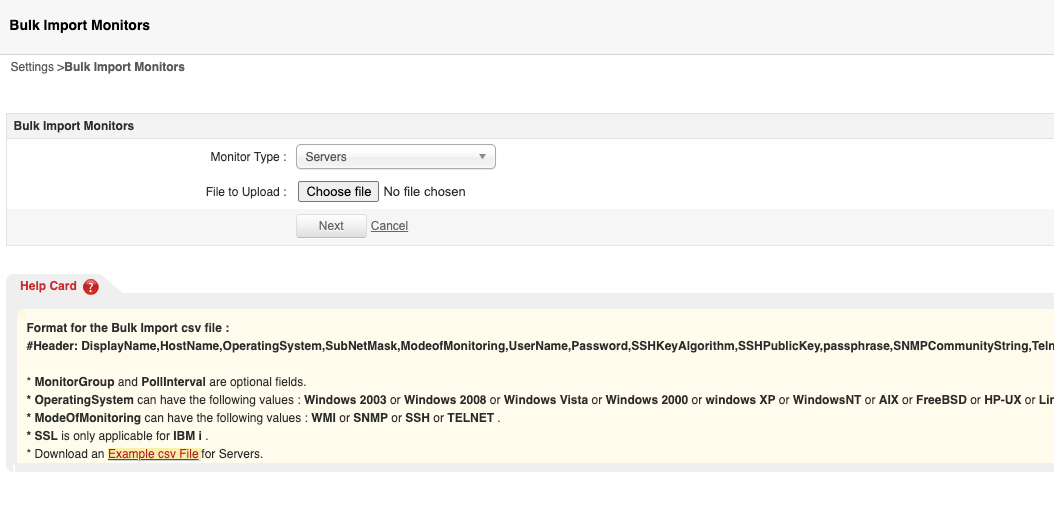
| Servers |
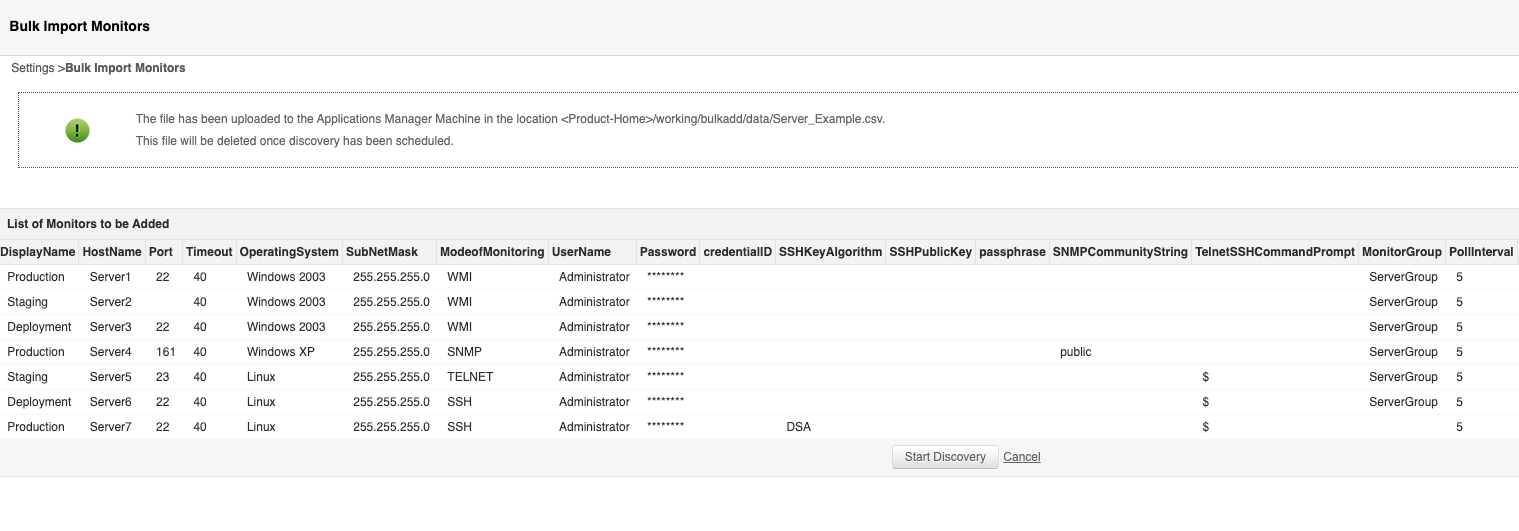
| Server | Format for the Bulk Import CSV file : #Header: DisplayName, HostName, Port, Timeout, OperatingSystem, SubNetMask, Mode of Monitoring, UserName, Password, credentialID, SSHKeyAlgorithm, SSHPublicKey, passphrase, SNMPCommunityString, TelnetSSHCommandPrompt, MonitorGroupID, PollInterval, EnableEventLogMonitoring, EnableKerberosAuthentication, PerformApplicationDiscovery
**MonitorGroupID, PollInterval entries are optional
* OperatingSystem can have the following values: Windows 2000, Windows 2003, Windows XP, Windows NT, WindowsNT, Windows 2016, Windows Vista, Windows 7, Windows 2008, Windows 8, Windows 2012, Windows 10, Windows 2019, Windows 11, Windows 2022, Windows 2025, AIX, FreeBSD, HP-UX, Linux, Mac OS, Novell, SUN, HP-TRU64, Windows, FreeBSD / OpenBSD, HP-UX / Tru64
* ModeOfMonitoring can have the following values: WMI, SNMP, SSH, or TELNET .
View sample CSV file | Download CSV file |
| Custom Monitors |
| File/Directory Monitor | Format for the Bulk Import CSV file : #Header: DisplayName, type, serversite, filepath, fileDirAge, selectMonStatus, selectChangeType, timeval, timeUnit, checkAvailability, choosehost, host, monitoringmode, username, password, prompt, port, credentialID, contentChk, fileCheckType, ccontent, clearAlerts, filterFiles, MonitorGroupID, PollInterval, timeout
View sample CSV file | Download CSV file |
| Script Monitor | Format for the Bulk Import CSV file : #Header: DisplayName, serversite, choosehost, host, isCommand, monitoringmode, username, password, prompt, mode, credentialID, port, serverpath, workingdirectory, opfile, outputfile, string_att, numeric_att, delimiter, tablespresent, table_row, tableattributes, manageTableRow, healthTableRow, message, timeout, MonitorGroupID, pollInterval, globalseverity
View sample CSV file | Download CSV file |
| Virtualization |
| Citrix Hypervisor | Format for the Bulk Import CSV file : #Header: DisplayName, HostName/IP Address, Https Port, UserName, Password, credentialID, VM Discovery, MonitorGroupID, PollInterval
**MonitorGroupID, PollInterval entries are optional. View sample CSV file | Download CSV file |
| Citrix Virtual Apps and Desktop | Format for the Bulk Import CSV file : #Header: DisplayName, HostName, Port, credentialID, Authentication Type, UserName, Password, Database Name, Force Encryption, Connect using Named Instance, Instance Name, Driver for SQL Server Connection, MonitorGroupID, PollInterval
**MonitorGroupID, PollInterval entries are optional. View sample CSV file | Download CSV file |
| Docker | Format for the Bulk Import CSV file : #Header: DisplayName, HostName/IP Address, Port, Username, Password, SSL is enabled, credentialID, Container Discovery, Discovery Filter Regex, Client Certificate Authentication Required, Client Certificate Name, Client Certificate Password (if required), Advanced Settings, Action on Deleted Resources, MonitorGroupID, PollInterval
TestDocker, apm-u12-temp, 4243, , , false, , , 5 SecuredDocker, 102.198.12.4, 2376, User, User123, true, , 10000095, 10 View sample CSV file | Download CSV file |
| Docker Swarm | Format for the Bulk Import CSV file : #Header: DisplayName, HostName/IP Address, Port, Username, Password, SSL is enabled, credentialID, Discovery Filter Regex, Client Certificate Authentication Required, Client Certificate Name, Client Certificate Password (if required), MonitorGroupID, PollInterval
TestSwarm, apm-swarm-manager, 2375, , , false, , , , , , , 5 SecuredSwarm, 102.198.12.4, 2376, User, User123, true, , , true, SwarmClientCert, CertPass123, 10000095, 10 View sample CSV file | Download CSV file |
| Horizon View | Format for the Bulk Import CSV file : #Header: DisplayName, Connection Broker Hostname / IP, User Name, Password, Version, MonitorGroupID, PollInterval
View sample CSV file | Download CSV file |
| Hyper-V Server | Format for the Bulk Import CSV file : #Header: DisplayName, Host Name / IP Address, User Name, Password, credentialID, VM Discovery, Kerberos, Version, MonitorGroupID, PollInterval
View sample CSV file | Download CSV file |
| Kubernetes | Format for the Bulk Import CSV file : #Header: DisplayName, Cluster Host Name/IP Address, Public Key Authentication (Supported for SSH2 only), User Name, Password, Private Key, Passphrase, Prompt, SSH Port, Monitor Specific Namespace(s), Filter Condition, Namespace Name(s), Enable Event Log Monitoring, credentialID, Timeout, MonitorGroupID, PollInterval
View sample CSV file | Download CSV file |
| KVM | Format for the Bulk Import CSV file : #Header: DisplayName, Host Name / IP Address, Mode of Monitoring, Port, credentialID, User Name, Password, Command Prompt, Public Key Authentication (Supported for SSH2 only), Private Key, Passphrase, Timeout, VM Discovery, MonitorGroupID, PollInterval
View sample CSV file | Download CSV file |
| Podman Monitor | Format for the Bulk Import CSV file : #Header: DisplayName, HostName / IP Address, REST API Port, SSL Enabled, UserName, Password, Timeout, PollInterval, Discovery Filter Regex, MonitorGroupID
View sample CSV file | Download CSV file |
| VMWare ESX/ESXi | Format for the Bulk Import CSV file : #Header: DisplayName, HostName/IP Address, Port, credentialID, UserName, Password, SSL Version, VM Discovery, MonitorGroupID, PollInterval, Discovery Filter Regex
* MonitorGroupID, PollInterval, Discovery Filter Regex are optional fields. * Monitor Performance Metrics of Virtual Machines : Specify Yesto monitor performance metrics of Virtual Machines. View sample CSV file | Download CSV file |
| VMWare Horizon View Connection Broker | Format for the Bulk Import CSV file : #Header: DisplayName, Connection Broker Hostname / IP, User Name, Password, Version, MonitorGroupID, PollInterval
* MonitorGroupID, PollInterval are optional fields. View sample CSV file | Download CSV file |
| XenApp | Format for the Bulk Import CSV file : #Header: DisplayName, HostName, Version, UserName, Password, credentialID, Enable Event Log Monitoring, MonitorGroupID, PollInterval
View sample CSV file | Download CSV file |
| XenServer Monitor | Format for the Bulk Import CSV file : #Header: DisplayName, HostName/IP Address, Https Port, UserName, Password, credentialID, VM Discovery, MonitorGroupID, PollInterval
View sample CSV file | Download CSV file |
| Converged Infrastructure |
| Cisco UCS | Format for the Bulk Import CSV file : #Header: DisplayName, Host Name / IP Address, Port, SSL is enabled, User Name, Password, Timeout, credentialID, MonitorGroupID, PollInterval
View sample CSV file | Download CSV file |
| Nutanix | Format for the Bulk Import CSV file : #Header: DisplayName, Cluster Host Name/IP Address, Port, User Name, Password, VM Discovery, credentialID, MonitorGroupID, PollInterval
View sample CSV file | Download CSV file |
| Nutanix Multi-Cluster | Format for the Bulk Import CSV file : #Header: DisplayName, Prism Central Hostname/IP Address, Port, UserName, Password, CredentialID, Discovery Filter, Action on Deleted Resource, Discovery Interval, PollInterval, MonitorGroupID
View sample CSV file | Download CSV file |