Endpoint Central domains to be excluded in Roaming agent
Roaming users directly contact the cloud server. Since these users are constantly roaming, they can't be managed by a central server. Therefore, the roaming agents should connect to these websites:
desktopcentral.manageengine.eu
This is the server's URL. The roaming agent updates the task status to the cloud server and in order to ensure seamless agent-server communication, the agent has to connect to desktopcentral.manageengine.eu. Check Domain
Endpoint Central agents will use these domains to contact endpoint central servers. If regex based domain whitelisting is not supported whitelist the following domains: endpointcentral-agent0.manageengine.com Check Domain endpointcentral-agent1.manageengine.com Check Domain endpointcentral-agent2.manageengine.com Check Domain endpointcentral-agent3.manageengine.com Check Domain endpointcentral-agent4.manageengine.com Check Domain endpointcentral-agentp1.manageengine.com Check Domain endpointcentral-agentp2.manageengine.com Check Domain endpointcentral-agentp3.manageengine.com Check Domain endpointcentral-agentp5.manageengine.com Check Domain endpointcentral-agent5.manageengine.com Check Domain endpointcentral-agent6.manageengine.com Check Domain endpointcentral-agent7.manageengine.com Check Domain endpointcentral-agent8.manageengine.com Check Domain endpointcentral-agent9.manageengine.com Check Domain endpointcentral-agent10.manageengine.com Check Domain endpointcentral-agentp18.manageengine.com Check Domain
patchdb.manageengine.com
This website will have the latest patch information along with the download URLs. To find the missing patches during the scan process, the agent gets the latest patch details from the patch database, for which it has to connect to patchdb.manageengine.com. Check Domain
bonitas.zohocorp.com
This is the cloud server's URL. To upload logs for analysis and troubleshooting, you need to connect to bonitas.zohocorp.com. Check Domain
patchdatabase.manageengine.com
The roaming agent has to connect to patchdatabase.manageengine.com in order to download dependent patches from the Endpoint Central Server. Check Domain
us3-dms.zoho.com
The roaming agent has to connect to us3-dms.zoho.com to perform on-demand operations. For instance, a user has added a new computer to the network, and he immediately wants to scan that computer. In that case, the user should perform an on-demand operation. Check Domain
us4-dms.zoho.com
The agent should connect to this domain for the user to be able to scan his system immediately. Check Domain
download-accl.zoho.com
The agent should connect to download-accl.zoho.com in order to download the manually uploaded packages in Software Deployment module. Check Domain
downloads.zohocdn.com
The Roaming agent should connect to downloads.zohocdn.com in order to download new agent binaries that are required during upgrade process. Check Domain
files-me-accl.zoho.com
The agent should connect to files-me-accl.zoho.com in order to download files from server. Check Domain
Endpoint Central domains that should be whitelisted in the domain itself
Distribution server is a component which allows you to download patch binaries from the respective vendor websites and distribute it to all the remote office computers managed under the DS. The Distribution server should connect to these websites:
desktopcentral.manageengine.eu
The replication of patches is done in the DS. The DS will then update the replication status to the server, for which it has to connect to desktopcentral.manageengine.eu. The remote office/WAN agents will contact the server to update the task status, for which it has to connect to the domain. Check Domain
Endpoint Central agents will use these domains to contact endpoint central servers. If regex based domain whitelisting is not supported whitelist the following domains: endpointcentral-agent0.manageengine.com Check Domain endpointcentral-agent1.manageengine.com Check Domain endpointcentral-agent2.manageengine.com Check Domain endpointcentral-agent3.manageengine.com Check Domain endpointcentral-agent4.manageengine.com Check Domain endpointcentral-agentp1.manageengine.com Check Domain endpointcentral-agentp2.manageengine.com Check Domain endpointcentral-agentp3.manageengine.com Check Domain endpointcentral-agentp5.manageengine.com Check Domain endpointcentral-agent5.manageengine.com Check Domain endpointcentral-agent6.manageengine.com Check Domain endpointcentral-agent7.manageengine.com Check Domain endpointcentral-agent8.manageengine.com Check Domain endpointcentral-agent9.manageengine.com Check Domain endpointcentral-agent10.manageengine.com Check Domain endpointcentral-agentp18.manageengine.com Check Domain
patchdb.manageengine.com
The DS gets the latest patch information from this website. It also downloads the patch binaries from the vendor's site through the download URL in this patchdb website. So it has to connect to patchdb.manageengine.com. Check Domain
bonitas.zohocorp.com
This is the cloud server's URL. To upload logs for analysis and troubleshooting, you need to connect to bonitas.zohocorp.com. Check Domain
patchdatabase.manageengine.com
The DS has to connect to this website in order to download the dependent patches from the Endpoint Central Server. Check Domain
us3-dms.zoho.com
The DS should connect to us3-dms.zoho.com in order to perform the operations involved in installing the agents using local AD without being interrupted. The remote office/WAN agents should connect to this domain to perform on-demand operations. Check Domain
us4-dms.zoho.com
The DS should connect to us4-dms.zoho.com in order to perform the operations involved in installing the agents using local AD without being interrupted. The remote office/WAN agents should connect to this domain to perform on-demand operations. Check Domain
download-accl.zoho.com
The DS should connect to download-accl.zoho.com in order to download the manually uploaded packages in Software Deployment module. Check Domain
downloads.zohocdn.com
The DS should connect to downloads.zohocdn.com in order to download new agent/DS binaries that are required during upgrade process. Check Domain
files-me-accl.zoho.com
The agent should connect to files-me-accl.zoho.com to download files from the server. Check Domain
The following domains should be whitelisted in agents that are under the distribution server.
The agents which belong to remote office/WAN should connect to these domains:
desktopcentral.manageengine.eu
The DS agent updates the task status to the cloud server and in order to ensure seamless agent-server communication, the agent has to connect to desktopcentral.manageengine.eu. Check Domain
Endpoint Central agents will use these domains to contact endpoint central servers. If regex based domain whitelisting is not supported whitelist the following domains: endpointcentral-agent0.manageengine.com Check Domain endpointcentral-agent1.manageengine.com Check Domain endpointcentral-agent2.manageengine.com Check Domain endpointcentral-agent3.manageengine.com Check Domain endpointcentral-agent4.manageengine.com Check Domain endpointcentral-agentp1.manageengine.com Check Domain endpointcentral-agentp2.manageengine.com Check Domain endpointcentral-agentp3.manageengine.com Check Domain endpointcentral-agentp5.manageengine.com Check Domain endpointcentral-agent5.manageengine.com Check Domain endpointcentral-agent6.manageengine.com Check Domain endpointcentral-agent7.manageengine.com Check Domain endpointcentral-agent8.manageengine.com Check Domain endpointcentral-agent9.manageengine.com Check Domain endpointcentral-agent10.manageengine.com Check Domain endpointcentral-agentp18.manageengine.com Check Domain
us3-dms.zoho.com
The DS agents should connect to us3-dms.zoho.com in order to perform the operations involved in installing the agents. Check Domain
bonitas.zohocorp.com
This is the cloud server's URL. To upload logs for analysis and troubleshooting, you need to connect to bonitas.zohocorp.com. Check Domain
patchdb.manageengine.com
This website will have the latest patch information along with the download URLs. To find the missing patches during the scan process, the agent gets the latest patch details from the patch database, for which it has to connect to patchdb.manageengine.com. Check Domain
us4-dms.zoho.com
The DS agents should connect to us4-dms.zoho.com in order to perform the operations involved in installing the agents. Check Domain
download-accl.zoho.com
The agent should connect to download-accl.zoho.com in order to download some dynamic files from the server. Check Domain
downloads.zohocdn.com
The ds agent should connect to downloads.zohocdn.com in order to download localization contents. Check Domain
files-me-accl.zoho.com
The agent should connect to files-me-accl.zoho.com in order to download some dynamic files from the server. Check Domain
IP Whitelist
Here's the list of IP addresses that are required to be added to the whitelist
US region data centre IP's
204.141.42.0/23
136.143.190.0/23
136.143.186.0/23
136.143.189.0/24
204.141.32.0/23
136.143.182.0/23
136.143.180.0/23
136.143.185.0/24
Geo DNS Domains
It is strongly recommended to whitelist the domain instead of whitelisting the IP address as these domains are using GeoDNS , i.e. The IP address of the domain's will change based on geolocation of the user.
However, if you still wish to whitelist IP for the domains:
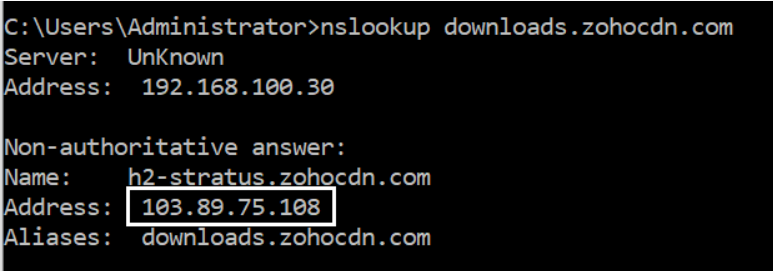
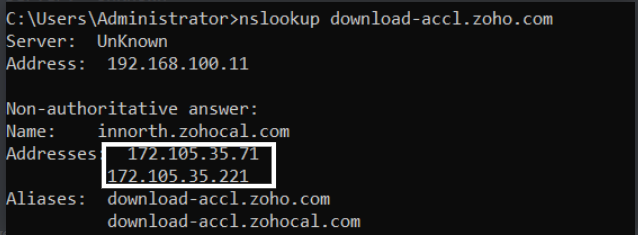
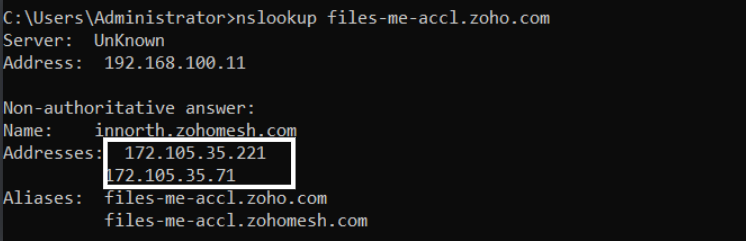
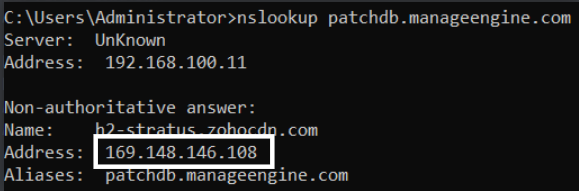
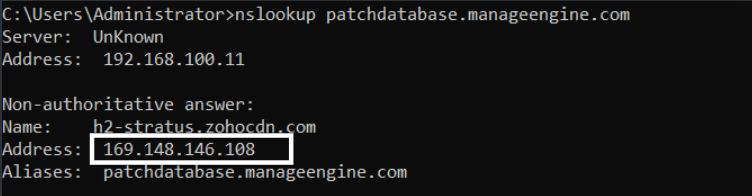
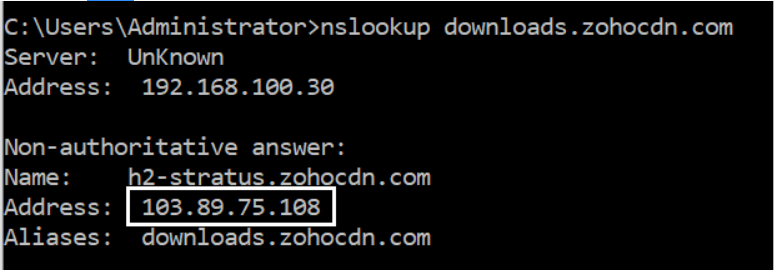
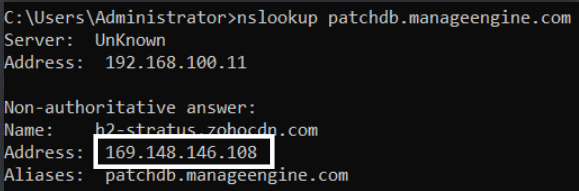
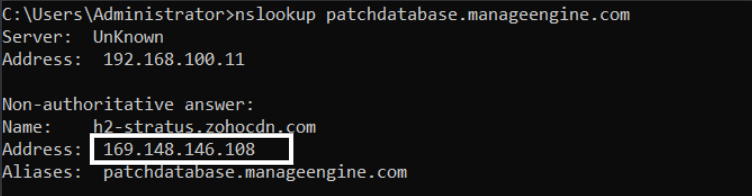
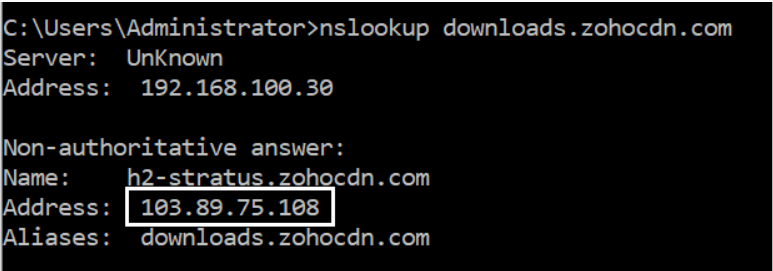
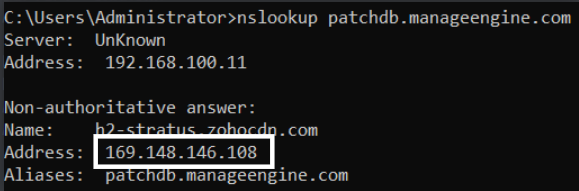
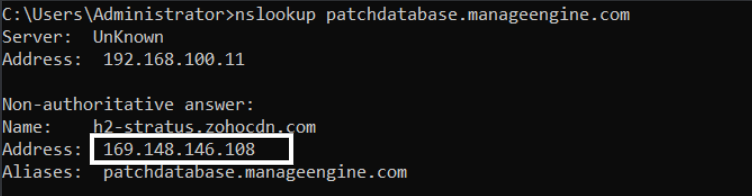
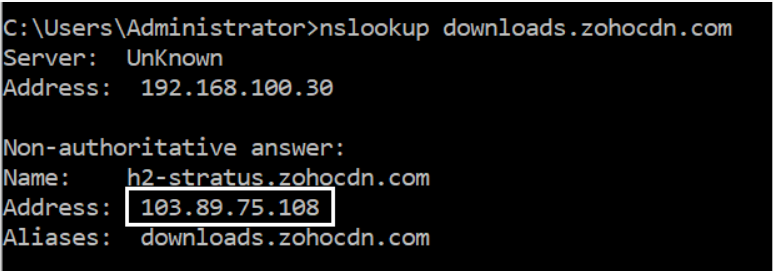
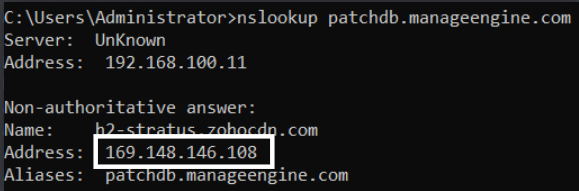
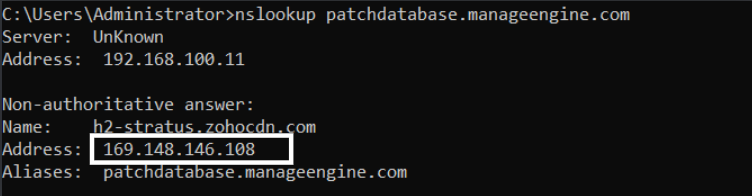
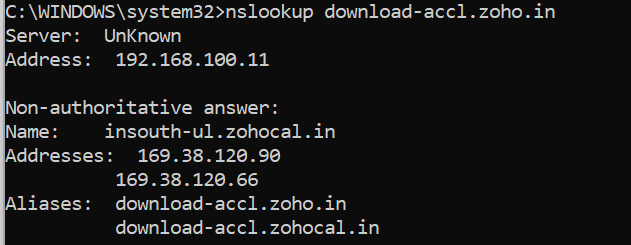
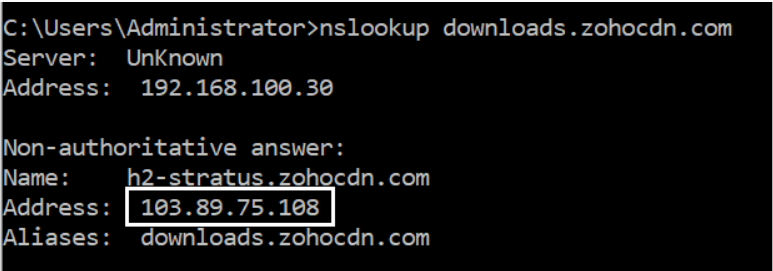
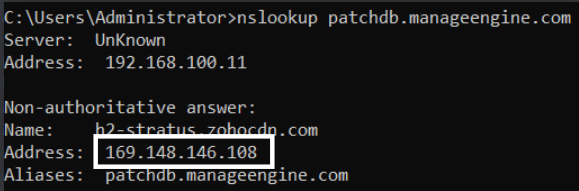
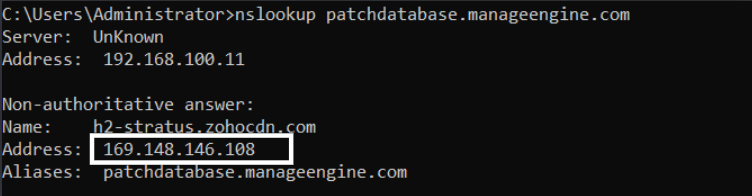
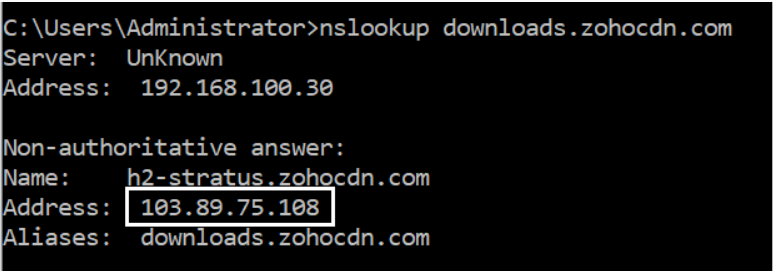
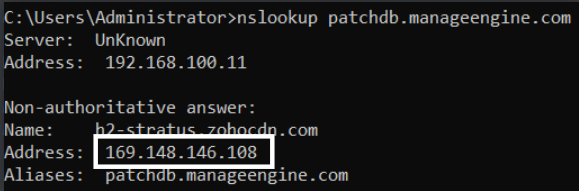
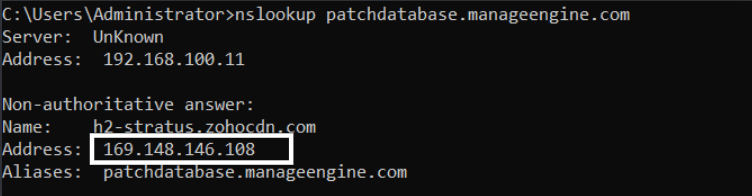
Navigate to the command prompt and execute the command- nslookup <domain> and get the IP as shown in the images below.
downloads.zohocdn.com
download-accl.zoho.com
files-me-accl.zoho.com
patchdb.manageengine.com
patchdatabase.manageengine.com
This document provides the list of approved domains and IP addresses which are required for seamless agent-server communication.
Endpoint Central domains to be excluded in Roaming agent
Roaming users directly contact the cloud server. Since these users are constantly roaming, they can't be managed by a central server. Therefore, the roaming agents should connect to these websites:
desktopcentral.manageengine.eu
This is the server's URL. The roaming agent updates the task status to the cloud server and in order to ensure seamless agent-server communication, the agent has to connect to desktopcentral.manageengine.eu. Check Domain
Endpoint Central agents will use these domains to contact endpoint central servers. If regex based domain whitelisting is not supported whitelist the following domains: endpointcentral-agent0.manageengine.eu Check Domain endpointcentral-agent1.manageengine.eu Check Domain endpointcentral-agentp1.manageengine.eu Check Domain endpointcentral-agent2.manageengine.eu Check Domain endpointcentral-agentp3.manageengine.eu Check Domain endpointcentral-agentp7.manageengine.eu Check Domain endpointcentral-agentp13.manageengine.eu Check Domain endpointcentral-agentp14.manageengine.eu Check Domain endpointcentral-agentp17.manageengine.eu Check Domain
patchdb.manageengine.com
This website will have the latest patch information along with the download URLs. To find the missing patches during the scan process, the agent gets the latest patch details from the patch database, for which it has to connect to patchdb.manageengine.com. Check Domain
bonitas.zohocorp.com
To upload logs for troubleshooting and analysis, you need to connect to bonitas.zohocorp.com Check Domain
bonitas.zohocorp.eu
To upload logs for troubleshooting and analysis, you need to connect to bonitas.zohocorp.eu Check Domain
patchdatabase.manageengine.com
The roaming agent has to connect to patchdatabase.manageengine.com in order to download dependent patches from the Endpoint Central Server. Check Domain
eu1-dms.zoho.eu
The roaming agent has to connect to eu1-dms.zoho.eu to perform on-demand operations. For instance, a user has added a new computer to the network, and he immediately wants to scan that computer. In that case, the user should perform an on-demand operation. Check Domain
eu2-dms.zoho.eu
The agent should connect to this domain for the user to be able to scan his system immediately. Check Domain
download-accl.zoho.eu
The agent should connect to download-accl.zoho.eu in order to download the manually uploaded packages in Software Deployment module. Check Domain
downloads.zohocdn.com
The Roaming agent should connect to downloads.zohocdn.com in order to download new agent binaries that are required during upgrade process. Check Domain
Endpoint Central domains that should be whitelisted in the domain itself
Distribution server is a component which allows you to download patch binaries from the respective vendor websites and distribute it to all the remote office computers managed under the DS. The DS should connect to these websites:
desktopcentral.manageengine.eu
The replication of patches is done in the DS. The DS will then update the replication status to the server, for which it has to connect to desktopcentral.manageengine.eu. The remote office/WAN agents will contact the server to update the task status, for which it has to connect to the domain. Check Domain
Endpoint Central agents will use these domains to contact endpoint central servers. If regex based domain whitelisting is not supported whitelist the following domains: endpointcentral-agent0.manageengine.eu Check Domain endpointcentral-agent1.manageengine.eu Check Domain endpointcentral-agentp1.manageengine.eu Check Domain endpointcentral-agent2.manageengine.eu Check Domain endpointcentral-agentp3.manageengine.eu Check Domain endpointcentral-agentp7.manageengine.eu Check Domain endpointcentral-agentp14.manageengine.eu Check Domain endpointcentral-agentp17.manageengine.eu Check Domain
patchdb.manageengine.com
The DS gets the latest patch information from this website. It also downloads the patch binaries from the vendor's site through the download URL in this patchdb website. So it has to connect to patchdb.manageengine.com. Check Domain
bonitas.zohocorp.com
To upload logs for troubleshooting and analysis, you need to connect to bonitas.zohocorp.com Check Domain
bonitas.zohocorp.eu
To upload logs for troubleshooting and analysis, you need to connect to bonitas.zohocorp.eu Check Domain
patchdatabase.manageengine.com
The DS has to connect to this website in order to download the dependent patches from the Endpoint Central Server. Check Domain
eu1-dms.zoho.eu
The DS should connect to eu1-dms.zoho.eu in order to perform the operations involved in installing the agents using local AD without being interrupted. The remote office/WAN agents should connect to this domain to perform on-demand operations. Check Domain
eu2-dms.zoho.eu
The DS should connect to eu2-dms.zoho.eu in order to perform the operations involved in installing the agents using local AD without being interrupted. The remote office/WAN agents should connect to this domain to perform on-demand operations. Check Domain
download-accl.zoho.eu
The DS should connect to download-accl.zoho.eu in order to download the manually uploaded packages in Software Deployment module. Check Domain
downloads.zohocdn.com
The DS should connect to downloads.zohocdn.com in order to download new agent/DS binaries that are required during upgrade process. Check Domain
The following domains should be whitelisted in agents that are under the distribution server.
The agents which belong to remote office/WAN should connect to these domains:
desktopcentral.manageengine.eu
The DS agent updates the task status to the cloud server and in order to ensure seamless agent-server communication, the agent has to connect to desktopcentral.manageengine.eu. Check Domain
Endpoint Central agents will use these domains to contact endpoint central servers. If regex based domain whitelisting is not supported whitelist the following domains: endpointcentral-agent0.manageengine.eu Check Domain endpointcentral-agent1.manageengine.eu Check Domain endpointcentral-agentp1.manageengine.eu Check Domain endpointcentral-agent2.manageengine.eu Check Domain endpointcentral-agentp3.manageengine.eu Check Domain endpointcentral-agentp7.manageengine.eu Check Domain endpointcentral-agentp14.manageengine.eu Check Domain endpointcentral-agentp17.manageengine.eu Check Domain
eu1-dms.zoho.eu
The DS agents should connect to this domain in order to perform the operations involved in installing the agents. Check Domain
patchdb.manageengine.com
The DS gets the latest patch information from this website. It also downloads the patch binaries from the vendor's site through the download URL in this patchdb website. So it has to connect to patchdb.manageengine.com. Check Domain
bonitas.zohocorp.com
To upload logs for troubleshooting and analysis, you need to connect to bonitas.zohocorp.com Check Domain
bonitas.zohocorp.eu
To upload logs for troubleshooting and analysis, you need to connect to bonitas.zohocorp.eu Check Domain
eu2-dms.zoho.eu
The DS agents should connect to this domain in order to perform the operations involved in installing the agents. Check Domain
download-accl.zoho.eu
The agent should connect to download-accl.zoho.eu in order to download some dynamic files from the server. Check Domain
downloads.zohocdn.com
The ds agent should connect to downloads.zohocdn.com in order to download localization contents. Check Domain
IP Whitelist
Here's the list of IP addresses that are required to be added to the whitelist
EU region data centre IP's
31.186.243.0 /24
185.20.209.0 /24
185.230.212.0 /23
87.252.213.0 /24
89.36.170.0 /24
185.230.214.0 /23
Geo DNS Domains
It is strongly recommended to whitelist the domain instead of whitelisting the IP address as these domains are using GeoDNS , i.e. The IP address of the domain's will change based on geolocation of the user.
However, if you still wish to whitelist IP for the domains:
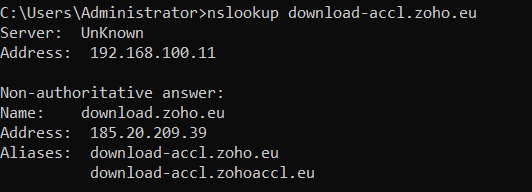
Navigate to the command prompt and execute the command- nslookup <domain> and get the IP as shown in the images below.
downloads.zohocdn.com
download-accl.zoho.eu
patchdb.manageengine.com
patchdatabase.manageengine.com
This document provides the list of approved domains and IP addresses which are required for seamless agent-server communication.
Endpoint Central domains to be excluded in Roaming agent
Roaming users directly contact the cloud server. Since these users are constantly roaming, they can't be managed by a central server. Therefore, the roaming agents should connect to these websites:
desktopcentral.manageengine.eu.au
This is the server's URL. The roaming agent updates the task status to the cloud server and in order to ensure seamless agent-server communication, the agent has to connect to desktopcentral.manageengine.eu.au. Check Domain
Endpoint Central agents will use these domains to contact endpoint central servers. If regex based domain whitelisting is not supported whitelist the following domains endpointcentral-agent0.manageengine.com.auCheck Domain endpointcentral-agentp1.manageengine.com.auCheck Domain endpointcentral-agentp10.manageengine.com.auCheck Domain
patchdb.manageengine.com
This website will have the latest patch information along with the download URLs. To find the missing patches during the scan process, the agent gets the latest patch details from the patch database, for which it has to connect to patchdb.manageengine.com. Check Domain
bonitas.zohocorp.com
This is the cloud server's URL. To upload logs for analysis and troubleshooting, you need to connect to bonitas.zohocorp.com. Check Domain
patchdatabase.manageengine.com
The roaming agent has to connect to patchdatabase.manageengine.com in order to download dependent patches from the Endpoint Central Server. Check Domain
au1-dms.zoho.com.au
The roaming agent has to connect to au1-dms.zoho.com.au to perform on-demand operations. For instance, a user has added a new computer to the network, and he immediately wants to scan that computer. In that case, the user should perform an on-demand operation. Check Domain
au2-dms.zoho.com.au
The agent should connect to this domain for the user to be able to scan his system immediately. Check Domain
downloads.zohocdn.com
The Roaming agent should connect to downloads.zohocdn.com in order to download new agent binaries that are required during upgrade process. Check Domain
download.zoho.com.au
The Roaming agent should connect to download.zoho.com.au in order to download new agent binaries that are required during upgrade process. Check Domain
Endpoint Central domains that should be whitelisted in the domain itself
Distribution server is a component which allows you to download patch binaries from the respective vendor websites and distribute it to all the remote office computers managed under the DS. The DS should connect to these websites:
desktopcentral.manageengine.eu.au
The replication of patches is done in the DS. The DS will then update the replication status to the server, for which it has to connect to desktopcentral.manageengine.eu.au. The remote office/WAN agents will contact the server to update the task status, for which it has to connect to the domain. Check Domain
Endpoint Central distribution server will use these domains to contact endpoint central server. If regex based domain whitelisting is not supported whitelist the following domains endpointcentral-agent0.manageengine.com.auCheck Domain endpointcentral-agentp1.manageengine.com.auCheck Domain endpointcentral-agentp10.manageengine.com.auCheck Domain
patchdb.manageengine.com
The DS gets the latest patch information from this website. It also downloads the patch binaries from the vendor's site through the download URL in this website. So it has to connect to patchdb.manageengine.com. Check Domain
bonitas.zohocorp.com
This is the cloud server's URL. To upload logs for analysis and troubleshooting, you need to connect to bonitas.zohocorp.com. Check Domain
patchdatabase.manageengine.com
The DS has to connect to this website in order to download the dependent patches from the Endpoint Central Server. Check Domain
au1-dms.zoho.com.au
The DS should connect to au1-dms.zoho.com.au in order to perform the operations involved in installing the agents using local AD without being interrupted. The remote office/WAN agents should connect to these websites to perform on-demand operations. Check Domain
au2-dms.zoho.com.au
The DS should connect to au2-dms.zoho.com.au in order to perform the operations involved in installing the agents using local AD without being interrupted. The remote office/WAN agents should connect to these websites to perform on-demand operations. Check Domain
downloads.zohocdn.com
The DS should connect to downloads.zohocdn.com in order to download new agent/DS binaries that are required during upgrade process. Check Domain
download.zoho.com.au
The DS should connect to download.zoho.com.au in order to download new agent/DS binaries that are required during upgrade process. Check Domain
The following domains should be whitelisted in agents that are under the distribution server.
The agents which belong to remote office/WAN should connect to these domains:
desktopcentral.manageengine.eu.au
The DS agent updates the task status to the cloud server and in order to ensure seamless agent-server communication, the agent has to connect to desktopcentral.manageengine.eu.au. Check Domain
Endpoint Central agents will use these domains to contact endpoint central servers. If regex based domain whitelisting is not supported whitelist the following domains endpointcentral-agent0.manageengine.com.auCheck Domain endpointcentral-agentp1.manageengine.com.auCheck Domain endpointcentral-agentp10.manageengine.com.auCheck Domain
au1-dms.zoho.com.au
The DS agents should connect to this domain in order to perform the operations involved in installing the agents. Check Domain
au2-dms.zoho.com.au
The DS agents should connect to this domain in order to perform the operations involved in installing the agents. Check Domain
downloads.zohocdn.com
The ds agent should connect to downloads.zohocdn.com in order to download localization contents. Check Domain
bonitas.zohocorp.com
This is the cloud server's URL. To upload logs for analysis and troubleshooting, you need to connect to bonitas.zohocorp.com. Check Domain
download.zoho.com.au
The ds agent should connect to download.zoho.com.au in order to download localization contents. Check Domain
IP Whitelist
Here's the list of IP addresses that are required to be added to the whitelist
AU region data centre IP's
101.97.36.0/24
103.138.128.0/23
103.91.166.0/24
165.173.191.0/24
Geo DNS Domains
It is strongly recommended to whitelist the domain instead of whitelisting the IP address as these domains are using GeoDNS , i.e. The IP address of the domain's will change based on geolocation of the user.
However, if you still wish to whitelist IP for the domains:
Navigate to the command prompt and execute the command- nslookup <domain> and get the IP as shown in the images below.
downloads.zohocdn.com
patchdb.manageengine.com
patchdatabase.manageengine.com
This document provides the list of approved domains and IP addresses which are required for seamless agent-server communication.
Endpoint Central domains to be excluded in Roaming agent
Roaming users directly contact the cloud server. Since these users are constantly roaming, they can't be managed by a central server. Therefore, the roaming agents should connect to these websites:
desktopcentral.manageengine.in
This is the server's URL. The roaming agent updates the task status to the cloud server and in order to ensure seamless agent-server communication, the agent has to connect to desktopcentral.manageengine.in. Check Domain
Endpoint Central agents will use these domains to contact endpoint central servers. If regex based domain whitelisting is not supported whitelist the following domains: endpointcentral-agent0.manageengine.in Check Domain endpointcentral-agent1.manageengine.in Check Domain endpointcentral-agent2.manageengine.in Check Domain endpointcentral-agent3.manageengine.in Check Domain endpointcentral-agentp1.manageengine.in Check Domain endpointcentral-agentp2.manageengine.in Check Domain endpointcentral-agentp3.manageengine.in Check Domain endpointcentral-agentp7.manageengine.in Check Domain endpointcentral-agentp12.manageengine.in Check Domain endpointcentral-agentp14.manageengine.in Check Domain endpointcentral-agentp15.manageengine.in Check Domain endpointcentral-agentp16.manageengine.in Check Domain endpointcentral-agentp19.manageengine.in Check Domain
patchdb.manageengine.com
This website will have the latest patch information along with the download URLs. To find the missing patches during the scan process, the agent gets the latest patch details from the patch database, for which it has to connect to patchdb.manageengine.com. Check Domain
bonitas.zohocorp.com
This is the cloud server's URL. To upload logs for analysis and troubleshooting, you need to connect to bonitas.zohocorp.com. Check Domain
patchdatabase.manageengine.com
The roaming agent has to connect to patchdatabase.manageengine.com in order to download dependent patches from the Endpoint Central Server. Check Domain
in1-dms.zoho.in
The roaming agent has to connect to in1-dms.zoho.in to perform on-demand operations. For instance, a user has added a new computer to the network, and he immediately wants to scan that computer. In that case, the user should perform an on-demand operation. Check Domain
in2-dms.zoho.in
The agent should connect to this domain for the user to be able to scan his system immediately. Check Domain
download-accl.zoho.in
The agent should connect to download-accl.zoho.in in order to download the manually uploaded packages in Software Deployment module. Check Domain
downloads.zohocdn.com
The Roaming agent should connect to downloads.zohocdn.com in order to download new agent binaries that are required during upgrade process. Check Domain
files-me-accl.zoho.in
The agent should connect to files-me-accl.zoho.in in order to download files from server. Check Domain
Endpoint Central domains that should be whitelisted in the domain itself
Distribution server is a component which allows you to download patch binaries from the respective vendor websites and distribute it to all the remote office computers managed under the DS. The DS should connect to these websites:
desktopcentral.manageengine.in
The replication of patches is done in the DS. The DS will then update the replication status to the server, for which it has to connect to desktopcentral.manageengine.in. The remote office/WAN agents will contact the server to update the task status, for which it has to connect to this domain. Check Domain
Endpoint Central agents will use these domains to contact endpoint central servers. If regex based domain whitelisting is not supported whitelist the following domains: endpointcentral-agent0.manageengine.in Check Domain endpointcentral-agent1.manageengine.in Check Domain endpointcentral-agent2.manageengine.in Check Domain endpointcentral-agent3.manageengine.in Check Domain endpointcentral-agentp1.manageengine.in Check Domain endpointcentral-agentp2.manageengine.in Check Domain endpointcentral-agentp3.manageengine.in Check Domain endpointcentral-agentp7.manageengine.in Check Domain endpointcentral-agentp12.manageengine.in Check Domain endpointcentral-agentp14.manageengine.in Check Domain endpointcentral-agentp15.manageengine.in Check Domain endpointcentral-agentp16.manageengine.in Check Domain endpointcentral-agentp19.manageengine.in Check Domain
patchdb.manageengine.com
The DS gets the latest patch information from this website. It also downloads the patch binaries from the vendor's site through the download URL in this patchdb website. So it has to connect to patchdb.manageengine.com. Check Domain
bonitas.zohocorp.com
This is the cloud server's URL. To upload logs for analysis and troubleshooting, you need to connect to bonitas.zohocorp.com. Check Domain
patchdatabase.manageengine.com
The DS has to connect to this website in order to download the dependent patches from the Endpoint Central Server. Check Domain
in1-dms.zoho.in
The DS should connect to in1-dms.zoho.in in order to perform the operations involved in installing the agents using local AD without being interrupted. The remote office/WAN agents should connect to these websites to perform on-demand operations. Check Domain
in2-dms.zoho.in
The DS should connect to this domain in order to perform the operations involved in installing the agents using local AD without being interrupted. The remote office/WAN agents should connect to these websites to perform on-demand operations. Check Domain
download-accl.zoho.in
The DS should connect to download-accl.zoho.in in order to download the manually uploaded packages in Software Deployment module. Check Domain
downloads.zohocdn.com
The DS should connect to downloads.zohocdn.com in order to download new agent/DS binaries that are required during upgrade process. Check Domain
files-me-accl.zoho.in
The agent should connect to files-me-accl.zoho.in in order to download files from server. Check Domain
The following domains should be whitelisted in agents that are under the distribution server.
The agents which belong to remote office/WAN should connect to these domains:
desktopcentral.manageengine.in
The DS agent updates the task status to the cloud server and in order to ensure seamless agent-server communication, the agent has to connect to desktopcentral.manageengine.in. Check Domain
Endpoint Central agents will use these domains to contact endpoint central servers. If regex based domain whitelisting is not supported whitelist the following domains: endpointcentral-agent0.manageengine.in Check Domain endpointcentral-agent1.manageengine.in Check Domain endpointcentral-agent2.manageengine.in Check Domain endpointcentral-agent3.manageengine.in Check Domain endpointcentral-agentp1.manageengine.in Check Domain endpointcentral-agentp2.manageengine.in Check Domain endpointcentral-agentp3.manageengine.in Check Domain endpointcentral-agentp7.manageengine.in Check Domain endpointcentral-agentp12.manageengine.in Check Domain endpointcentral-agentp14.manageengine.in Check Domain endpointcentral-agentp15.manageengine.in Check Domain endpointcentral-agentp16.manageengine.in Check Domain endpointcentral-agentp19.manageengine.in Check Domain
in1-dms.zoho.in
The DS agents should connect to this domain in order to perform the operations involved in installing the agents. Check Domain
bonitas.zohocorp.com
This is the cloud server's URL. To upload logs for analysis and troubleshooting, you need to connect to bonitas.zohocorp.com. Check Domain
in2-dms.zoho.in
The DS agents should connect to this domain in order to perform the operations involved in installing the agents. Check Domain
download-accl.zoho.in
The agent should connect to download-accl.zoho.in in order to download some dynamic files from the server. Check Domain
downloads.zohocdn.com
The ds agent should connect to downloads.zohocdn.com in order to download localization contents. Check Domain
files-me-accl.zoho.in
The agent should connect to files-me-accl.zoho.in in order to download files from server. Check Domain
IP Whitelist
Here's the list of IP addresses that are required to be added to the whitelist
IN region data centre IP's
169.148.148.0/23 (PI-IP)
169.148.146.0/23 (PI-IP)
103.103.196.0/24 (PI-IP)
103.103.197.0/24 (PI-IP)
103.117.158.0/24 (PI-IP)
103.89.75.0/24 (Edge IP)
169.148.148.0/23 (PI-IP)
103.103.198.0/24 (PI-IP)
103.117.159.0/24 (PI-IP)
103.89.74.0/24 (Edge IP)
Geo DNS Domains
It is strongly recommended to whitelist the domain instead of whitelisting the IP address as these domains are using GeoDNS , i.e. The IP address of the domain's will change based on geolocation of the user.
However, if you still wish to whitelist IP for the domains:
Navigate to the command prompt and execute the command- nslookup <domain> and get the IP as shown in the images below.
downloads.zohocdn.com
patchdb.manageengine.com
patchdatabase.manageengine.com
download-accl.zoho.in
This document provides the list of approved domains and IP addresses which are required for seamless agent-server communication.
Endpoint Central domains to be excluded in Roaming agent
Roaming users directly contact the cloud server. Since these users are constantly roaming, they can't be managed by a central server. Therefore, the roaming agents should connect to these websites:
desktopcentral.manageengine.jp
This is the server's URL. The roaming agent updates the task status to the cloud server and in order to ensure seamless agent-server communication, the agent has to connect to desktopcentral.manageengine.jp. Check Domain
endpointcentral-agent0.manageengine.jp
Endpoint Central agents will use this domain to contact endpoint central serversCheck Domain
patchdb.manageengine.com
This website will have the latest patch information along with the download URLs. To find the missing patches during the scan process, the agent gets the latest patch details from the patch database, for which it has to connect to patchdb.manageengine.com. Check Domain
bonitas.zohocorp.com
This is the cloud server's URL. To upload logs for analysis and troubleshooting, you need to connect to bonitas.zohocorp.com. Check Domain
patchdatabase.manageengine.com
The roaming agent has to connect to patchdatabase.manageengine.com in order to download dependent patches from the Endpoint Central Server. Check Domain
jp1-dms.zoho.jp
The roaming agent has to connect to jp1-dms.zoho.jp to perform on-demand operations. For instance, a user has added a new computer to the network, and he immediately wants to scan that computer. In that case, the user should perform an on-demand operation. Check Domain
jp2-dms.zoho.jp
The agent should connect to this domain for the user to be able to scan his system immediately. Check Domain
downloads.zohocdn.com
The Roaming agent should connect to downloads.zohocdn.com in order to download new agent binaries that are required during upgrade process. Check Domain
download.zoho.jp
The Roaming agent should connect to download.zoho.jp in order to download new agent binaries that are required during upgrade process. Check Domain
Endpoint Central domains that should be whitelisted in the domain itself
Distribution server is a component which allows you to download patch binaries from the respective vendor websites and distribute it to all the remote office computers managed under the DS. The DS should connect to these websites:
desktopcentral.manageengine.jp
The replication of patches is done in the DS. The DS will then update the replication status to the server, for which it has to connect to desktopcentral.manageengine.jp. The remote office/WAN agents will contact the server to update the task status, for which it has to connect to this domain. Check Domain
endpointcentral-agent0.manageengine.jp
Endpoint Central distribution server will use this domain to contact endpoint central server.Check Domain
patchdb.manageengine.com
The DS gets the latest patch information from this website. It also downloads the patch binaries from the vendor's site through the download URL in this patchdb website. So it has to connect to patchdb.manageengine.com. Check Domain
bonitas.zohocorp.com
This is the cloud server's URL. To upload logs for analysis and troubleshooting, you need to connect to bonitas.zohocorp.com. Check Domain
patchdatabase.manageengine.com
The DS has to connect to this website in order to download the dependent patches from the Endpoint Central Server. Check Domain
jp1-dms.zoho.jp
The DS should connect to jp1-dms.zoho.jp in order to perform the operations involved in installing the agents using local AD without being interrupted. The remote office/WAN agents should connect to these websites to perform on-demand operations. Check Domain
jp2-dms.zoho.jp
The DS should connect to jp2-dms.zoho.jp in order to perform the operations involved in installing the agents using local AD without being interrupted. The remote office/WAN agents should connect to these websites to perform on-demand operations. Check Domain
downloads.zohocdn.com
The DS should connect to downloads.zohocdn.com in order to download new agent/DS binaries that are required during upgrade process. Check Domain
download.zoho.jp
The DS should connect to download.zoho.jp in order to download new agent/DS binaries that are required during upgrade process. Check Domain
The following domains should be whitelisted in agents that are under the distribution server.
The agents which belong to remote office/WAN should connect to these domains:
desktopcentral.manageengine.jp
The DS agent updates the task status to the cloud server and in order to ensure seamless agent-server communication, the agent has to connect to desktopcentral.manageengine.jp. Check Domain
endpointcentral-agent0.manageengine.jp
Endpoint Central agents will use this domain to contact endpoint central serversCheck Domain
bonitas.zohocorp.com
This is the cloud server's URL. To upload logs for analysis and troubleshooting, you need to connect to bonitas.zohocorp.com. Check Domain
jp1-dms.zoho.jp
The DS agents should connect to this domain in order to perform the operations involved in installing the agents. Check Domain
jp2-dms.zoho.jp
The DS agents should connect to this domain in order to perform the operations involved in installing the agents. Check Domain
downloads.zohocdn.com
The ds agent should connect to downloads.zohocdn.com in order to download localization contents. Check Domain
download.zoho.jp
The ds agent should connect to download.zoho.jp in order to download localization contents. Check Domain
IP Whitelist
Here's the list of IP addresses that are required to be added to the whitelist
JP region data centre IP's
103.163.152.0/23
193.118.160.0/24
193.118.161.0/24
Geo DNS Domains
However, if you still wish to whitelist IP for the domains:
It is strongly recommended to whitelist the domain instead of whitelisting the IP address as these domains are using GeoDNS , i.e. The IP address of the domain's will change based on geolocation of the user.
Navigate to the command prompt and execute the command- nslookup <domain> and get the IP as shown in the images below.
downloads.zohocdn.com
patchdb.manageengine.com
patchdatabase.manageengine.com
This document provides the list of approved domains and IP addresses which are required for seamless agent-server communication.
Endpoint Central domains to be excluded in Roaming agent
Roaming users directly contact the cloud server. Since these users are constantly roaming, they can't be managed by a central server. Therefore, the roaming agents should connect to these websites:
desktopcentral.manageengine.cn
This is the server's URL. The roaming agent updates the task status to the cloud server and in order to ensure seamless agent-server communication, the agent has to connect to desktopcentral.manageengine.cn. Check Domain
Endpoint Central agents will use these domains to contact endpoint central servers. If regex based domain whitelisting is not supported whitelist the following domains: endpointcentral-agent0.manageengine.cn Check Domain endpointcentral-agentp7.manageengine.cn Check Domain
patchdb.manageengine.com
This website will have the latest patch information along with the download URLs. To find the missing patches during the scan process, the agent gets the latest patch details from the patch database, for which it has to connect to patchdb.manageengine.com. Check Domain
bonitas.zohocorp.com
This is the cloud server's URL. To upload logs for analysis and troubleshooting, you need to connect to bonitas.zohocorp.com. Check Domain
patchdatabase.manageengine.com
The roaming agent has to connect to patchdatabase.manageengine.com in order to download dependent patches from the Endpoint Central Server. Check Domain
cn2-dms.zoho.com.cn
The roaming agent has to connect to cn2-dms.zoho.com.cn to perform on-demand operations. For instance, a user has added a new computer to the network, and he immediately wants to scan that computer. In that case, the user should perform an on-demand operation. Check Domain
cn3-dms.zoho.com.cn
The agent should connect to cn3-dms.zoho.com.cn for the user to be able to scan his system immediately. Check Domain
downloads.zohocdn.com
The Roaming agent should connect to downloads.zohocdn.com in order to download new agent binaries that are required during upgrade process. Check Domain
download.zoho.com.cn
The Roaming agent should connect to download.zoho.com.cn in order to download new agent binaries that are required during upgrade process. Check Domain
patchdb.manageengine.cn
Connection to patchdb.manageengine.cn is required to download patch metadata and synchronize the Patch Database for patch and vulnerability updates. Check Domain
Endpoint Central domains that should be whitelisted in the domain itself
Distribution server is a component which allows you to download patch binaries from the respective vendor websites and distribute it to all the remote office computers managed under the DS. The DS should connect to these websites:
desktopcentral.manageengine.cn
The replication of patches is done in the DS. The DS will then update the replication status to the server, for which it has to connect to desktopcentral.manageengine.cn. The remote office/WAN agents will contact the server to update the task status, for which it has to connect to this domain. Check Domain
Endpoint Central agents will use these domains to contact endpoint central servers. If regex based domain whitelisting is not supported whitelist the following domains: endpointcentral-agent0.manageengine.cn Check Domain endpointcentral-agentp7.manageengine.cn Check Domain
patchdb.manageengine.com
The DS gets the latest patch information from this website. It also downloads the patch binaries from the vendor's site through the download URL in this website. So it has to connect to patchdb.manageengine.com. Check Domain
bonitas.zohocorp.com
This is the cloud server's URL. To upload logs for analysis and troubleshooting, you need to connect to bonitas.zohocorp.com. Check Domain
patchdatabase.manageengine.com
The DS has to connect to this website in order to download the dependent patches from the Endpoint Central Server. Check Domain
cn2-dms.zoho.com.cn
The DS should connect to cn2-dms.zoho.com.cn in order to perform the operations involved in installing the agents using local AD without being interrupted. The remote office/WAN agents should connect to this website to perform on-demand operations. Check Domain
cn3-dms.zoho.com.cn
The DS should connect to cn3-dms.zoho.com.cn in order to perform the operations involved in installing the agents using local AD without being interrupted. The remote office/WAN agents should connect to this website to perform on-demand operations. Check Domain
downloads.zohocdn.com
The DS should connect to downloads.zohocdn.com in order to download new agent/DS binaries that are required during upgrade process. Check Domain
download.zoho.com.cn
The DS should connect to download.zoho.com.cn in order to download new agent/DS binaries that are required during upgrade process. Check Domain
patchdb.manageengine.cn
Connection to patchdb.manageengine.cn is required to download patch metadata and synchronize the Patch Database for patch and vulnerability updates. Check Domain
The following domains should be whitelisted in agents that are under the distribution server.
The agents which belong to remote office/WAN should connect to these domains:
desktopcentral.manageengine.cn
The DS agent updates the task status to the cloud server and in order to ensure seamless agent-server communication, the agent has to connect to desktopcentral.manageengine.cn. Check Domain
Endpoint Central agents will use these domains to contact endpoint central servers. If regex based domain whitelisting is not supported whitelist the following domains: endpointcentral-agent0.manageengine.cn Check Domain endpointcentral-agentp7.manageengine.cn Check Domain
cn2-dms.zoho.com.cn
The DS agents should connect to this domain in order to perform the operations involved in installing the agents. Check Domain
cn3-dms.zoho.com.cn
The DS agents should connect to this domain in order to perform the operations involved in installing the agents. Check Domain
bonitas.zohocorp.com
This is the cloud server's URL. To upload logs for analysis and troubleshooting, you need to connect to bonitas.zohocorp.com. Check Domain
downloads.zohocdn.com
The ds agent should connect to downloads.zohocdn.com in order to download localization contents. Check Domain
download.zoho.com.cn
The ds agent should connect to download.zoho.com.cn in order to download localization contents. Check Domain
patchdb.manageengine.cn
Connection to patchdb.manageengine.cn is required to download patch metadata and synchronize the Patch Database for patch and vulnerability updates. Check Domain
IP Whitelist
Here's the list of IP addresses that are required to be added to the whitelist
CN region data centre IP's
163.53.93.0/24
163.53.94.0/27
118.126.63.128/25
118.126.63.64/26
103.212.59.96/29
124.251.121.0/24
124.251.122.0/25
124.251.128.0/24
Geo DNS Domains
It is strongly recommended to whitelist the domain instead of whitelisting the IP address as these domains are using GeoDNS , i.e. The IP address of the domain's will change based on geolocation of the user.
However, if you still wish to whitelist IP for the domains:
Navigate to the command prompt and execute the command- nslookup <domain> and get the IP as shown in the images below.
downloads.zohocdn.com
patchdb.manageengine.com
patchdatabase.manageengine.com
This document provides the list of approved domains and IP addresses which are required for seamless agent-server communication.
Endpoint Central domains to be excluded in Roaming agent
Roaming users directly contact the cloud server. Since these users are constantly roaming, they can't be managed by a central server. Therefore, the roaming agents should connect to these websites:
desktopcentral.manageengine.ca
This is the server's URL. The roaming agent updates the task status to the cloud server and in order to ensure seamless agent-server communication, the agent has to connect to desktopcentral.manageengine.ca. Check Domain
Endpoint Central agents will use these domains to contact endpoint central servers. If regex based domain whitelisting is not supported whitelist the following domains: endpointcentral-agent0.manageengine.ca Check Domain endpointcentral-agentp1.manageengine.ca Check Domain
patchdb.manageengine.com
This website will have the latest patch information along with the download URLs. To find the missing patches during the scan process, the agent gets the latest patch details from the patch database, for which it has to connect to patchdb.manageengine.com. Check Domain
bonitas.zohocorp.com
This is the cloud server's URL. To upload logs for analysis and troubleshooting, you need to connect to bonitas.zohocorp.com. Check Domain
patchdatabase.manageengine.com
The roaming agent has to connect to patchdatabase.manageengine.com in order to download dependent patches from the Endpoint Central Server. Check Domain
ca1-dms.zohocloud.ca
The roaming agent has to connect to ca1-dms.zohocloud.ca to perform on-demand operations. For instance, a user has added a new computer to the network, and he immediately wants to scan that computer. In that case, the user should perform an on-demand operation. Check Domain
ca2-dms.zohocloud.ca
The agent should connect to this domain for the user to be able to scan his system immediately. Check Domain
downloads.zohocdn.com
The Roaming agent should connect to downloads.zohocdn.com in order to download new agent binaries that are required during upgrade process. Check Domain
download.zohocloud.ca
The Roaming agent should connect to download.zohocloud.ca in order to download new agent binaries that are required during upgrade process. Check Domain
Endpoint Central domains that should be whitelisted in the domain itself
Distribution server is a component which allows you to download patch binaries from the respective vendor websites and distribute it to all the remote office computers managed under the DS. The DS should connect to these websites:
desktopcentral.manageengine.ca
The replication of patches is done in the DS. The DS will then update the replication status to the server, for which it has to connect to desktopcentral.manageengine.ca. The remote office/WAN agents will contact the server to update the task status, for which it has to connect to this domain. Check Domain
Endpoint Central agents will use these domains to contact endpoint central servers. If regex based domain whitelisting is not supported whitelist the following domains: endpointcentral-agent0.manageengine.ca Check Domain endpointcentral-agentp1.manageengine.ca Check Domain
patchdb.manageengine.com
The DS gets the latest patch information from this website. It also downloads the patch binaries from the vendor's site through the download URL in this patchdb website. So it has to connect to patchdb.manageengine.com. Check Domain
bonitas.zohocorp.com
This is the cloud server's URL. To upload logs for analysis and troubleshooting, you need to connect to bonitas.zohocorp.com. Check Domain
patchdatabase.manageengine.com
The DS has to connect to this website in order to download the dependent patches from the Endpoint Central Server. Check Domain
ca1-dms.zohocloud.ca
The DS should connect to ca1-dms.zohocloud.ca in order to perform the operations involved in installing the agents using local AD without being interrupted. The remote office/WAN agents should connect to these websites to perform on-demand operations. Check Domain
ca2-dms.zohocloud.ca
The DS should connect to ca2-dms.zohocloud.ca in order to perform the operations involved in installing the agents using local AD without being interrupted. The remote office/WAN agents should connect to these websites to perform on-demand operations. Check Domain
downloads.zohocdn.com
The DS should connect to downloads.zohocdn.com in order to download new agent/DS binaries that are required during upgrade process. Check Domain
download.zohocloud.ca
The DS should connect to download.zohocloud.ca in order to download new agent/DS binaries that are required during upgrade process. Check Domain
The following domains should be whitelisted in agents that are under the distribution server.
The agents which belong to remote office/WAN should connect to these domains:
desktopcentral.manageengine.ca
The DS agent updates the task status to the cloud server and in order to ensure seamless agent-server communication, the agent has to connect to desktopcentral.manageengine.ca. Check Domain
bonitas.zohocorp.com
This is the cloud server's URL. To upload logs for analysis and troubleshooting, you need to connect to bonitas.zohocorp.com. Check Domain
Endpoint Central agents will use these domains to contact endpoint central servers. If regex based domain whitelisting is not supported whitelist the following domains: endpointcentral-agent0.manageengine.ca Check Domain endpointcentral-agentp1.manageengine.ca Check Domain
ca1-dms.zohocloud.ca
The DS agents should connect to this domain in order to perform the operations involved in installing the agents. Check Domain
ca2-dms.zohocloud.ca
The DS agents should connect to this domain in order to perform the operations involved in installing the agents. Check Domain
downloads.zohocdn.com
The ds agent should connect to downloads.zohocdn.com in order to download localization contents. Check Domain
download.zohocloud.ca
The ds agent should connect to download.zohocloud.ca in order to download localization contents. Check Domain
IP Whitelist
Here's the list of IP addresses that are required to be added to the whitelist
CA region data centre IP's
199.67.69.0/24
199.67.84.0/24
199.67.85.0/24
199.67.86.0/24
199.67.87.0/24
Geo DNS Domains
However, if you still wish to whitelist IP for the domains:
It is strongly recommended to whitelist the domain instead of whitelisting the IP address as these domains are using GeoDNS , i.e. The IP address of the domain's will change based on geolocation of the user.
Navigate to the command prompt and execute the command- nslookup <domain> and get the IP as shown in the images below.
downloads.zohocdn.com
patchdb.manageengine.com
patchdatabase.manageengine.com
This document provides the list of approved domains and IP addresses which are required for seamless agent-server communication.
Endpoint Central domains to be excluded in Roaming agent
Roaming users directly contact the cloud server. Since these users are constantly roaming, they can't be managed by a central server. Therefore, the roaming agents should connect to these websites:
desktopcentral.manageengine.uk
This is the server's URL. The roaming agent updates the task status to the cloud server and in order to ensure seamless agent-server communication, the agent has to connect to desktopcentral.manageengine.uk. Check Domain
Endpoint Central agents will use these domains to contact endpoint central servers. If regex based domain whitelisting is not supported whitelist the following domains: endpointcentral-agent0.manageengine.uk Check Domain endpointcentral-agentp9.manageengine.uk Check Domain
patchdb.manageengine.com
This website will have the latest patch information along with the download URLs. To find the missing patches during the scan process, the agent gets the latest patch details from the patch database, for which it has to connect to patchdb.manageengine.com. Check Domain
bonitas.zohocorp.com
This is the cloud server's URL. To upload logs for analysis and troubleshooting, you need to connect to bonitas.zohocorp.com. Check Domain
patchdatabase.manageengine.com
The roaming agent has to connect to patchdatabase.manageengine.com in order to download dependent patches from the Endpoint Central Server. Check Domain
uk1-dms.zoho.uk
The roaming agent has to connect to uk1-dms.zoho.uk to perform on-demand operations. For instance, a user has added a new computer to the network, and he immediately wants to scan that computer. In that case, the user should perform an on-demand operation. Check Domain
uk2-dms.zoho.uk
The agent should connect to this domain for the user to be able to scan his system immediately. Check Domain
downloads.zohocdn.com
The Roaming agent should connect to downloads.zohocdn.com in order to download new agent binaries that are required during upgrade process. Check Domain
download.zoho.uk
The Roaming agent should connect to download.zoho.uk in order to download new agent binaries that are required during upgrade process. Check Domain
Endpoint Central domains that should be whitelisted in the domain itself
Distribution server is a component which allows you to download patch binaries from the respective vendor websites and distribute it to all the remote office computers managed under the DS. The DS should connect to these websites:
desktopcentral.manageengine.uk
The replication of patches is done in the DS. The DS will then update the replication status to the server, for which it has to connect to desktopcentral.manageengine.uk. The remote office/WAN agents will contact the server to update the task status, for which it has to connect to this domain. Check Domain
Endpoint Central agents will use these domains to contact endpoint central servers. If regex based domain whitelisting is not supported whitelist the following domains: endpointcentral-agent0.manageengine.uk Check Domain endpointcentral-agentp9.manageengine.uk Check Domain
bonitas.zohocorp.com
This is the cloud server's URL. To upload logs for analysis and troubleshooting, you need to connect to bonitas.zohocorp.com. Check Domain
patchdb.manageengine.com
The DS gets the latest patch information from this website. It also downloads the patch binaries from the vendor's site through the download URL in this patchdb website. So it has to connect to patchdb.manageengine.com. Check Domain
patchdatabase.manageengine.com
The DS has to connect to this website in order to download the dependent patches from the Endpoint Central Server. Check Domain
uk1-dms.zoho.uk
The DS should connect to uk1-dms.zoho.uk in order to perform the operations involved in installing the agents using local AD without being interrupted. The remote office/WAN agents should connect to these websites to perform on-demand operations. Check Domain
uk2-dms.zoho.uk
The DS should connect to uk2-dms.zoho.uk in order to perform the operations involved in installing the agents using local AD without being interrupted. The remote office/WAN agents should connect to these websites to perform on-demand operations. Check Domain
downloads.zohocdn.com
The DS should connect to downloads.zohocdn.com in order to download new agent/DS binaries that are required during upgrade process. Check Domain
download.zoho.uk
The DS should connect to download.zoho.uk in order to download new agent/DS binaries that are required during upgrade process. Check Domain
The following domains should be whitelisted in agents that are under the distribution server.
The agents which belong to remote office/WAN should connect to these domains:
desktopcentral.manageengine.uk
The DS agent updates the task status to the cloud server and in order to ensure seamless agent-server communication, the agent has to connect to desktopcentral.manageengine.uk. Check Domain
Endpoint Central agents will use these domains to contact endpoint central servers. If regex based domain whitelisting is not supported whitelist the following domains: endpointcentral-agent0.manageengine.uk Check Domain endpointcentral-agentp9.manageengine.uk Check Domain
uk1-dms.zoho.uk
The DS agents should connect to this domain in order to perform the operations involved in installing the agents. Check Domain
bonitas.zohocorp.com
This is the cloud server's URL. To upload logs for analysis and troubleshooting, you need to connect to bonitas.zohocorp.com. Check Domain
uk2-dms.zoho.uk
The DS agents should connect to this domain in order to perform the operations involved in installing the agents. Check Domain
downloads.zohocdn.com
The ds agent should connect to downloads.zohocdn.com in order to download localization contents. Check Domain
download.zoho.uk
The ds agent should connect to download.zoho.uk in order to download localization contents. Check Domain
IP Whitelist
Here's the list of IP addresses that are required to be added to the whitelist
UK region data centre IP's
199.67.88.0/24
199.67.89.0/24
169.148.129.0/24
169.148.131.0/24
169.148.129.23
169.148.131.23
Geo DNS Domains
However, if you still wish to whitelist IP for the domains:
It is strongly recommended to whitelist the domain instead of whitelisting the IP address as these domains are using GeoDNS , i.e. The IP address of the domain's will change based on geolocation of the user.
Navigate to the command prompt and execute the command- nslookup <domain> and get the IP as shown in the images below.
downloads.zohocdn.com
patchdb.manageengine.com
patchdatabase.manageengine.com
This document provides the list of approved domains and IP addresses which are required for seamless agent-server communication.
Endpoint Central domains to be excluded in Roaming agent
Roaming users directly contact the cloud server. Since these users are constantly roaming, they can't be managed by a central server. Therefore, the roaming agents should connect to these websites:
Endpoint Central agents will use these domains to contact endpoint central servers. If regex based domain whitelisting is not supported whitelist the following domains: endpointcentral-agent0.manageengine.sa Check Domain
patchdb.manageengine.com
This website will have the latest patch information along with the download URLs. To find the missing patches during the scan process, the agent gets the latest patch details from the patch database, for which it has to connect to patchdb.manageengine.com. Check Domain
bonitas.zohocorp.com
This is the cloud server's URL. To upload logs for analysis and troubleshooting, you need to connect to bonitas.zohocorp.com. Check Domain
patchdatabase.manageengine.com
The roaming agent has to connect to patchdatabase.manageengine.com in order to download dependent patches from the Endpoint Central Server. Check Domain
sa1-dms.zoho.sa
The roaming agent has to connect to sa1-dms.zoho.sa to perform on-demand operations. For instance, a user has added a new computer to the network, and he immediately wants to scan that computer. In that case, the user should perform an on-demand operation. Check Domain
sa2-dms.zoho.sa
The agent should connect to this domain for the user to be able to scan his system immediately. Check Domain
downloads.zohocdn.com
The agent should connect to downloads.zohocdn.com in order to download the manually uploaded packages in Software Deployment module. Check Domain
files.zoho.sa
The Roaming agent should connect to files.zoho.sa in order to download new agent binaries that are required during upgrade process. Check Domain
Endpoint Central domains that should be whitelisted in the domain itself
Distribution server is a component which allows you to download patch binaries from the respective vendor websites and distribute it to all the remote office computers managed under the DS. The DS should connect to these websites:
Endpoint Central agents will use these domains to contact endpoint central servers. If regex based domain whitelisting is not supported whitelist the following domains: endpointcentral-agent0.manageengine.sa Check Domain
patchdb.manageengine.com
The DS gets the latest patch information from this website. It also downloads the patch binaries from the vendor's site through the download URL in this patchdb website. So it has to connect to patchdb.manageengine.com. Check Domain
bonitas.zohocorp.com
This is the cloud server's URL. To upload logs for analysis and troubleshooting, you need to connect to bonitas.zohocorp.com. Check Domain
patchdatabase.manageengine.com
The DS has to connect to this website in order to download the dependent patches from the Endpoint Central Server. Check Domain
sa1-dms.zoho.sa
The DS should connect to sa1-dms.zoho.sa in order to perform the operations involved in installing the agents using local AD without being interrupted. The remote office/WAN agents should connect to these websites to perform on-demand operations. Check Domain
sa2-dms.zoho.sa
The DS should connect to this domain in order to perform the operations involved in installing the agents using local AD without being interrupted. The remote office/WAN agents should connect to these websites to perform on-demand operations. Check Domain
downloads.zohocdn.com
The DS should connect to downloads.zohocdn.com in order to download the manually uploaded packages in Software Deployment module. Check Domain
files.zoho.sa
The DS should connect to files.zoho.sa in order to download new agent/DS binaries that are required during upgrade process. Check Domain
The following domains should be whitelisted in agents that are under the distribution server.
The agents which belong to remote office/WAN should connect to these domains:
Endpoint Central agents will use these domains to contact endpoint central servers. If regex based domain whitelisting is not supported whitelist the following domains: endpointcentral-agent0.manageengine.sa Check Domain
sa1-dms.zoho.sa
The DS agents should connect to this domain in order to perform the operations involved in installing the agents. Check Domain
bonitas.zohocorp.com
This is the cloud server's URL. To upload logs for analysis and troubleshooting, you need to connect to bonitas.zohocorp.com. Check Domain
sa2-dms.zoho.sa
The DS agents should connect to this domain in order to perform the operations involved in installing the agents. Check Domain
files.zoho.sa
The agent should connect to files.zoho.sa in order to download some dynamic files from the server. Check Domain
downloads.zohocdn.com
The ds agent should connect to downloads.zohocdn.com in order to download localization contents. Check Domain
IP Whitelist
Here's the list of IP addresses that are required to be added to the whitelist
SA region data centre IP's
199.67.80.0/23
199.67.82.0/23
Geo DNS Domains
It is strongly recommended to whitelist the domain instead of whitelisting the IP address as these domains are using GeoDNS , i.e. The IP address of the domain's will change based on geolocation of the user.
However, if you still wish to whitelist IP for the domains:
Navigate to the command prompt and execute the command- nslookup <domain> and get the IP as shown in the images below.
downloads.zohocdn.com
patchdb.manageengine.com
patchdatabase.manageengine.com
files.zoho.sa
This document provides the list of approved domains and IP addresses which are required for seamless agent-server communication.
Endpoint Central domains to be excluded in Roaming agent
Roaming users directly contact the cloud server. Since these users are constantly roaming, they can't be managed by a central server. Therefore, the roaming agents should connect to these websites:
Endpoint Central agents will use these domains to contact endpoint central servers. If regex based domain whitelisting is not supported whitelist the following domains: endpointcentral-agent0.manageengine.ae Check Domain
patchdb.manageengine.com
This website will have the latest patch information along with the download URLs. To find the missing patches during the scan process, the agent gets the latest patch details from the patch database, for which it has to connect to patchdb.manageengine.com. Check Domain
bonitas.zohocorp.com
This is the cloud server's URL. To upload logs for analysis and troubleshooting, you need to connect to bonitas.zohocorp.com. Check Domain
patchdatabase.manageengine.com
The roaming agent has to connect to patchdatabase.manageengine.com in order to download dependent patches from the Endpoint Central Server. Check Domain
uae1-dms.zoho.ae
The roaming agent has to connect to uae1-dms.zoho.ae to perform on-demand operations. For instance, a user has added a new computer to the network, and he immediately wants to scan that computer. In that case, the user should perform an on-demand operation. Check Domain
uae2-dms.zoho.ae
The agent should connect to this domain for the user to be able to scan his system immediately. Check Domain
downloads.zohocdn.com
The agent should connect to downloads.zohocdn.com in order to download the manually uploaded packages in Software Deployment module. Check Domain
files.zoho.ae
The Roaming agent should connect to files.zoho.ae in order to download new agent binaries that are required during upgrade process. Check Domain
Endpoint Central domains that should be whitelisted in the domain itself
Distribution server is a component which allows you to download patch binaries from the respective vendor websites and distribute it to all the remote office computers managed under the DS. The DS should connect to these websites:
Endpoint Central agents will use these domains to contact endpoint central servers. If regex based domain whitelisting is not supported whitelist the following domains: endpointcentral-agent0.manageengine.ae Check Domain
patchdb.manageengine.com
The DS gets the latest patch information from this website. It also downloads the patch binaries from the vendor's site through the download URL in this patchdb website. So it has to connect to patchdb.manageengine.com. Check Domain
bonitas.zohocorp.com
This is the cloud server's URL. To upload logs for analysis and troubleshooting, you need to connect to bonitas.zohocorp.com. Check Domain
patchdatabase.manageengine.com
The DS has to connect to this website in order to download the dependent patches from the Endpoint Central Server. Check Domain
uae1-dms.zoho.ae
The DS should connect to uae1-dms.zoho.ae in order to perform the operations involved in installing the agents using local AD without being interrupted. The remote office/WAN agents should connect to these websites to perform on-demand operations. Check Domain
uae2-dms.zoho.ae
The DS should connect to this domain in order to perform the operations involved in installing the agents using local AD without being interrupted. The remote office/WAN agents should connect to these websites to perform on-demand operations. Check Domain
downloads.zohocdn.com
The DS should connect to downloads.zohocdn.com in order to download the manually uploaded packages in Software Deployment module. Check Domain
files.zoho.ae
The DS should connect to files.zoho.ae in order to download new agent/DS binaries that are required during upgrade process. Check Domain
The following domains should be whitelisted in agents that are under the distribution server.
The agents which belong to remote office/WAN should connect to these domains:
Endpoint Central agents will use these domains to contact endpoint central servers. If regex based domain whitelisting is not supported whitelist the following domains: endpointcentral-agent0.manageengine.ae Check Domain
uae1-dms.zoho.ae
The DS agents should connect to this domain in order to perform the operations involved in installing the agents. Check Domain
bonitas.zohocorp.com
This is the cloud server's URL. To upload logs for analysis and troubleshooting, you need to connect to bonitas.zohocorp.com. Check Domain
uae2-dms.zoho.ae
The DS agents should connect to this domain in order to perform the operations involved in installing the agents. Check Domain
files.zoho.ae
The agent should connect to files.zoho.ae in order to download some dynamic files from the server. Check Domain
downloads.zohocdn.com
The ds agent should connect to downloads.zohocdn.com in order to download localization contents. Check Domain
IP Whitelist
Here's the list of IP addresses that are required to be added to the whitelist
UAE region data centre IP's
199.67.80.0/23
199.67.82.0/23
Geo DNS Domains
It is strongly recommended to whitelist the domain instead of whitelisting the IP address as these domains are using GeoDNS , i.e. The IP address of the domain's will change based on geolocation of the user.
However, if you still wish to whitelist IP for the domains:
Navigate to the command prompt and execute the command- nslookup <domain> and get the IP as shown in the images below.
downloads.zohocdn.com
Ports
These Ports must be enabled for communication between the agent and the server
Port
Purpose
Type
Connection
443
For communication between the agent or distribution server and the Endpoint Central server.
Source: Agent/Distribution server Destination: Endpoint Central server
HTTPS
Outbound from Agent/DS
443
The Notification server port is responsible for communicating on-demand operations from the server to the agent.
Source: Agent/Distribution server Destination: Notification server
WSS
Outbound from Agent/DS
8384
For communication between remote agent and distribution server
Source: Agent Destination: distribution server
HTTPS
Inbound to distribution server Outbound from Agent/DS
Module Wise Configurations
Refer to this page to know about domains required for patching.
Note: If agents are managed through a Distribution Server, the domains listed must be whitelisted on the Distribution Server. If no Distribution Server is configured, the exclusions should be applied directly on the agent.
Exclusions (File Extensions) to be made in Endpoint Central Agents and Distribution Server
The below file extensions must be excluded in the Endpoint Central Agent/ Distribution Server for patch detection, deployment and other agent functionalities.
Note: Remote Control is an on-demand operation that requires the agent to communicate directly with the cloud for session authentication and WebSocket connectivity. Because these communications do not pass through the Distribution Server, all Remote Control—related domains must be whitelisted on the agent, even if the agent is managed under a Distribution Server.
Domains
Exclude these Domains in the firewall and proxy settings:
Theseportsneed to be opened to enable remote control/view with Zoho Assist.
Outbound to Server
5223
HTTPS
Used for outbound communication to Apple Push Notification service (APNs) from devices connected via corporate Wi-Fi. It is recommended to configure the IP in the range 17.0.0.0/8.
Outbound from Corporate Network Firewall
5228, 5229, 5230
HTTPS
For FCM to reach the managed mobile device. Host address: https://android.com; play.google.com; android.clients.google.com; www.google.com; googleapis.com; android.googleapis.com; gstatic.com; google-analytics.com; googleusercontent.com; *.gvt1.com; *ggpht.com; dl.google.com; fcm.googleapis.com; fcm-xmpp.googleapis.com; gcm-http.googleapis.com; gcm-xmpp.googleapis.com
As FCM doesn't provide specific IPs, you should allow your firewall to accept outgoing connections to all IP addresses contained in the IP blocks listed inGoogle's ASN of 15169. Learn more.




 Yes
Yes