Package Cleanup Settings
With the new Package Cleanup Settings option, you can now clean old or unused versions of software packages in Endpoint Central by deleting or archiving them. This setting helps to automatically delete older packages while they are upgraded to newer versions for packages where auto-update is enabled.
Note: This feature is available in Endpoint Central version 11.3.2414.01 and above.
What are Package Cleanup Settings?
Package Cleanup Settings is a feature located under the Software Deployment tab. It automates the removal or archiving of old or unused software packages from the Endpoint Central Server. This feature provides options to define criteria for identifying outdated packages and to specify the action to be taken when these criteria are met.
Why do you need Package Cleanup Settings?
- Clutter Reduction: Over time, software packages accumulate, leading to clutter.
- Efficiency: Manual cleanup of packages, especially in large systems, can be time-consuming and error-prone.
- Increase Storage Space: Removing unused packages can free up storage space and system resources.
- Compliance and Security: Automatic removal of old packages helps maintain compliance and reduces potential vulnerabilities.
How to enable Package Cleanup Settings?
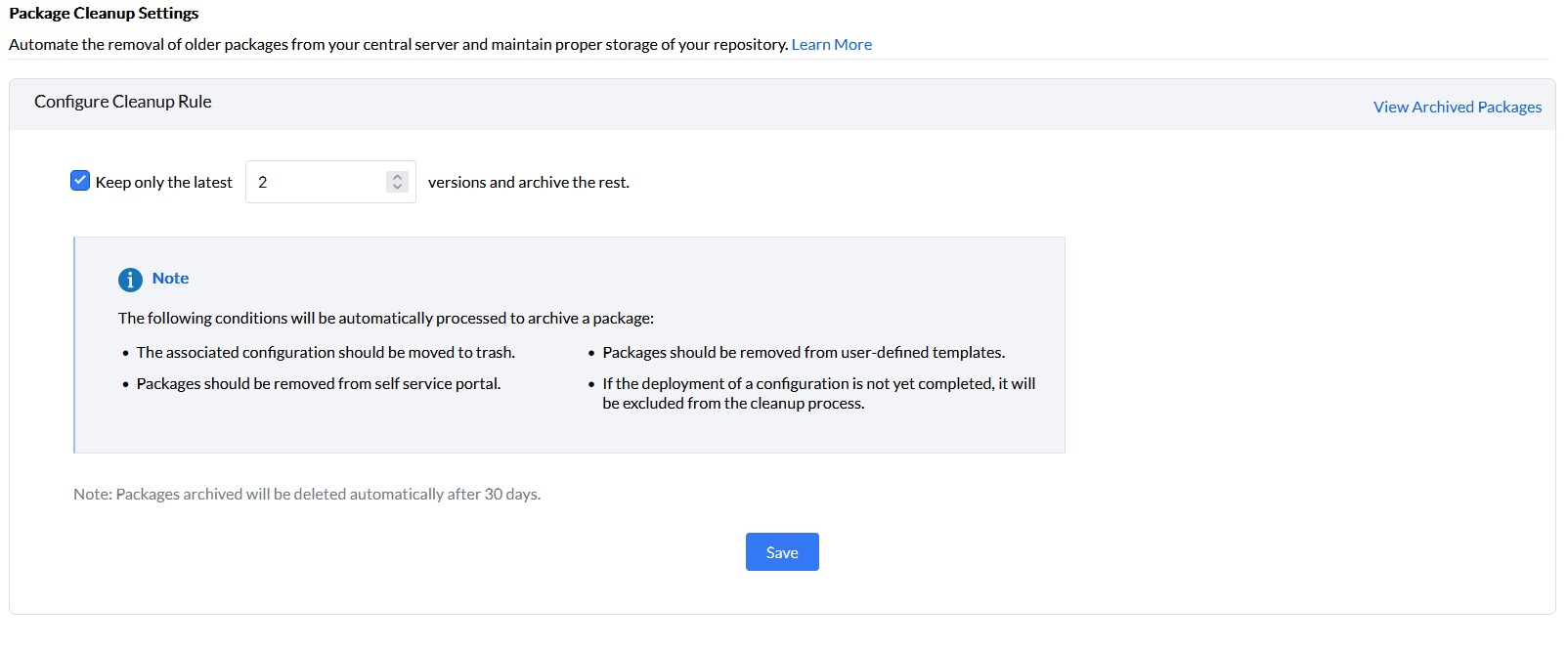
- Log in to Endpoint Central web console --> Software Deployment tab
- Navigate to Package Cleanup Settings
- Cleanup rules for packages
When you give auto-update for software packages, the newer version of the software packages gets updated automatically. By enabling the cleanup settings for auto-update packages, all the older versions of software packages will be deleted and only the specified number of recent packages will be retained.
Under Define Cleanup Rules,
- Specify the number of recent packages that need to be retained when there is an auto-update. By default, the number of recent packages that need to be retained is set to 2.
Note: The configurations that are scheduled to be deployed at startup, logon or refresh cycle will not be archived. Similarly, configurations that show that their status is in progress cannot be archived.
The older packages will be archived after removing the applicable associations as mentioned below:
- Cleanup rules for packages associated with configurations:
- If the configuration contains only old packages then the configurations will be moved to trash and the packages will be archived.
- If the configuration contains both old and new packages then the configuration with all the old packages will be removed. The configuration with all the old packages along with the target endpoints will be cloned. Then, the configuration with the old packages will be moved to trash and archived.
- Cleanup rules for packages associated with user defined templates:
- If the user defined templates contain old packages then the user defined template will be removed and the package will be archived.
- If the user defined templates contains both old and new packages then the old packages will be removed from the user defined templates and archived later.
- Cleanup rules for packages associated with custom groups in self-service portal:
- If the packages in the self-service portal associated with custom groups contain only old packages, then the custom group will be removed from the self-service portal and the old packages will be archived.
- If the packages in the self-service portal associated with custom groups contain both old and new packages, then the old packages will be removed from the self-service portal and archived later.
Deletion rules for archived packages
- If the trash contains only archived packages then the configurations in the trash along with the archived packages will be deleted.
- If trash contains both archived and non archived packages then only the archived packages will be deleted from the trash.
- The packages will be deleted 30 days after the time of archival by default.
Restoration rules for archived packages
- Once the archived packages are restored it will be archived again after 30 days based on the time of restoration by default.
- If you choose to click restore trash configurations, then the archived packages in the configuration will be restored.
- If you choose to click save as new trash configurations, then the archived packages in the configuration will be restored.