# HTML 5 Viewer Web Socket Secure (WSS) - Failure !
## Problem
You are trying to establish remote connection using HTML 5 Viewer in HTTPS mode and you get the message **"Web Socket Secure (WSS) - Failure"**.
## Cause
You are trying to access the Endpoint Central server in HTTPS mode. The Self Signed/Third Party certificates configured on the server are not recognized on the Safari browser.
## Resolution
You will have to configure the Safari browser to trust/allow secure web socket connections to the Endpoint Central server.
Follow the steps mentioned below when you try to access the Endpoint Central web console from the Safari browser:
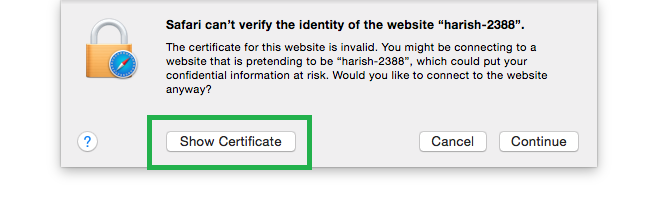
1. You can see the prompt as shown below. Click **Show Certificate**.
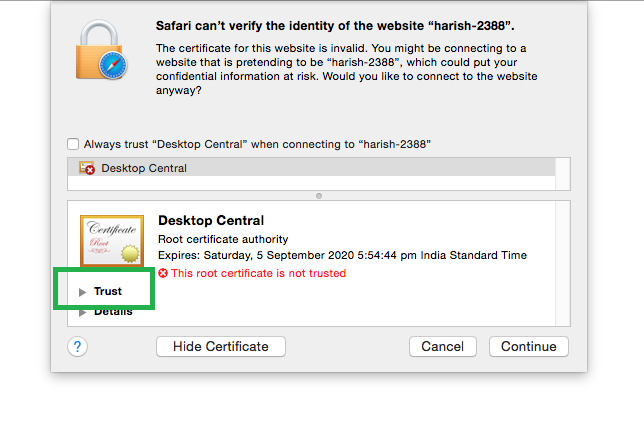
2. Click **Trust** to accept certificates.
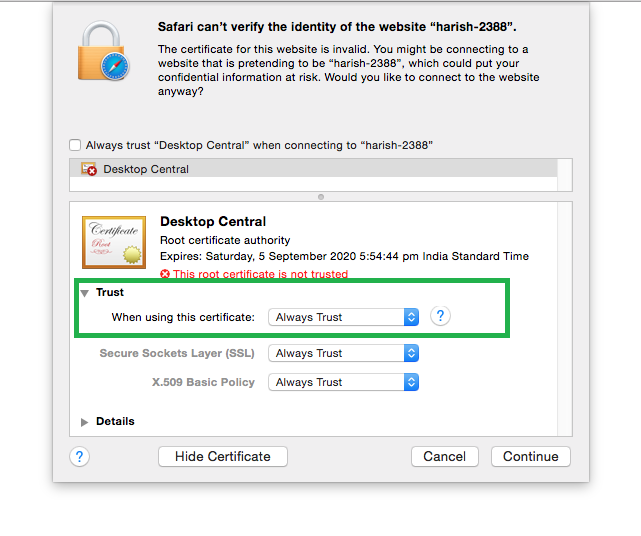
3. Choose **Always Trust** as shown in the image and click **Continue**.
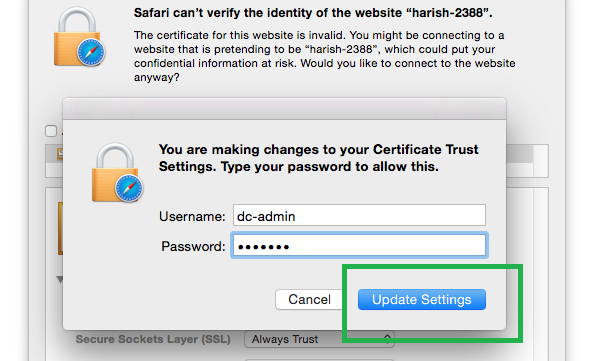
4. Click **Update Settings** to save the changes.
You can now retry to establish the remote connection. If the problem still persists, then you can contact Endpoint Central support.
**Applies to:** Remote Desktop Management, Troubleshoot Remote Desktop, Remote Desktop Connection Problems
**Keywords:** Remote Desktop, Manage Remote Computers, Troubleshoot Remote Machines