Before resolving this issue, make sure that you know which license you're currently using.
Oracle Patch Download Failure
Problem
You are trying to download Oracle patches like JRE 6, JRE 7, JRE 8, JDK 8, and JDK 11 for Windows and JRE 8 for Mac and the download fails.
Cause
This is because you're not logged in to Oracle. To download you should provide your login credentials.
Resolution
Follow the steps given below to resolve this issue:
- These are the download links of the Oracle applications: JRE 6, JRE 7, JRE 8, JDK 8, and JDK 11 for Windows and JRE 8 for Mac. Click on any application which you want to download and provide your login credentials. Once you login to the application, the installer file will automatically be downloaded.
- If you're using Endpoint Central Build Version 10.0.319 and above
- You'll be able to find an option to 'Upload' near the Download failed error message. Using the Upload option you can install this patch.
Else navigate to Patch Mgmt -> Patches -> Downloaded Patches -> Search for the Bulletin ID of the application which you want to install and click on the Patch ID to find the Patch Name. Then go to Upload Patches -> Search for the Bulletin ID which has the same Patch Name and click on Install Patch.
Here are the Bulletin IDs for Oracle applications:
- JRE 6 - TU-011
- JRE 7 - TU-030
- JRE 8 - TU-053
- JDK 8 - TU-160
- JDK 11 - TU-802
- JRE 8 for Mac - MAC-033
Refer this document to know how to upload patches using the Upload Patches option.
If you're using Endpoint Central Build Version below 10.0.319
- Rename the downloaded file in this format: <Patchid>-<Patchname> Reference image attached below will explain how the Patchname can be identified for the corresponding Patch ID
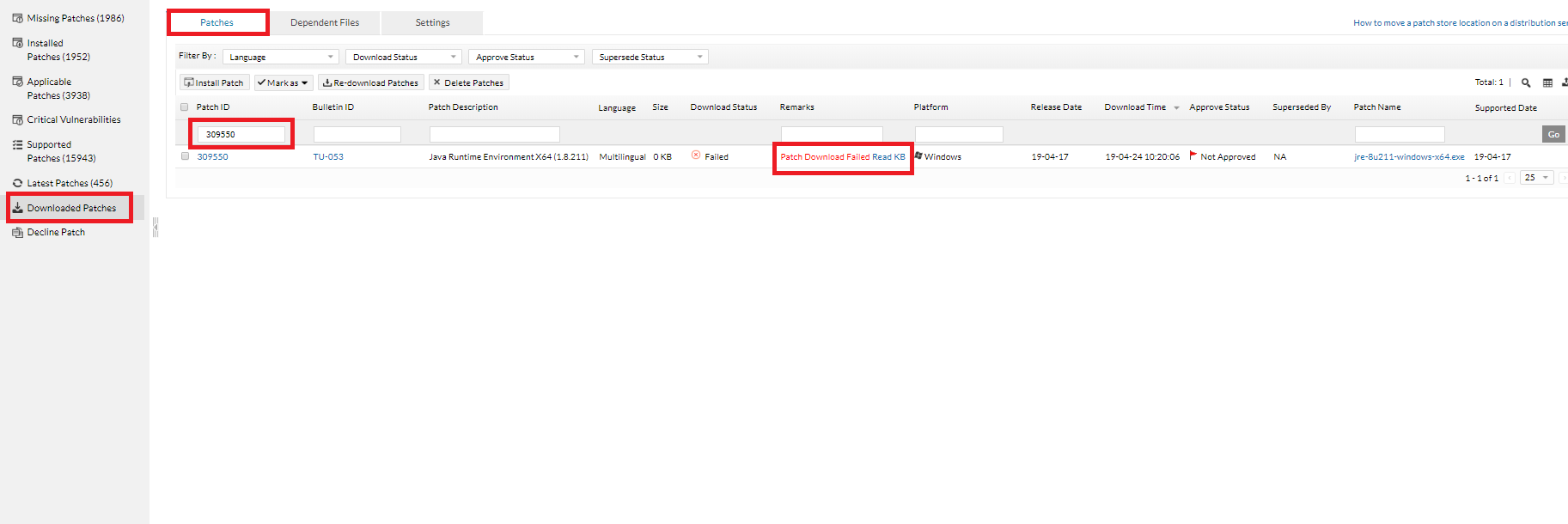
PS: You can find the PatchID from Configuration status->Draft download failure-> Execution status(Download Failed Patches, in case of APD) ->PatchID .
Operating System Patch ID Bulletin ID Patch Description Java Setup File* Windows 323263 TU-053 Java 8 Update 321 (64-bit) (8.0.3210.7) 323263-jre-8u321-windows-x64.exe Windows 323264 TU-053 Java 8 Update 321 (8.0.3210.7) 323264-jre-8u321-windows-i586.exe Windows 323266 TU-160 Java SE Development Kit 8 Update 321 (64-bit) (8.0.3210.7) 323266-jdk-8u321-windows-x64.exe Windows 323267 TU-160 Java SE Development Kit 8 Update 321 (32-bit) (8.0.3210.7) 323267-jdk-8u321-windows-i586.exe Windows 323265 TU-802 Java SE Development Kit (x64) (11.0.14) 323265-jdk-11.0.14_windows-x64_bin.exe MAC 603555 MAC-033 Java Runtime Environment for Mac (1.8.321) 603555-jre-8u321-macosx-x64.dmg Windows 300796 TU-030 Java Runtime Environment (1.7.79) 300796-jre-7u79-windows-i586.exe Windows 300797 TU-030 Java Runtime Environment X64 (1.7.79) 300797-jre-7u79-windows-x64.exe Windows 315118 TU-030 Java 7 Update 271 315118-jre-7u271-windows-i586.msi Windows 315119 TU-030 Java 7 Update 271 (64-bit) 315119-jre-7u271-windows-x64.msi Windows 300537 TU-011 Java Runtime Environment (1.6.45) 300537-jre-6u45-windows-i586.exe Windows 300538 TU-011 Java Runtime Environment X64 (1.6.45) 300538-jre-6u45-windows-x64.exe * Copy the 'Java Setup File' name for the respective PatchID and rename the downloaded file.
- Navigate to the <Desktop Central Installed Directory>\webapps\DesktopCentral\Store and place the renamed files.
- Once the process is complete, redeploy the failed configuration.
If the issue persists even after following the above-mentioned resolutions, please feel free to contact Support.