How to create Endpoint Central agent reinstall executable?
This guide provides a comprehensive overview of the steps required to create an executable for reinstalling the Endpoint Central agent. It covers the processes for downloading the necessary packages, generating the cleanup tool, and performing reinstallation through Intune.
Table of Contents
- Download the new agent package
- Download the zip
- Generate AgentCleanupToolclient
- Reinstallation via Intune
Download the new agent package
- Open the server web console.
- Navigate to Agent -> Computers.
- Select the required remote office.
- Click the Download Agent button.
- Rename the file to LocalOffice_Agent.exe and place it in a folder.
Download the zip
Extract and copy the contents from
to the previously created folder.
Generate AgentCleanupToolclient
- Follow the steps in this page to create the agent cleanup tool and place the generated AgentCleanupToolClient.exe to the same folder.
- The folder should contain the below files.
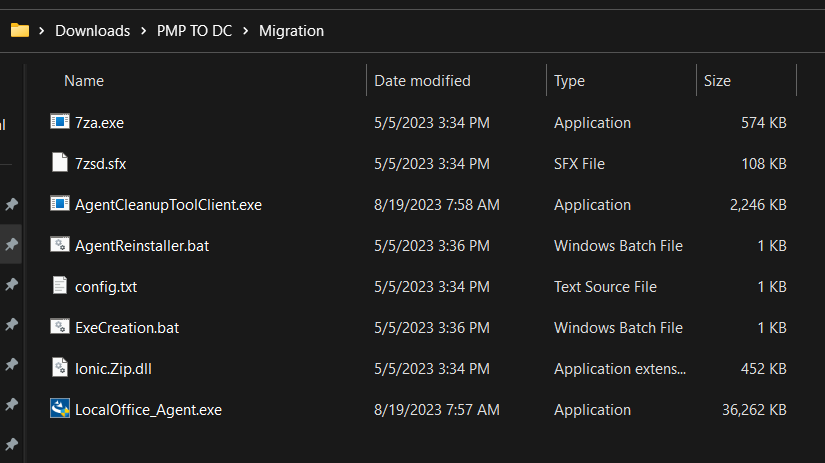
- Open command prompt with Admin rights and run ExeCreation.bat and generate Agent.exe

- Copy the Agent.exe file to the client machine and run it with the /silent command in Command Prompt as an administrator.
- Ensure if the migration is working seamlessly.
Reinstallation via Intune
- First, create the Agent.exe by following the steps outlined above.
- Next, follow the Intune setup instructions provided in this document to reinstall agent via Intune.