See the traffic behind every slowdown with NetFlow Analyzer

Slow applications, buffering video calls, and constant user complaints often leave IT teams without clear answers. Basic speed tests only show surface level numbers and fail to reveal which users, applications, or devices are actually consuming bandwidth and causing slowdowns. Without real time visibility into network speed and traffic behaviour, troubleshooting becomes reactive, making it harder to identify bottlenecks, verify ISP performance, and ensure critical applications get the bandwidth they need.

ManageEngine NetFlow Analyzer gives you complete visibility into network throughput, bandwidth usage, and traffic patterns across your infrastructure. Instead of relying on surface level metrics, it shows exactly where congestion originates, which applications impact performance, and how network speed behaves across interfaces, WAN links, and locations. With deep, real time analytics, you can quickly detect slowdowns, identify root causes, prioritise critical traffic, and maintain consistent network performance without guesswork or lengthy troubleshooting.

Powerful network speed monitoring
with NetFlow Analyzer

Detect interface saturation and speed drops instantly

Network slowdowns often begin at the interface or WAN link level. NetFlow Analyzer continuously monitors throughput, utilisation, and traffic rates across routers, switches, firewalls, and WAN interfaces using flow technologies such as NetFlow, sFlow, and IPFIX.

This enables teams to quickly identify saturated links, abnormal traffic bursts, and performance drops at their source, ensuring faster isolation of network speed issues.

NetSpeed Tracker Report
Last 24 hours
Speed
Upload Download
50 40 30 20 10 0 Mbps 13:34 15:31 17:28 19:25 21:22 23:19 01:16 04:31
Time ( HH:MM )
Time ↑ Upload Download Upload Volume Download Volume Jitter (ms) Latency (ms)
2022-11-10 00:35:00 51.532 Mbps 49.510 Mbps 57.666 MB 63.900 MB 3.78 0.09
2022-11-10 00:50:00 52.331 Mbps 50.097 Mbps 78.637 MB 65.623 MB 3.72 0.07
2022-11-09 13:35:00 50.270 Mbps 51.145 Mbps 65.756 MB 68.445 MB 4.18 2.19
2022-11-09 13:40:00 51.326 Mbps 49.652 Mbps 56.502 MB 63.413 MB 3.63 2.87
2022-11-09 13:45:00 50.538 Mbps 50.701 Mbps 64.474 MB 61.752 MB 3.76 0.17
2022-11-09 13:50:00 24.798 Mbps 34.533 Mbps 43.087 MB 46.029 MB 10.38 5.88

Identify bandwidth-consuming applications and users

Understanding what consumes bandwidth is critical to maintaining consistent network performance. NetFlow Analyzer provides deep application and user-level visibility using advanced Layer 7 traffic classification and CBQoS support.

IT teams can analyse top applications, conversations, and endpoints impacting bandwidth, making it easier to prioritise business-critical traffic and control non-essential usage.

Overview Application Users Conversations Protocols
Top N Application Hourly Report
YouTube2.4 GB
MS Teams1.8 GB
Google1.2 GB
Netflix890 MB
Other640 MB
Top N Users Hourly Report
192.168.1.45
2.4 GB
192.168.1.112
1.8 GB
192.168.1.78
1.2 GB
192.168.1.203
890 MB
192.168.1.8
640 MB

Pinpoint congestion across the network path

Network bottlenecks often occur across multiple devices and segments. NetFlow Analyzer delivers end-to-end traffic visibility by analysing flow records across the infrastructure.

This helps teams trace traffic paths, locate congestion points, and identify exactly where performance degradation occurs across core, distribution, and edge layers.

Interface Traffic Graph 1 Congestion Detected
Last 6 hours
GigabitEthernet0/1 — Core-Router-01
In Out Congestion
900M 700M 500M 300M 100M 0 bps 10:00 10:30 11:00 11:30 12:00 12:30 13:00 13:30
Time ( HH:MM )
Interface Device In Rate Out Rate Utilization Status
GigabitEthernet0/1 Core-Router-01 840 Mbps 620 Mbps 84% Critical
GigabitEthernet0/2 Core-Router-01 490 Mbps 320 Mbps 49% Warning
GigabitEthernet0/24 Dist-Switch-01 380 Mbps 210 Mbps 38% Normal
GigabitEthernet1/1 Edge-Router-01 210 Mbps 180 Mbps 21% Normal
FastEthernet0/8 Access-SW-01 95 Mbps 48 Mbps 10% Normal

Maintain consistent speed across WAN and branch locations

Performance inconsistencies frequently originate from WAN links, VPN tunnels, or branch locations. NetFlow Analyzer provides centralised visibility into bandwidth usage and link utilisation across all sites.

With site and link-wise insights, teams can quickly detect overloaded links, optimise traffic distribution, and maintain consistent performance across remote and hybrid networks.

Devices (12) Interfaces (11) Groups (11) Apps •••
Last Hour
Interface Status
Link Up8
Unknown1
Link Down1
Link Up & NoFlows1
11
Interfaces Type
Others
7
Ethernets
3
tunnel
1
Status Interface Name Router Name IN Utilization OUT Utilization IN Speed OUT Speed Alert
GigabitEthernet0/1 DataCentreAVC-Mains…
0%
1%
49.787 bps 52.303 bps 0
GigabitEthernet0/1/1 DataCentreAVCMains-…
0%
0%
9.286 bps 9.371 bps 0
GigabitEthernet0/1/1 DataCentreBasicV9-N…
10%
51%
1.020 Kbps 511.154 bps 0
GigabitEthernet0/1/2 DataCentreBasicV9ipv…
5%
5%
1.006 Kbps 1.011 Kbps 0
GigabitEthernet0/2 DataCentreBasicV9ipv…
100%
>100%
1.003 Kbps 1.024 Kbps 0
GigabitEthernet0/1/2 DataCentreipV4Bi-ASA
>100%
>100%
14.819 Kbps 14.786 Kbps 0
GigabitEthernetBIASA… DataCentreipV6Bi-ASA
20%
20%
19.882 Kbps 19.907 Kbps 0
ASAGigabitEthernet0/1 DataCentreV9ASA.me…
>100%
>100%
1.001 Kbps 1.004 Kbps 0
MediaGigabitEthernet… DataCentreV9Mediane…
51%
50%
1.011 Kbps 996.705 bps 0
MultiGigabitEthernet0/1 DataCentreV9Multicast
>100%
20%
1.015 Kbps 1.014 Kbps 0
! IfIndex1 Viptela_SD-WAN
0%
0%
0.000 bps 0.000 bps 0

Analyse performance trends and plan capacity effectively

Short-term fixes are not enough to maintain long-term network speed. NetFlow Analyzer stores historical traffic and bandwidth data to reveal recurring congestion patterns, peak usage trends, and capacity constraints.

These insights support proactive bandwidth planning, infrastructure upgrades, and long-term performance optimisation based on real network behaviour.

Capacity Planning Report DataCentreV9Basic-ASA / GigabitEthernet0/1
Volume Speed Utilization Packets
Last 24 hours
bps 1 0.8 0.6 0.4 0.2 0 05:00 07:00 09:00 11:00 13:00 15:00 17:00 19:00 21:00 23:00 01:00 03:00 Time ( HH:MM )
TRUNK-1_App
IDPR_App
RDP_App
TRUNK-2_App
XNS_IDP_App
MUX_App
IPENCAP_App
IRTP_App
ST_App
EMCON_App
Application ↕ 05:00 07:00 09:00 11:00 13:00 15:00 17:00 19:00 21:00 23:00 01:00 03:00 05:00
TRUNK-1_App 0.087 bps 0.487 bps 0.389 bps - 0.289 bps 0.364 bps 0.842 bps 0.253 bps 0.938 bps 0.378 bps 0.100 bps 1.029 bps -
IDPR_App 0.182 bps 0.584 bps 0.638 bps 0.380 bps 0.149 bps 0.720 bps 0.349 bps 0.702 bps 0.236 bps 0.162 bps 0.296 bps 0.436 bps -
RDP_App 0.049 bps 0.300 bps 0.393 bps 1.124 bps 0.040 bps 0.251 bps 0.620 bps - 0.540 bps 0.436 bps 0.776 bps 0.300 bps -
XNS-IDP_App 0.513 bps 0.291 bps 0.113 bps 0.164 bps 0.929 bps 0.304 bps 0.844 bps 0.840 bps 0.280 bps 0.138 bps 0.151 bps 0.202 bps -
TRUNK-2_App - 0.789 bps 0.231 bps 0.513 bps 0.044 bps 0.042 bps 0.838 bps 0.858 bps 0.389 bps 0.547 bps 0.222 bps 0.298 bps -
MUX_App 0.242 bps 0.569 bps 0.873 bps 0.178 bps 0.113 bps 0.073 bps 0.082 bps 0.422 bps 0.284 bps 0.462 bps 1.000 bps 0.424 bps -
IPENCAP_App 0.160 bps 0.142 bps 0.873 bps 0.220 bps 0.242 bps 0.596 bps 1.058 bps 0.249 bps 0.198 bps 0.547 bps 0.311 bps 0.857 bps -
IRTP_App 0.082 bps 0.200 bps 0.180 bps 0.330 bps 0.370 bps 0.280 bps 0.520 bps 0.430 bps 0.480 bps 0.380 bps 0.150 bps 0.470 bps -

Prevent slowdowns with intelligent alerts and proactive monitoring

Continuous monitoring and early detection are essential to maintaining network performance. NetFlow Analyzer enables threshold-based alerts for utilisation spikes, abnormal traffic patterns, and speed drops.

With real-time notifications and detailed analytics, teams can detect emerging issues early, resolve them faster, and ensure consistent network performance across the infrastructure.

52
18
32
2
0
3
Active Alarms (52)
Alarm Source Type Assignee Severity Time
Incompatible NPS request detected for 50000768 50000768 System UnAssigned Critical 10 min ago
Configuration Changed at Mar 27, 2023 1… Unknown Config UnAssigned Critical 1 hour ago
Configuration Changed at Mar 26, 2023 0… Unknown Config UnAssigned Critical 1 day ago
Interface GigabitEthernet0/0[CiscoRouter7… CiscoRouter7… Link Down UnAssigned Critical 21 days ago
Interface FastEthernet0/1[CiscoRouter28013… CiscoRouter28013… Link Down UnAssigned Critical 136 days ago
- Wan1 (Wan2) :::: Availability threshold… Unknown Threshold UnAssigned Critical 159 days ago
- Voip1 (Voip1) :::: MOS threshold limit vi… Unknown Threshold UnAssigned Critical 321 days ago
2.0 packets transferred (violated threshold… 5.5.5.9 Realtime Alert admin Trouble 1 year ago
2.0 packets transferred (violated threshold… 5.5.5.9 Realtime Alert UnAssigned Trouble 1 year ago
80.0 packets transferred (violated threshold… 5.5.5.2 Realtime Alert UnAssigned Trouble 1 year ago
3.0 packets transferred (violated threshold… Medianet Realtime Alert UnAssigned Trouble 1 year ago
63.0 packets transferred (violated threshold… Multicast Realtime Alert UnAssigned Trouble 1 year ago
50.0 packets transferred (violated threshold… 5.5.5.5 Realtime Alert UnAssigned Attention 1 year ago

Real-time network speed issues
resolved with NetFlow Analyzer

A sudden slowdown disrupts the entire office

Problem

Multiple teams reported slow applications and lag during video calls. Bandwidth usage appeared normal, yet performance continued to drop.

How NetFlow Analyzer helped

The IT team used NetFlow Analyzer to view real-time traffic across the network. Within minutes, a large file transfer and non-business streaming traffic consuming bandwidth on a core interface were identified. By prioritising critical applications and controlling unnecessary traffic, performance was restored without prolonged downtime.

Video conferencing fails during an important client meeting

Problem

During peak hours, video calls began buffering and disconnecting across departments. The IT team needed immediate clarity on what was affecting performance.

How NetFlow Analyzer helped

Live application traffic analysis revealed a scheduled backup consuming significant bandwidth across the WAN link. After rescheduling the backup and reallocating bandwidth, video conferencing returned to normal without further disruption.

Branch office users report inconsistent speed

Problem

Employees in a remote branch started experiencing intermittent slowness while accessing cloud applications. The issue could not be replicated at headquarters, making troubleshooting difficult.

How NetFlow Analyzer helped

The team monitored speed across branch links and quickly identified congestion on a specific WAN interface during peak usage. By rerouting traffic and optimising bandwidth allocation, consistent performance was restored across the branch.

Unusual bandwidth spike affects critical apps

Problem

Network performance dropped unexpectedly one afternoon, impacting access to essential business applications with no obvious cause.

How NetFlow Analyzer helped

NetFlow Analyzer detected a sudden spike caused by a newly installed application generating heavy background traffic. Real-time alerts and traffic analysis helped isolate the source and control bandwidth consumption immediately, preventing further disruption to critical services.

Why NetFlow Analyzer stands out as a
network speed monitor

Correlates flow data across the entire network

Analyses NetFlow, sFlow, IPFIX, and other flow exports to provide detailed visibility into traffic behaviour across routers, switches, and firewalls.

Identifies top applications, conversations, and endpoints

Provides granular insights into which applications, users, and IPs consume bandwidth, enabling precise root cause identification during slowdowns.

Pinpoints congestion across interfaces and WAN links

Tracks utilisation and throughput across interfaces and site-to-site links to help isolate exactly where performance degradation occurs.

Delivers centralised visibility for distributed environments

Monitors traffic patterns and link utilisation across data centres, branch offices, VPNs, and hybrid infrastructures from a single console.

Supports historical traffic analysis and capacity planning

Stores and analyses long-term bandwidth and performance data to identify recurring congestion trends and plan upgrades based on actual usage.

Enables threshold-based alerts and performance monitoring

Generates alerts for utilisation spikes, abnormal traffic patterns, and speed drops, allowing faster detection and response to emerging issues.

Key metrics to monitor network speed

Bandwidth utilisation

Throughput

Latency

Packet loss

Jitter

Application bandwidth consumption

Top talkers and endpoints

WAN and interface performance

Benefits of monitoring network speed with NetFlow Analyzer

Accelerated root cause identification

Quickly isolate bandwidth bottlenecks, top talkers, and congestion points using real-time and historical traffic analysis, reducing dependency on manual troubleshooting.

Optimised bandwidth for critical applications

Gain clear visibility into application and user-level consumption to prioritise business-critical traffic and prevent non-essential usage from impacting performance.

Proactive performance management

Detect utilisation spikes, abnormal traffic patterns, and speed drops early with continuous monitoring and intelligent alerts to prevent user impact.

Data-driven capacity and ISP management

Validate service provider performance, analyse long-term traffic trends, and plan bandwidth upgrades confidently using detailed historical insights.

See the traffic behind every performance issue
with NetFlow Analyzer

NetFlow Analyzer security and compliance

Safeguarding your network and data, at once

NetFlow Analyzer keeps your network and data safe with advanced encryption and authentication standards. Features like SSL configuration, password protection, and trusted certificates help secure your network at every layer.

NetFlow Analyzer complies with the following data security standards

  • GDPR
  • FIPS 140-2
  • ISO/IEC 27001

Case study

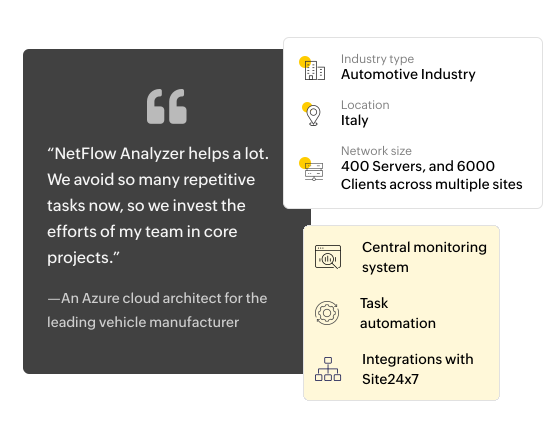
An Italian luxury vehicle manufacturer needed a unified solution to manage its large, complex network — supporting video conferencing and MPLS while preparing for future growth. ManageEngine NetFlow Analyzer met all their needs with a user-friendly interface, advanced monitoring capabilities, and smooth integration, becoming the top choice for scalable network management.

NetFlow Analyzer case study