IP address scanner

As enterprise networks grow and diversify with remote work and BYOD devices, maintaining visibility into every connected endpoint has become a challenge. That’s where IP scanning plays a vital role. It helps administrators identify active devices, detect unused or conflicting IPs, and ensure smooth network connectivity across subnets.

ManageEngine OpUtils’ IP address scanner, part of its integrated DDI and switch port management suite, simplifies enterprise-wide IP address scanning with speed and precision. It automatically discovers devices across IPv4 and IPv6 subnets, tracks IP usage in real time, and detects conflicts or unauthorized addresses instantly. With built-in integrations for DHCP, DNS, and switch-port mapping, OpUtils transforms IP scanning data into actionable network insights.

How IP scanning works in OpUtils

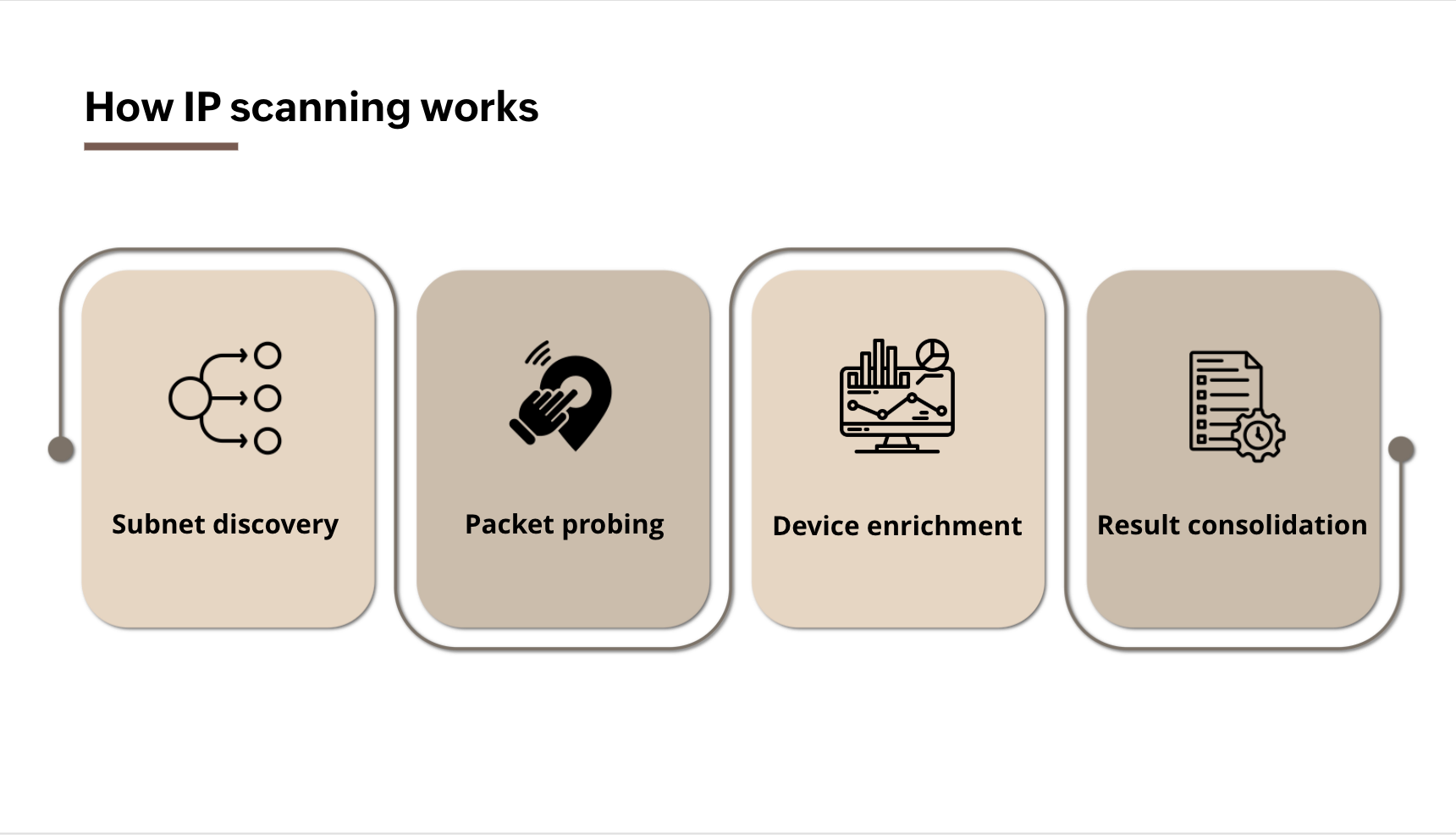
OpUtils performs IP scanning in four stages:

  1. Subnet discovery: Automatically identifies available subnets from your IPAM or controllers like Cisco Meraki and ACI.
  2. Packet probing: Sends ICMP (Internet Control Message Protocol), TCP (Transmission Control Protocol), or SNMP (Simple Network Management Protocol) probes to detect live hosts across IPv4 and IPv6 ranges.
  3. Device enrichment: Correlates active IPs with MAC addresses, hostnames, and switch-port data for complete visibility.
  4. Result consolidation: Displays a real-time map of active and inactive IPs, and syncs findings with your DHCP/DNS data for continuous accuracy.

IP Address Scanning Working - ManageEngine OpUtils

7 key features of OpUtils' advanced IP scanner

While it’s possible to scan IP ranges manually using native commands like ipconfig or ping, such methods don’t scale well in large enterprise networks. As subnets grow and address utilization increases, manual IP scanning becomes inefficient and prone to errors.

In real-world enterprise networks, IP scanning plays a critical role in maintaining stability and security. Continuous scans help teams quickly spot unauthorized devices, identify duplicate IP assignments that can disrupt critical business applications, and detect misconfigured hosts before they cause outages. Organizations also rely on periodic scans to locate dormant or unused IPs, keep inventory accurate across distributed offices, and ensure that every device on the network is accounted for.

With OpUtils’ network IP scanner, administrators can automate discovery, validation, and tracking of every IP address in the network, reducing manual effort and improving visibility.

Core IP scanning capabilities in OpUtils

Manage IPv4 and IPv6 addresses across multiple subnets

OpUtils’ IP address scanner consolidates IPv4 and IPv6 discovery into one unified console, giving you complete visibility into every active IP across distributed networks.

You can create, import, or schedule scans for both IPv4 and IPv6 ranges to continuously detect live hosts, spot unused or abandoned IPs, and keep utilization data updated in real time. The scanner supports both subnet-level and range-level discovery, ensuring no address is missed whether it belongs to a local VLAN or a remote branch site.

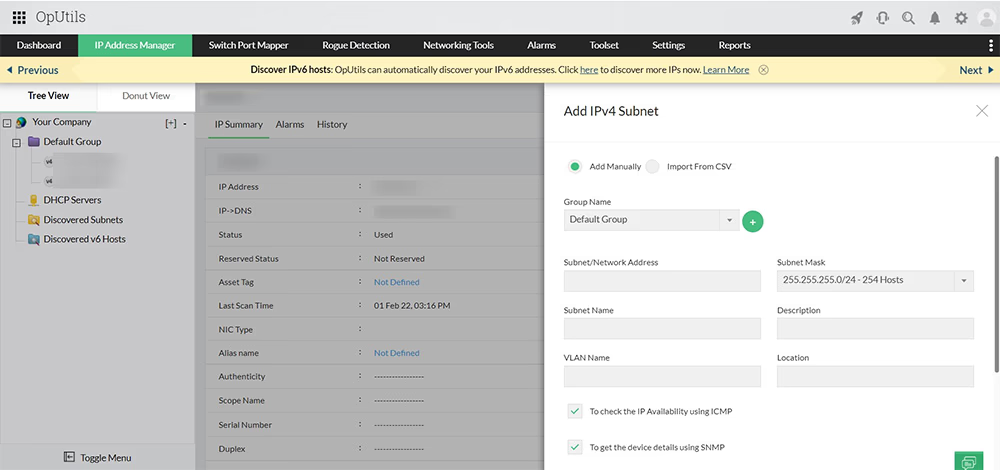
Administrators can add IPv4 subnets or ranges manually or import them in bulk via CSV for immediate scanning. For IPv6 environments, OpUtils allows scanning based on prefix parameters such as prefix name, prefix length, prefix address, and description, providing complete visibility across dual-stack deployments.

A built-in tree-based subnet hierarchy helps you visualize usage across all scanned subnets, making large-scale IP scanning, tracking, and management effortless.

IP address scanner - ManageEngine OpUtils

View IP-to-device and port mappings in real time

When OpUtils performs an IP scan, it doesn’t just list active addresses. It reveals the full context behind each scanned IP. During the scanning process, the IP address scanner automatically correlates every detected IP with its associated device, user, and network location.

For each scanned IP, OpUtils displays key identifiers such as the device name, MAC address, operating system, and physical location, helping administrators verify device authenticity and usage.

Beyond basic discovery, the IP scanner maps each IP address to its exact switch and port, providing complete end-to-end visibility. You can instantly view the switch name and port number to trace how every device connects within your network, making troubleshooting and auditing faster and more accurate.

Network IP address scanner - ManageEngine OpUtils

Search and locate devices using scanned IP data

Every time OpUtils runs an IP scan, it builds a dynamic MAC-to-IP inventory that lists all active devices discovered on your network. This scanned data helps administrators instantly trace any device by its MAC address or IP address with no manual lookup required.

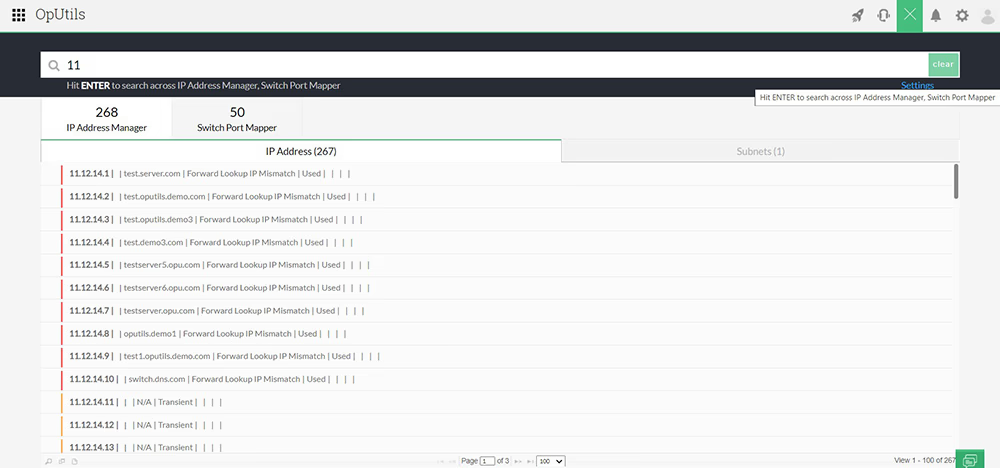
Using the Global Search option, you can quickly find a specific IP address or device across all scanned subnets. Whether you’re verifying a host’s status, tracking down a duplicate IP, or investigating a security alert, OpUtils makes it easy to locate the exact device and its associated details within seconds.

Advanced IP address scanner - ManageEngine OpUtils

Export and analyze your IP scanning results

After completing a full IP scan, OpUtils lets you export the scanned data instantly for documentation or audit purposes. You can download IP scan results including detailed IP address information and subnet utilization reports in PDF or CSV formats.

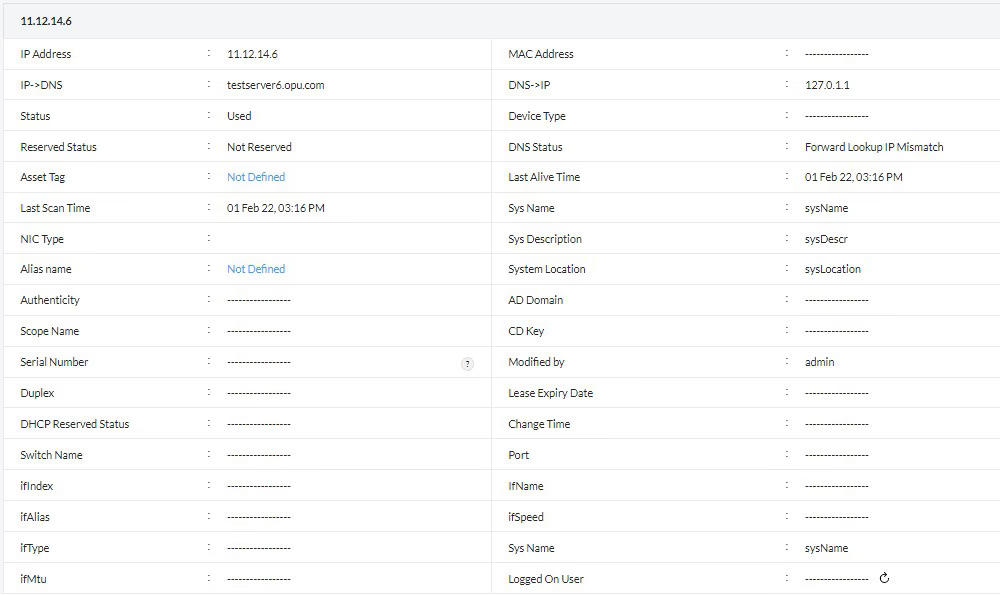
The IP address details section provides comprehensive insights into every scanned address, showing the IP-DNS lookup status, reservation status, system description, device type, connected port, and more.

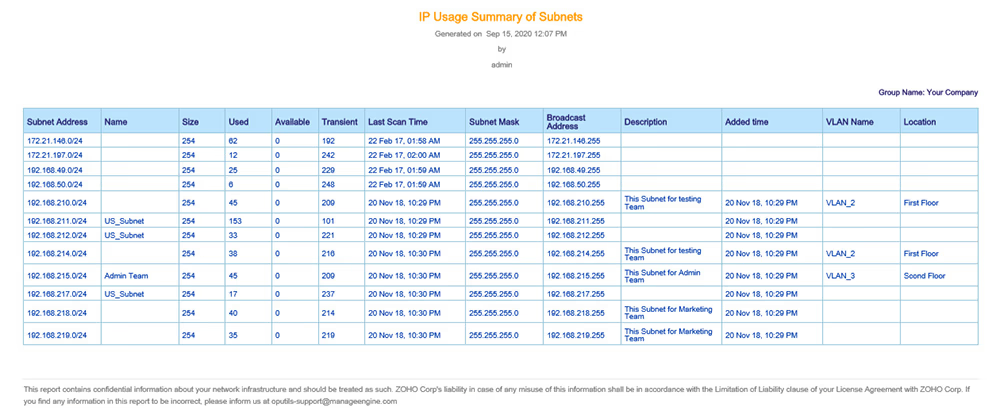
The exported IP usage summary provides a complete view of each scanned subnet, covering subnet name, size, used and available IPs, transient and broadcast addresses, VLAN name, and location. These insights help you track IP usage trends, plan capacity, and share accurate scanning reports with your IT and compliance teams.

Advance IP address scanner - ManageEngine OpUtils

Track historic IP address usage logs

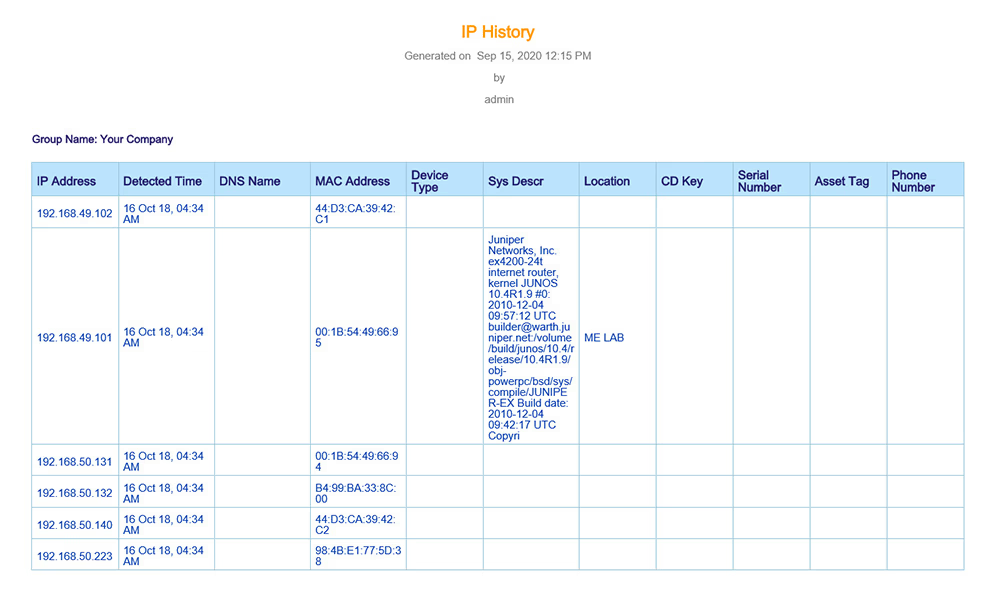
OpUtils’ IP scanner automatically maintains a history of scanned IP addresses, helping admins track changes and usage patterns over time. The IP history logs record every scanned IP along with its DNS name, associated MAC address, system description, and device location.

With this, you can trace any IP address to its previous user or device, identify reassignments, and detect unusual activity. This feature ensures you always have a clear timeline of IP address allocation, making IP scanning and auditing more reliable and transparent.

IP Address Scanner Software - ManageEngine OpUtils

Enable IP-centered network security by creating a trusted list of new devices

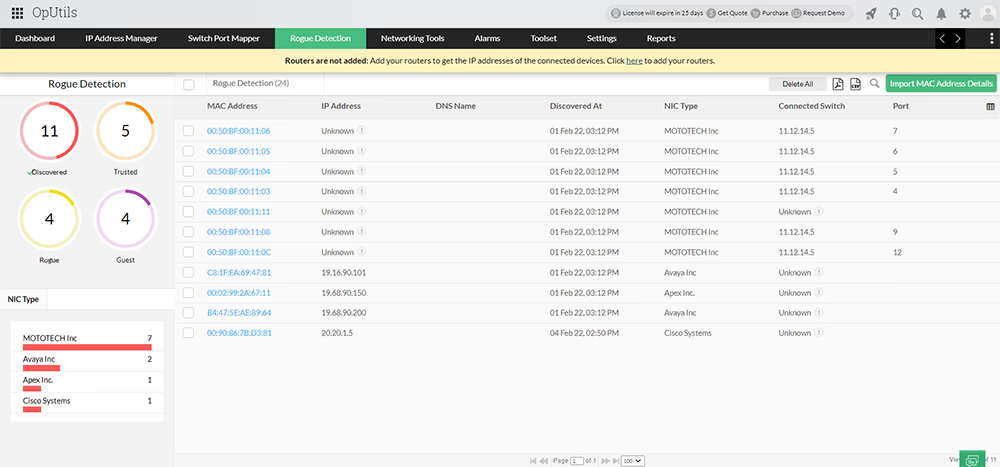
OpUtils’ IP address scanner continuously scans your network to detect and classify every device connecting to it. During the IP scanning process, OpUtils’ Rogue Detection module identifies new or unknown devices and allows you to mark them as Trusted, Guest, or Rogue.

Trusted devices are authentic systems that are automatically whitelisted, ensuring uninterrupted access and preventing them from being flagged in future IP scans.

Guest devices receive temporary network access, after which they are re-evaluated during the next scan to determine whether access should continue or be revoked.

Rogue devices are potentially malicious endpoints that are immediately denied network access to prevent unauthorized connections.

By combining continuous IP scanning with device-level verification, OpUtils helps admins strengthen network security, block unauthorized access, and simplify device whitelisting across enterprise networks.

IP Address Scanner Tool - ManageEngine OpUtils

Code-free custom IP address scanning
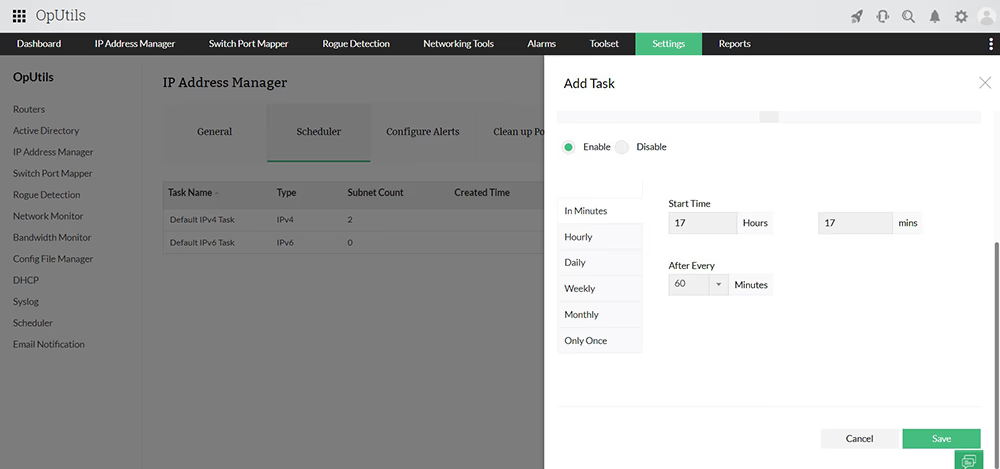
OpUtils’ IP address scanner simplifies IP scanning with a code-free, one-click interface. You can easily schedule automated scans for your entire IPv4 and IPv6 address space using the built-in Scheduler.

Customize your scanning frequency by choosing how often you want OpUtils to inspect your subnets:

  • In minutes: Scan IPs and subnets at intervals starting from 5 minutes.
  • Hourly: Schedule scans starting from every 1 hour.
  • Daily: Perform daily IP scanning to monitor address usage.
  • Weekly: Run a weekly scan to keep subnet data up to date.
  • Only once: Perform a one-time network-wide IP scan at a specific time.

By automating IP address scanning schedules, OpUtils ensures continuous visibility into your address space, without the need for manual scripts or coding effort.

IP Address Scanning history- ManageEngine OpUtils

How OpUtils fits enterprise scanning scenarios

In large enterprise networks, IP scanning is more than just detecting active devices. It’s about maintaining visibility, compliance, and uptime across distributed environments. OpUtils’ IP address scanner adapts to diverse network topologies and operational needs, helping IT teams manage IPs efficiently under different use cases:

  • Branch office visibility: Perform scheduled IP scans across remote branches to ensure every device is accounted for and active subnets remain synchronized.
  • Data center management: Use IP scanning to track critical assets, detect configuration drift, and map connected devices to switches and ports.
  • Security auditing: Combine IP scanning with rogue detection and MAC filtering to uncover unauthorized devices or IPs with duplicate or spoofed addresses.
  • Compliance reporting: Generate IP scan reports to support audits, capacity planning, and IP utilization tracking for governance frameworks.

By aligning scanning schedules and rules with your operational model, OpUtils ensures consistent IP visibility and control, no matter how complex your network becomes.

Optimizing IP scanning performance in large networks

In expansive enterprise environments, scanning every device in one go can overload the network, delay results, and create blind spots. OpUtils improves scan efficiency by segmenting IP scans along natural network boundaries, ensuring faster, cleaner, and more accurate visibility:

  • Segment-by-segment scanning: Divide large address spaces into logical units such as VLANs, subnets, or branch offices and run concurrent scans across these segments. This reduces overall scan time, avoids unnecessary traffic across network zones, and ensures each segment is updated efficiently without overloading bandwidth.
  • Geography-aware scanning: For organizations with global or multi-regional offices, assigning scans to specific branch locations avoids latency issues and ensures each site is monitored based on its business hours and connectivity constraints.
  • VLAN-focused scanning: Scanning per VLAN ensures that IP usage, device availability, and conflicts are mapped accurately within the logical boundaries IT teams already use for segmentation and access control.
  • Subnet-level prioritization: Critical or high-density subnets (like server/data-center ranges) can be scanned more frequently, while stable subnets (like static endpoints) can follow a lighter schedule.

By eliminating irrelevant scanning paths and focusing only on intended network segments, OpUtils delivers quicker IP discovery with minimal impact on routers, firewalls, and WAN links.

Why choose OpUtils for enterprise-grade IP scanning

Unlike basic network scanners that provide limited visibility, OpUtils delivers end-to-end IP scanning and management designed for enterprise networks. It goes beyond simple discovery to provide real-time IP monitoring, switch-port mapping, and rogue device detection, all from a unified console.

With its agentless, code-free IP scanning, OpUtils empowers admins to:

  • Automate subnet-level scans for IPv4 and IPv6 networks.
  • Detect and classify new devices instantly during scans.
  • Correlate IPs with DNS, MAC, and switch-port data for contextual insights.
  • Generate comprehensive IP scan reports for capacity and security analysis.

By combining speed, accuracy, and visibility, OpUtils simplifies enterprise-wide IP scanning, helping IT teams detect issues earlier, strengthen network hygiene, and make informed decisions, without the manual overhead.

Getting started with OpUtils advanced IP scanner

OpUtils’ advanced IP scanner is part of a unified network IP scanning and management toolkit that includes more than 30 built-in utilities such as Ping, Trace Route, and MIB Browser for efficient network troubleshooting.

Beyond IP scanning, OpUtils offers IP address tracking, subnet management, switch-port mapping, and rogue device detection, all accessible from a single console.

Get started today by taking a feature tour or schedule a live demo with a product expert. Try the free trial for the next 30 days to experience OpUtils’ IP scanning and network management capabilities hands-on.

More on network IP address scanner

What is an IP address scanner?


An IP address scanner performs automated IP scanning across your network’s entire address space, including subnets and VLANs. It helps you discover used and available IPs, track connected devices, and maintain visibility into your network infrastructure.

Continuous IP scanning prevents IP conflicts, reduces downtime, and ensures that every address in your network is correctly assigned and active.

What are the benefits of using an IP address scanner?


The key benefits of using an IP address scanner for IP scanning include:

  • Eliminating human errors caused by manual tracking or native command-line scans.
  • Gaining real-time visibility into active hosts and their DHCP/DNS associations.
  • Quickly adding, discovering, and managing IP subnets across large networks.
  • Performing end-to-end IP scanning with minimal configuration.
  • Collecting real-time data on IP utilization and performance.
  • Troubleshooting IP conflicts with instant alerts and scan-based insights.
  • Auditing IP allocation using detailed, IP-level usage reports.
  • Reducing administrative overhead through automated scanning tasks.
  • Supporting both dynamic and static IP address scanning for complete coverage.

How to scan all IP addresses in your network?


To identify all IP addresses in your network using OpUtils’ IP address scanner, you can:

  • Add IPv4 subnets or IP ranges manually by specifying the group name, subnet mask, VLAN, and location.
  • Import bulk IP data through CSV files for quick setup.
  • Add IPv6 subnets or sites using the Add IPv6 subnet/site option.
  • Schedule automated IP scans to detect new or changed devices continuously across your address space.

With OpUtils, you can perform these scans on demand or on a recurring schedule, without writing a single line of code.

How does the IP address scanner work?


The IP address scanner uses multiple discovery techniques, including ICMP ping sweeps, SNMP polling, and DNS lookups, to identify active devices across subnets.

During each IP scan, the tool sends probe packets to all IPs within a defined range and records responses from live hosts. It then correlates these responses with MAC and switch-port data to build a detailed view of your network topology.

This combination of ICMP and SNMP-based IP scanning ensures accurate, real-time insights into device connectivity and IP utilization.

Manage every IP in your network with OpUtils’ IP address scanner

Try OpUtils for free today
OpUtils IP Scanner