Notification Settings
ADSelfService Plus can automatically notify administrators and end users about important product events such as license expirations, server downtime, and product updates via email and SMS. The Notification Settings page is where you configure which events trigger these alerts and who receives them.
How it works
When a configured event occurs (for example, the ADSelfService Plus license is about to expire, or the server goes down) the product sends an alert to the relevant recipients using the email and SMS servers configured under Admin > Product Settings > Mail/SMS Settings.
Notifications can be directed to admins, end users, or both, and can be sent to primary as well as secondary contact details.
Configuration instructions
To access Notification Settings, navigate to Admin > Product Settings > Mail/SMS Settings > Notification Settings.
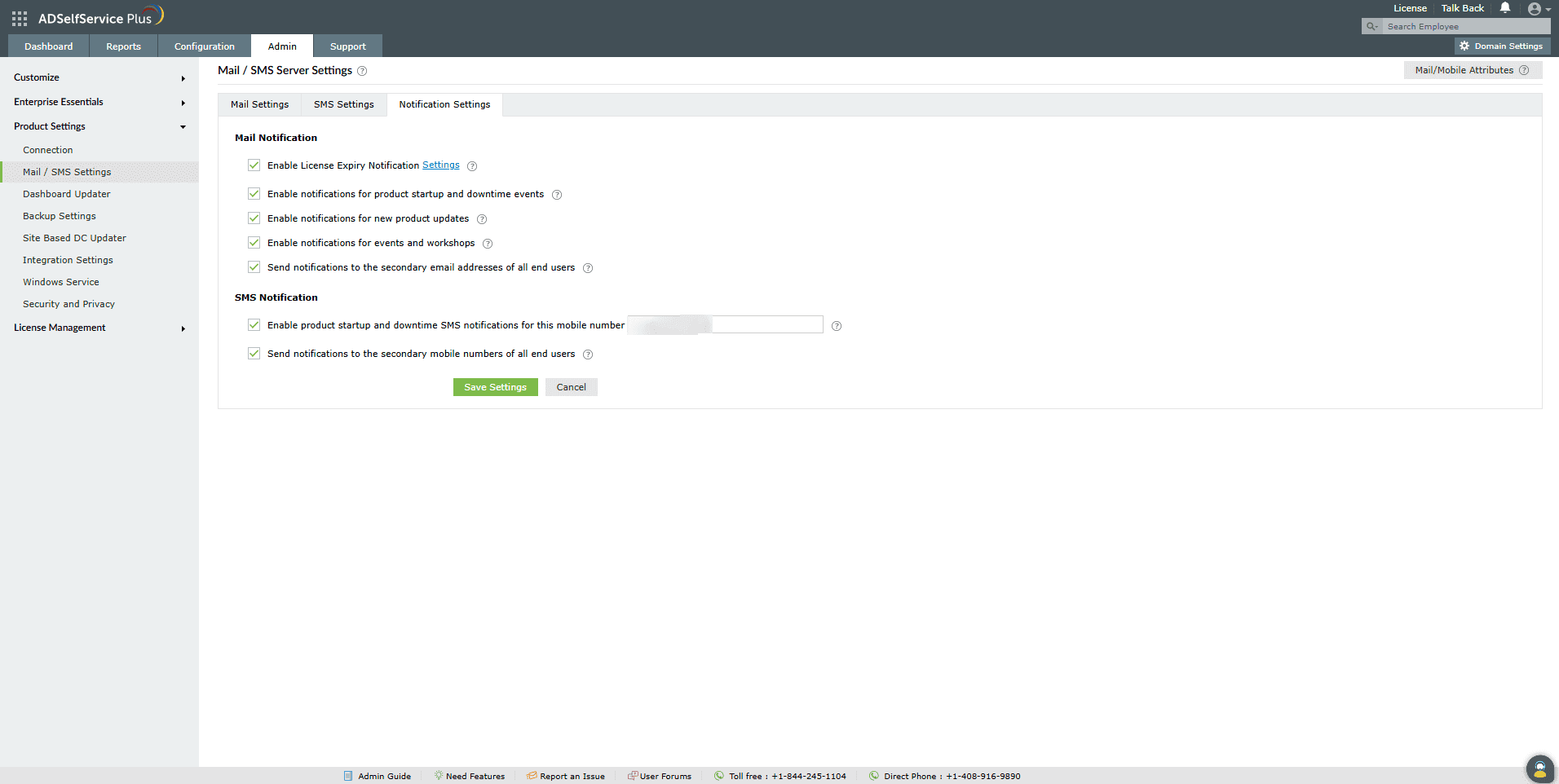
Email notifications
- Enable license expiration notification: Sends an email alert to admins when the license is approaching expiry, when available licenses fall below a specified threshold, or when the license has expired.
- Enable notifications for product startup and downtime events: Sends an email alert to admins when the ADSelfService Plus server goes down.
- Enable notifications for new product updates: Sends an email alert when new product updates are available.
- Enable notifications for events and workshops: Sends an email alert about events and workshops conducted by ManageEngine.
- Send notifications to the secondary email addresses of all end users: When enabled, email notifications are sent to both the primary and secondary email addresses of end users.
- Notify when SSL certificate reaches ___ days to expiration: Sends an email alert to admins when the SSL certificate is nearing expiration. You can stagger notifications by entering comma-separated values — for example, entering 1,3,6 will send alerts 1, 3, and 6 days before the certificate expires.
SMS notifications
- Enable product startup and downtime SMS notifications for this mobile number: Sends an SMS alert to the specified mobile number when the ADSelfService Plus server goes down. Enter the number in the text box provided.
- Send notifications to the secondary mobile numbers of all end users: When enabled, SMS notifications are sent to both the primary and secondary mobile numbers of end users.
Once you have configured the required settings, click Save Settings.
Tips
The following best practices will help you get the most out of Notification Settings, maximize reach, and ensure critical alerts aren't missed.
- Enable license expiration notifications well in advance to avoid unexpected service interruptions.
- Configure both email and SMS alerts for critical events like server downtime to ensure immediate awareness and faster response.
- Enable product update notifications to stay on top of new features and security patches.
- If your organization uses secondary contact details, enable the secondary email and SMS options to ensure no user misses a critical alert.
- Periodically review your notification settings to keep them aligned with any changes in your organization's contact information or admin responsibilities.
Don't see what you're looking for?
-
Visit our community
Post your questions in the forum.
-
Request additional resources
Send us your requirements.
-
Need implementation assistance?
Try OnboardPro
 ADManager Plus
 ADAudit Plus
 Exchange Reporter Plus
 M365 Manager Plus
 Previous Topic