What is configuration
management database (CMDB)?

Try ServiceDesk Plus Now

Written by: Suganya Raju

Last updated on: 24 February, 2026

Originally published on: 10 August, 2018

Regulations like ISO, NIS2, HIPAA, DORA, and GDPR make it clear that organizations need full visibility into their IT environment. Staying compliant means knowing what assets you have, how they’re set up, and how everything works together. A CMDB helps you do exactly that by giving you one reliable place to understand and manage your entire IT landscape.

Key takeaways

  • A CMDB is the central source of truth for all configuration items, services, and their relationships.
  • It helps IT teams stay on top of complex, hybrid environments with clarity and consistency.
  • A modern CMDB speeds up incident resolution, simplifies change management, supports compliance, and aids capacity planning.
  • With the right implementation, a CMDB becomes the foundation of ITSM maturity.

What is a CMDB?

A CMDB is the organized hub that contains every crucial detail about your IT landscape. It stores information about all the components, configuration items (CIs), that allow your business to function and maps their relationships and dependencies, creating a exhaustive view of your IT ecosystem. The CMDB functions as a single authoritative data source which helps IT teams gain better knowledge of their IT infrastructure and perform change impact assessments and incident resolution and support data-based decision making.

The CMDB is a digital blueprint for your organization, showing how all parts of your IT environment are linked and influence one another. For example, say one of your business apps suddenly crashes. Instead of guessing where the issue is, your CMDB can tell you:

  • Which server that app runs on
  • What other services depend on the server
  • Who owns it
  • What's changed recently

In modern ITSM solutions like ServiceDesk Plus, the CMDB works hand in hand with other modules like incident, problem, change, and asset management. It helps you:

  • See the dependencies of relevant CI during impact analyses before making changes
  • Identify which related CIs or services may be affected during incident or problem investigations, helping technicians narrow the scope quickly
  • Know the owners, access privileges, and recent changes for any critical CI, enabling faster, more targeted RCA and smoother coordination with the right stakeholders
  • Plan routine maintenance more efficiently, since teams know exactly who to notify and who is authorized to perform the activity

Core components of a CMDB

A CMDB is built on three core elements: CIs, their attributes, and the relationships between them.

1. CIs are any component that needs to be tracked, such as servers, software, people, or network links. Not every IT asset is a CI. Only components with interdependencies that impact service delivery should be tracked in the CMDB. For example, a computer qualifies as a CI because its OS, applications, and network links are interconnected and need management. In contrast, a mouse is usually tracked only in ITAM since it doesn't affect service configurations.

CIs within the CMDB can be classified under different CI Types which categorizes a group of CIs with similar properties. For example, data center, storage device, computer, department, people, etc.

2. Attributes define a CI's characteristics or data field, like version, owner, or installation date. These attributes bring clarity and help IT teams understand the who, what, and where of each component.

3. Relationships show how CIs depend on or interact with one another. Common types of relationships include:

  • Depends on: An application depends on a database.
  • Connected to: A server is connected to a network switch.
  • Hosts: A physical server hosts multiple VM. A VM hosts several applications.
  • Supports: A support team supports a specific application.
  • Contains: A data center contains multiple racks, which contain servers.

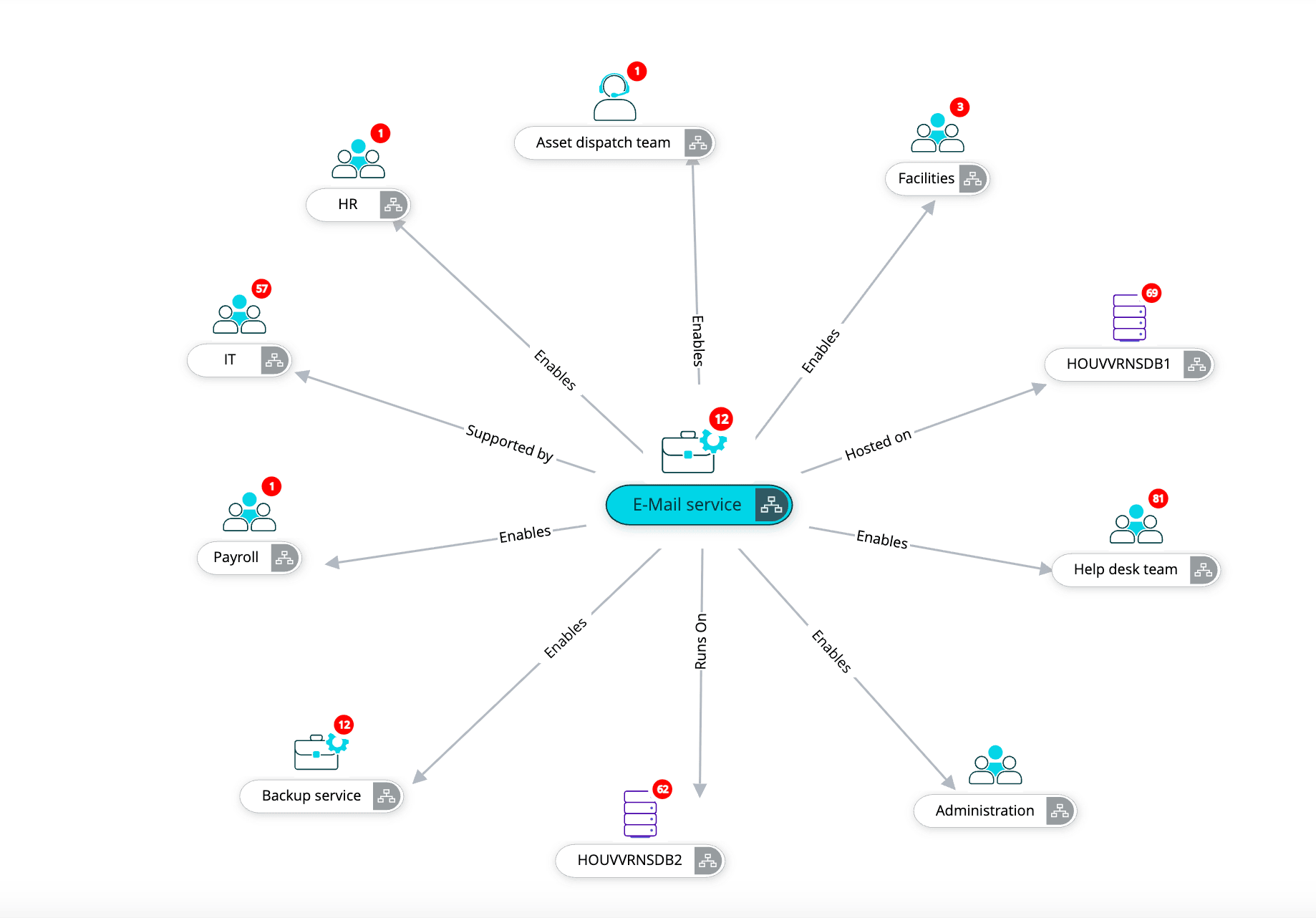
For example, consider the Email Service CI, which falls under the Business Service CI type that inherits from the parent CI type Service. It could include fields such as service owner, availability, or server details, and show relationships like runs on, hosted on, depends on, or managed by to map its underlying infrastructure.

CMDB relationships showing depends on, hosts, and connected to links

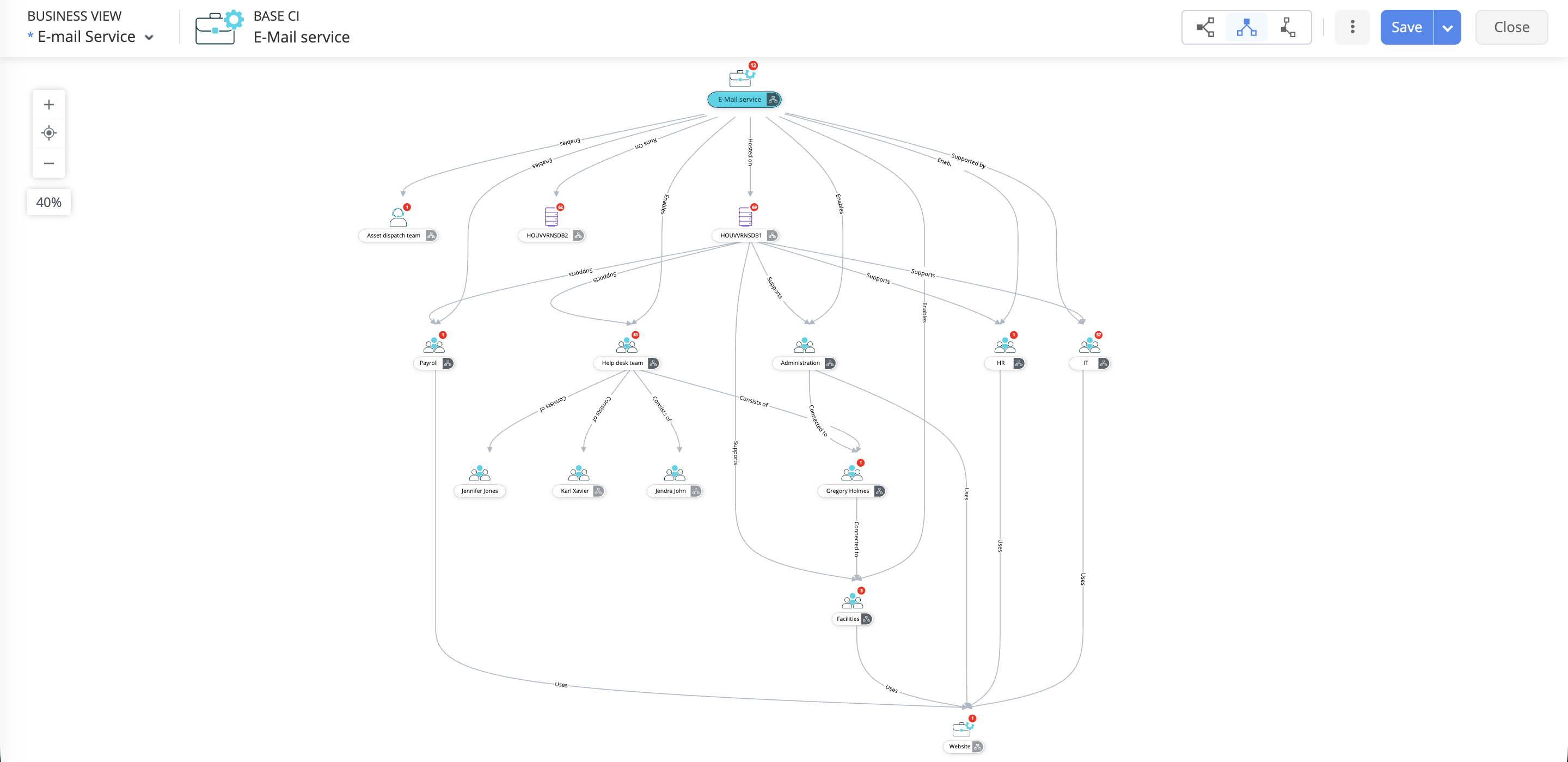
Visualizing these connections through dependency mapping provides a bird's-eye view of your IT landscape. It shows how services depend on each other, highlights single points of failure, and helps you see the real impact of changes or outages. This mapping turns scattered data into useful, practical insights.

Email service mapped to servers and dependencies

Common IT struggles without a CMDB

  • Dispersed asset data across multiple systems makes it difficult to gain a unified view of the entire IT environment.
  • IT teams spend extra time manually identifying affected and related components during incidents, resulting in a longer mean time to resolution (MTTR).
  • IT teams sometimes approve changes without fully grasping the potential chain reactions. A minor update can unexpectedly lead to significant disruptions.
  • Meeting regulatory requirements is a tedious, manual process, and audits frequently encounter difficulties because of incomplete or inconsistent documentation of their IT infrastructure.

Why a CMDB matters: Benefits you need to know

A CMDB goes beyond asset tracking by linking infrastructure to enterprise operations. It helps IT teams to understand how components such as servers, networks, and applications work together to deliver business services.

Here are the key benefits of a CMDB:

BenefitDescription
Improved visibility Stops the fragmentation caused by scattered records and siloed tools, giving you a single pane of glass to view every asset, its configuration, and where it lives.
Faster incident resolution During an incident, the CMDB helps your team immediately identify the dependencies of the primarily affected systems.
Change impact analysis Before you push an update, the CMDB shows how changes affect related components. This massively reduces service disruptions caused by poorly planned changes.
Regulatory compliance Keeps accurate, audit-ready records of all assets and their current configurations, making compliance reporting painless.
Offers configuration data for automation A CMDB feeds accurate configuration data into your ITSM, DevOps, AIOps, and orchestration tools, enabling dependable automation, smarter incident correlation, and safer change execution.

CMDB vs. ITAM: What's the difference?

A CMDB maps how systems are configured and connected, complementing ITSM processes like incident and change management. ITAM handles the business aspect of IT assets, including costs, licenses, contracts, and inventory.

AspectCMDBITAM
PurposeTracks CIs along with their attributes and relationships.Manages the financial, contractual, and life cycle aspects of hardware and software.
FocusMaintains a database of CIs such as servers, applications, and network devices that are critical to service delivery.Focuses on assets as standalone items that hold financial value for the organization.
Data storedCIs attributes, dependencies.Assets, licenses, financials, warranties.
Use casesIncident, change, problem management, compliance.Life cycle management, Procurement, budgeting, audits.
ExampleServer hosts multiple apps.Server costs $2,600 and warranty expires in 2028.

How CMDB and ITAM work together

In practice, CMDB and ITAM are not competitors but partners.

  • ITAM provides accurate inventory data and life cycle details. It answers questions like: Is this server under warranty? What is the license usage for this software?
  • The CMDB enriches that data by adding operational context and relationships. It reveals the service impact, answering: Which critical business applications depend on this server?

Together, they create an unified view of the IT environment. This partnership helps IT teams to reduce unnecessary costs, manage technical and compliance risks, and respond far more quickly to service-impacting incidents.

How a CMDB works

Bringing together scattered IT configuration data into a trusted, integrated source of truth takes a structured approach. This involves several key steps:

  • Discovery and ingestion: The CMDB starts by gathering data from your existing ITAM tools, agent scanners, ITOM tools, and other business app integrations so it knows what people, assets, and services are in your environment.
  • Normalization and reconciliation: Then, it cleans the data, removes duplicates, and standardizes all the imported CIs so the information stays accurate and reliable.
  • Relationship mapping: Next, it identifies how your applications, services, and infrastructure depend on each other. Some relationships are discovered automatically through integrated tools, while others need to be added by the IT team. These mapped connections are then validated to ensure accuracy.
  • Storage and indexing: All the CIs are organized and categorized based on the IT team's policies, that makes it easy to search, retrieve, and correlate whenever you need it.
  • Visualization and queries: Dashboards, service maps, and relationship views help teams explore the environment and understand how everything fits together.
  • Ongoing updates: Regular syncs and occasional manual reviews keep the CMDB fresh and accurate over time.
  • Use in daily operations: With clean, connected data, teams can resolve incidents faster, assess impact, plan changes, support audits, and make smarter ITSM decisions.

CMDB in action: Real-world application

Enhancing ITSM core processes: The real value of a CMDB emerges when its relationship-based data is applied in daily IT operations. Its practical benefits become evident through integration with key ITSM processes, where it helps reduce risk and speed up service recovery.

ITSM ProcessCMDB functionality leveragedStrategic business outcomeImpact
Change enablementImpact analysis and dependency mapping: The CMDB provides a comprehensive visualization of all services and CIs dependent on the component targeted for modification.Risk mitigation and service resilience: Transforms change management from relying on manual guesses to a systematic, data-based approach, enabling change managers to precisely evaluate the impact of a proposed change. Inadequate planning of changes accounts for service outages. A functioning CMDB ensures comprehensive risk assessment, reducing fallback rates and service disruption.
Incident managementContextual triage and CI association: Links an incoming incident to the affected CI, providing the service desk technician with the historical context, owner, and underlying infrastructure details.Accelerated MTTR: L1 support can skip manual lookup, quickly identifying the service owner and likely root cause, thereby accelerating triage, minimizing unnecessary escalations, and substantially cutting down service restoration time. The capacity to quickly locate and reference CI records aids in meeting stringent SLA targets by facilitating faster identification of problematic components.
Problem managementPattern identification and RCA: CMDB data helps you link recurring incidents to the underlying CI causing them and trace related service dependencies, making it easier to pinpoint the true source of failure.Problem analysis and service stability: CMDB data speeds up RCA by highlighting which assets or server clusters are causing recurring issues, helping IT teams resolve problems faster and plan targeted maintenance for greater stability. A proactive approach, facilitated by CMDB dependency mapping, builds a robust known error database (KEDB), enhancing the overall stability and maturity of the IT environment.
ComplianceAudit traceability: A CMDB maintains a historical record of CIs and their changes, enabling IT teams to trace what changed, when, and by whom.Regulatory assurance and governance maturity: Helps organizations meet regulatory, audit, and security requirements by providing a complete and reliable audit trail. Reduces audit findings, avoids compliance penalties, improves security posture, and strengthens overall IT governance.

DevOps and cloud environments: Modern CMDBs integrate with continuous integration/ continuous delivery/deployment pipelines, enabling DevOps teams to track resources across hybrid environments. This helps prevent drift between environments, ensuring consistency from development to production.

Capacity planning & optimization: By analyzing CI usage and interdependencies, IT teams can predict capacity bottlenecks and allocate resources more efficiently.

CMDB use case: Linking incident, problem, and change management

This example demonstrates how a CMDB provides the essential data link between three core ITSM processes during a major system failure.

Use case: Email service outage

Scenario: Let's say, Zylker tech, an IT company's email service (a Business Service CI in the CMDB) is down. Employees cannot send or receive emails, impacting business operations.

Phase 1: Incident management

  • Users report the issue.
  • The incident is logged and automatically linked to the email service CI in the CMDB.
  • The service desk sees all related information: servers, mail gateways, dependencies, and recent changes.
  • Quick analysis shows that the mail server CI (a child CI under email service) has a failed service.

Using CMDB insights, the team identifies the service dependencies and locates the secondary mail server. After monitoring tools confirm that the secondary mail server is healthy, they redirect email traffic to it, restoring service temporarily while the root cause is investigated.

Phase 2: Problem management

  • Since this is a major issue, a problem record is created to identify the root cause.
  • CMDB relationship history shows that a recent patch update CI applied to the mail server may be causing the failures.
  • The problem management team uses the CMDB to analyze dependencies, assess the impact on related services (like CRM and HR systems), and trace the underlying issue—found to be the patch that initiated the issue.

Phase 3: Change management

  • A change request is raised to roll back or fix the faulty patch on the Mail Server.
  • CMDB relationships help assess risks, impacted CIs, and potential downtime before approving the change.
  • The change is implemented during a planned window, and the mail server CI is updated in the CMDB.
  • Once the fix is validated, the incident is fully resolved and the Problem record is closed.

Outcome

  • The email service is quickly restored using a CMDB-guided temporary workaround, minimizing business disruption.
  • The root cause is accurately identified through CI relationship and history analysis.
  • A controlled, low-risk change permanently resolves the issue and prevents recurrence.
  • All records—incident, problem, and change—remain linked to the same CIs, ensuring full traceability and better future troubleshooting.
  • Zylker's IT team improves MTTR, avoids unplanned downtime, and strengthens overall service reliability.

Best practices for a modern CMDB

A modern CMDB succeeds only when it is treated as an ongoing process and not a one-time setup. With clear ownership, continuous audits, and the right automation, the CMDB becomes a reliable source of truth for IT teams. Here are a few best practices to follow:

  • Define a clear scope and assign CI ownership: Start small and focused. Instead of loading every device or asset, identify only the CIs that truly impact business services. Work with service owners and application owners to decide which CI classes and attributes matter. Assign clear owners for each CI so someone is always accountable for keeping its information accurate and up to date.
  • Use automation and integration: Leverage automation and integration to sync validated data from ITAM, ADDM, monitoring, observability, and discovery tools into the CMDB, automatically identifying components and mapping their relationships.
  • Maintain data quality with continuous audits: CMDB data tends to become outdated over time. By conducting routine health assessments, removing stale CIs, and running validation processes, the data remains up to date. Monitoring KPIs like data accuracy and the time needed to resolve discrepancies provides insight into the CMDB's overall health and how swiftly gaps are addressed.

Key metrics for CMDB success

These key metrics help assess the accuracy, completeness, and operational value of your CMDB as it supports ITSM processes.

KPI categoryMeasureRelevance
Data qualityCI data accuracy percentageMeasures the percentage of CIs with correct, verified attributes. Directly correlates to trust in the CMDB.
TimelinessMean time to resolve discrepancies (MTTR-D) Tracks the efficiency of the configuration management process in correcting inaccurate CI records.
CoverageCritical service coverage (%)Measures the proportion of business-critical services whose underlying CIs are fully mapped, defining the scope of protection.
Process integrationChange failure rate attributable to CMDB gapMeasures the percentage of failed changes linked to missing or incorrect relationship data.

Choosing the right CMDB tool

Selecting the correct CMDB solution depends on its scalability, integration capabilities, and native alignment with your current ITSM processes. Consider the following questions:

  • Does it scale? Can the solution handle thousands of CIs and high transaction volumes without performance degradation?
  • Does it integrate? Does it offer out-of-the-box, bidirectional integration with monitoring, discovery, and ticketing systems?
  • Is it built-in? Does the CMDB natively reside within the ITSM platform, avoiding messy integration projects?
  • Is it intelligent? Does it offer AI-based features for automated relationship discovery and predictive impact analysis?

Setting up your CMDB in ServiceDesk Plus

With ServiceDesk Plus, you can quickly discover your environment, bring in clean data from ITAM and other tools, and map key services without complexity. The platform’s step-by-step setup, automated processes, and built-in integrations enable you to create a dependable CMDB, enabling your teams to immediately enhance incident response, change management, and service visibility.

Key CMDB features in ServiceDesk Plus

FeaturesWhat it does
IT asset discoveryScans and detects IT assets using agents, probes, and self-scan scripts.
Custom CI types and relationshipsLets you define CI categories, create custom CI types, and set direct/inverse relationships.
Visual relationship mappingProvides an interactive map to visualize dependencies and understand service impact.
CI inventory managementCentralized list view to view, filter, add, edit, or remove CIs easily.
Business viewsEnables custom service maps to visualize how CIs support business services.
Automatic CI syncUses sync rules to update the CMDB with newly discovered assets automatically.
Integration for dependency mapping Integrates with various discovery, monitoring, and IT operations tools, including ManageEngine Applications Manager, OpManager, and Endpoint Central, as well as third-party sources, to auto-populate CI data and application dependencies.
ITSM process integrationLinks CIs with incidents, problems, changes, and releases for better impact analysis.
CI Status & Lifecycle TrackingTracks CI life cycle states such as Active, In Repair, or End-of-Life.
Custom CI forms & attributesAllows adding unlimited custom fields to capture organization-specific CI data.
CI audit & history TrackingMaintains a history of CI updates for accountability and compliance.
Role-Based Access ControlRestricts CMDB access and edit permissions based on user roles.

Watch how the CMDB in ServiceDesk Plus gives you complete visibility into your assets, services, and their relationships. This demo shows how you can trace dependencies, resolve incidents faster, plan changes confidently, and stay compliant with evolving regulations—all from a single source of truth.

A phased setup helps teams build a usable, accurate CMDB without getting overwhelmed. The goal is to start small, establish data accuracy, and gradually expand.

Phase 1: Define scope and CI categories

  • Identify the business-critical services you want to model first
  • Define the CI classes needed for those services (servers, VMs, applications, network devices, databases, etc.)
  • Establish ownership for every CI category

Why it matters: Clear scope prevents over engineering. Teams focus only on the services that deliver immediate value.

Phase 2: Discover, import, and clean CI data

  • Use ServiceDesk Plus' discovery tools (network scans, agent-based discovery, Scan script)
  • Import existing spreadsheets if needed
  • Clean and validate data immediately after import
    • Remove duplicates
    • Standardize naming
    • Confirm CI owners and support groups

Why it matters: Accurate, clean data is the foundation for dependable relationships, reports, and RCA.

Phase 3: Build relationships and connect ITSM processes

  • Map dependencies across services, applications, servers, and databases
  • Link CIs with incidents, problems, changes, and releases
  • Test how technicians use CI information inside tickets

Why it matters: Relationships turn static CI data into actionable insights. Technicians can see impact paths and identify risky change scopes faster.

Phase 4: Integrate and automate for continuous accuracy

Integrate ServiceDesk Plus with:

  • ITOM tools (for health/performance confirmation)
  • Endpoint management (for workstation/server updates)
  • Identity management systems (for user and privilege data)
  • Cloud services (for SaaS and VM sync)
  • Set up scheduled scans and sync rules to populate assets, departments, service categories, software installations, support groups, and users as CIs in ServiceDesk Plus.
  • Build dashboards and reports for CMDB audits

Why it matters: Integrations keep CI data fresh. Automation reduces manual work and ensures the CMDB stays trustworthy over time.

Why this phased approach works

  • Teams see value as soon as relationships and impact views show up in incident and change tickets.
  • You build only what’s needed, without turning the CMDB into a data dump.
  • Once you model the core services, you can keep adding more layers such as network segments, cloud resources, or entire business services.
  • Continuous data sync ensures accurate impact analysis, faster RCA, and improved change success rates.

The future of CMDB: Automation and AI

AI-driven relationship mapping: Instead of relying on technicians to manually map relationships, future CMDBs will use AI to understand how applications communicate across the environment. By analyzing dependency data from APM tools, observability platforms, logs, and topology maps, the CMDB will be able to auto-populate accurate service models. This is especially valuable in microservice and hybrid-cloud environments where manual discovery and relationship mapping are no longer practical for ITSM teams.

Predictive impact analysis: AI will analyze large volumes of past incidents, change records, CI details, and service connections to spot hidden patterns. It can highlight things teams might overlook, like slow-building failure trends or repeated service disruptions tied to the same CI. This turns the CMDB from a static database into a smart assistant that helps change managers understand risks faster and make decisions with more confidence.

Self-healing capabilities: As part of AIOps integration, the CMDB will provide context for automated remediation actions. It will move IT closer to self-healing systems where configuration drift is automatically detected and corrected.

A good CMDB doesn’t just help you tick compliance boxes. It simply makes everyone’s life easier. When you know what you have and how everything connects, you avoid last-minute chaos, fix issues faster, and keep services running smoothly. With connected, trustworthy data, every ITSM process works better, and the business benefits from greater stability and efficiency.

Frequently asked questions

Expand all

What is a configuration item (CI)?

A CI is any component in your IT environment that you need to track to deliver a service. It could be a server, a business service like email, a VM, or even a critical application. If it affects how your services run, it’s a CI.

How often should the CMDB be updated?

Ideally, your CMDB should be updated continuously. Any time a CI is added, removed, or changed, the CMDB needs to reflect it.

How does the CMDB help with incident management and change?

A well-maintained CMDB gives technicians quick visibility into what’s connected to what. During an incident, it helps identify the root cause faster. During change, it lets you assess dependencies and risks so you don’t accidentally bring down a critical service.

Is a CMDB useful for small organizations or only large enterprises?

A CMDB is useful for both small organizations and large enterprises. Its value depends less on the size of the organization and more on the complexity of the IT environment. If a business relies heavily on its technology stack or is experiencing growing infrastructure demands, a CMDB provides clarity, control, and reliability for organizations of any size.

Can I customize CI types and attributes in ServiceDesk Plus?

Yes. ServiceDesk Plus lets you create custom CI types, define attributes, and set relationships that match how your IT environment actually works. You get flexibility without complicating your CMDB.

What’s the difference between a CMDB and an asset inventory?

An asset inventory tells you what you own, whereas a CMDB tells you how everything works together. It goes beyond hardware and software lists by mapping relationships, dependencies, and the services each component supports.

How can ServiceDesk Plus integrate with other tools to populate the CMDB?

ServiceDesk Plus can pull data from discovery tools, monitoring systems, directory services, and third-party apps through integrations and APIs. This helps you automatically populate and enrich the CMDB with accurate, real-time data.

What are best practices for maintaining data integrity in the CMDB?

Follow clear CI criteria, define ownership, and automate wherever possible. Use standard naming conventions, review CI data regularly, and avoid dumping unnecessary items into the CMDB. High-quality, trusted data leads to better decisions during incidents, changes, and audits.

Let's support faster, easier, and together