Microsoft 365 outage phishing campaign highlights the need for phishing-resistant MFA
After Microsoft 365's service disruption on November 12, 2026, attackers were quick to exploit the uncertainty. Within a day, a phishing campaign began circulating emails that appeared to be legitimate Microsoft 365 service-health notifications. The messages warned recipients that emails held during the outage would be permanently deleted unless they acted quickly to recover them.
Microsoft Threat Intelligence detailed the campaign in a report published on November 16, 2026, describing how attackers targeted organizations across multiple industries with outage-themed messages and links to external websites. The campaign demonstrates how an operational disruption can provide the perfect backdrop for credential phishing. It also raises an important question for organizations that already enforce MFA: How well do their authentication methods hold up when employees encounter convincing phishing attempts?
How the November 2026 Microsoft 365 outage fueled a phishing campaign
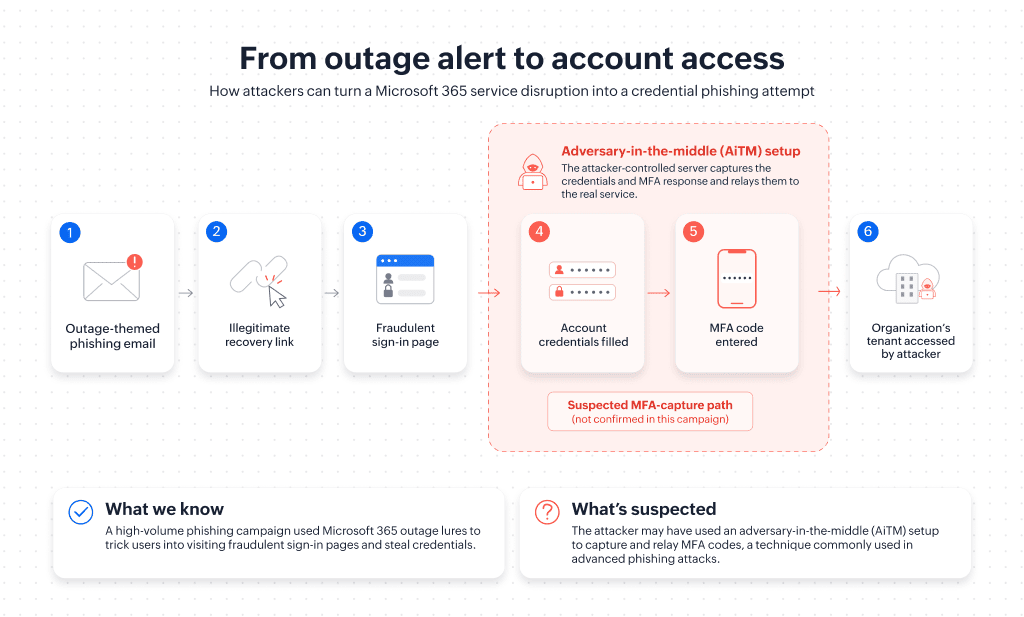
On November 13, attackers began circulating phishing emails, shortly after the worldwide Microsoft 365 service disruption that affected Exchange Online and Outlook. Attackers impersonated service-health notifications and referenced familiar Microsoft applications such as Microsoft Teams, SharePoint Online, and Microsoft 365 Copilot, to make their messages appear credible. Some observed emails claimed that four messages had been held during the outage and warned that they would be deleted within 24 hours unless recipients clicked a "RESTORE MESSAGES" button.
The messages were carefully designed to resemble legitimate operational communications from administrators.The attackers also embedded what appeared to be an email conversation within the message body, potentially to evade email filtering mechanisms. Microsoft identified suspicious sender domains, randomized outage-related subject lines, and recipient-specific tracking links that redirected users to external websites that imitated Microsoft's login screens.
The timing made the campaign particularly convincing. Employees who had experienced delayed or unavailable email services might reasonably expect follow-up communications about restoring normal operations. The attackers exploited this expectation to lure recipients into clicking malicious recovery links, thinking they are participating in a recovery activity.
Microsoft's investigation identified the activity as likely credential phishing, although it did not establish that users submitted credentials or that accounts were compromised. Microsoft Defender policies blocked or quarantined detected campaign messages in environments where it was active. Even without evidence of successful compromise, the campaign illustrates how attackers can exploit familiar business processes and legitimate service disruptions to make malicious requests appear trustworthy.
Why conventional MFA can still leave organizations exposed
MFA is one of the most effective ways to strengthen account security because it requires users to verify their identities through more than one factor. However, not all authentication methods provide the same level of protection against phishing. Methods that rely on manually entered verification codes can still be vulnerable when attackers successfully impersonate a legitimate sign-in page.
Consider an employee who receives an outage-related notification and follows a link to what appears to be a Microsoft 365 sign-in page. If the website is fraudulent, the attacker may attempt to collect the employee's password and any one-time verification code entered during authentication. In more sophisticated adversary-in-the-middle attacks, authentication interactions can be relayed to the legitimate service, potentially allowing attackers to capture session tokens that they can use from anywhere without having to reauthenticate.
This vulnerability arises because authentication systems with traditional one-time passwords cannot not inherently verify whether the user is interacting with the intended website. When users enter their credentials on these sites, they can then be reused on the legitimate sites by illegitimate actors. An ideal solution is an authentication system that does not work on pages its not intended for. Passwords and OTPs do. Phishing resistant methods such as FIDO2 keys are, by, design, do not work on illegitimate pages since they can't detect the exact key and share the secret.
Recognizing this limitation, Microsoft recommends prioritizing phishing-resistant authentication methods such as passkeys and security keys. Unlike conventional verification codes, these methods use cryptographic authentication designed to prevent fraudulent websites from obtaining valid authentication responses for legitimate services.
How phishing-resistant MFA protects against fraudulent sign-in pages
Phishing-resistant MFA strengthens authentication by removing the need for users to enter reusable verification codes that attackers can intercept or relay. FIDO2 authentication, for example, relies on public-key cryptography, with a private key protected by the user's authenticator and a corresponding public key registered with the legitimate service.
When a user signs in, the authenticator generates a cryptographic response that the service can verify. The credential is bound to the legitimate service's identity, preventing a phishing website operating under a different domain from obtaining a valid authentication response for that service. This protection does not depend on the employee recognizing every suspicious link or noticing subtle differences between legitimate and fraudulent sign-in pages.
For organizations, the advantage extends beyond stopping a single type of phishing attack. Phishing-resistant authentication reduces reliance on passwords and verification codes that can be disclosed through social engineering, while providing a more consistent way to secure access to enterprise applications. It is particularly valuable for accounts with access to sensitive business information, administrative privileges, or critical systems.
Strengthening enterprise authentication with ManageEngine Identity Access
The November 2026 Microsoft 365 outage phishing campaign highlights the importance of authentication controls that remain effective even when phishing messages appear legitimate. Email filtering and security awareness training help reduce the likelihood of employees encountering malicious links, but organizations also need safeguards that protect accounts when users are deceived into visiting fraudulent websites. This includes websites across non-Microsoft 365 services like enterprise applications, on-premise systems, and even their own devices. An access management solution, like ManageEngine Identity Access, that secures not just Microsoft 365 but your entire organization is required to protect against phishing across your organization.
Identity Access is a cloud-native, directory-agnostic access management platform that secures logins across devices, cloud applications, VPNs, RADIUS endpoints, and email. Its passwordless authentication methods replace manually entered verification codes with cryptographic authentication, helping prevent attackers from obtaining usable authentication responses through fraudulent sign-in pages.
Identity Access supports phishing-resistant authentication which empowers organizations to strengthen authentication across multiple parts of their IT environment rather than focusing exclusively on just Microsoft 365.
Beyond phishing-resistant authentication, Identity Access delivers adaptive MFA and conditional access capabilities that evaluate contextual factors such as device, network, IP address, time, and location. These policies help administrators apply appropriate authentication requirements and access restrictions based on the circumstances of a sign-in attempt. Combined with centralized cloud SSO, Identity Access provides a way to manage authentication and access policies consistently across supported enterprise services.
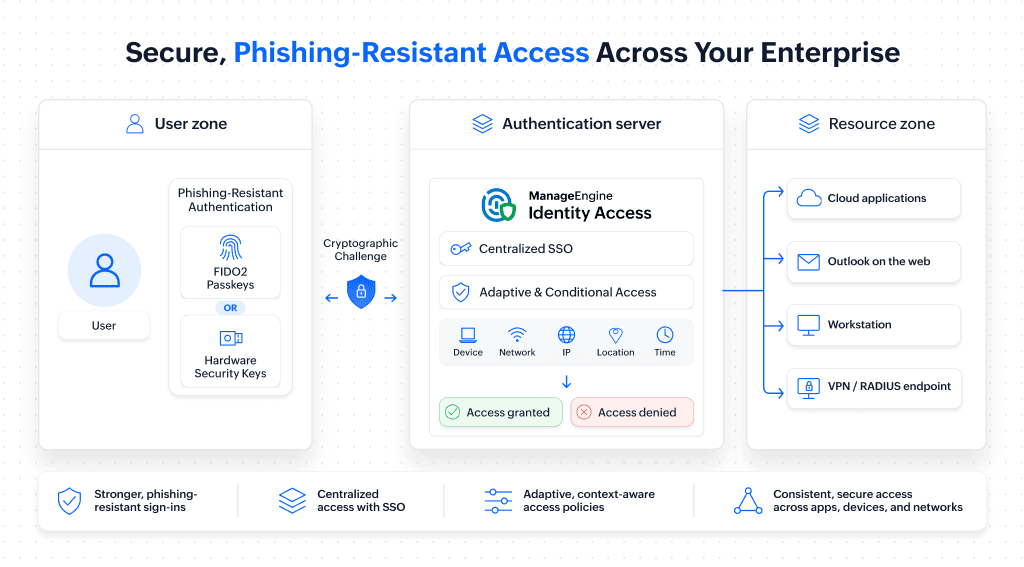
Identity Access brings phishing-resistant authentication and contextual access controls together to help organizations thwart credential phishing and strengthen access security across their environment.
Building stronger defenses against outage-themed phishing
Microsoft's investigation provides an immediate starting point for organizations concerned about exposure to the campaign. Security teams can use these findings to investigate potential threats and strengthen authentication against similar phishing attempts.
Identify suspicious emails: Security teams can review Microsoft's published indicators of compromise and hunting queries to detect campaign-related messages and identify users who interacted with malicious links.
Investigate potential account compromise: Security teams should examine sign-in activity, active sessions, authentication registrations, mailbox forwarding rules, and unusual application permissions, particularly where credential exposure is suspected.
Strengthen authentication methods: IAM teams can replace phishable authentication methods, such as SMS codes and other one-time passwords, with phishing-resistant FIDO2 passkeys and hardware security keys.
Prioritize critical accounts and applications: IAM teams can prioritize privileged accounts and sensitive applications when rolling out phishing-resistant MFA before extending protection across other supported access points.
The November 2026 Microsoft 365 outage phishing campaign shows how quickly attackers can turn a legitimate service disruption into a convincing social engineering opportunity. Employees may be trained to recognize suspicious emails, but an urgent message referencing a disruption they have already experienced can still be persuasive. Stronger authentication helps ensure that a moment of misplaced trust does not automatically translate into compromised access.
Schedule a personalized demo of Identity Access to explore how FIDO2 passkeys, hardware security keys, and adaptive access policies can help protect your organization's identities against credential-focused attacks.