Analytics Plus upgrade plan
Follow the step-wise sequence to upgrade to the latest build
- You're on build 5500
- Download and install service pack to move to build 6000
- Download and install service pack to move to build 6100
- Download and install service pack to move to build 6200
- Download and install service pack to move to build 6300
- Download and install service pack to move to build 6400
- Download and install service pack to move to build 6430
- Download and install service pack to move to build
Follow the step-wise sequence to upgrade to the latest build
- Your build number is between 5400 to 5420
- Download and install service pack to move to build 5500
- Download and install service pack to move to build 6000
- Download and install service pack to move to build 6100
- Download and install service pack to move to build 6200
- Download and install service pack to move to build 6300
- Download and install service pack to move to build 6400
- Download and install service pack to move to build 6430
- Download and install service pack to move to build
Follow the step-wise sequence to upgrade to the latest build
- Your build number is between 5300 to 5360
- Download and install service pack to move to build 5400
- Download and install service pack to move to build 5500
- Download and install service pack to move to build 6000
- Download and install service pack to move to build 6100
- Download and install service pack to move to build 6200
- Download and install service pack to move to build 6300
- Download and install service pack to move to build 6400
- Download and install service pack to move to build 6430
- Download and install service pack to move to build
Follow the step-wise sequence to upgrade to the latest build
- Your build number is between 5200 to 5260
- Download and install service pack to move to build 5301
- Download and install service pack to move to build 5400
- Download and install service pack to move to build 5500
- Download and install service pack to move to build 6000
- Download and install service pack to move to build 6100
- Download and install service pack to move to build 6200
- Download and install service pack to move to build 6300
- Download and install service pack to move to build 6400
- Download and install service pack to move to build 6430
- Download and install service pack to move to build
Follow the step-wise sequence to upgrade to the latest build
- You're on build 5150
- Download and install service pack to move to build 5200
- Download and install service pack to move to build 5301
- Download and install service pack to move to build 5400
- Download and install service pack to move to build 5500
- Download and install service pack to move to build 6000
- Download and install service pack to move to build 6100
- Download and install service pack to move to build 6200
- Download and install service pack to move to build 6300
- Download and install service pack to move to build 6400
- Download and install service pack to move to build 6430
- Download and install service pack to move to build
Follow the step-wise sequence to upgrade to the latest build
- Your build number is between 5000 to 5140
- Download and install service pack to move to build 5150
- Download and install service pack to move to build 5200
- Download and install service pack to move to build 5301
- Download and install service pack to move to build 5400
- Download and install service pack to move to build 5500
- Download and install service pack to move to build 6000
- Download and install service pack to move to build 6100
- Download and install service pack to move to build 6200
- Download and install service pack to move to build 6300
- Download and install service pack to move to build 6400
- Download and install service pack to move to build 6430
- Download and install service pack to move to build
If you're on build 4760 or below, please contact support at analyticsplus-support@manageengine.com to upgrade to the latest build.
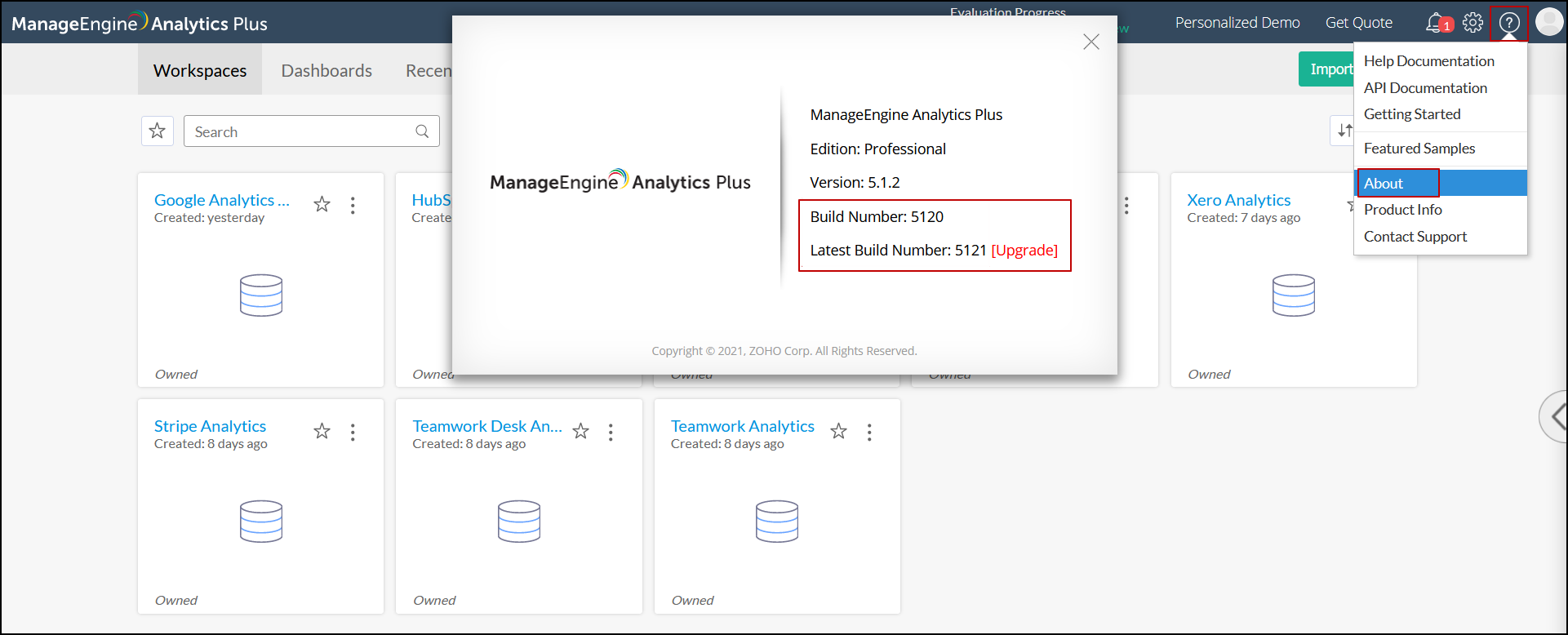
How to locate my existing and latest build number?
- Open your Analytics Plus application.
- Click the Help icon and choose About from the drop-down. You can find your present and latest build number in the pop-up that appears.
Steps to upgrade Analytics Plus
To upgrade Analytics Plus from one build to another, follow the steps detailed in this documentation.
Note: If you have rebranded Analytics Plus and are upgrading from build 3100 or below, please perform the rebranding procedure again.
Frequently asked questions
What is 'End of technical support'?
End of technical support only means technical assistance will not be available for the specified builds past the retirement dates. However, our engineers will assist you in upgrading to the latest build provided you have a valid AMS contract.
Why should I upgrade?
Upgrading to the latest builds will give you access to the latest features, enhancements and bug fixes.
Is the upgrade done free of cost?
All customers under a valid AMS contract are eligible for upgrades at no additional cost.
My Analytics Plus subscription has expired. How can I upgrade?
You have to renew your subscription before you can upgrade. Please write to sales@manageengine.com for a renewal price offer.
How long will you provide support for older builds?
Support will be provided for older builds (mentioned above) till the end of the support date.