Architecture - Browser Security Plus WAN
Browser Security Plus WAN Architecture
With rapid increase in globalisation, most companies have their branch offices spread across different places of the world. Managing the computers in these branch offices effectively is always a tedious job for the system administrators. With Browser Security Plus in hand, managing computers in WAN across remote office will turn out to be a much easier process. To manage computers in a remote location you have to add remote offices. You can add and modify the remote offices according to your requirement. Communication across these remote offices is possible by two ways
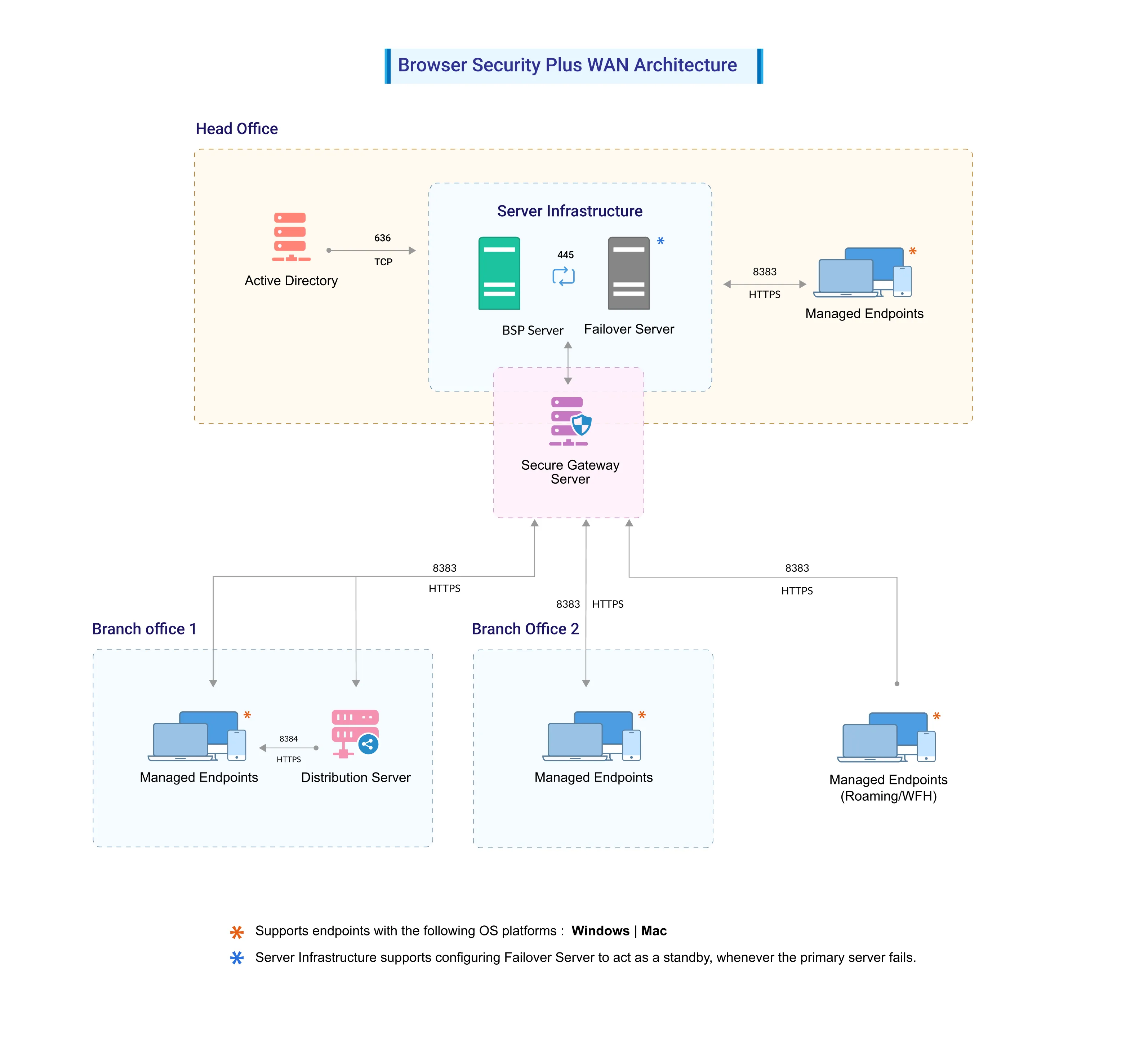
- Through Distribution Server
- Direct communication with Browser Security Plus server
When to use distribution server?
Distribution server acts as a communication layer between your remote office computers and the Browser Security Plus server. It replicates the software and patch binaries from the Browser Security Plus server and gives it to the computers in that remote office. The remote office computers, instead of getting the patch and software binaries individually from the Browser Security Plus server, gets it from the Distribution server, thus saving your WAN bandwidth. So, it is ideal to use a Distribution Server, if you have a limited WAN bandwidth and if you can afford to keep one computer which should be always running, to serve the purpose of Distribution server. We recommend Distribution server when you manage more than 10 computers in your remote office.
When to use direct communication?
When you choose your communication type as Direct communication, all the remote office computers will get the required data from the Browser Security Plus server directly. You can use this option, if you have limited computers in your remote office, say less than 10, or if you do not have any bandwidth limitation.
Adding a remote office
For managing computers in WAN you have to add a remote office. You can add the remote office directly by selecting the Remote offices tab and clicking Add Remote office. The following points are needed to be taken care while adding a remote office.
- As discussed above, decide on the communication type you wish to choose while adding a remote office. Either Through Distribution server or Direct communication.
- If you choose the communication type Through Distribution server, it is recommended that you have a dedicated computer for your distribution server and this computer should have static IP address for hassle free communication between the remote office computers and the distribution server.
- While specifying the data replication interval, you can use the default time (2 minutes) given by Browser Security Plus or change it if required. The replication interval is the interval at which the distribution server synchronizes its required patch and software binaries with those in Browser Security Plus server.
- After setting the replication interval, you can limit the Data transfer rate for replicating binaries between the Browser Security Plus server and Distribution sever. Distribution server will not consume more that the specified data. This will help you in saving your bandwidth. However, if the limit is too low, distribution server might take more time to synchronize large binaries.
- To install Distribution server and WAN agents automatically, under Remote office agent Installation section, ensure that you specify the Domain credentials with administrator privileges to all the computers managed in the remote office.
- You can add the computers to be managed either directly by clicking the Add computers option, or by importing a CSV file. For adding multiple computers, the CSV file should contain computer name given in separate lines.
Adding Multiple Remote offices
You can also add the remote office by importing a CSV file. For adding multiple remote offices, the CSV file should contain remote office names given in separate lines.
Modifying a remote office
You can also modify the remote office, by clicking the Modify icon, under the Actions column against the remote office you want to modify. If you have modified the communication type from Direct communication to Through Distribution server, you have to install a Distribution server to manage that remote office.