Integrates with ServiceDesk Plus MSP
Endpoint Central MSP can be readily integrated with ITIL-ready help desk application, ServiceDesk Plus MSP, to offer an integrated help desk and desktop management functions.
Using the cloud editions? Endpoint Central MSP Cloud now integrates with ServiceDesk Plus MSP Cloud for asset data sync to the CMDB. The other capabilities on this page are currently available for on-premises editions only.
Benefits of Integration
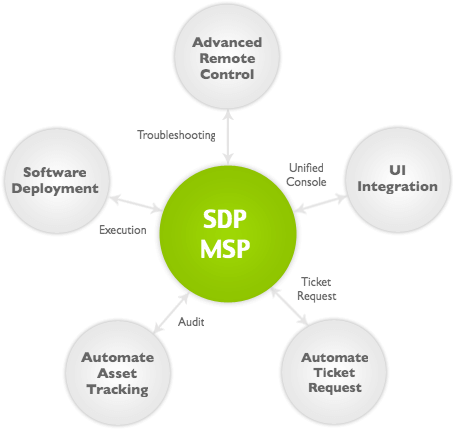
Some of the benefits of this integration include:
- Automating the asset data retrieval and updating in ServiceDesk Plus MSP CMDB.
- Making users automatically submit requests to help desk from SSP.
- Deploy software application to clients' desktop.
- Log specific events like detection of prohibited software, insufficient software licenses, etc., as tickets in ServiceDesk Plus MSP.
- Advanced Remote Control with the ability to record the entire remote session for audit purposes and performance tuning options like color quality, compression ratio, screen resolution, etc.
Integration of Asset Data to CMDB
Endpoint Central MSP automatically scans the systems in your network periodically and collects data related to hardware and software assets and updates it to your ServiceDesk Plus MSP CMDB. The scanning is initiated whenever a hardware/software change occurs without waiting for the scan interval. This means your asset data in ServiceDesk Plus MSP is accurate and up-to-date. There is no manual intervention required to gather the asset information irrespective of the customers' network setup.
Advanced Remote Control Options
Endpoint Central MSP provides advanced options to Remote Control like video recording the remote session, performance tuning options like controlling the color quality, compression ratio, screen resolution, etc. Video recording is more powerful for companies that have to comply with regulatory bodies as it provides better auditing capability.
Sending Help Desk Requests as Tickets
With Endpoint Central MSP, users will get to submit requests to help desk from their system tray. It is something similar to a native mini self-service application with different request templates that eliminates the need for any additional authentication. The requests submitted will also send additional information about the computer like system properties that the help desk technician finds useful while troubleshooting. The users' active desktop can also be sent as an image attachment to make users say what they mean.
Deploying Software Applications
Business applications like MS Office can be installed from ServiceDesk Plus MSP. If a user requests a company-approved software application, the help desk technician can directly initiate the deployment from the ServiceDesk request.
Patch Management
Using Endpoint Central MSP for Patch Management is quite simple. You just have to set it up once and it takes care of patching your clients' computers automatically without you having to do anything further. It doesn't stop with Microsoft application patches; it also supports other widely used third-party applications like Adobe Acrobat, Mozilla Firefox, Java, etc.
USB Device Management
Restrict the usage of USB devices and other portable devices like external hard disk, Bluetooth, etc. This will enhance the security of your clients' network and also allow usage for selected users or specific USB instances.
Policy Management
25+ pre-defined policy templates allow you to configure your clients' computers to map network drives, install printers, manage power settings, registry settings, manage local users and groups and so on.
User Interface Integration
ServiceDesk Plus MSP technicians can now perform all desktop management functions from within ServiceDesk Plus MSP console. Users can choose the desktop management functions that they wish to perform from the Desktop Management menu, which means under a single console you can perform entire management functions.
Next Steps ..
If you are already using Endpoint Central MSP and ServiceDesk Plus MSP, integrate these applications. Refer to the Step-by-Step Integration Guide to integrate the solutions.
If you are looking for a unified solution for network monitoring and endpoint management, try RMM Central today!
Free, 30-day trial