The IPAM stats dashboard
The IPAM stats dashboard presents an overview of the DHCP scopes or network topological units.
To access ManageEngine DDI Central's IPAM:
- Log into ManageEngine DDI Central with your login credentials.
- Select the IPAM menu from the left menu bar. With the IPAM selected, select Stats menu from the list of submenus that appear parallel to the left menu bar.
The IPAM stats offering insights on the IP address inventory managed by your DHCP server, referred as the Stats dashboard appears on screen. View IP address statistics for DHCPv4 and DHCPv6 address spaces using the toggle at the top right corner.
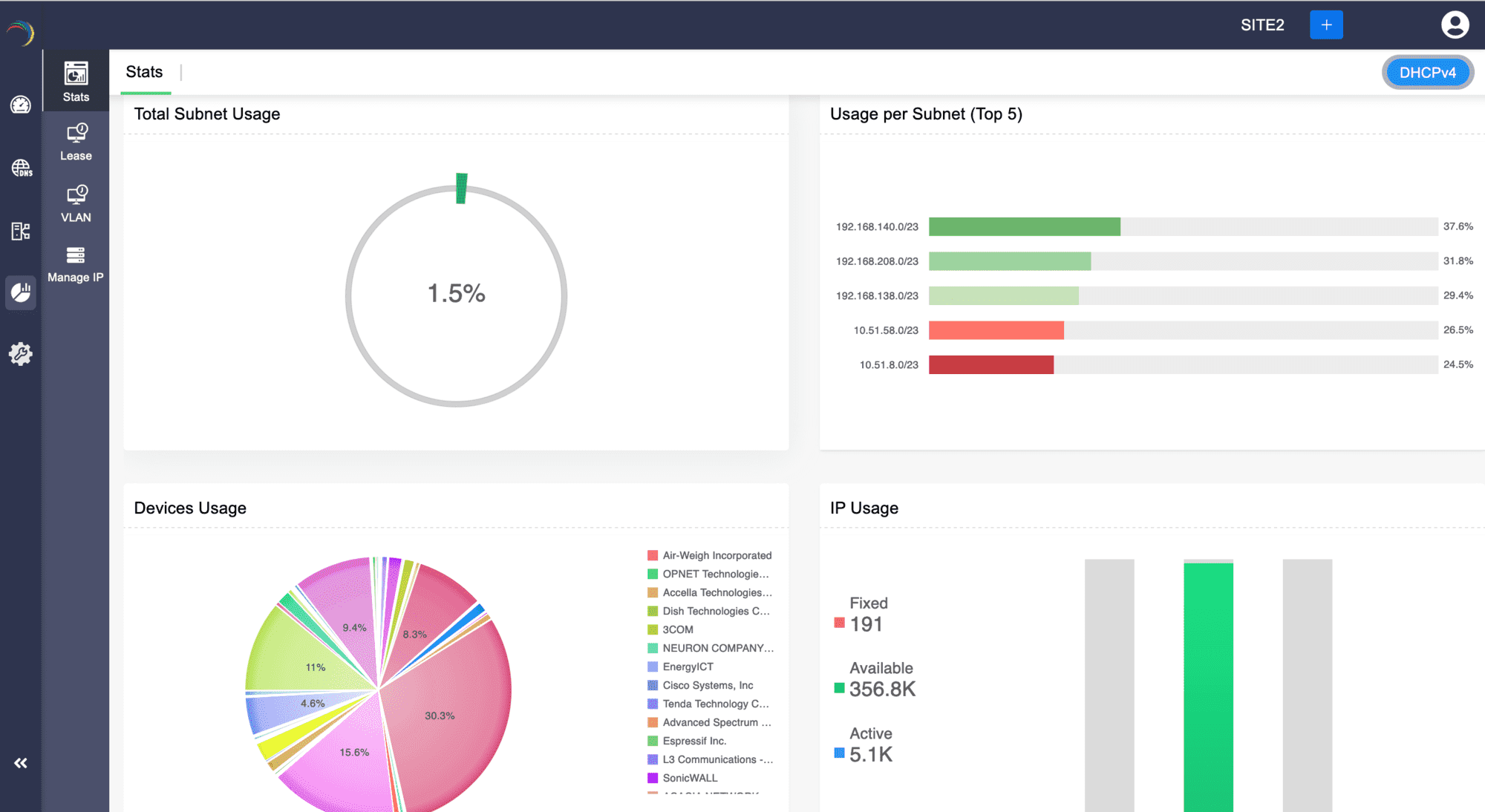
Total Subnet Usage
Provides quick insights on the overall utilization of all subnets within a network infrastructure. It provides an aggregate view of the allocated and available subnets, offering a comprehensive understanding of the subnet distribution across the network.
Usage per Subnet
Displays a bar graph showcasing the top 5 subnets with the highest IP utilization percentage within each subnet managed by the DHCP server.
Devices Usage
Device Usage statistics provide insights into the distribution of assigned IPs among various hardware vendors.
IP Usage
Displays bar graphs illustrating the total number of fixed, available, and active IPs in the entire IPv4/IPv6 address space managed by the DHCP server.