

On this page
Overview
The quiet revolution happening in enterprise IT doesn't involve flashy new technologies or massive cloud migrations. It's about something far more fundamental: finally understanding what's already sitting in your Active Directory (AD).
Your AD isn't just an authentication database. It's an untapped intelligence layer that reveals who has access to what, when permissions changed, why security policies exist, and where your organization's actual identity landscape differs from what you think it should be.
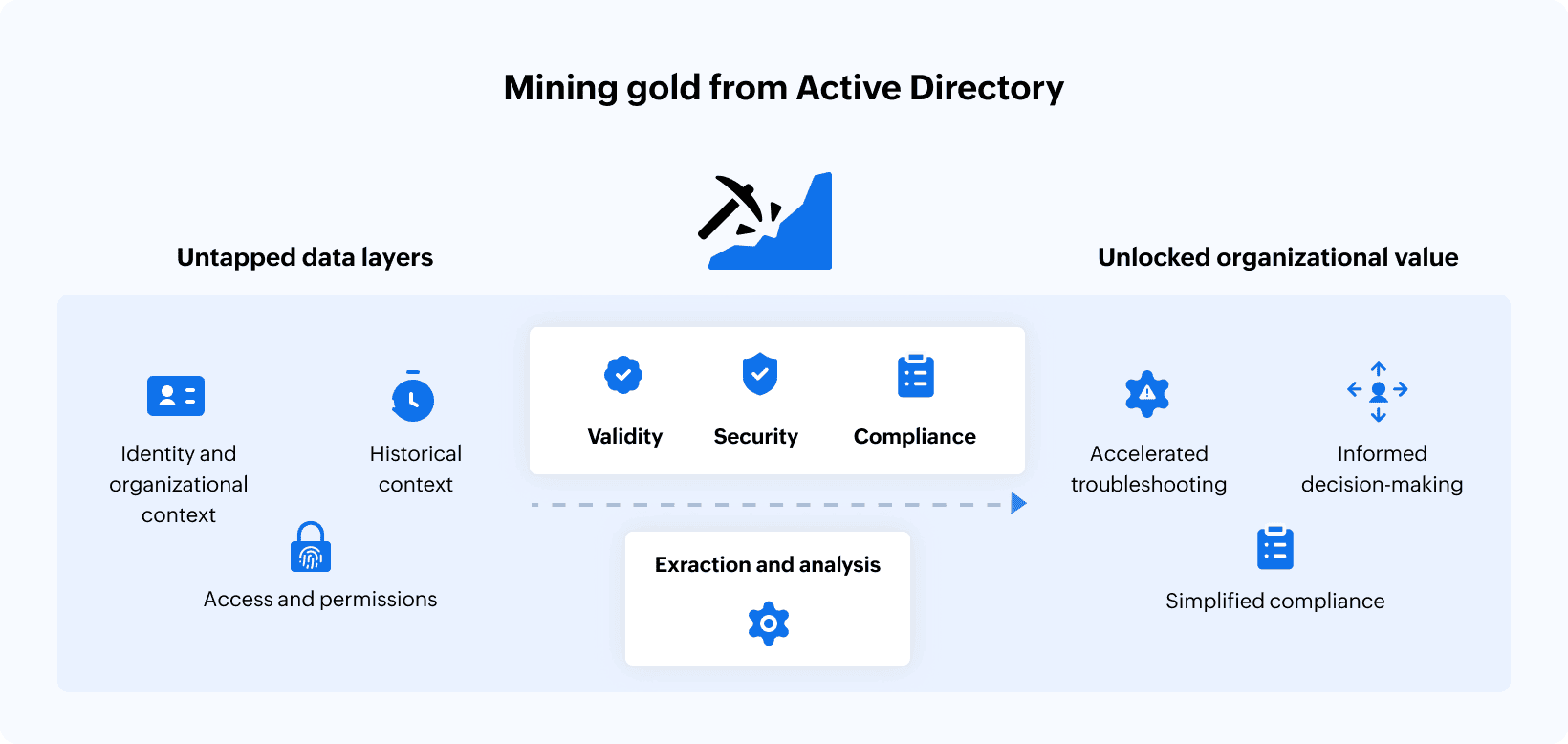
Most IT admins treat AD like a black box—make changes, hope nothing breaks, move on. But the smartest ones? They're extracting actionable intelligence that transforms security posture, accelerates compliance, and turns AD administration from reactive firefighting into strategic asset management.
The intelligence gap: What you're missing
AD contains a wealth of organizational data that most enterprises never fully leverage. Every object, attribute, and policy in AD tells a story about your organization's structure, security posture, and operational patterns.
Consider what's actually stored in your directory.
Identity and organizational context: User accounts with department assignments, manager relationships, job titles, and location data that mirror your company's actual structure.
Access permissions and group memberships: Who belongs to which security groups, nested group relationships, and the cascading permissions that determine actual access across your environment. This data reveals privilege distribution patterns that often surprise even experienced administrators.
Security policies and enforcement mechanisms: GPOs that control everything from password requirements to software installation rights, firewall rules to login scripts. Each GPO represents documented decisions about how your organization balances security with usability.
Historical change records: When properly captured, AD change logs reveal the evolution of your identity infrastructure. See who made changes, what those changes were, when they occurred, and the state before and after each modification.
System and resource information: Computer accounts, service accounts, and application integrations that map your entire technology ecosystem and reveal interdependencies that documentation rarely captures accurately.
The challenge? Most organizations lack the tools and processes to extract meaningful insights from this data repository.
Who needs this intelligence (and why)
Different stakeholders require different perspectives on AD data, but most organizations fail to deliver tailored intelligence to any of them.
IT administrators need operational visibility to understand current configurations, track changes, and troubleshoot issues efficiently. Without proper AD intelligence tools, they're forced into reactive mode—addressing problems after they occur, rather than identifying risks before they materialize.
Security teams require threat detection capabilities and compliance verification. They need to identify privilege creep, detect unauthorized changes, and validate that security policies are actually enforced. AD data provides this visibility when properly analyzed.
Compliance officers must demonstrate access controls to auditors. They need evidence that segregation of duties policies are enforced, that access certifications are accurate, and that privileged access is appropriately managed and monitored.
IT leadership needs strategic insights about infrastructure health, resource allocation efficiency, and risk exposure. They're making budget decisions and prioritization calls based on incomplete information when AD intelligence isn't available.
The "who" question: Understanding user context at scale
Every user account in AD contains organizational context that IT rarely leverages effectively. Understanding who users are within your organizational structure unlocks powerful capabilities.
User attributes reveal reporting hierarchies, departmental boundaries, and geographic distribution. When administrators understand these relationships, they can implement role-based access patterns that align permissions with actual job responsibilities rather than relying on ad-hoc access requests.
Group membership analysis exposes how permissions actually flow through your organization. Nested groups create complex permission inheritance chains that can grant unintended access. Without visibility into complete group membership hierarchies—including nested groups several levels deep—administrators cannot accurately assess what access any given user actually possesses.
Manager attributes and organizational unit structures provide the framework for delegated administration models. When properly leveraged, this data enables department managers to approve access requests for their teams, IT to scope administrative permissions appropriately, and security teams to implement segregation of duties controls that reflect real organizational boundaries.
The "when" factor: Change tracking that actually matters
Timestamps matter more than most administrators realize. Understanding when changes occurred transforms AD data from a static snapshot into a dynamic intelligence source.
Account creation and modification dates reveal provisioning patterns. Are new accounts created weeks before employees start, or are they scrambled together on their first day? Do account attributes get updated when employees change roles, or do they drift out of sync with reality? These temporal patterns expose process maturity and identify areas where automation could eliminate delays.
Password change history indicates authentication patterns and potential security concerns. Accounts with passwords that haven't changed in years might be service accounts lacking proper documentation, orphaned accounts from former employees, or security risks waiting to be exploited.
Group membership changes tracked over time reveal how access evolves. When did a user join the Domain Admins group? Who added them? Was the membership temporary for a specific project, or has it persisted indefinitely? Without temporal visibility, privilege creep becomes inevitable as temporary access assignments become permanent through administrative oversight.
Group policy modifications must be tracked with precision. When a GPO changes, administrators need to know the exact modifications made, who made them, when they occurred, and what the previous configuration looked like. This change history becomes critical during incident investigations and troubleshooting sessions.
Object deletion and recovery timelines document administrative actions that could indicate malicious activity or accidental mistakes. When accounts disappear or organizational units get deleted, the timeline of events determines whether this represents normal operations or a security incident requiring investigation.
The "where" dimension: Location and scope intelligence
Physical and logical location data within AD provides essential context for security policies and access controls.
OU structure determines GPO application scope. Understanding which OUs contain user accounts versus computer objects, how OUs map to departments or geographic locations, and where administrative permissions are delegated reveals how your directory structure actually functions versus how it was originally designed.
Site topology and subnet assignments control authentication patterns and replication behavior. When users authenticate from unexpected locations, it could indicate compromised credentials, remote access policy violations, or simply mobile employees working from new offices. Geographic intelligence derived from AD site data enables security teams to establish baseline behavior patterns and detect anomalies.
GPO application scope defines where security policies actually enforce controls. A GPO might be created with excellent security settings, but if it's linked to the wrong OU or blocked by inheritance settings, those controls never get enforced. Mapping GPO scope across your directory reveals the actual security posture versus documented policies.
Cross-domain relationships in multi-domain forests create trust boundaries that affect access patterns. Understanding where trusts exist, what access they enable, and how permissions flow across domain boundaries is essential for securing complex AD environments.
The "what" intelligence: Granular configuration details
Surface-level AD visibility isn't sufficient for modern security requirements. Administrators need granular details about what's actually configured.
GPO intelligence at scale
GPOs represent documented security and configuration decisions, but most organizations lack detailed visibility into GPO contents and settings. Effective GPO intelligence requires understanding multiple layers:
Security settings within GPOs control authentication requirements, account policies, user rights assignments, and system security options. Password complexity requirements, account lockout thresholds, and audit policy configurations all live within GPO security settings. Administrators need visibility into these settings across all GPOs to identify configuration drift, conflicting policies, or gaps in security controls.
Registry-based policy settings modify system behavior through registry value modifications. These settings control everything from Windows Firewall configurations to application restrictions, remote desktop permissions to encryption requirements. Without detailed registry policy visibility, administrators cannot fully assess what configurations are enforced across their environment.
Administrative template settings define application behaviors and operating system features. These templates control folder redirection, software installation rights, removable media access, and thousands of other configurable parameters. Tracking these settings at a granular level reveals the actual user experience and security controls in place.
Preference settings within GPOs create or modify registry values, files, folders, and other configuration items. Unlike traditional policy settings that enforce configurations, preferences apply settings once but allow users to modify them afterward. Understanding which configurations are enforced versus merely suggested requires granular GPO intelligence.
Script assignments attached to GPOs execute during startup, shutdown, login, or logout events. These scripts automate configuration tasks, but they also represent potential security risks if not properly managed and monitored. Visibility into script contents, execution timing, and assignment scope is essential for security assessment.
WMI filtering and security filtering determine which computers or users actually receive GPO settings. A GPO might contain excellent security configurations, but if WMI filters or security filtering prevent its application, those controls never take effect. Mapping actual GPO application requires analyzing all filtering mechanisms.
User rights and permission intelligence
Understanding who can do what within your environment requires analyzing multiple permission layers that interact in complex ways.
Direct permission assignments on AD objects grant specific users or groups the ability to modify directory data. These permissions might allow password resets, account management, or even full control over organizational units. Tracking direct permissions across thousands of AD objects manually is impractical, yet this data is essential for security assessment.
Delegated administration rights enable department managers or help desk staff to perform specific administrative functions without full domain admin privileges. When properly implemented, delegation follows the principle of least privilege. When poorly managed, delegated rights accumulate over time, creating excessive privilege combinations that auditors flag during compliance reviews.
Inherited permissions flow through the AD hierarchy based on object location and permission inheritance settings. An object might have no explicit permissions assigned but inherit extensive rights from parent containers. Understanding effective permissions requires analyzing the complete inheritance chain, including any blocked inheritance settings that interrupt normal permission flow.
Group-based access means that understanding effective permissions requires resolving nested group memberships. A user might not be directly assigned administrative rights, but membership in a group that's nested within another group that has administrative permissions grants those rights indirectly. This transitive group membership analysis becomes essential for privilege assessment.
Old value versus new value: The change context that matters
When AD objects change, the "what changed" question is incomplete without understanding what the previous value was. This before-and-after context transforms change logs from simple event records into actionable intelligence.
Group membership changes documented with both old and new values reveal the specific access modifications that occurred. Knowing that a group membership has changed is useful. Knowing that the group previously contained five members and now contains 50 members suggests something different from a single member being added. The magnitude of change often indicates the severity of potential security impact.
Security permission modifications must show previous permission states to assess actual risk. When an administrator modifies permissions on an organizational unit, security teams need to understand what rights existed before the change, what rights exist afterward, and whether the modification increased or decreased security posture.
Group policy setting changes require side-by-side comparison of old and new configurations. If a GPO's password policy changes from requiring 12-character passwords to 8-character passwords, that represents a security degradation that demands investigation. Without the old value for comparison, administrators might never notice this weakening of security controls.
User attribute modifications sometimes indicate normal business operations and sometimes signal potential compromise. When a user's email address changes, it might represent a legitimate name change or a potential account takeover. The old value provides context that helps administrators distinguish routine changes from suspicious activity.
Account status changes between enabled and disabled states create access windows or deny legitimate access. Tracking these state changes with timestamps and old/new values enables security teams to identify when accounts were accessible, who made status changes, and whether timing aligns with normal business processes like employee terminations.
Turning AD data into strategic assets
Organizations that successfully leverage AD intelligence transform their IT operations in fundamental ways.
Proactive security posture management becomes possible when administrators can identify risks before exploitation. Orphaned accounts, excessive privileges, and policy gaps are discovered through systematic analysis rather than incident response. Security teams shift from reactive firefighting to proactive risk reduction.
Accelerated troubleshooting and root cause analysis emerge when historical change data is available. When users report access issues, administrators can review recent permission changes, group membership modifications, and GPO updates that might explain the problem. The time required for a resolution drops dramatically when complete change context is available.
Compliance preparation transforms from painful manual evidence gathering to automated reporting. Auditors request evidence of access controls, segregation of duties enforcement, and privileged account management. Organizations with comprehensive AD intelligence generate this evidence automatically rather than scrambling to compile it manually.
Informed decision making at the leadership level improves when AD data is presented as strategic intelligence. Instead of requesting additional administrative headcount based on perceived workload, IT leaders can demonstrate specific inefficiencies, security gaps, and automation opportunities backed by concrete data.
Delegation and decentralization become viable when proper visibility and controls exist. Organizations hesitate to delegate administrative functions when they lack visibility into delegated activities. Comprehensive AD intelligence enables safe delegation by providing the monitoring and audit capabilities that ensure delegated permissions are used appropriately.
The technical foundation: What makes AD intelligence possible
Extracting value from AD requires specific technical capabilities that many organizations lack.
Change auditing with sufficient detail captures not just what changed, but the complete context surrounding each modification. Native AD auditing provides basic event logs, but these logs often lack the granularity needed for meaningful analysis. Effective solutions capture old values, new values, the complete change context, and sufficient detail to understand both what changed and why.
Real-time monitoring capabilities enable immediate response to critical changes. When high-privilege group memberships change, security policies are modified, or suspicious patterns emerge, waiting hours or days for batch report generation isn't acceptable. Real-time alerting transforms AD intelligence from historical analysis to active security monitoring.
Historical data retention enables trend analysis and long-term compliance requirements. Some regulatory frameworks require access to review documentation for years. Short retention periods for AD change data create compliance gaps and prevent meaningful trend analysis that could reveal gradual security degradation.
User-friendly reporting and visualization makes AD intelligence accessible to non-technical stakeholders. Security teams, compliance officers, and executives need insights presented in understandable formats rather than raw log files or database queries. Effective solutions translate technical AD data into business intelligence.
Integration with security information and event management systems enables correlation between AD changes and other security events. When AD modifications occur simultaneously with suspicious network activity, failed authentication attempts, or unusual file access patterns, these correlations might indicate coordinated attacks that would be missed when analyzing each event source in isolation.
The bottom line
AD contains organizational intelligence that most enterprises never fully exploit. The data exists—user relationships, permission structures, policy configurations, and historical changes—but lacks the visibility tools and analytical capabilities to transform it into strategic assets.
IT administrators who unlock this value shift their role from reactive maintenance to strategic enablement. They provide security teams with the visibility needed for threat detection. They give compliance officers the evidence required for audit success. They offer leadership the intelligence necessary for informed decision-making.
The technical capabilities required aren't exotic or cutting-edge. Change auditing, granular visibility into GPO settings, permission analysis, and historical tracking are well-established technologies. What's missing in most organizations isn't technical feasibility—it's recognition that AD data deserves the same analytical rigor applied to other business intelligence sources.
Your AD already contains the answers to critical questions about identity, access, security posture, and operational efficiency. The only question remaining: how much longer will you leave that intelligence untapped?
Related solutions
ManageEngine AD360 provides unified Active Directory management with advanced reporting on GPO settings, permission analysis, and delegated administration tracking. Transform raw AD data into strategic intelligence with automated compliance reports, security posture assessments, and actionable insights for IT leadership.
Schedule a personalized demoManageEngine Log360 provides comprehensive Active Directory intelligence with real-time auditing of user modifications, group membership changes, and GPO updates. Track old and new values for every AD change with complete audit trails, enabling security teams to detect privilege escalation, policy drift, and unauthorized modifications before they become security incidents.
Request a personalized demoThis content has been reviewed and approved by Ram Vaidyanathan, IT security and technology consultant at ManageEngine.