

On this page
Overview
The digital transformation of K–12 education brought incredible opportunities for learning. It also created a ticking time bomb that most school IT administrators don't realize they're sitting on: shared Active Directory accounts.
Walk into any K–12 school district and you'll find them everywhere: generic accounts for computer labs, shared logins for library systems, and district-wide credentials for testing platforms. Don't forget the student accounts that dozens of kids cycle through on classroom devices. They seem practical, efficient, cost-effective.
They're also security disasters waiting to happen.
Shared accounts aren't just a minor security inconvenience or a compliance technicality that auditors fuss about. They represent a fundamental breakdown in identity management that exposes student data, creates legal liability, and turns the Active Directory environment into an accountability nightmare where you cannot answer the most basic security question: who did what?
The problem isn't theoretical. School districts are being breached at alarming rates, and shared accounts are repeatedly identified as contributing factors that either enabled initial access or made incident response impossible.
The shared account epidemic in education
Most school IT teams didn't choose shared accounts out of negligence. They chose them because they seemed like reasonable solutions to very real operational challenges.
Consider the typical pressures:
- Budget constraints: Every student account in some systems means another license cost. When your district serves 15,000 students but your budget was built for 10,000, those student1 through student50 shared accounts for the computer lab start looking financially responsible.
- Technical limitations in legacy systems: That attendance system your district has used for twelve years? It wasn't built for modern identity management. It supports exactly 100 concurrent users. Your school has 800 students. The vendor's solution: share accounts across grade levels since they're not all in the building simultaneously.
- Operational convenience that trumps security: Creating individual accounts for every student, especially in elementary schools where kids forget passwords constantly, feels like administrative overhead. A single Grade3 account that the teacher controls seems simpler. The students can focus on learning instead of authentication.
- Temporary solutions that became permanent: That shared account created for standardized testing three years ago? It was supposed to be deleted afterward. Nobody remembered to remove it. Now it's documented in the testing procedures manual, and teachers expect it to work every spring.
- Third-party system integration gaps: Your student information system, learning management platform, library system, and cafeteria point-of-sale system were all built by different vendors who never considered interoperability. Getting them all to authenticate against your Active Directory seemed impossible, so each got its own set of shared credentials.
These aren't excuses— they're the reality of K–12 IT operations. But understanding why shared accounts proliferate doesn't make them less dangerous.
What makes shared accounts especially dangerous in K–12
Student data isn't just sensitive, it's legally protected at both federal and state levels. Shared accounts turn compliance requirements from manageable to impossible.
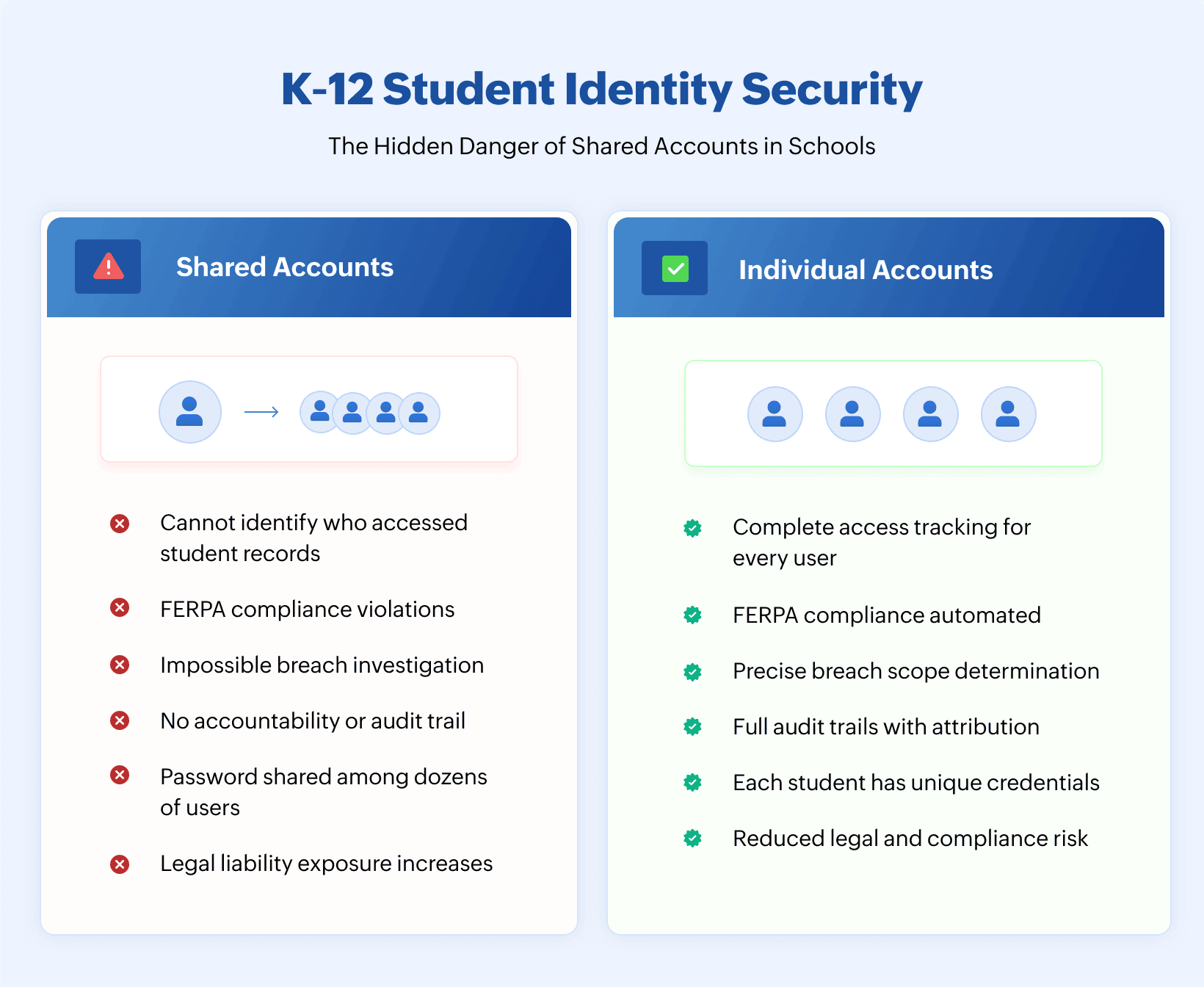
You cannot satisfy FERPA's access requirements: The Family Educational Rights and Privacy Act requires schools to maintain records of who accesses student education records. When five teachers share the same TeacherAdmin account, that record doesn't exist. During an audit or legal investigation, you have no defensible answer for who viewed which student's grades, medical information, or disciplinary records.
You cannot prove compliance with state privacy laws: States like California, New York, and Illinois have enacted student data privacy laws that impose specific requirements about access tracking, data minimization, and breach notification. Shared accounts make it impossible to demonstrate that you know who accessed student data, when they accessed it, and whether that access was appropriate.
You cannot identify insider threats or malicious access: When something suspicious happens—grades mysteriously changed, student records inappropriately accessed, confidential information leaked—shared accounts eliminate your ability to identify the responsible party. Every person with access to that shared credential becomes a suspect, and proving who actually performed the action becomes impossible.
You cannot respond effectively to breaches: Modern breach notification laws require specificity about what data was accessed and which individuals are affected. When shared accounts are compromised, you have no choice but to assume worst-case scenarios because you cannot definitively determine the actual scope of unauthorized access.
You multiply your attack surface exponentially: Every person who knows a shared password represents a potential leak point. Students tell siblings. Teachers write passwords on whiteboards. Credentials get saved in browsers on personal devices. Former employees still remember the DistrictAdmin password from two years ago. The more people who share an account, the less control you have over its security.
The accountability void
Beyond regulatory compliance, shared accounts create an operational nightmare that makes day-to-day IT management exponentially harder.
Troubleshooting becomes guesswork: When something breaks—permissions changed, files deleted, systems misconfigured—you need to know who made the change to understand what happened. Shared accounts turn every investigation into detective work without clues. Log files show LabComputer performed an action. Was it a student? A teacher? The IT tech who was working on that system last week? You're left guessing.
Change management collapses: Your district implements sensible policies: changes to critical systems require approval, modifications must be documented, configuration updates need review. Shared accounts make these policies unenforceable because you cannot tie actions to individuals who can be held accountable.
Security incidents lack critical context: During a breach investigation, every minute matters. Security teams need to establish timelines, identify affected systems, and scope unauthorized access. Shared accounts turn these investigations into open-ended mysteries. That suspicious file access pattern? Could have been any of thirty people who shared those credentials.
Legitimate users get blamed for others' mistakes: Nothing destroys trust faster than a teacher being accused of inappropriate actions they didn't commit because someone else used a shared account credential. This isn't hypothetical. It regularly happens in districts using shared accounts.
The ripple effect: How shared accounts compromise your entire Active Directory
Shared accounts don't just create isolated security problems. They undermine the fundamental trust model that Active Directory was designed around.
Permission structures become meaningless: Active Directory's security model assumes that permissions grant access to specific, identified individuals. When you assign permissions to a shared account, you're actually assigning them to an unknown and changing group of people. That carefully designed least-privilege permission structure is now full of holes you cannot see or document.
Group membership loses integrity: Security groups should reflect job functions, organizational roles, and legitimate access requirements. When shared accounts join groups, the entire group's purpose becomes ambiguous. Is Teachers a group of individual educators, or does it include shared lab accounts that students use?
Audit trails become unreliable: Your Active Directory audit logs show account activity, but with shared accounts, those logs don't reveal actual user behavior. Compliance reporting becomes exercises in creative writing rather than factual documentation.
Administrative delegation becomes impossible: You might want to delegate student account management to registrars or password reset capabilities to helpdesk staff. Shared accounts make secure delegation impractical because you cannot grant appropriate permissions without risking those shared credentials being used inappropriately.
The legal exposure that keeps superintendents awake
School districts face legal liability from multiple directions when student data security fails. Shared accounts dramatically increase that exposure.
Breach notification becomes a worst-case scenario. Most state laws allow districts to avoid notifying families if they can prove that compromised credentials couldn't have accessed specific student data. Shared accounts eliminate that option. You must assume maximum exposure and notify accordingly, creating panic and eroding trust even if actual impact was limited.
Lawsuits find easier footing. Plaintiff attorneys love shared account cases because they demonstrate obvious neglect of basic security practices. The district couldn't even tell us whose credentials were compromised is a devastating statement in court. Proving you exercised reasonable care becomes exponentially harder.
Regulatory penalties multiply. Federal and state regulators can impose financial penalties for privacy violations. When investigations reveal that shared accounts prevented adequate access tracking, regulators typically assume the worst regarding compliance failures. Your lack of visibility becomes evidence of systemic problems.
Insurance coverage might not apply. Cyber insurance policies increasingly include language about reasonable security practices. Some insurers explicitly cite individual user accounts as baseline requirements. Shared accounts might void your coverage exactly when you need it most.
The we're just a small district fallacy
Small districts often believe they're not attractive targets for attackers. This thinking is dangerously wrong.
Attackers specifically target smaller districts. Schools in smaller communities often have fewer IT resources, less sophisticated security monitoring, and more operational shortcuts like shared accounts. Attackers know this and actively seek these easier targets.
Student data has significant value. Social Security numbers, birth dates, addresses, medical information, and behavioral records create complete identity profiles. This data sells on dark web marketplaces because it belongs to individuals with clean credit histories and long time horizons before discovery.
Ransomware doesn't discriminate by district size. Recent years have seen devastating ransomware attacks against school districts of all sizes. Shared accounts provide perfect initial access points—high-privilege credentials with weak security.
Compliance requirements apply regardless of size. FERPA doesn't have a small district exemption. State privacy laws protect students equally, whether they attend a 200-student rural district or a 100,000-student urban system. Your legal obligations remain identical.
The path forward: Eliminating shared accounts without operational chaos
Moving away from shared accounts feels overwhelming, especially for under-resourced IT teams. But it's achievable with the right approach and tools.
Start with risk-based prioritization. Not all shared accounts pose equal danger. Begin by identifying and eliminating shared accounts with access to sensitive student data, like student information systems, special education platforms, medical records. Next tackle shared administrative accounts. Lab and testing accounts can come later.
Leverage modern identity solutions. Cloud-based identity providers and single sign-on solutions dramatically simplify individual account management. Students get personal credentials that work across platforms without IT teams manually creating accounts in each system.
Use automated provisioning and deprovisioning. Solutions that sync your student information system with Active Directory eliminate the manual overhead of account creation. When new students enroll, accounts are created automatically and when students graduate or transfer, accounts are disabled immediately.
Implement self-service password reset for students. Elementary students struggle with passwords, but self-service reset systems designed for younger users eliminate much of the administrative burden. Students verify their identity through security questions appropriate for their age group.
Work with vendors to fix integration gaps. Many legacy systems that supposedly require shared accounts actually support standards-based authentication but vendors haven't enabled it. Push back. Your vendor contracts should include requirements for individual user authentication.
Document temporary shared accounts with sunset dates. In rare cases where shared accounts are necessary temporarily, document the specific business justification, set automatic expiration dates, and require approval to extend them. What gets measured gets managed.
Building proper visibility into student account activity
Even after eliminating shared accounts, proper Active Directory monitoring becomes essential for protecting student identities.
Track every authentication event. Know when student accounts are authenticated, from which devices, and from which locations. Unusual patterns, like a student account logging in at 2 AM or from an unexpected IP address, might indicate credential compromise.
Monitor permission and group changes. Student accounts should have predictable, limited permissions. When those permissions change or accounts are added to privileged groups, you need immediate alerts. These changes could indicate privilege escalation by attackers who've compromised student credentials.
Audit access to sensitive systems. Beyond just Active Directory authentication, track when student accounts access systems containing sensitive data. If a student account suddenly accesses hundreds of other students' records, that access pattern demands investigation.
Maintain complete audit trails. Privacy laws increasingly require detailed access logs with long retention periods. Your Active Directory auditing solution needs to capture not just what happened, but complete context: who made changes, what the previous configuration was, when modifications occurred, and from which systems.
Enable real-time alerting. Waiting for weekly reports means threats fester for days. Critical Active Directory events, such as student accounts added to admin groups, massive password resets, unusual authentication patterns, need immediate notification so security teams can respond before damage escalates.
The compliance advantage of individual accounts
Proper individual student accounts transform compliance from a nightmare into a manageable process.
FERPA compliance becomes demonstrable. When auditors or parents request access records for a specific student's data, you can provide detailed logs showing exactly who accessed which records and when. No ambiguity, no guesswork, and no legal exposure.
State privacy law requirements are satisfied. Most state student data privacy laws require districts to maintain detailed access logs. Individual accounts make this straightforward. Your Active Directory audit data becomes your compliance evidence.
Incident response becomes precise. When security incidents occur, you can definitively scope the impact. Which student accounts were compromised? What data did they have access to? Who needs notification? These questions have clear answers when individual accounts are properly monitored.
Audits become routine instead of painful. Annual compliance audits stop being desperate scrambles to compile evidence. Your Active Directory monitoring solution generates required reports automatically, demonstrating proper access controls, segregation of duties, and security practices.
The technical implementation path
Moving to individual student accounts requires specific technical capabilities that make management practical.
Integration between student information systems and Active Directory. Automated provisioning based on enrollment data eliminates manual account creation. When students transfer between schools or grade levels, their accounts move with them. When they graduate or withdraw, accounts are disabled automatically.
Age-appropriate password policies. Elementary students need different password requirements than high school students. Your Active Directory policies should reflect these differences while maintaining security. Longer password lifetimes for younger students, simplified reset procedures, and visual password strength indicators all help.
Self-service capabilities that work for students. Password reset systems need to accommodate users who might not have email addresses or phone numbers. Security questions, teacher-assisted reset workflows, and in-person identity verification options bridge these gaps.
Device management that doesn't require remembering credentials. Younger students struggle with authentication. Solutions like Windows Hello for Education use PINs or biometrics on specific devices, reducing authentication friction while maintaining individual accountability.
Reporting that satisfies both IT and compliance needs. Your monitoring solution needs technical details for troubleshooting but also executive summaries for leadership and compliance-focused reports for auditors. The same data, presented differently for different audiences.
The bottom line
Shared accounts in K–12 environments represent a fundamental security failure that creates legal liability, prevents effective incident response, and makes compliance impossible. They persist not because they're good ideas, but because operational pressures and technical limitations make them seem necessary.
Those operational challenges are real, but they're solvable. Modern identity management solutions, automated provisioning systems, and age-appropriate authentication methods make individual student accounts practical even for districts with limited IT resources.
The question isn't whether your district can afford to eliminate shared accounts; it's whether you can afford not to. The next data breach, compliance audit, or legal challenge will make that calculation obvious.
Student data privacy isn't optional—it's a legal requirement, an ethical obligation, and a trust responsibility. Shared accounts undermine all three.
Your students and district deserve better. Your IT team deserves better than trying to secure an environment where fundamental accountability doesn't exist.
Individual student accounts aren't a luxury for well-funded districts. They're a baseline requirement for anyone serious about protecting student identities.
The real question: how much longer will your district wait?
Related solutions
ManageEngine AD360 provides comprehensive student identity management with automated provisioning from student information systems, self-service password reset for age-appropriate workflows, and detailed compliance reporting that satisfies FERPA and state privacy requirements. Transform student account management from operational burden to security asset.
Schedule a personalized demoManageEngine Log360 elivers real-time monitoring of student account activity with complete audit trails for every authentication, permission change, and system access. Detect credential compromise, unusual access patterns, and privilege escalation before they become data breaches—with detailed compliance reports ready for auditors.
Request a personalized demoThis content has been reviewed and approved by Ram Vaidyanathan, IT security and technology consultant at ManageEngine.