Direct Inward Dialing: +1 408 916 9890
The rumors from late January 2026 have been confirmed. There is a new Microsoft 365 license in town. Microsoft 365 E7 launched on May 1, 2026, dethroning Microsoft 365 E5 as the flagship license, at $99 per user per month.
Check out what features and benefits Microsoft 365 E7 offers, why it's priced at $99, who this new Microsoft 365 license is for, and how you can implement its usage in your organization.
Microsoft calls E7 "the frontier suite" designed for agentic enterprise operations and is aimed at organizations who wish to integrate AI into their workloads and administer it securely.
Microsoft 365 E7 will help customers adopt AI-powered applications without sacrificing on any security aspect while getting the best out of Microsoft 365, resulting in enhanced workflows, access to new frontiers, and top-of-the-line security.
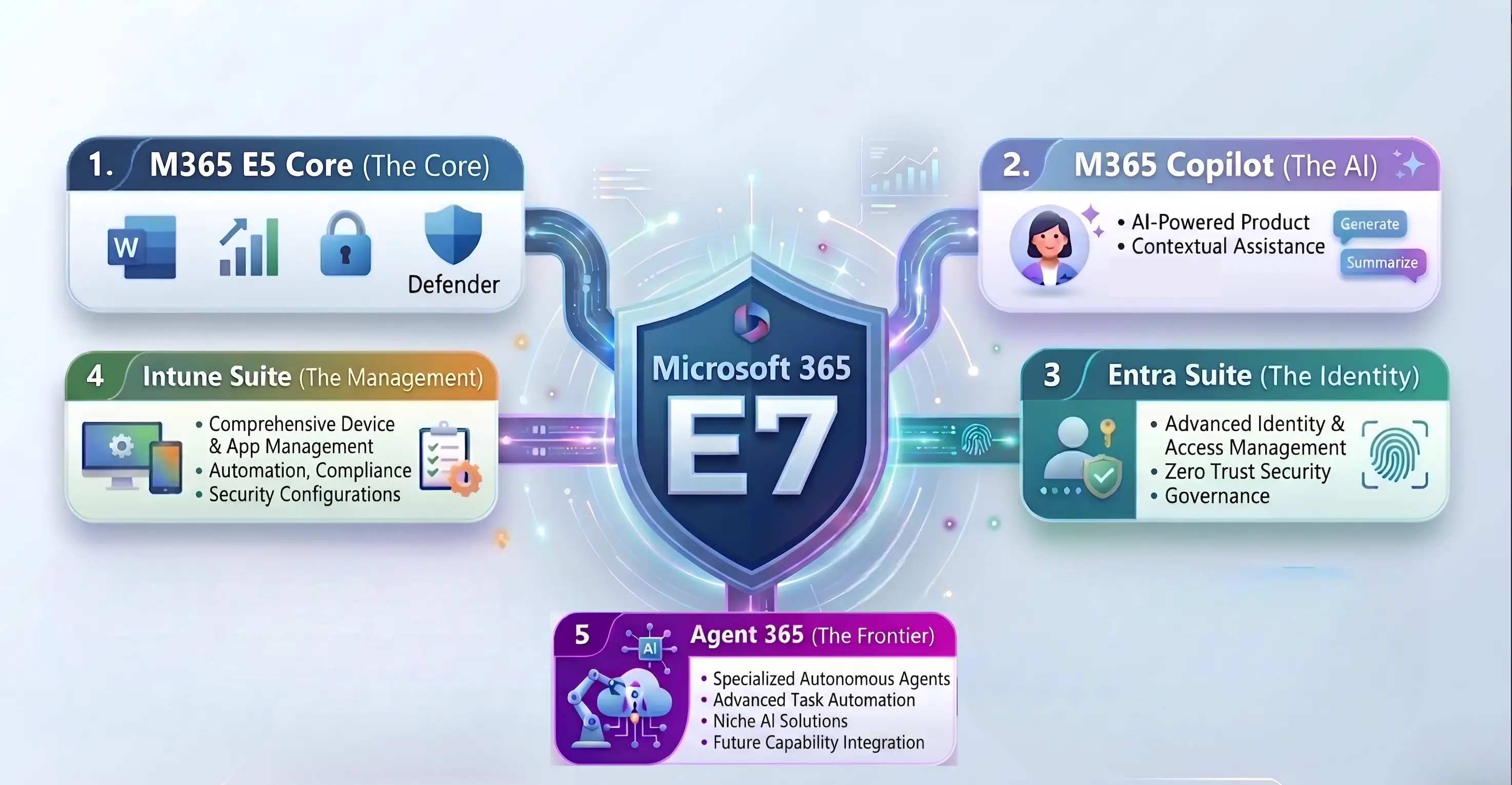
Microsoft 365 E7 is powered by five major components that enable all features and crucial add-ons Microsoft 365 has to offer. Microsoft 365 E7 bundles the following.
Microsoft 365 E5 was the highest all-inclusive license for a non-admin enterprise user. It offers the best tiers of Microsoft 365
Built upon this strong base, Microsoft 365 E7 is made to be capable of enabling customers to implement AI agents across every one of their workflows while being securely governed with all of the security features Microsoft 365 brings in.
Microsoft 365 Copilot brings AI assistance into the Microsoft 365 apps that employees rely on every day such as Word, Excel, Outlook, PowerPoint, Teams, and more. Instead of being an isolated chatbot, you can ask Copilot in plain language to handle these work applications for you.
What sets Microsoft 365 Copilot apart is how it provides organizational context through Microsoft Graph and its enterprise-ready foundation, which allows it to use files, emails, calendars, chats, and meetings to deliver relevant results while inheriting the same compliance, identity, and security framework that Microsoft 365 already uses. It is built to help teams save time, improve decision-making, and stay focused on outcomes inside the flow of their daily tasks.
The Microsoft Entra Suite consists of all Microsoft Entra ID add-ons such as Entra ID Governance, Verified ID, Private Access, and Internet Access. This gives Microsoft 365 users the complete enterprise IAM experience with IGA, automated life cycle workflows, privileged identity management, entitlement management, AI-driven access reviews, and more.
This extends identity and access controls to users, apps, and agents, enabling secure access, conditional controls, and least-privilege governance, which will be required when governing new AI developments and is also becoming a necessity in the modern IAM environment.
The Microsoft Intune Suite consists of all Microsoft Intune add-ons such as Remote Help, Endpoint Privilege Management (EPM), Enterprise App Management, Microsoft Cloud PKI, and Advanced Analytics. This gives Microsoft 365 users a unified endpoint management (UEM) solution with a mission-critical edge, including cross-platform remote troubleshooting, automated certificate life cycle management, and secure third-party app deployment.
The Microsoft Intune Suite extends management and security controls to the device and application layer, enabling proactive AI-driven health monitoring, automated remediation, and granular privilege controls. These capabilities are essential for maintaining a Zero Trust posture and ensuring seamless, high-performance digital employee experiences across diverse, modern work environments.
And that's not all. The Microsoft 365 E7 license includes Microsoft Agent 365, which enables AI integration and administrative capabilities.
If you plan to use AI agents in your tenant or implement any of Microsoft 365's agentic AI features, Microsoft Agent 365 is the admin portal to manage them; it's like the Entra ID of AI agents. Microsoft Agent 365 gives each AI agent its own Agent ID and makes them observable right from the Microsoft 365 admin center.
With Agent 365, you can now run third-party agents in Microsoft 365 apps to simplify your workflows and in Microsoft 365 admin portals to make sense of cluttered log data.

You can find third-party AI agent suggestions on the Agent Recommendations page and run them in a sandbox with Agent Evaluations. If third-party agents do not satisfy your requirements, you can build your own agents with the Agent Factory and deploy them in your own tenant. What makes Microsoft Agent 365 the secure admin portal for AI agents is its ability to audit all of these activities with Data Security Posture Management for AI in Microsoft Purview to ensure secure agentic AI development and deployment.
Microsoft 365 E7 is priced at $99 per user per month and will take Microsoft 365 E5's place as the flagship license when it launches May 1, 2026.
Microsoft 365 E7 is also available with or without Teams, so organizations can adopt it in the way that best fits their workflow.
While Microsoft 365 can be easily summarized as E5 with a bunch of add-ons, the real value lies in the savings it brings about.
The pricing of individual Microsoft 365 E7 components are as follows:
| Components | Price per user per month (in USD) |
| Microsoft 365 E5 | 57 |
| Microsoft 365 Copilot | 30 |
| Microsoft Entra Suite | 12 |
| Microsoft Intune Suite | 10 |
| Microsoft Agent 365 | 15 |
| Total pricing | 124 |
| Microsoft 365 E7 license | 99 |
| E5+ all add-ons | 124 |
When bought separately, the total cost of all components that come with the E7 license amounts to $124 per user per month, which makes Microsoft 365 E7 20% cheaper compared to buying all licenses individually.
Great power does come with great responsibility. With a price tag of $99 per user per month, the Microsoft 365 E7 license is not something you should blindly assign to every user.
The Microsoft 365 E7 license is designed for enterprises that use every tool Microsoft 365 has to offer and are gearing up for complete AI adoption. This points to users with Microsoft 365 E5 licenses who are looking to upgrade their workflows with AI agents, and as a bonus, their identity and devices will be managed better with improved capabilities from the Microsoft Entra suite and Microsoft Intune add-ons.
Think privileged employees like CXOs who need the highest tier of every productivity app, need to be governed with the highest IGA and endpoint security, and are looking to experiment and get a view of their AI adoption campaigns.
AI engineers would also need the Microsoft 365 E7 license to develop, test, and deploy their AI agents securely across all applications, ensuring their work is seamlessly integrated into the organization's workflows.
As for standard power users, unless they use all of Microsoft 365's applications, you can just get them Microsoft 365 Copilot with any of the Microsoft 365 Business plans or Microsoft 365 E3 and save up on $68 compared to a Microsoft 365 E7 licensee. If they do need all applications and Agent 365, Microsoft 365 E7 is a better deal than Microsoft 365 E5 plus Microsoft 365 Copilot, which totals $100 per user per month.

Microsoft 365 partners receive performance credit for incremental revenue from E7 and Agent 365. Your Copilot plus Power Accelerate programs now include Agent 365 in Immersion Briefings, Proof of Concepts (PoCs), and workshops to help you pitch Microsoft 365 E7 to the right audience effectively.
While procuring Microsoft 365 E7 licenses is a challenge in itself, the real complexity lies in deciding who actually needs them.
In most organizations, users already hold a mix of licenses—such as Microsoft 365 E5, Copilot add-ons, or components from the Entra and Intune suites. Identifying which users would benefit from an upgrade to E7 requires careful analysis of license usage, role requirements, and cost implications. On top of that, manual license assignment can be time-consuming and error-prone, especially in large environments where admins must:
Without proper visibility and automation, this process can quickly become inefficient and lead to unnecessary licensing costs.
If you wish to speed up the mundanity of license assignment, ManageEngine M365 Manager Plus is the Microsoft 365 license management tool that will make your licensing reviews a breeze.
M365 Manager Plus is a comprehensive administration and security solution for Microsoft 365 used for reporting, managing, monitoring, auditing, and creating alerts for critical activities in your Microsoft 365 environments without any PowerShell scripting.
With M365 Manager Plus, you can get a list of users who have certain Microsoft 365 licenses—in this case, Microsoft 365 E5, Agent 365, Entra Suite, and Intune Suite— and assign Microsoft 365 E7 licenses to the required users in just a few clicks.
Assigning a Microsoft 365 E7 license to every user is one of the fastest ways to burn through your budget. In most organizations, there are users who hold licenses for services they rarely use. This could be employees who no longer use desktop Office apps, apps that see little activity, or accounts that only log in occasionally but still carry premium add-ons. When these licenses remain assigned to these users by default, they remain underused and could be reassigned.
In just a few clicks, M365 Manager Plus license activity trackers help you retrieve the list of users with the components of the Microsoft 365 E7 license across your tenant, such as users with the Microsoft 365 E5 license, Microsoft 365 Copilot, and any of the Entra Suite or Intune Suite add-ons.

While at it, you can also identify Microsoft 365 E5 users who are not using the license to its full potential by tracking their Microsoft 365 app usage and assign them a more appropriate license to save up for Microsoft 365 E7. Generate the report, then select your preferred inactivity period, and you will get a list of users who have not used the services for which they have licenses.

Once you have found the users eligible for Microsoft 365 E7 licenses, you can feed this data to M365 Manager Plus and have it assign the procured licenses for multiple users in a single operation. Instead of spending hours assigning licenses to multiple users one at a time, do all of it in one click. This makes both your admins and users happy, with the mundanity of license assignment jobs removed and users receiving access to their AI implementation tools as soon as possible.

There are even more benefits to using M365 Manager Plus to manage and monitor your Microsoft 365 environment than just Microsoft 365 license management.
Download the free, 30-day trial of M365 Manager Plus to explore these features and capabilities for yourself. Contact us for a free, personalized demo to discover how to best secure your Microsoft 365 environment using these features.
Wishing you the best in your endeavor for AI implementations and Microsoft 365 administration.