☰
Related Products
 ADManager Plus
 ADAudit Plus
 ADSelfService Plus
 M365 Manager Plus
Using this feature, instead of setting multiple conditions, upload a CSV file with the required attributes and values, based on which users must be retrieved.
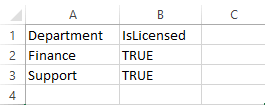
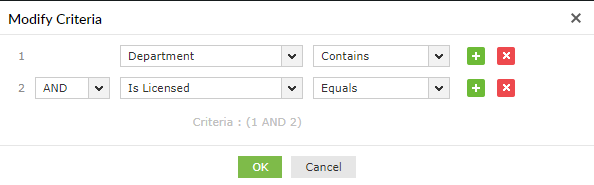
Note: The condition set in the Modify Criteria pop-up will be applied for the attributes (columns in the CSV) within a row alone. 'OR' condition will be applied between the rows, and it cannot be changed.
| Name in Microsoft 365 | Header in CSV file |
|---|---|
| Display Name | DisplayName |
| User Principal Name | UserPrincipalName |
| First Name | FirstName |
| Last Name | LastName |
| Is Licensed | IsLicensed |
| Mobile Phone | MobilePhone |
| Title | Title |
| Department | Department |
| Manager | Manager |
| Fax | Fax |
| Office | Office |
| Company | Company |
| PhoneNumber | PhoneNumber |
| Other Telephone | OtherTelephone |
| Home Phone | HomePhone |
| Other Home Phone | OtherHomePhone |
| Alternate Email Address | AlternateEmailAddresses |
| Alternate Mobile Phone | AlternateMobilePhones |
| City | City |
| State | State |
| Postal Code | PostalCode |
| Country | Country |
| Usage Location | UsageLocation |
| User Account Property | UserAccountControl |
| Sign-in Name | SignInName |
| Initials | Initials |
| User Type | UserType |
| Recipient Type | RecipientType |
| Recipient Type Details | RecipientTypeDetails |
| Previous Recipient Type | PreviousRecipientTypeDetails |
| Blocked Credential | BlockCredential |
| Strong Password Required | StrongPasswordRequired |
| Password Never Expires | PasswordNeverExpires |
| Is Blackberry User | IsBlackberryUser |
Copyright © 2023, ZOHO Corp. All Rights Reserved.
 Previous Topic