Conditional Access Gap Analyzer workbook in Microsoft Entra ID
Safeguarding user identities and access to resources is critical in today’s cloud-first, hybrid work environments. While Microsoft Entra ID's Conditional Access policies offer robust protections, identifying gaps in policy coverage can be a daunting task. Using audit logs to keep track of unprotected applications, risky sign-ins that bypass policies, users leveraging legacy authentication, and access from unsecured and named locations is time-consuming.
Microsoft Entra ID workbooks can be the tool you need to collate and follow up with these data points efficiently. The Conditional Access Gap Analyzer workbook can help streamline detection and mitigation of flaws in your conditional access policies by categorizing data, such as pinpointing users accessing apps without coverage or sign-ins from high-risk locations.
In this blog, we’ll explore how the Conditional Access Gap Analyzer workbook helps secure your environment by providing actionable insights, streamlining policy enforcement, and mitigating potential vulnerabilities in your Conditional Access policies.
How to access the Conditional Access Gap Analyzer workbook
The Conditional Access Gap Analyzer workbook is one of the Public Workbook Templates available in Microsoft Entra ID. You can access this workbook by following the steps mentioned below.
- Log in to Microsoft Entra ID using an account with permissions to access workbooks.
- Navigate to Identity > Monitoring & Health > Workbooks.
- Select the Conditional Access Gap Analyzer workbook from the available templates
Microsoft Entra ID Conditional Access Gap Analyzer workbook explained
The Conditional Access Gap Analyzer workbook is structured into sections that help administrators identify trends in user sign-ins, applications, locations, and authentication protocols that are managed by Conditional Access, helping organizations pinpoint vulnerabilities and enhance their security posture. This workbook has five report categories.
- Legacy Authentication
- Unprotected Applications
- Compromised User Sign-ins
- Unprotected locations
- Unprotected named locations
Legacy Authentication
Legacy authentication protocols, like POP and IMAP, lack modern security features and are more susceptible to attacks. This category focuses on highlighting risks associated with outdated protocols.
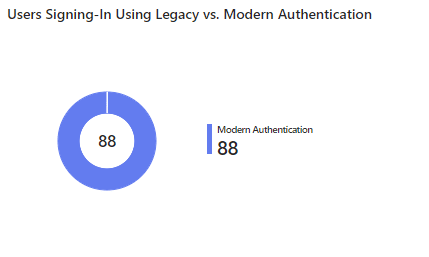
- Users Signing-In Using Legacy vs. Modern Authentication
This report displays the number of users relying on legacy versus modern authentication. This helps organizations prioritize migrating users to modern, more secure authentication methods.
- Users Using Legacy Authentication by Application
This report shows applications accessed with legacy authentication and their associated users. This aids in identifying high-risk applications and enforcing modern authentication protocols.
Unprotected Applications
Applications without Conditional Access policies are vulnerable entry points that attackers can use. This category highlights apps that lack protection, whether due to misconfigurations or oversight, and helps ensure all apps are protected against unauthorized access.
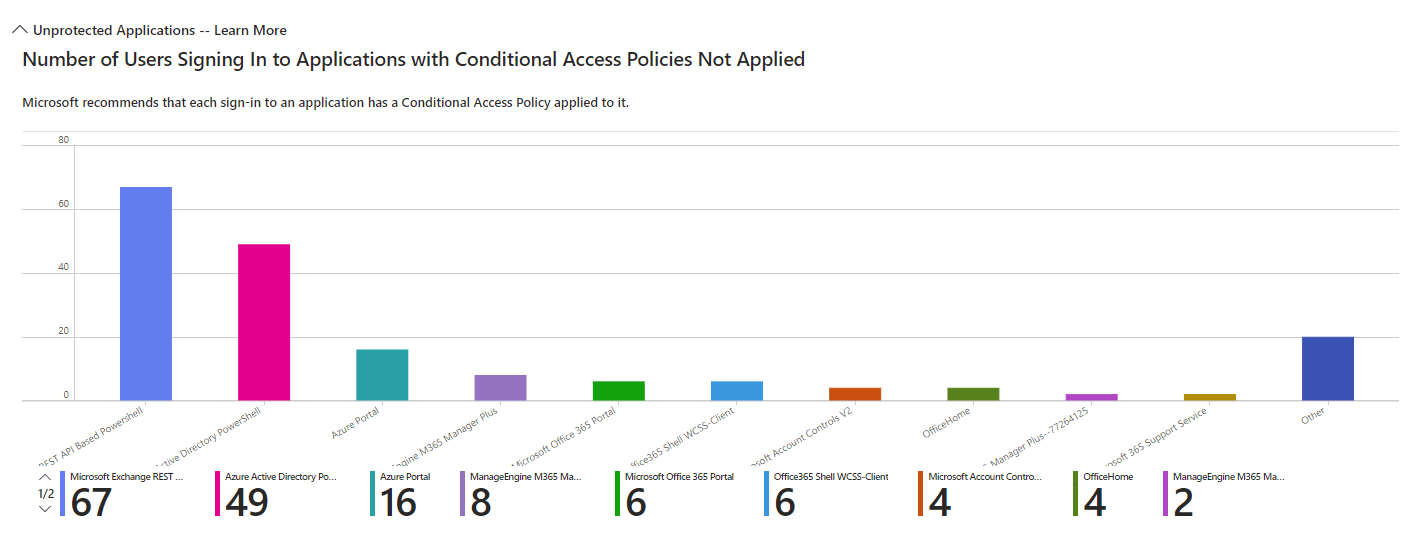
- Number of Users Signing In to Applications with Conditional Access Policies Not Applied
This report highlights applications being accessed without Conditional Access policies applied. This enables organizations to identify and secure vulnerable applications.
Compromised User Sign-ins
Compromised accounts pose significant risks, particularly if they bypass Conditional Access enforcement. This category identifies risky sign-ins‚—flagged based on Microsoft Entra ID's identity protection insights—that were not governed by Conditional Access policies.
- High Risk Sign-In Events Bypassing Conditional Access Policies
This report lists high-risk sign-in attempts that bypass Conditional Access policies. This helps identify and mitigate access control gaps for risky user behaviors.
Unprotected Locations
Access from ungoverned regions can introduce vulnerabilities, especially from high-risk or geographically anomalous locations. This category tracks sign-ins from such areas, ensuring all access points are monitored and controlled.
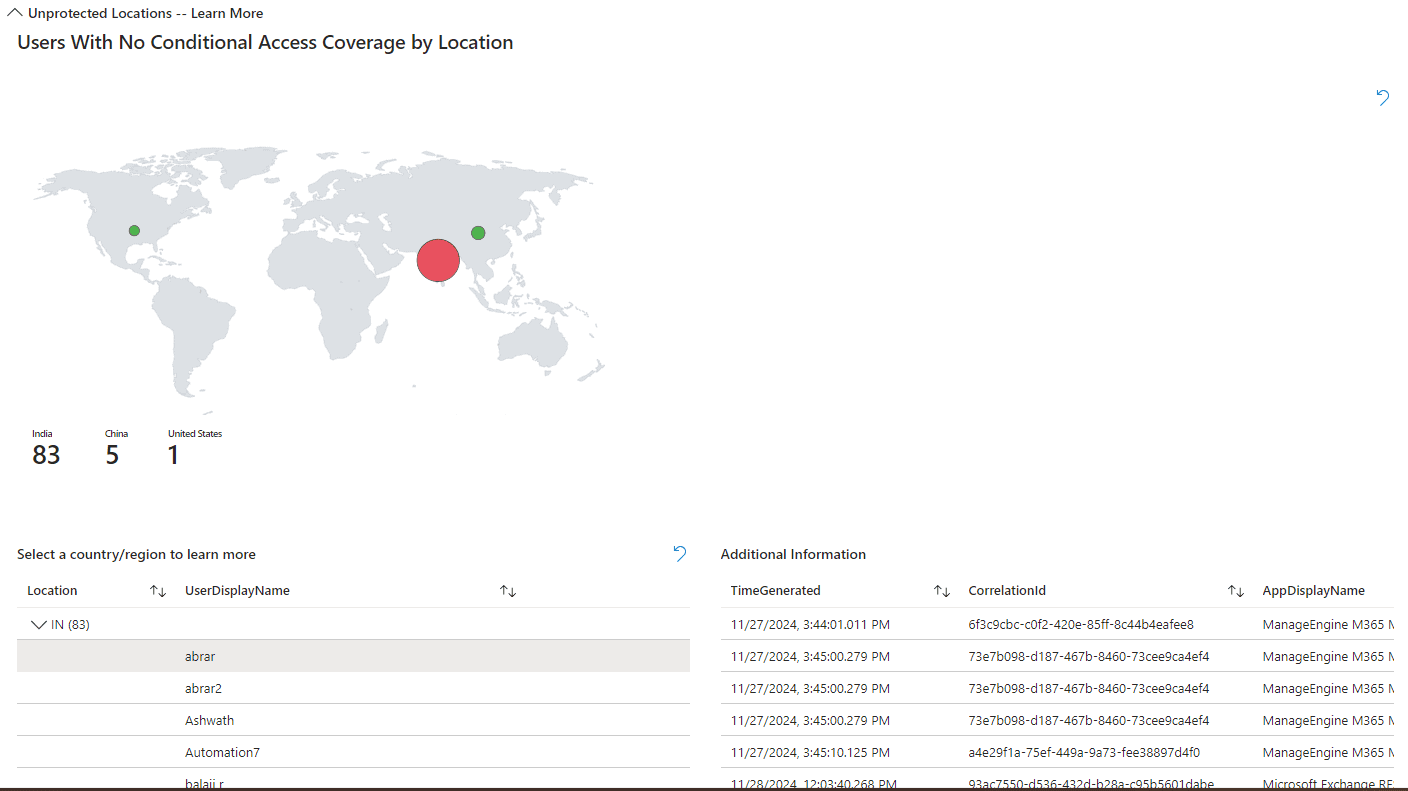
- Users With No Conditional Access Coverage by Location
This report displays sign-ins from locations that lack Conditional Access enforcement. This helps identify and secure regions exposed to potential threats.
Unprotected Named Locations
Even defined and trusted locations need Conditional Access coverage to prevent exploitation. This policy ensures that all trusted and known locations are governed by Conditional Access policies to prevent unauthorized access.
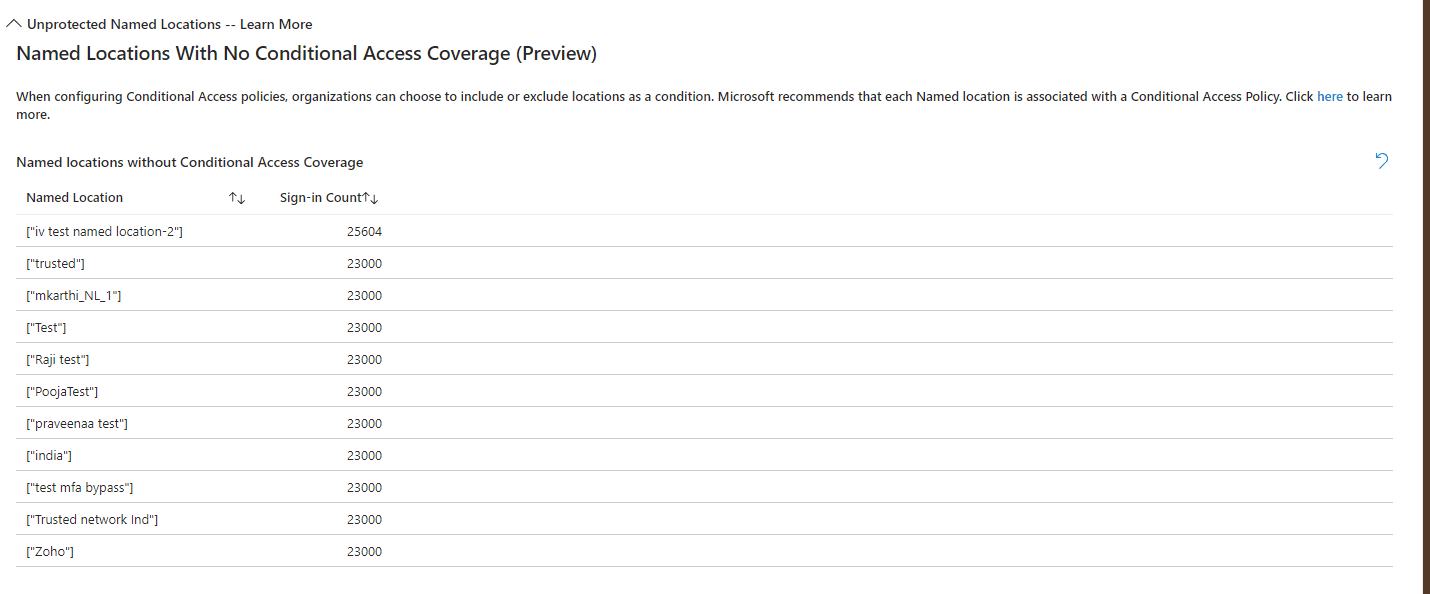
- Named Locations With No Conditional Access Coverage
This report highlights named locations without Conditional Access policies applied. This ensures consistent security across defined trusted locations.
Get a clear overview of your Microsoft 365 environment with M365 Manager Plus
ManageEngine M365 Manager Plus is a comprehensive administration and security solution for Microsoft 365 used for reporting, managing, monitoring, auditing, and creating alerts for critical activities in your Microsoft 365 environments. You can gain a thorough understanding of your environment not just in Microsoft Entra ID, but also Exchange Online, SharePoint Online, OneDrive for Business, and other Microsoft 365 services, with detailed reports and intuitive visualizations—all from a single console.
There are also other benefits to using M365 Manager Plus to manage and monitor your Microsoft 365 environment:
- Filter your reports just once and save them as custom reports that you can access in just a few clicks.
- Export reports generated in M365 Manager Plus in not just CSV, but also in other presentable formats such as HTML, PDF, and XLSX.
- Delegate granular permissions to technicians without elevating their Microsoft 365 privileges and create custom roles with any combination of reporting, management, and auditing tasks.
- Easily manage users, groups, contacts, mailboxes, teams, and sites in bulk without PowerShell scripting.
- Keep tabs on even the most granular user activities in your Microsoft 365 environment.
- Configure alert profiles in M365 Manager Plus to notify you of specific activities that take place outside of business hours or occur at unusual frequencies.
- Gain a thorough understanding of your environment in Exchange Online, Microsoft Entra ID, SharePoint Online, OneDrive for Business, and other Microsoft 365 services with detailed reports from a single console.
- Monitor the health and performance of Microsoft 365 features and endpoints around the clock.
Streamline your Microsoft 365 governance and administration with M365 Manager Plus
Get Your Free Trial