Samsung Knox is a security platform built into Samsung mobile devices to protect both the device and the corporate data on it. Knox uses hardware-rooted protection, kernel-level threat detection, and data containerization to close the security gaps common in open-source Android.
Knox also makes device enrollment and management easier for enterprises. Features like Knox Mobile Enrollment and Knox Service Plugin let IT admins deploy and configure Samsung devices at scale without manual setup. Paired with a Knox-compatible MDM solution such as ManageEngine Mobile Device Manager Plus, an Android Enterprise Recommended (AER) vendor that has retained its Gold Badge for 2026, organizations get full control over their Samsung device fleet from one console.
What Is Samsung Knox?
Samsung Knox is a multi-layered security platform that ships pre-installed on Samsung mobile devices. It combines hardware-rooted security, live threat detection, and data isolation to protect corporate and personal information stored on the device.
Knox works at three levels:
- Hardware level security keys and encryption are protected by a dedicated chip (Knox Vault), physically isolated from the main processor
- OS level Real-Time Kernel Protection (RKP) prevents kernel-level attacks and verifies the device boot chain integrity
- Application level Knox creates secure containers (replaced by Android Work Profile in newer versions) that keep corporate and personal data separate
This layered approach is why Samsung Knox is certified for use in government, military, and regulated industries worldwide. For enterprises, Knox paired with an MDM solution forms the foundation of secure mobile workforce management.
This Samsung Knox Management guide covers the following:
- How Samsung Knox Works: The Security Architecture Explained
- Samsung Knox Security Certifications
- Samsung Knox Suite vs MDM: Which Does Your Enterprise Need?
- How to Manage Samsung Knox Devices with ManageEngine MDM
- Knox Mobile Enrollment: Zero-Touch Deployment
- Knox Container and Work Profile
- How to Set Up a Knox Container in ManageEngine MDM
- Knox Service Plugin (KSP)
- Why Enterprises Need Samsung Knox Management
- Benefits of Managing Samsung Knox Devices with ManageEngine MDM
- Which Samsung Devices Support Knox?
How Samsung Knox Works: The Security Architecture Explained
Before deciding how to manage Knox devices, it helps to understand how Knox protects them. Knox's architecture rests on three pillars: hardware isolation, kernel protection, and continuous integrity checks. Together they make Knox one of the most thoroughly engineered mobile security platforms available today.
Knox Vault: Physically Isolated Protection for Your Most Sensitive Data
Knox Vault is a dedicated, tamper-resistant security chip built into modern Samsung devices. Unlike software-based security, Knox Vault sits physically separate from the main processor and operating system. That separation means malware or attackers that compromise the main OS cannot reach what Knox Vault holds.
Knox Vault protects:
- Biometric data (fingerprints, face recognition templates)
- Device PINs, passwords, and pattern locks
- Encryption keys for device storage and corporate data
- Cryptographic keys used by enterprise apps
- Security credentials for VPN, Wi-Fi, and email accounts
Because Knox Vault runs independently from the main system, the data inside stays protected even if the device's main OS is compromised. This matters most for organizations handling financial records, patient data, or government information.
Real-Time Kernel Protection (RKP): Blocking Kernel-Level Attacks
Real-Time Kernel Protection is a Samsung Knox feature that watches the device's OS kernel for unauthorized modifications. The kernel is the core of Android. Once an attacker reaches that layer, virtually every other security control above it can be bypassed.
RKP works by:
- Monitoring kernel memory in real time for unauthorized changes
- Blocking kernel privilege escalation attempts (a common attack vector)
- Verifying that critical kernel data structures haven't been tampered with
- Preventing root access exploits used by malware and attackers
- Maintaining a verified boot chain from hardware up to the OS
RKP and Knox Vault work together to defend against both software exploits and hardware-level attacks. That defense-in-depth design is what makes Samsung Knox suitable for the most security-sensitive enterprise deployments.
Samsung Knox Security Certifications: Government-Grade Compliance
For regulated industries such as government, military, healthcare, and financial services, security certifications are non-negotiable. Samsung Knox holds more security certifications than any other mobile platform, which is why it consistently shows up in procurement specs for organizations with documented compliance needs.
Key Samsung Knox certifications:
- Common Criteria (CC) certification internationally recognized security evaluation standard used by governments worldwide
- FIPS 140-3 validation U.S. and Canadian government standard for cryptographic modules, required for federal deployments
- DISA STIGs compliance U.S. Department of Defense Security Technical Implementation Guides
- NIAP CSfC approved National Information Assurance Partnership Commercial Solutions for Classified program
- NATO Restricted approval certified for use in NATO operations
- HIPAA-ready architecture supports healthcare data protection requirements when configured correctly
- Five Eyes (FVEY) approval certified by intelligence agencies across the U.S., U.K., Canada, Australia, and New Zealand
These certifications are why Samsung Knox is the mobile platform most widely approved for classified government work, defense contractors, and highly regulated industries.
Samsung Knox Suite vs MDM: Which Does Your Enterprise Need?
One of the most common questions IT teams ask is whether to use Samsung Knox Suite (Knox Manage) or a third-party MDM solution like ManageEngine MDM Plus. The right answer depends on the device mix, scale, and what else you need to manage.
| Capability | Samsung Knox Suite | ManageEngine MDM Plus |
|---|---|---|
| Device support | Samsung devices only | Samsung, Android, iOS, macOS, Windows, ChromeOS |
| Knox-specific features | Native, full access | Full access via Knox Service Plugin and Knox Mobile Enrollment integration |
| Deployment options | Cloud only | Cloud, on-premises, or hybrid |
| Cross-platform management | Limited to Samsung ecosystem | Unified console for all device types |
| Pricing model | Per-device subscription | Per-device tiered with free edition for up to 25 devices |
| Best for | Samsung-only fleets needing the deepest Knox integration | Mixed-device enterprises wanting Knox security alongside broader management |
For most enterprises running mixed device fleets, ManageEngine MDM Plus is the practical choice: full Samsung Knox capability through deep integration, plus management of every other platform from one console. Organizations standardized exclusively on Samsung may benefit from Knox Suite's native depth.
How to Manage Samsung Knox Devices with ManageEngine MDM
Many mobile device management solutions can act as a Samsung Knox manager (Samsung Knox MDM) and let organizations make full use of Knox capabilities. Mobile Device Manager Plus is an MDM solution that supports Samsung Knox devices in depth across the platform's security features. The Knox capabilities supported in MDM Plus fall into three groups:
Here's how MDM Plus manages Samsung Knox devices and works alongside Knox's built-in security.
Knox Mobile Enrollment: Zero-Touch Deployment for Samsung Devices
Knox Mobile Enrollment is an out-of-the-box enrollment method that gets compatible Samsung devices enrolled with MDM on first boot, right after unboxing. The whole flow is automated and doesn't need user intervention, similar to Google's Zero Touch Enrollment for Android devices.
For organizations running large device rollouts, enrolling one device at a time is impractical. Knox Mobile Enrollment supports bulk enrollment and lets IT skip initial setup screens so users can pick up the device and start working.
Another benefit of Knox Mobile Enrollment is mandatory management. If a user tries to factory reset their device, management stays in place. The same applies to lost or stolen devices, which prevents unauthorized use. MDM Plus also offers other proactive and reactive methods to secure misplaced or stolen devices.
For the full step-by-step procedure and prerequisites for Knox Mobile Enrollment, refer to our help document.
Knox Container and Work Profile: Separating Corporate and Personal Data
Important: Samsung deprecated the legacy Knox Container starting with Knox 3.0, replacing it with Android Enterprise Work Profile. New deployments should use Work Profile. Existing Knox Container deployments continue to work but should plan a migration. ManageEngine MDM Plus supports Work Profile as part of its Android Enterprise Recommended (AER) status. See Knox version mapping for compatibility details.
Knox Management in Mobile Device Manager Plus gives IT precise control over corporate data without sacrificing flexibility for users. With MDM Plus, IT admins can:
- Activate Knox containers (or Work Profile on newer devices) on employees' personal devices automatically
- Configure policies that protect corporate data inside the container
- Secure the container with a container-specific passcode
- Deploy required applications inside the container without touching personal apps
All of this happens from one console. The only prerequisite for creating a Knox container is purchasing Knox Workspace Licenses through a Knox Portal Account. Learn more here.
Knox containers separate business and personal data cleanly. IT controls the work profile fully and has zero visibility into the personal profile. Here's how a Knox container appears on a device:
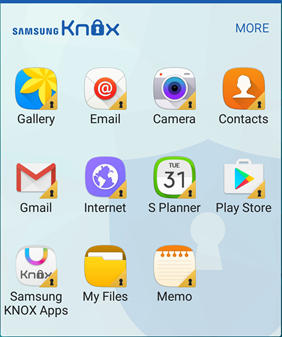
For the Knox container, MDM Plus supports policies to secure the container with a passcode; configure E-mail and Exchange ActiveSync accounts; and apply restrictions that disable specific device features and functions.
Organizations using custom enterprise apps can add and distribute them to devices with Knox containers. Custom apps available inside the work profile keep employees productive on personal devices without compromising security.
How to Set Up a Knox Container in ManageEngine MDM
Setting up a Knox Container on Knox-supported Samsung devices through MDM Plus involves the following steps:
- Create a Knox portal account and purchase licensesCreate an account in the Samsung Knox portal using your corporate email ID and buy the required number of licenses.
- Upload licenses to Mobile Device Manager Plus Upload the purchased licenses to the MDM Plus server console for distribution to managed Samsung devices. You'll enter the license key and its expiry date on the MDM server.
- Distribute licenses Once licenses are in MDM Plus, choose between automatic and manual distribution. Automatic distribution sends licenses to Knox devices on enrollment. Manual distribution lets the admin pick which managed Knox devices receive licenses.
Once a valid Knox license applies to a device, a Knox container gets created on it so the user can access corporate apps and files inside a protected space.
Knox Service Plugin (KSP): Advanced Samsung Policies via OEMConfig
Knox Service Plugin (KSP) is an OEMConfig app from Samsung that gives enterprise devices access to advanced security configurations, restrictions, and features as soon as Samsung releases them, often before they make their way into MDM consoles directly. That makes KSP one of the most useful tools for organizations that need deep, Samsung-specific control over their devices.
With Knox Service Plugin and ManageEngine MDM Plus, IT admins can:
- Access the latest Knox Platform for Enterprise (KPE) policies the day Samsung releases them
- Configure granular hardware controls (USB, camera, Bluetooth, NFC)
- Manage Knox E-FOTA (Enterprise Firmware Over-The-Air) for controlled OS updates
- Set up advanced VPN and certificate policies
- Deploy advanced kiosk and dedicated device configurations
- Configure DeX-specific policies for Samsung's desktop experience
Mobile Device Manager Plus handles the distribution, installation, and configuration of the Knox Service Plugin app so devices get the latest Knox Platform for Enterprise features without additional integration work. Learn more about how to configure the Knox Service Plugin here.
Why Enterprises Need Samsung Knox Management
Mobile devices give employees fast access to corporate data, but they also bring their own problems: higher risk of loss and theft, mobile malware, and BYOD security concerns. Samsung Knox addresses these directly. Here's what Knox offers organizations:
- Hardware-based security Knox devices are built for end-to-end data protection, covering both hardware and OS. Device integrity is checked at boot and rechecked regularly. If malware is detected, Knox cuts off access to business-critical data automatically.
- Data segregation With BYOD now standard in many organizations, employees access corporate data on personal devices. Knox keeps business data inside a container so unauthorized personal or malicious apps cannot reach it.
- Certified compliance Knox's certifications (Common Criteria, FIPS 140-3, DISA STIGs) provide documented evidence for regulated industries that need it during audits.
- Centralized firmware control Through Knox E-FOTA, IT can push enterprise firmware updates over-the-air on its own schedule, keeping devices current on security patches.
Knox's security features are part of why these devices are increasingly common in enterprises. To get full value from Knox at scale, IT teams pair Samsung devices with a Samsung Knox manager or Samsung Knox MDM that handles onboarding and distributes corporate configurations, apps, and documents.
Benefits of Managing Samsung Knox Devices with ManageEngine MDM
Using ManageEngine MDM Plus to manage Samsung Knox devices gives IT teams several advantages:
- Quick and easy deployment With Knox Mobile Enrollment integration, MDM Plus delivers zero-touch deployment for Knox devices.
- Robust device management IT can build Groups based on roles, hierarchy, or departments so the right configurations and apps are on each device the moment it activates.
- Additional support for configuration policies MDM Plus supports an extensive list of configuration profiles for Samsung Knox devices that complement Knox's security features. These policies apply without user intervention.
- Comprehensive control over devices Features like Geo-tracking and Remote Control simplify ongoing device maintenance.
- Knox E-FOTA support Centrally manage enterprise firmware updates and keep devices current on security patches without disrupting daily work.
- Cross-platform management Manage Samsung Knox devices alongside iOS, macOS, Windows, ChromeOS, and other Android devices from one console.
Which Samsung Devices Support Knox?
Not every Samsung device ships with Knox. Knox is included on most Galaxy enterprise and flagship devices, but the supported features vary by model and Knox version.
Knox-supported device categories:
- Galaxy S series All Galaxy S devices from S6 onwards support Knox (latest Knox features on S22 and newer)
- Galaxy Note series All Note devices from Note 4 onwards support Knox
- Galaxy Tab series Tab S and Tab Active tablets are Knox-capable
- Galaxy A series (enterprise editions) Select A-series devices support Knox
- Galaxy XCover series Rugged devices for field work, all Knox-supported
- Foldable devices Galaxy Z Fold and Z Flip series
To check whether a specific device is Knox-capable, refer to the official Samsung Knox supported devices list. On any Samsung device, you can also verify Knox availability by going to Settings > About Phone > Software Information. If the device is Knox-capable, the Knox version will be listed there.
Give ManageEngine's Samsung Knox MDM a try, free for 30 days, and simplify Samsung Knox device management.
Frequently Asked Questions
What is Samsung Knox?
Samsung Knox is a security layer built into Samsung devices to protect them from threats. IT teams rely on this military-grade security layer to keep sensitive data safe on the Samsung devices used for work. On enterprise devices, Knox also supports Knox Mobile Enrollment and data containerization through the Knox container to make management easier.
How does Samsung Knox work?
Data on Knox devices is strongly encrypted, so sensitive information stays protected even when the device is powered off. Knox works at three levels: hardware (Knox Vault chip), OS (Real-Time Kernel Protection), and application (containerization or Work Profile). Separating business and personal data into a password-protected container gives users two distinct workspaces on one device, with safe access to corporate information wherever they are.
How do you check if your device has Samsung Knox?
To check whether your Samsung device is Knox-secured, go to Settings > About Phone > Software Information. If the device is Knox-capable, the Knox version will be listed there.
What is Samsung MDM?
Samsung MDM refers to managing Samsung devices so organizations can apply control over them. Samsung Knox handles many parts of the Samsung device lifecycle, including automated enrollment, mandatory management, and containerization.
Which devices have Knox security?
Not every Samsung device ships with Knox. Refer to the official Knox supported devices list to see exactly which Samsung devices are Knox-capable.
Is Samsung Knox safe?
Knox uses defense-grade security measures that meet the standards set by government organizations around the world. It has been approved and certified for security by several global bodies, including Common Criteria, FIPS 140-3, DISA STIGs, and NIAP CSfC, which is why it's trusted in highly security-sensitive deployments.
Is Samsung Knox free?
The Knox platform is free for individual users since it ships as part of the device. Business enterprises that want to explore every Knox feature can start with the free trial, after which they'll need to purchase license keys.
What is Knox E-FOTA?
Knox E-FOTA (Enterprise Firmware Over-The-Air) lets organizations control software updates remotely and push enterprise firmware over the air on their own schedule. Devices receive only the approved firmware updates IT has cleared, so security patches roll out without unscheduled disruptions.
What is Knox Vault?
Knox Vault is a hardware-based secure storage solution built into modern Samsung devices. It physically isolates sensitive information such as biometric data, encryption keys, PINs, and security credentials from the main processor. Even if the main OS is compromised, data inside Knox Vault stays protected.
What is Real-Time Kernel Protection (RKP)?
Real-Time Kernel Protection is a Samsung Knox feature that watches the device's OS kernel for unauthorized modifications. It blocks kernel-level attacks, privilege escalation attempts, and root exploits used by malware, protecting the most fundamental layer of the operating system.
Is Samsung Knox Container being deprecated?
Yes. Samsung deprecated the legacy Knox Container starting with Knox 3.0 and replaced it with Android Enterprise Work Profile. Existing Knox Container deployments are still supported, but new deployments should use Work Profile. ManageEngine MDM Plus supports both the legacy and the current implementations, and as an Android Enterprise Recommended (AER) vendor with a Gold Badge for 2026, MDM Plus keeps Work Profile support aligned with Google's latest standards.
How do you use Samsung Knox?
You can use Knox on Samsung devices in your organization with a Knox MDM solution like Mobile Device Manager Plus, which integrates with the Knox portal to make enrollment and management straightforward.