Default Alarm Rules in Opmanager
The Default Alarm Rules feature in OpManager provides a centralized interface to view and manage all internally generated alarms. It allows users to access all alarm rules in a single tab, enable or disable them as needed, and define their severity levels for better operational control. By using the Default Alarm Rules feature in OpManager, users can achieve the following:
Noise reduction
- Provides the flexibility to disable redundant or system-generated alarms based on customer configurations.
- Allows temporary disabling of specific alarm types during scheduled maintenance or known downtime periods, minimizing unnecessary alerts.
Severity customization
- Enables setting Critical severity only for specific alarm types, ensuring dashboards reflect accurate device health status.
- Supports assigning lower severity levels to less impactful alarms, reducing alert noise and enhancing operational focus.
Accessing Default Alarm Rules
Follow the steps below to view or modify default alarm rules in OpManager:
- Go to Settings → Configuration → Alarm Rules.
- Select the Default Alarm Rules tab.
- This page lists all predefined alarm rules that OpManager uses to trigger alerts when specific conditions are met.
- In the Default Alarm Rules table, locate the desired rule.
- Use the Severity drop-down menu to change the alarm severity as required.
- Some alarm rules are marked as Non-configurable because their thresholds and severities are determined dynamically based on their child elements and internal polling values. Therefore, the severity cannot be manually set to a fixed value.
- Toggle the Status switch to enable or disable the alarm rule.
- Changes are applied automatically and take effect globally across the installation.
- The following options are available only from version 12.8.636 and above.
- The Event Type column displays the rule's associated event type.
- Under the Actions column,
- Use the Edit button to configure the scope for a particular rule. Using this option, you can assign the rule to multiple devices.
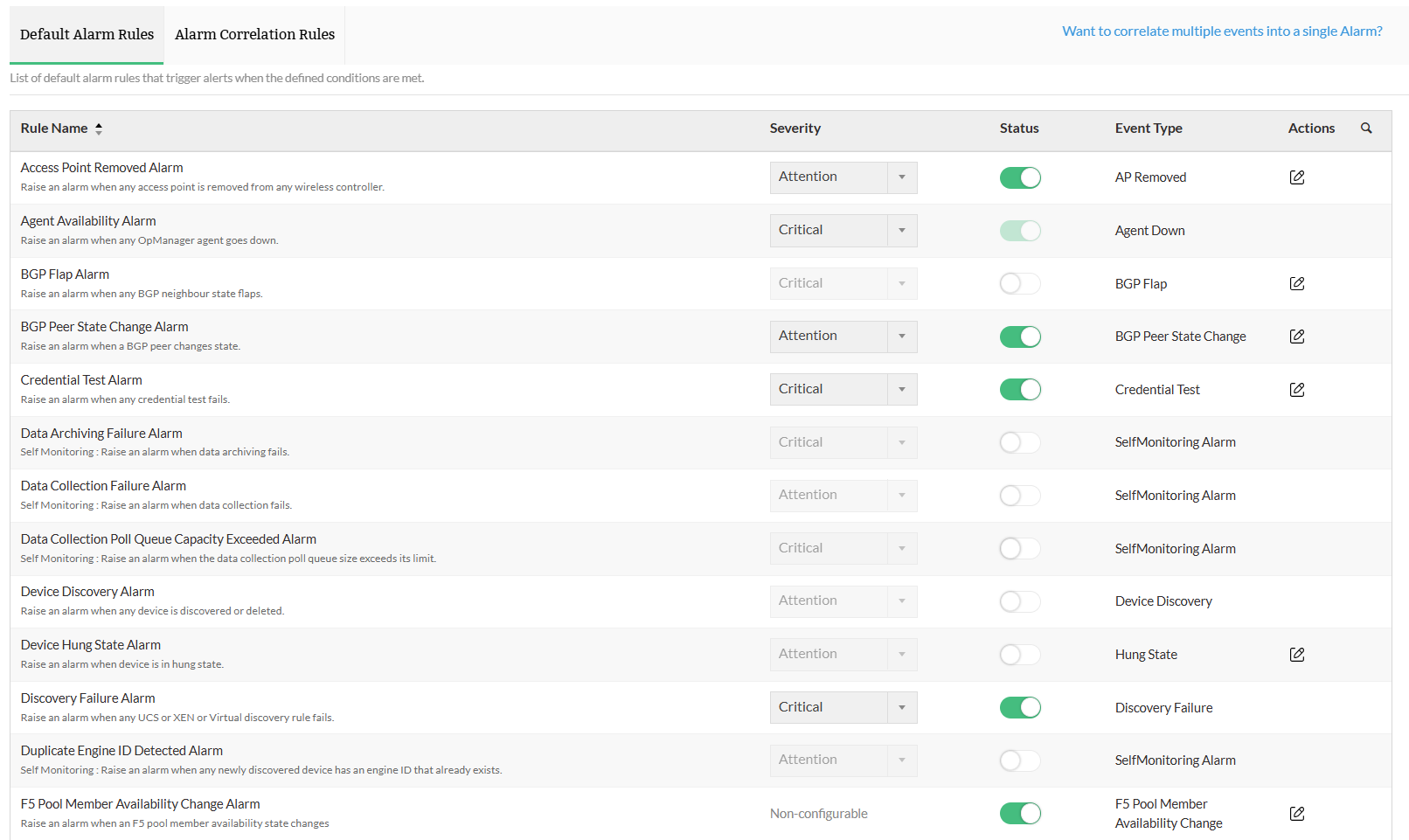
List of Default Alarm Rules available in OpManager
The following table lists the default alarm rules available in OpManager and the conditions under which they are triggered.
| Rule Name | Description |
|---|---|
| Access Point Removed Alarm | Triggers an alarm when an access point is removed. |
| Agent Availability Alarm | Triggers an alarm when an agent becomes unavailable. |
| APMPlugin Communication Alarm | Triggers an alarm when a communication issue occurs with the APM Plugin. |
| BGP Flap Alarm | Triggers an alarm when a BGP session flaps. |
| BGP Peer State Change Alarm | Triggers an alarm when a BGP peer changes its state. |
| Credential Test Alarm | Triggers an alarm when a credential test fails. |
| Data Archiving Failure Alarm | Triggers an alarm when data archiving fails. |
| Data Collection Failure Alarm | Triggers an alarm when data collection fails. |
| Data Collection Poll Queue Size Down Alarm | Triggers an alarm when the data collection poll queue size goes down. |
| Datapoll Thread Blocked Alarm | Triggers an alarm when a datapoll thread is blocked. |
| Device Discovery Alarm | Triggers an alarm when a device is discovered or deleted. |
| Device Hung State Alarm | Triggers an alarm when device enters Hung state. Learn more. |
| Discovery Failure Alarm | Triggers an alarm when a UCS, Xen, or Virtual discovery rule fails. |
| Engine ID Exist Alarm | Triggers an alarm when a duplicate engine ID exists. |
| Eventlog Alarm | Triggers an alarm when an EventLog rule is violated. |
| F5 Pool Member Availability Change Alarm | Triggers an alarm when an F5 pool member’s availability state changes. |
| F5 Pool Member Enabled Change Alarm | Triggers an alarm when an F5 pool member’s enabled state changes. |
| F5 Virtual Server Availability Change Alarm | Triggers an alarm when an F5 virtual server’s availability state changes. |
| F5 Virtual Server Enabled Change Alarm | Triggers an alarm when an F5 virtual server’s enabled state changes. |
| FCSwitch Port Status Change Alarm | Triggers an alarm when the status of an FC switch port changes. |
| FCSwitch Status Change Alarm | Triggers an alarm when the status of an FC switch changes. |
| File Integrity Alarm | Triggers an alarm when any product file is modified or an unexpected file is detected in the product directory. |
| Free License Device Count Exceeded Alarm | Triggers an alarm when the number of monitored devices exceeds the free license limit. |
| Group Alarm | Generates an alarm for a group when any of its members encounter a fault. |
| HA State Change Alarm | Triggers an alarm when the high availability state of a device changes. |
| Hardware Sensor Alarm | Triggers an alarm when the availability status of a monitored hardware sensor, such as fan or CPU sensor, changes. |
| Interface Bandwidth Exceeded Alarm | Triggers an alarm when interface bandwidth usage exceeds the configured limit. |
| Inventory Metrics Alarm | Triggers an alarm when any hardware component such as HDD, Serial Number, RAM, or other inventory details are changed. |
| IP Driver Failure Alarm | Triggers an alarm when the IP driver fails. |
| IPSLA Echo Violation Alarm | Triggers an alarm when an IPSLA Echo monitor exceeds its configured threshold. |
| IPSLA VoIP Violation Alarm | Triggers an alarm when an IPSLA VoIP monitor exceeds its configured threshold. |
| Kemp Real Server Exceeded Alarm | Triggers an alarm when a Kemp real server exceeds its configured threshold. |
| Kemp Real Server State Change Alarm | Triggers an alarm when a Kemp real server changes state. |
| Kemp Virtual Service Exceeded Alarm | Triggers an alarm when a Kemp virtual service exceeds its configured threshold. |
| Kemp Virtual Service State Change Alarm | Triggers an alarm when a Kemp virtual service changes state. |
| LAMA Alarm | Triggers an alarm for any error detected in the Log Analytics and Monitoring Application. |
| Mail Server Delay Alarm | Triggers an alarm when there is a delay in the mail server response. |
| Mail Server Down Alarm | Triggers an alarm when the mail server becomes unavailable. |
| Network Connectivity Lost Alarm | Triggers an alarm when network connectivity is lost. |
| Network Path Checksum Alarm | Triggers an alarm when a network path checksum fails. |
| Network Path Down Alarm | Triggers an alarm when a network path becomes unreachable. |
| Network Path Threshold Alarm | Triggers an alarm when a network path exceeds its configured threshold. |
| Neighbour Flap Violation Alarm | Triggers an alarm when neighbor state flaps for OSPF, EIGRP, or IS-IS protocols. |
| Neighbour State Change Alarm | Triggers an alarm when neighbor state changes for OSPF, EIGRP, or IS-IS protocols. |
| New Access Point Discovered Alarm | Triggers an alarm when a new access point is discovered. |
| Performance Monitor Failure Alarm | Triggers an alarm when a performance monitor fails consecutively. |
| Printer Alarm | Triggers an alarm when the status of a printer changes. |
| Process Monitor Down Alarm | Triggers an alarm when a monitored process goes down. |
| Route Changes Alarm | Triggers an alarm when routing table changes occur for OSPF, EIGRP, or IS-IS protocols. |
| Script Down Alarm | Triggers an alarm when a monitored script goes down. |
| SDWAN Site Decommission Alarm | Triggers an alarm when an SDWAN site is decommissioned. |
| SDWAN Site State Change Alarm | Triggers an alarm when the state of an SDWAN site changes. |
| SDWAN Tunnel Decommission Alarm | Triggers an alarm when an SDWAN tunnel is decommissioned. |
| SDWAN Tunnel State Change Alarm | Triggers an alarm when the state of an SDWAN tunnel changes. |
| Service Down Alarm | Triggers an alarm when any monitored service goes down. |
| Stack Switch Alarm | Triggers an alarm when any change occurs in a stack switch. |
| Stack Switch Number Change Alarm | Triggers an alarm when the number of units in a stack switch changes. |
| Stack Switch Role Change Alarm | Triggers an alarm when the role of a stack switch changes. |
| Stack Switch State Change Alarm | Triggers an alarm when the state of a stack switch changes. |
| Storage Array Status Change Alarm | Triggers an alarm when the status of a storage array changes. |
| Storage Disk Status Change Alarm | Triggers an alarm when the status of a storage disk changes. |
| Superadmin Password Change Alarm | Triggers an alarm when the superadmin password is changed. |
| Syslog Alarm | Triggers an alarm when a Syslog rule is violated. |
| TapeLibrary Status Change Alarm | Triggers an alarm when the status of a tape library changes. |
| UCS Health Alarm | Triggers an alarm when a UCS health event occurs. |
| UPS Battery Alarm | Triggers an alarm when the battery state of a UPS device changes. |
| URL Down Alarm | Triggers an alarm when a monitored URL becomes unavailable. |
| VMware SAN Disk Status Alarm | Triggers an alarm when the status of a VMware SAN disk changes. |
| VMware Storage Adapter Status Alarm | Triggers an alarm when the status of a VMware storage adapter changes. |
| Windows Service Down Alarm | Triggers an alarm when a Windows service goes down. |
| WMI Data Collection Scheduler Refresh Down Alarm | Triggers an alarm when the WMI data collection scheduler is down. |
| WMI Data DLL Corrupt Alarm | Triggers an alarm when the WMI data DLL is corrupt. |
| WMI Thread Blocks Alarm | Triggers an alarm when WMI thread blocks are detected. |