Wireless network monitoring software
- Track RSSI, noise, & SNR
- Monitor the clients, access points, & SSIDs
- Get instant, AI-driven alerts
- Set up dedicated dashboards and reports
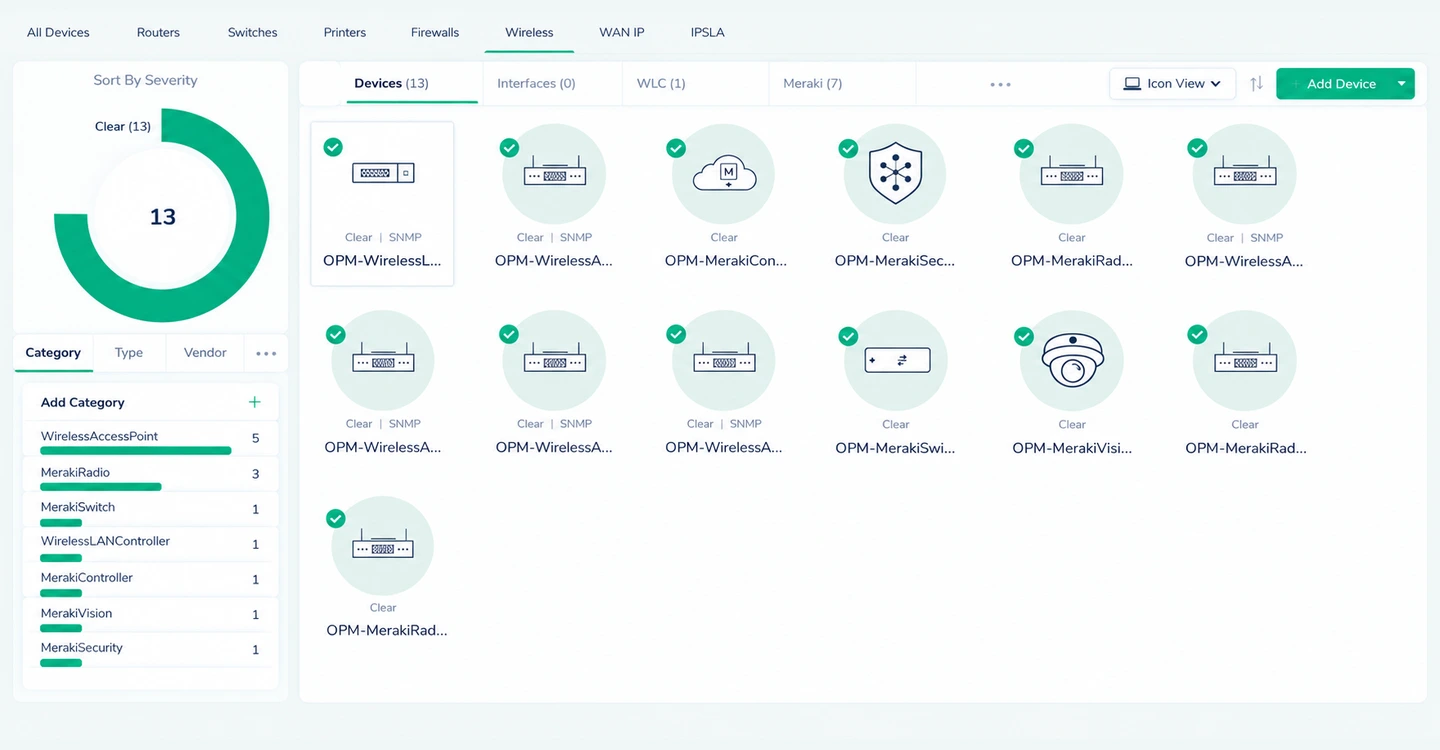
Monitor wireless networks with OpManager
ManageEngine OpManager is a network monitoring software with powerful wireless network monitoring capabilities. It uses protocols like SNMP, telemetry standards like gNMI, and third party APIs to discover and monitor controllers, routers, switches, access points, IoT sensors, or any other wireless network devices connected to your network.
OpManager's wireless network monitoring capabilities
Gain visibility into wireless and SD-WAN networks
OpManager provides visibility into wireless networks across sites, from the edge device to the access points. Your wireless network infrastructure will be neatly classified under their respective controllers in a neat inventory.
- Drill down into each device, set up performance monitors, and review performance.
- Leverage automated topology maps and organization-spanning views to visualize upstream and downstream dependencies in your wireless network.
- OpManager can suppress alarms for downstream devices when the upstream device goes down to prevent alarm floods.
Monitor clients and access points to optimize signal strength
OpManager gives deep insights into the WiFi RF and the clients using them to help you prevent signal dead zones, interference, client congestion, and roaming failures.
- Track the channels, the number of clients, and active clients connected to each network from your access points.
- Monitor signal strength at regular intervals and set up alerts to warn you of weak signal access.
- Ensure clear stable connections by keeping tabs of the Signal to Noise ratio (SNR) from each access point.
- Monitor channel noise for access points to detect interference events before they inconvenience users.
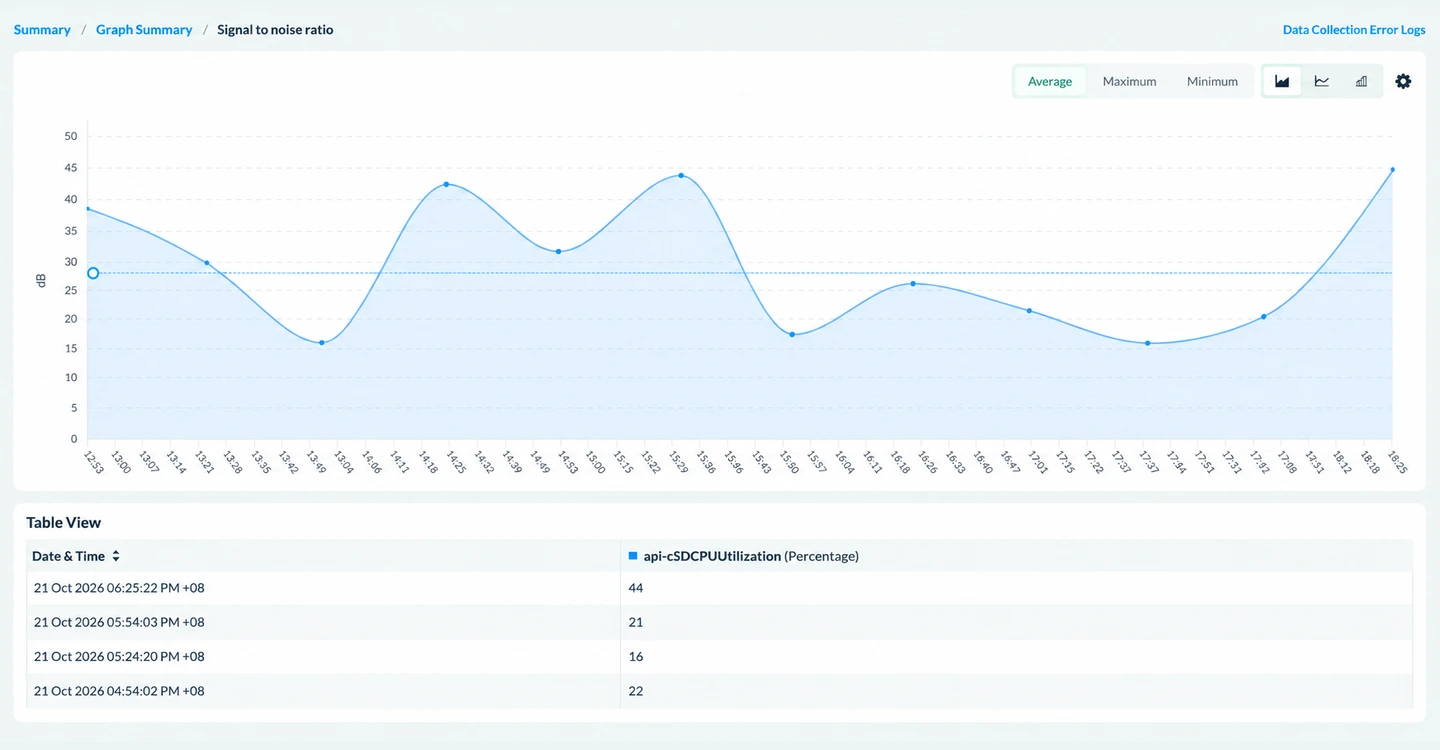
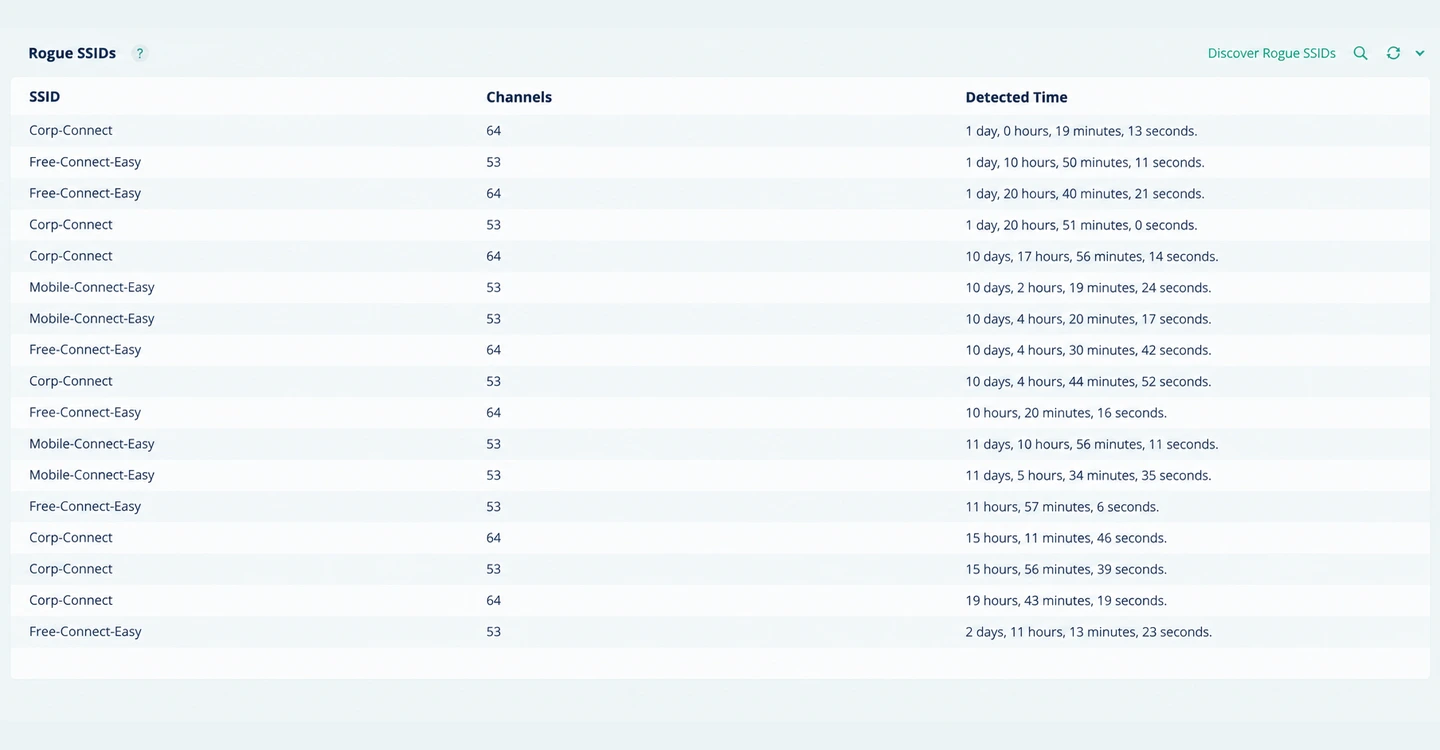
Keep tabs on VLANs, SSIDs, and rogue SSID connections
OpManager discovers and maps VLAN assignments, SSID associations, and rogue access points across your wireless network so you can keep segmentation clean and connections secure.
- Identify VLAN misconfigurations that cause unreachable devices or cross-segment communication issues.
- Correlate SSIDs with their associated WLCs and access points from a single pane of glass.
- Detect and monitor rogue SSIDs with signal strength tracking and threshold-based alerts.
- Spot unauthorized access points before they become a security liability.
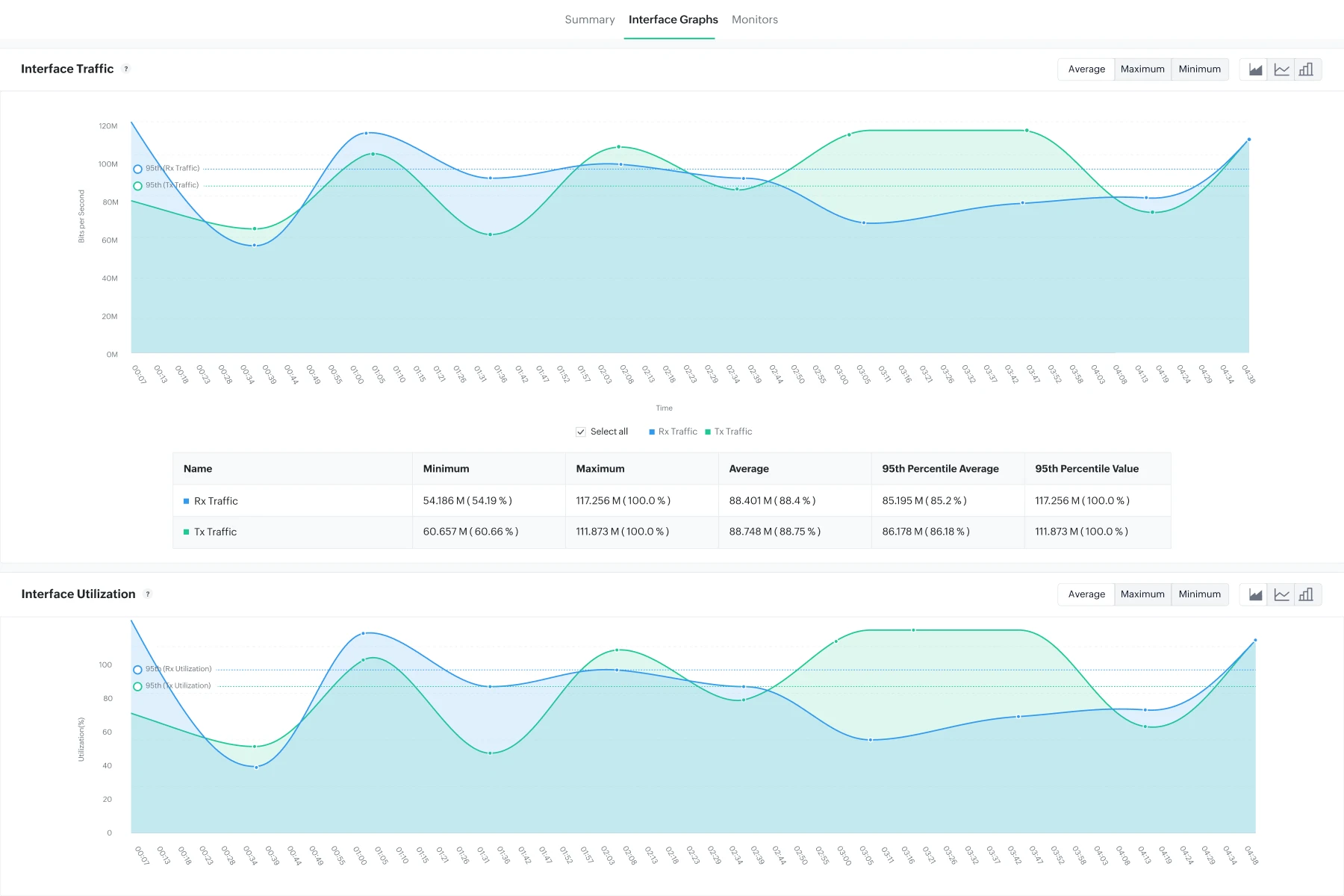
Track latency to optimize network performance
OpManager tracks bandwidth consumption and latency across your wireless interfaces in real time, helping you pinpoint congestion before it impacts users.
- Monitor interface Rx/Tx traffic trends, packet errors, and discards across access points and WLCs.
- Track response time and jitter for wireless components like controllers and access points.
- Use ML-driven utilization forecasts to anticipate bandwidth growth and plan capacity expansions.
- Set adaptive thresholds to calculate and set alerts automatically for latency and traffic deviations.
Set up AI-driven monitoring to find hardware issues proactively
OpManager's AI-driven adaptive thresholds and hardware health monitors flag degradation in access points and controllers before it causes unplanned outages.
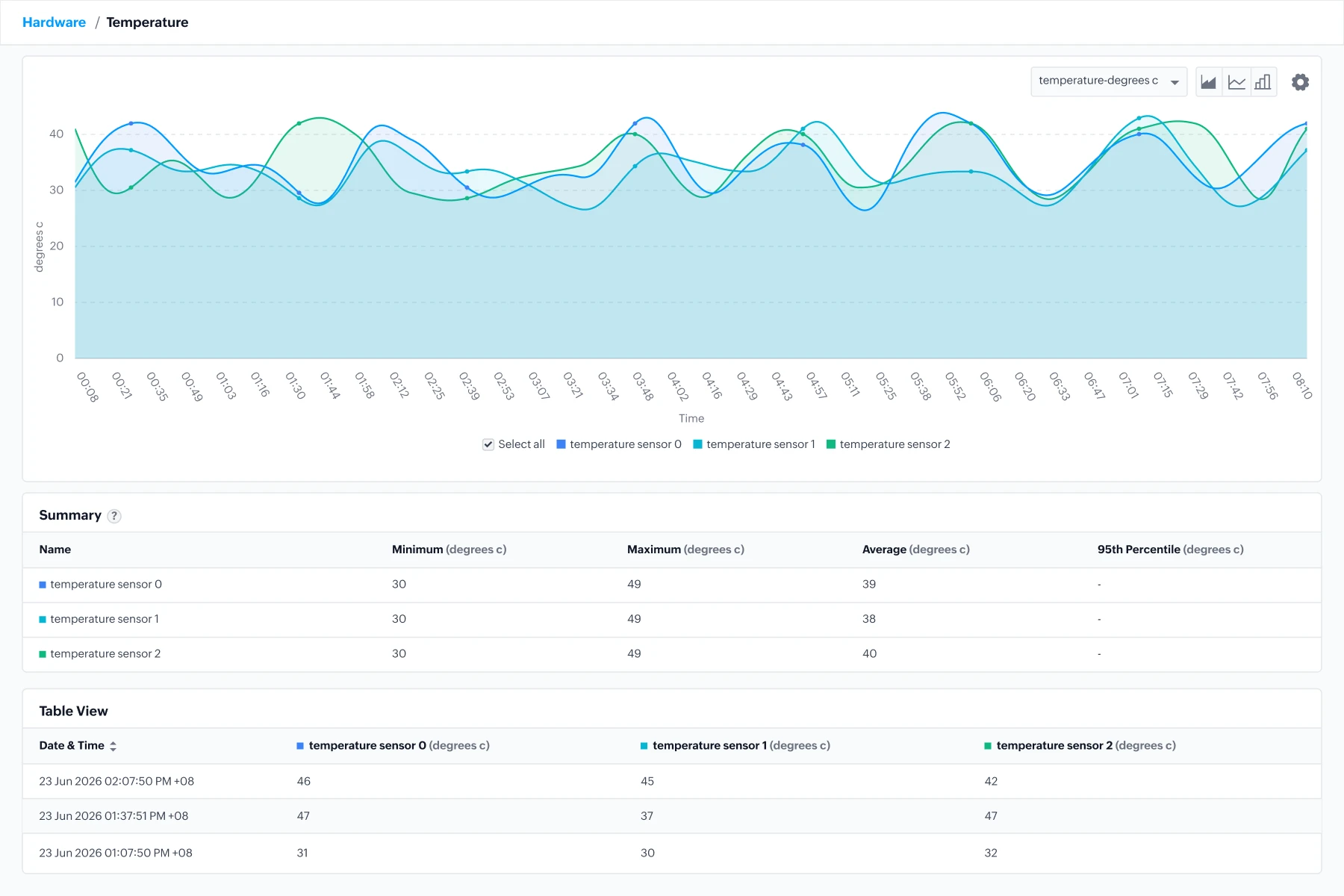
- Track CPU usage, memory utilization, temperature, fan speed, and PSU health across wireless hardware.
- Get color-coded, context-rich alarms that indicate severity and speed up troubleshooting.
- OpManager suppresses downstream alarms automatically when an upstream device goes down, preventing alarm floods.
- Schedule maintenance proactively using predicted hardware sensor trends and historical data.
Suited for all networks: Use cases for wireless network monitoring

Unified visibility across client sites
An IT services firm supports clients with a mix of wired switches, standalone APs, and small controller deployments. When clients report WiFi outages, engineers have to log into separate tools to check whether it's the AP, PoE switch, or up-link.
- OpManager's MSP edition brings every client's wired and wireless estate into one console, so the root cause shows up in minutes instead of hours.
- SNMP-based discovery automatically adds switches, standalone APs, and controllers at each client site and groups them by client, so engineers can filter the dashboard to one customer at a time.
- Uplink dependency rules between APs and their upstream switches suppress duplicate alarms. An uplink failure raises one actionable alert instead of twenty "AP down" notifications.
- Integration with ticketing systems such as ServiceDesk Plus, ServiceNow, or Jira automatically opens a ticket in the right client's queue, with performance graphs attached for faster triage and SLA reporting.

Managing large-scale campus networks
In large-scale campus networks with hundreds of access points like universities, hospitals, or corporate business parks with high client density, packet loss, jitter, and low SNR are common issues. Rogue access points are also a persistent security risk.
- OpManager scales to thousands of devices and gives organization-spanning views to manage distributed wireless infrastructure. Giving teams complete visibility into their networks.
- Real-time signal strength monitoring, client count tracking, and latency metrics help network admins pinpoint the root cause quickly and resolve it before users escalate.
- OpManager's WiFi analyzer tracks rogue SSID signal strength and triggers threshold-based alerts, giving security and network teams early warning before unauthorized devices can be exploited.
- OpManager's scheduled reporting, availability statistics, and dashboards make it easy to demonstrate SLA compliance and identify performance gaps.

Pinpointing slowdowns across retail branches
A retail chain replaced MPLS with Cisco Meraki SD-WAN over broadband at hundreds of stores. In-store Wi-Fi carries POS terminals, handheld inventory scanners, and guest access. When checkout slows, store staff blame the Wi-Fi, but the real cause is unknown.
- OpManager provides visibility into the Meraki controllers, devices, networks, and clients at different branch locations in one view.
- Store APs are monitored alongside SD-WAN edge devices, with latency, and packet loss for each broadband circuit shown in the same view as AP health.
- Traffic/NetFlow analysis shows which applications and interfaces are using bandwidth, exposing cases where guest streaming crowds out POS transactions.
- By monitoring the wireless networks, the upstream LAN, WAN edge devices, and hops in a WAN path. When latency spikes, it can be pinpointed to the exact device.

Keeping warehouse and yard connected
A logistics company relies on wireless across its distribution centers: indoor APs above high-bay racking, plus outdoor APs and point-to-point bridges covering loading docks and yards. Weather, physical obstructions, scanner disconnections, and changing stacking patterns gradually degrade the outdoor links.
- OpManager monitors the full indoor-to-outdoor wireless path and flags degradation early.
- Outdoor APs and wireless bridges are polled via SNMP for availability, signal strength, and link throughput. Vendor-specific metrics can be added through custom SNMP monitors.
- Historical graphs let teams correlate link drops with time of day, shift patterns, or weather events, which helps identify recurring problem spots.
- AI/ML-driven anomaly detection learns each link's normal performance baseline and alerts on gradual declines in throughput or signal quality, well before a bridge fails outright.

Monitoring air-gapped pharma wireless zones
A pharmaceutical manufacturer runs wireless across production, lab, and offices with strict segmentation. Production zones are air-gapped, while corporate systems span on-prem data centers and cloud services. SaaS tools can't be used, and config changes must be documented for audits.
- OpManager's on-premises deployment fits these constraints without weakening segmentation.
- OpManager runs entirely on-premises. A standalone instance can sit inside fully air-gapped zones, and probes can cover segmented zones that allow one controlled connection to the central server.
- Network configuration management add-on backs up wireless device configurations, detects changes, and keeps a full audit trail to support GMP and data-integrity requirements.
- Device health alerts and unauthorized-change alerts reach the right teams. The central console gives corporate IT a combined view of on-prem and cloud-connected infrastructure outside the restricted zones.
FAQs about wireless network monitoring
Learn more about wireless monitoring
Seven best practices for optimizing your WiFi networks
Optimize the WiFi management lifecycle: from designing for capacity to monitoring for performance.
Learn more →Unlock more value with add-ons
Extend easily with complementary products — add deeper traffic visibility, configuration management, and more.
Bandwidth monitoring
Layer NetFlow-based traffic analysis to see who and what is driving every byte across the network.
Try free trial →Firewall management
Audit firewall rule changes, spot shadow rules, and tie every config change back to the network event.
Try free trial →Network configuration
Back up configs, detect drift, and push standardized changes across thousands of devices.
Try free trial →