Debian patch management across the multitude of endpoints in your network is undoubtedly a necessary evil. With over 600 active Linux distros and Debian accounting for ~16% of the Linux market, it is crucial to understand how to update Debian packages to prevent vulnerabilities from exploiting the endpoints in your network.
This article talks in detail about the following:
- What is a Debian update?
- When are Debian updates released?
- How to update Debian packages automatically using Patch Manager Plus?
- FAQs related to Debian updates
What is a Debian update?
A Debian update refers to the process of updating software packages and system components on a Debian-based Linux distribution to their latest versions. Updating Debian ensures the system remains secure, stable, and up-to-date with the latest features and bug fixes.
Debian, also known as Debian GNU/Linux, is a free and open-source Linux distribution known for its robustness and extensive software repository. Since its initial release in 1993, it has become one of the most influential Linux distributions, forming the base for other popular distributions like Ubuntu and Kali Linux.
The Debian update packages include the following:
- Security Updates: Critical updates to address vulnerabilities and protect the system from potential threats.
- Distribution Updates: These involve upgrading to a new version of Debian, which includes the latest features and improvements.
- Kernel Updates: These updates ensure that the core of the operating system is up-to-date with the latest patches and improvements.
- Package Updates: Routine updates to installed software packages to fix bugs and add new features.
It is known to be the first distribution to include a package management system. Due to its pioneering work in Linux distributions, Debian has a large user base. Hence it is important to stay informed about the various Debian update packages.
When are Debian updates released?
Debian updates do not follow a fixed schedule. The latest Debian release - Debian 13 codenamed trixie, became the new stable branch on August 9, 2025, with its most recent point release (13.7) issued in September 2026. Debian typically ships a new major version roughly every two years, with smaller point releases every few months to patch security issues and bugs.
How to install a Debian update manually?
To update Debian and install the latest Debian security updates, connect to your Debian system via SSH. Once you are in the terminal, enter the following commands:
- grep security /etc/apt/sources.list | tee /etc/apt/security.sources.list
- apt-get update
- apt-get upgrade -o Dir::Etc::SourceList=/etc/apt/security.sources.list
- Type Y and press Enter. Security updates will be installed and your system will be up to date.
To check and apply updates at a later stage do this:
- apt-get update
- apt-get upgrade -o Dir::Etc::SourceList=/etc/apt/security.sources.list
How to update Debian packages automatically using Patch Manager Plus?
With ManageEngine Patch Manager Plus, you can update Debian packages automatically as well as automate the deploying of security updates to endpoints completely. The entire process of Debian patch management - from scanning the machines for missing updates, downloading these updates, testing them in your work environment for anomalies, and deploying them to the respective client machines is fully automated. To handle Debian security updates:
- Sync the patch database for information regarding the newly released Debian updates. You can either schedule the sync between the patch database and the Patch Manager Plus server or you can manually initiate the sync by navigating to Deployment --> Update Vulnerability DB.
- Scan the client machines for the missing updates by navigating to Systems --> Scan systems.
- Navigate to Missing patches and click on the update to be installed. Install these updates at a time of your convenience.
- You can also create an Automated Patch Deployment (APD) task specifically for Debian updates that will iteratively run every time a missing Debian update is detected in your client machines running Debian OS.
- You can further test these updates on a pilot group of systems running Debian OS before deploying them in bulk. Navigate to Deployment --> Test and Approve --> Create test group. There are options to automatically approve the tested updates as well.
- Further, there are also options to generate extensive reports on the entire patching process.
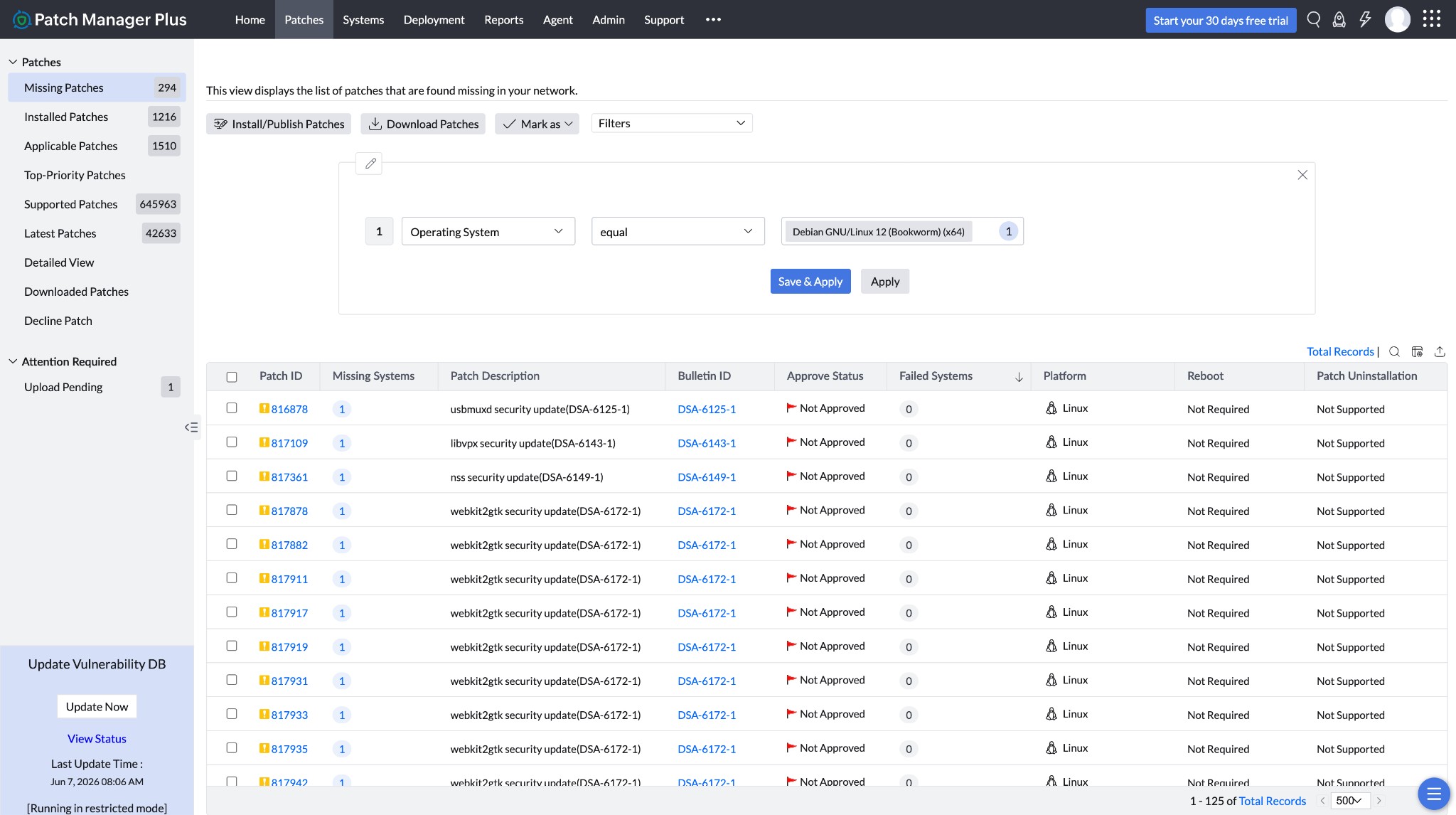
Thereby, with Patch Manager Plus, we can completely automate the process of deploying Debian updates to your endpoints.
Manage unlimited endpoints, free for 30 days.
Scan, test, deploy and report patches for Windows, macOS, Linux and 1,100+ third-party applications from one console.