Active Directory (AD) is Microsoft’s directory service used by organizations to manage user identities, authentication, and access control across domains. While it forms the backbone of most enterprise networks, maintaining its performance can be challenging. Slow logons, account lockouts, and replication delays can quickly impact productivity. That’s why IT teams need an Active Directory performance monitoring tool to keep the AD environment healthy and ensure uninterrupted access.
Applications Manager helps monitor Active Directory performance by tracking key metrics, running diagnostic tests, and identifying potential bottlenecks. It detects issues such as replication delays or service outages and triggers corrective actions to maintain smooth and reliable AD operations.
Ensure reliable logins with domain controller health checks
Monitor the performance and availability of your domain controllers in real time. Track metrics like CPU, memory, and disk usage, and ensure NTDS files have sufficient space to prevent authentication failures or access delays.
Monitor core AD services, DNS, and critical processes
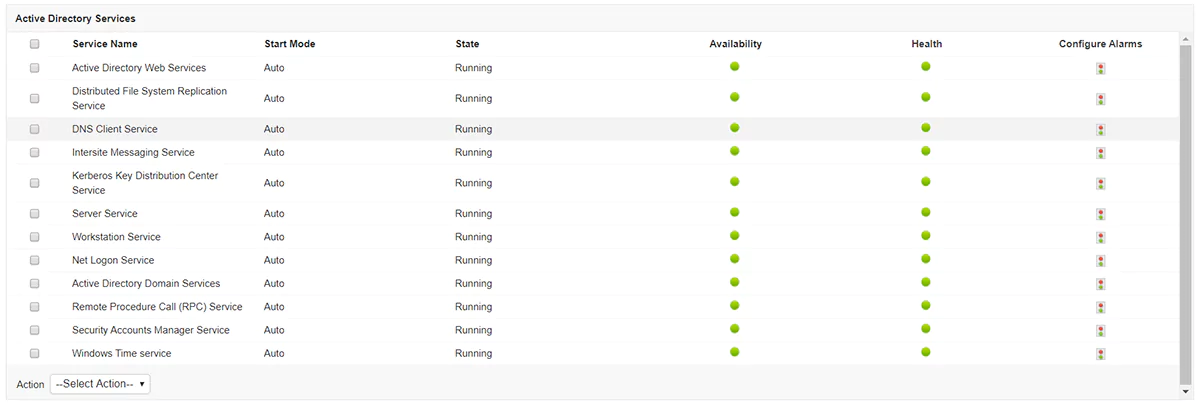
Applications Manager provides insights about various categories of active directory services such as domain services, certificate services, directory federation services, and rights management. These services have several important functionalities varying from data storage to rights management.
With Applications Manager's AD Monitoring tool, you can monitor the availability, health, and start modes of these services in one unified view. Set up alerts for threshold violations to detect and fix failures early. Ensure that address books, email directories, and contact information stay synchronized across domains.
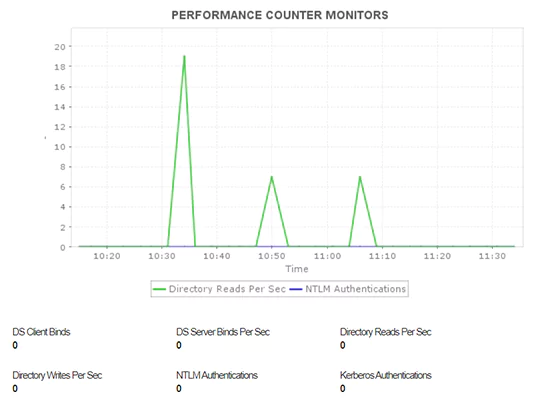
Track critical performance counters like Kerberos and NTLM authentications to understand how your domain controllers handle user requests. These insights help detect authentication delays, overloaded controllers, or security configuration issues before they impact users.
Detect and fix Active Directory replication issues quickly
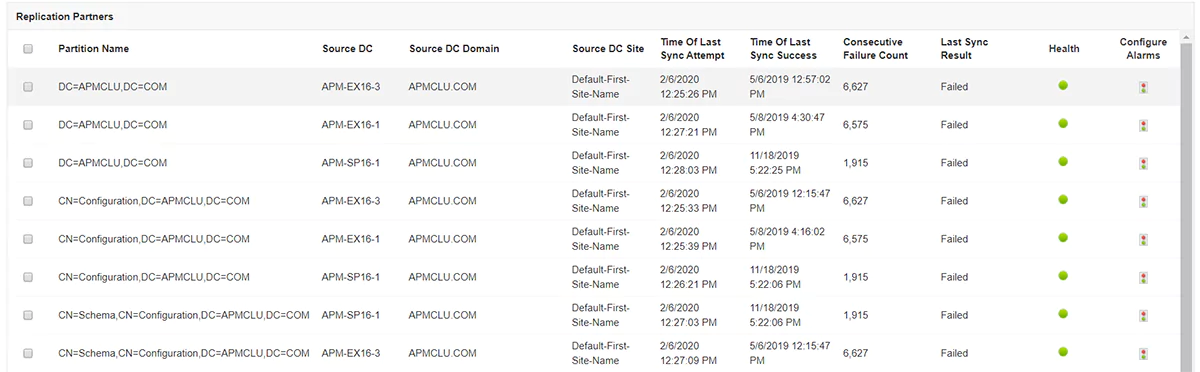
Active Directory maintains consistency by replicating schema, configuration, and domain partitions across domain controllers. Monitoring these replication activities ensures that all controllers remain synchronized and up to date.
With Applications Manager, track replication partitions, monitor replication load, and measure how efficiently the AD server processes these operations. Identify any replication tasks that are taking longer than usual or consuming excess resources.
Get early alerts for synchronization failures, pending replications, or bottlenecks that may lead to authentication or directory update delays. Resolve these issues quickly to maintain consistent data and reliable access across your AD forest.
Track AD connectivity metrics to prevent login delays
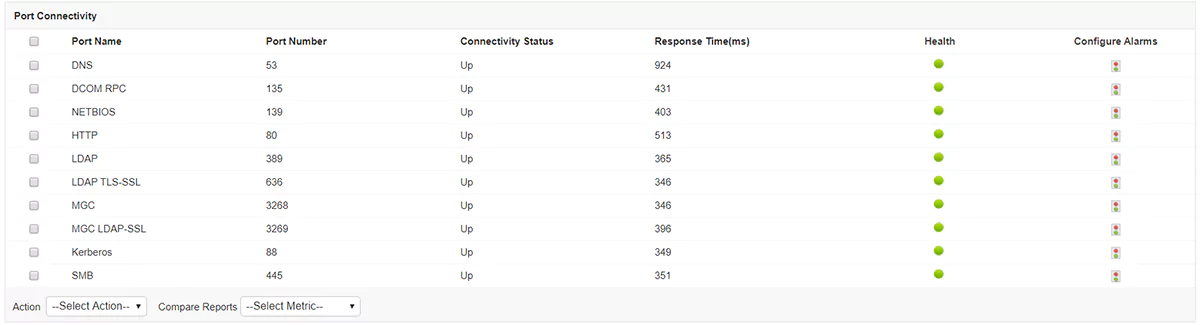
Track port connectivity, response time, and health to ensure stable communication between domain controllers. By monitoring RPC and LDAP ports, Applications Manager's active directory monitoring tool helps prevent login delays and authentication timeouts caused by network issues.
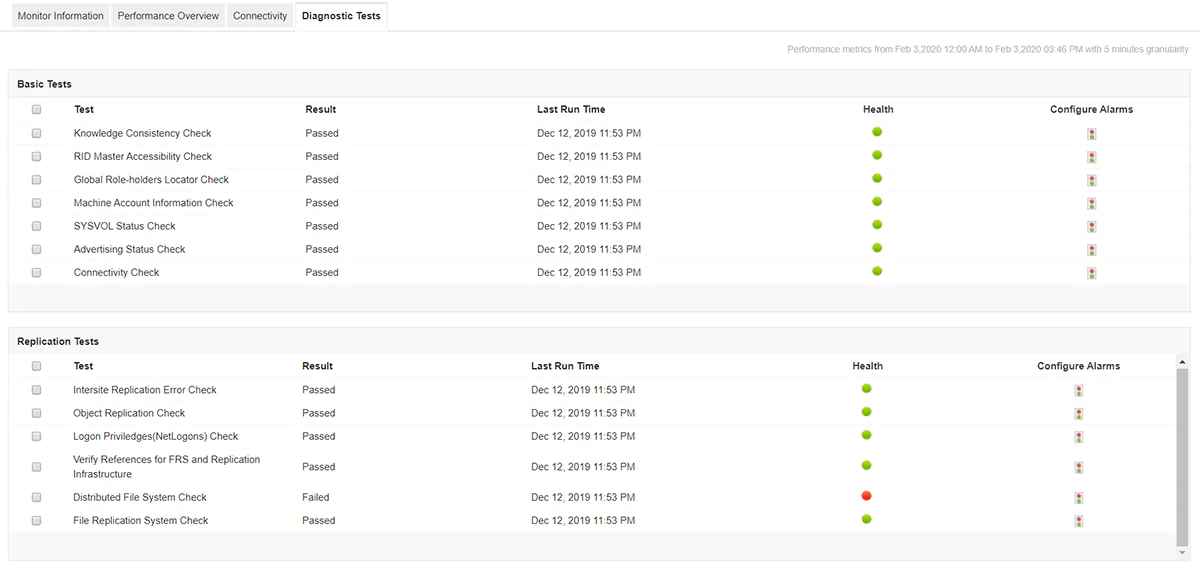
Automate AD health checks with built-in diagnostic tests
Applications Manager's active directory monitoring software automatically runs diagnostic tests such as connectivity checks, knowledge consistency, and replication health checks. These tests help you verify server availability, responsiveness and overall AD health, without manual intervention.
Ensure AD database consistency and fast query response
- Monitor NTDS.DIT file size, disk utilization, and cache performance to maintain database health and prevent query slowdowns.
- Get alerts when database growth or free space drops below safe limits, helping you plan capacity and schedule maintenance proactively.
Track LDAP and LSASS counters to ensure server stability
Monitor LDAP query volume and LSASS process utilization to detect potential overload.
Identify spikes caused by inefficient queries, offline domain controllers, or subnet configuration issues.
Resolve anomalies early to prevent logon delays and server crashes.
Detect and resolve DFS replication issues across domains
With Applications Manager's AD Monitoring software:
- Identify high CPU or memory usage caused by DFS replication and adjust staging quotas as needed.
- Ensure consistent file synchronization across servers to avoid data loss.
Resolve Active Directory address book sync and access issues
Monitor Global Address List (GAL) synchronization health and detect session errors to keep user contact data consistent across the organization.
Identify number of jobs in the queue
Track queued replication jobs to detect overloads early. If the number exceeds set limits, you can tune replication parameters or upgrade resources for better performance.
Use Cases for Active Directory Monitoring
Applications Manager’s Active Directory monitoring helps IT teams troubleshoot performance issues, maintain domain controller health, and secure authentication services, all from a single dashboard.
- Troubleshoot slow logins: Identify replication delays, DNS errors, and overloaded domain controllers that slow authentication, ensuring faster logins and a smoother end-user experience.
- Detect replication failures early: Monitor replication health to detect sync delays or broken links before they cause authentication errors, keeping directory data consistent across all sites.
- Resolve account lockouts quickly: Track failed logins and lockout events across domain controllers to pinpoint and fix recurring authentication failures, reducing user downtime.
- Monitor FSMO roles and controller health: Track FSMO role ownership and domain controller performance to prevent unexpected role changes or failures, ensuring stable AD operations.
- Prevent DNS and service outages: Monitor DNS and SRV record health to avoid name-resolution issues that disrupt logins and domain connectivity, maintaining seamless access.
- Strengthen security and compliance: Audit group policy changes, permission updates, and privileged account activity continuously to improve security posture and simplify audit readiness.

