
Applications Manager is an enterprise-ready and affordable application performance management solution that helps you manage the performance of a hybrid set of applications and servers across physical, virtual and cloud environments. It provides availability & performance dashboards for business applications along with proactive fault management and notification capabilities. The powerful reporting module helps administrators plan inventory and empower the line of business managers.
Find out why Amazon, EDS, McKesson, MetLife, PFizer and many other businesses believe that ManageEngine Applications Manager adds value to their business.
Agentless Monitoring Capabilities
| Application Servers | Servers | Databases |
|---|---|---|
| JBoss 3.2.x, 4.0.x, 4.2.2 GA, 5, 5.1, 6.0, 7.0 | Windows 2000, 2003, 2008, 2012, XP, NT, Vista, 7 | Oracle 8.x, 9i, 10g, 10.1.3, 11g, RAC (real application clusters) |
| Tomcat 3.x, 4.x, 5.x, 6.x, 7.x | Linux | MySQL 3.23.x, 4.x, 5.x, 5.1.x, 5.5.x, 5.6.x |
| WebLogic 6.1, 7.x, 8.x, 9.x, 10.x (11g), 12c | Sun Solaris | MS SQL 2000, 2005, 2008, 2012 |
| VMware vFabric tc Server | IBM AIX | IBM DB2 8.x, 9 |
| Glassfish Server | IBM AS400/iSeries | Sybase ASE 12.5.3 & above |
| Sliverstream | Tru64 Unix | PostgreSQL 8.1 & above |
| WebLogic Integration 8.x | FreeBSD | Memcached 1.2 &above |
| WebSphere 5.x, 6.x, 7.x & above | Mac OS | Cassandra |
| Oracle AS up to 10.1.2, 10.1.3 & above | Novell | MongoDB |
| Microsoft .NET | Redis | |
| Java / J2EE Web Transactions | ||
| Java Runtime JRE 1.5 and higher | ||
| ERP | Web Server / Services | Services |
| SAP | SOAP Web Services | JMX Applications |
| SAP CCMS | SSL Certificate Monitoring | Service Monitoring |
| Oracle E-Business Suite | Apache Server | Ping Monitor |
| IIS Server | SNMP | |
| Nginx Server | Telnet | |
| PHP | Active Directory | |
| Other Web Servers |   | |
| Custom Applications | Websites | Mail Servers |
| Custom MBeans in WebLogic, WebSphere, JBoss, or any JMX-enabled Server | URL Monitoring URL Sequence URL Content | Exchange Server Other Mail Servers |
| Custom applications that consists of JMX MBean and SNMP OID data sources | ||
| Custom scripts | ||
| Database Query monitoring | ||
| File/ Directory monitoring | ||
| Script monitoring | ||
| Windows Performance Counters | ||
| Cloud Apps | Virtualization | |
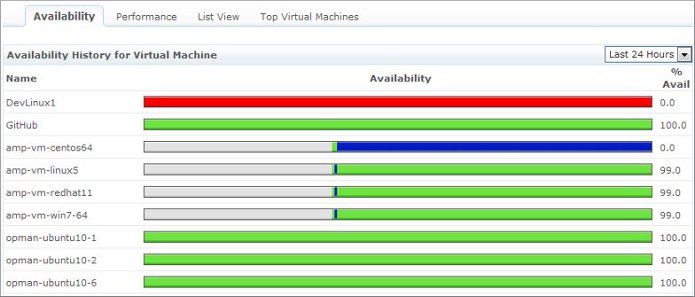
| Amazon EC2, RDS instances EBS Volumes S3 buckets Windows Azure | VMware ESX/ESXi vCenter Server Microsoft Hyper-V Virtual Machines |
System Requirements
| Minimum Hardware Requirements* (Windows, Linux) | ||
|---|---|---|
| Processor Speed 1.4 GHz | Memory 2 GB RAM | HD Space 40 GB* |
| * The above is for 250 monitors. Higher configuration of hardware would enable you to manage more monitors. | ||
| Software Requirements | |
|---|---|
| Operating Systems | Windows Professional/2000/2003/2008/XP/Vista Red Hat Linux 8.0 and above Enterprise Linux 2.1 and above Debian/SuSe/Ubuntu |
| Browsers | Internet Explorer 6.0 and above. Firefox 2.x and above. |
Product References and Contact Information
| Product Information | https://www.manageengine.com/appmanager |
| Live Demo | http://demo.appmanager.com |
| User Forum | https://pitstop.manageengine.com/portal/en/community/applications-manager |
| Product Blog | https://www.manageengine.com/products/applications_manager/blog/ |
| Product Troubleshooting | https://pitstop.manageengine.com/portal/en/kb/applications-manager/ |
| Help | https://www.appmanager.com/help.html |
| Product Overview | https://www.appmanager.com/me-appmanager-overview.html |
| Technical Support | appmanager-support@manageengine.com |
| Online Store | https://www.manageengine.com/products/applications_manager/store.html |

