Forecast Recommendations
Overview
Forecast Recommendations extend Forecast Alerts by generating a possible Impact message and a Recommendation message for every triggered forecast alert. They use forecast data to list out the possible effects of a predicted threshold breach and suggests actions, such as adding capacity before a resource reaches its limit. This helps you quickly understand the consequence of a threshold violation and the corrective actions to take, without having to analyze the underlying metric trend manually.
Working
The Forecast Alert scheduler runs daily during non-business hours (01:30 AM) and evaluates the alert rules configured for your monitors. When a forecast alert is triggered during this run, Applications Manager checks whether a recommendation is available for the corresponding alert rule and, if one exists, generates the Impact and Recommendation messages for that alert.
The recommendation evaluates the forecasted resource utilization and suggests the additional capacity, or the extent of utilization increase, required to prevent the resource from reaching its capacity limit within the forecast period. For example, a forecast recommendation for a disk utilization alert indicates how much additional disk space should be provisioned to avoid the disk from running out of space within the predicted time frame.
Note: Forecast Recommendations are currently generated only for Forecast Alerts. Recommendations are not available for regular threshold-based alarms.
Viewing Forecast Recommendations
To view the generated recommendations, navigate to Settings → Alarm / Action → Forecast Alert → Forecast Recommendations.
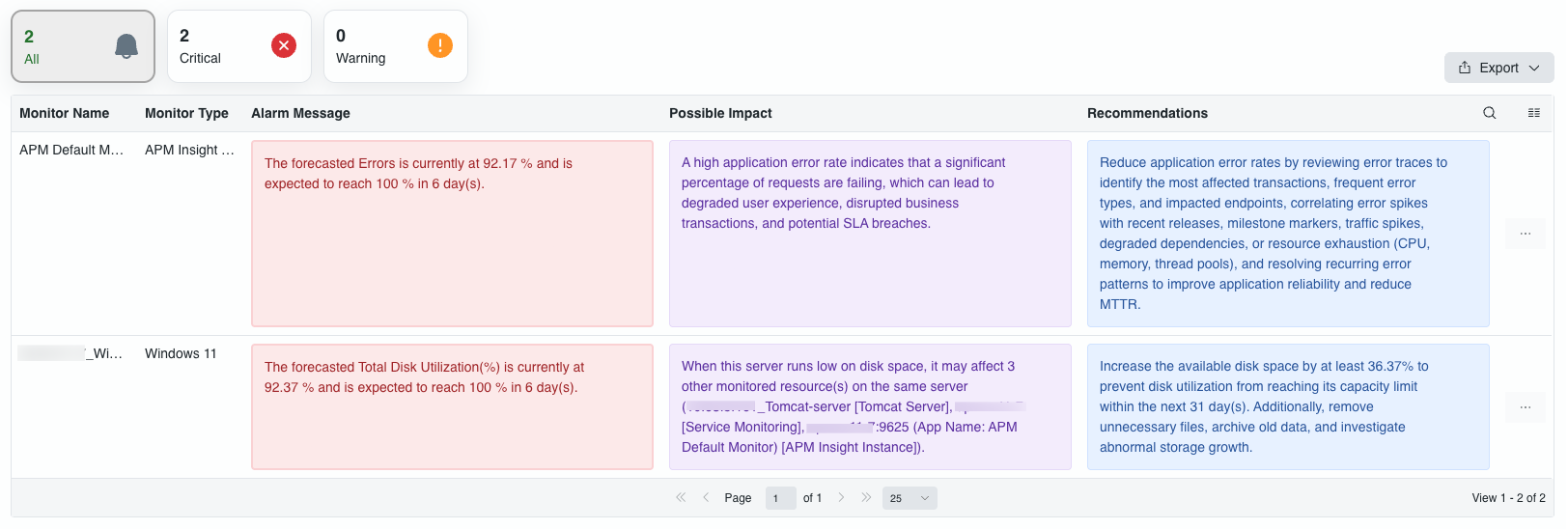
The Forecast Recommendations view lists every forecast alert along with its recommendation, and includes the following:
- Summary cards: Show the total number of forecast alerts (All) and the count of alerts by severity (Critical, Warning).
- Forecast alert table: Lists the Resource ID, Monitor Name, Monitor Type, Title, Alarm Message, Possible Impact, Recommendations, Attribute ID, Attribute Name, Severity, and Alert Time for each forecast alert.
- Export: Export the listed forecast alerts and recommendations.
- Search and column selection: Search within the list, and choose the columns to display, using the icons above the table.
- Users with restricted monitor access can view forecast alerts and recommendations only for the monitors they have permission to access.
- For applications monitored through Applications Manager, Forecast Recommendations will include the applications running on the server, along with their associated processes and services running within it.
Forecast Recommendation Widget
The Forecast Recommendation widget lets you add forecast alerts and their recommendations directly to a dashboard, so you do not have to navigate to the Forecast Recommendations view separately. The widget can be configured using the options below to display recommendations relevant to your requirement.
Configuration options
| Option | Description |
|---|---|
| Severity | Filter forecast recommendations by alert severity, such as Critical or Warning. |
| Monitor Type | Restrict recommendations to a specific monitor type. |
| Monitor Group | Restrict recommendations to monitors belonging to a specific monitor group. |
| Monitor | Restrict recommendations to one or more specific monitors. |
By default, Applications Manager provisions a Zia Insights Dashboard for new installations and after upgrade, with the Forecast Recommendation widget already added to it.
Note: The Forecast Recommendation widget is not supported on Published Widgets or Published Dashboards.