Replication Policy | Endpoint Central
Data Replication
To manage computers belonging to various branch offices of your enterprise (Computers in WAN), you will have to install unique Distribution Servers while creating Remote offices. Know more here.
Let's say you have five different branch (remote) offices with Distribution Servers and you are creating a configuration to deploy a policy or profile. Once the configuration is created, the associated policies or profiles will get automatically replicated/duplicated to the Distribution Server.
Let's say you have five different branch (remote) offices with Distribution Servers and you are creating a configuration to manage a patch or to deploy a software to all the computers of your enterprise. Once the configuration is created, the associated software or the patch binaries will get automatically replicated/duplicated to the Distribution Server.
Challenges in Replication
- What happens if all your Distribution Servers happen to contact your main server at the same instance?
- The Replication happens via WAN (Wide Area Network). What if your bandwidth utilization is not optimized and the transfer occurs during the peak productive hours of your enterprise?
- You may face server overload or downtime.
How Replication Policy helps?
To overcome this pain in deploying policy / profile across branch offices, you can create a "Replication Policy" and associate it with various remote offices. Replication policies defines how data is replicated, where is it replicated to and how often the data is replicated. By configuring a replication policy in Endpoint Central, you will be able to optimize the bandwidth consumed while replicating the policies or profiles. The replication takes place between the Central server and the distribution server and you can configure different replication policies for different remote offices to save bandwidth consumption.
To overcome this pain in deploying a patch or software across branch offices, you can create a "Replication Policy" and associate it with various remote offices. Replication policies defines how data is replicated, where is it replicated to and how often the data is replicated. By configuring a replication policy in Endpoint Central, you will be able to optimize the bandwidth consumed while replicating the software and patch binaries. The replication takes place between the Central server and the distribution server and you can configure different replication policies for different remote offices to save bandwidth consumption.
With Replication policy, you can customize:
- Replication Interval, the time interval each Distribution Server takes to contact the main server.
- Data transfer rate, the bandwidth used for transferring data to the Distribution Server.NoteFor Endpoint Central Cloud, to keep up with the server's scalability, the actual data transfer rate may sometimes differ from your configured rate.
- With the scheduler, you can plan and organize the time of data replication from the Server to Distribution Server.
- With the scheduler, you can plan and organize the time of Patch or Software data replication from the Server to Distribution Server.
How to configure a replication policy?
To configure a replication policy,
- In the console, navigate to the Agent tab and click Replication Policy under Settings
- Click Create Policy
- Enter the Policy Name
- Select the Data transfer rate
- Configure the Replication Interval
- Select the days during which the software and patches should be replicated from the server and configure the time interval at which the replication should take place.
- Click Save
To see a video on replication policy, click here.
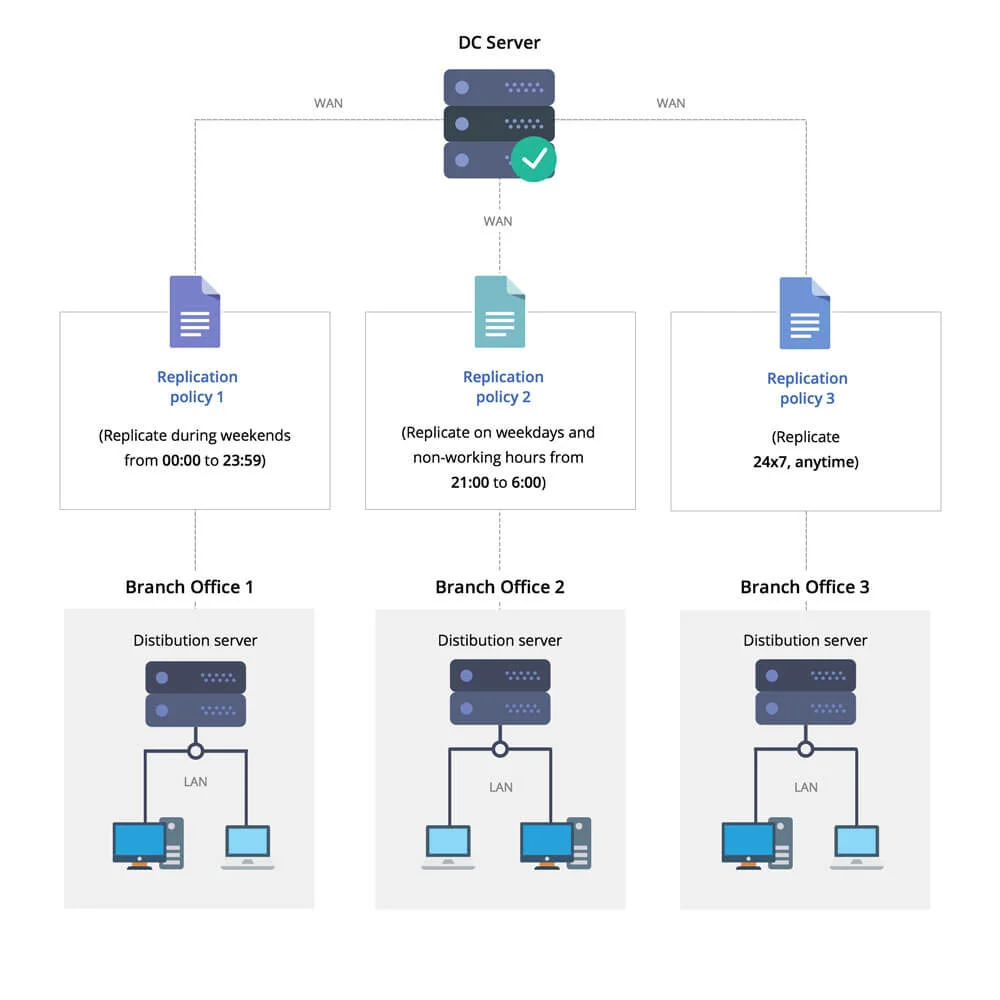
Let's say you have created three different Replication policies and associated them with your branch offices 1, 2, and 3 respectively. Now if you create a configuration to manage a 5 MB patch and deploy it across your network, the transfer of binaries will happen only in accordance with the time and the data transmission rate that is specified in the associated Replication Policy.
- Branch Office 1: The Replication policy associated with branch office-1 will start replicating the binaries from the main server only during weekends between 00:00 and 11:59 hours.
- Branch Office 2: In branch office-2, the replication occurs on all days during non-working hours, i.e., from 21:00 to 6:00.
- Branch Office 3: In branch office-3, the replication window is open 24/7, and the data replication will take place immediately when the Distribution Server contacts the main server.
Once the data replication is complete, the configuration will get deployed in the subsequent deployment window to all the WAN agents. Know more about the deployment window and Deployment Policy here.