Understanding Private Access
Private Access creates a secure connection between roaming users and internal applications (intranet).
Unlike traditional VPNs that grant broad network access, Private Access provides application-specific access only to the resources explicitly required by the user.
This section explains the workflow to enable secure access to internal applications using Endpoint Central ’s Private Access solution, built on Zero Trust Network Access (ZTNA) principles.
As a prerequisite, deploy the Application Connector within the network to enable and manage secure connections between users and internal applications.
Register Agent
Endpoint Central ’s agent, which is already installed on the user’s endpoint, automatically registers with the Endpoint Central server when Private Access is enabled.
IdP Authentication
When a user tries to access an internal application, the organization’s Identity Provider (IdP) verifies their identity. Private Access uses your existing IdP to provide a consistent sign-in experience and support single sign-on. After authentication, the agent sends the verified session to the Endpoint Central server, which checks the user details and applies the required access rules before allowing the connection.
Secure Tunneling
After successful authentication and policy checks, the Application Connector creates a secure, encrypted tunnel between the user’s device and the target internal application. This application-specific tunnel ensures data confidentiality and prevents lateral movement across the network. Users can now securely access internal resources without ever exposing them to the public internet.
You can choose between two architecture models based on your environment:
Without Edge Connector
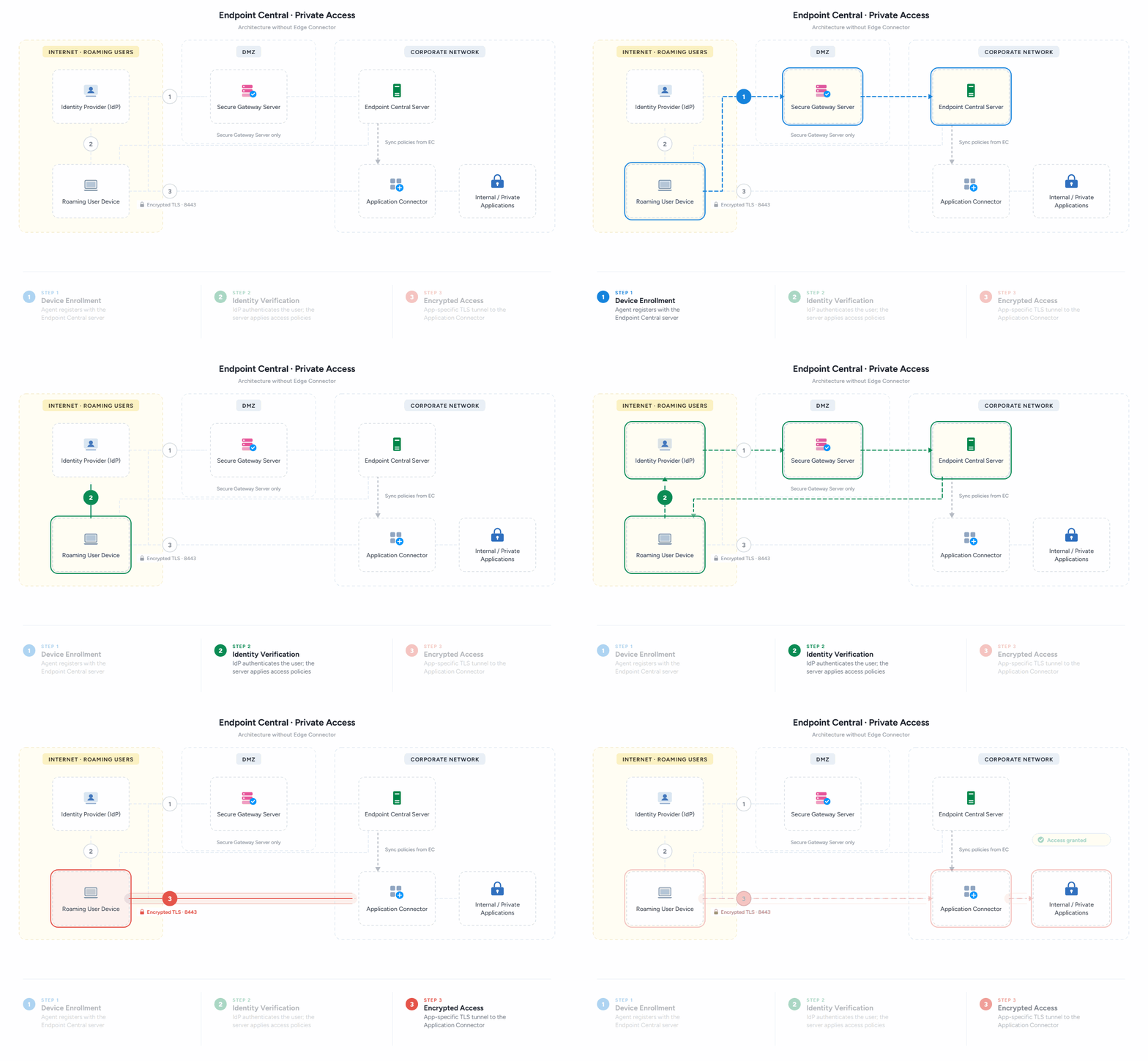
Components
Server :
Endpoint Central Server acts as the central control point for Private Access. It stores all configuration details and delivers the required instructions to agents and Application Connectors whenever needed. All enrolled endpoints communicate with this server to receive policy updates and maintain secure access. To maintain continuous operation and access to internal applications, ensure that the Endpoint Central server remains operational except during scheduled maintenance or upgrades.
Agent :
The Endpoint Central agent is a lightweight software application installed on computers managed using Endpoint Central . It communicates with the server to receive instructions and applies the required configurations on the endpoint. When Private Access is enabled, the agent automatically registers with the Application Connector so the device can securely access the internal applications.
Identity Provider :
The Identity Provider verifies the user’s identity before granting access. When a user tries to access a private application, the IdP handles the authentication using the user’s corporate credentials and confirms their identity. After successful authentication, the system receives session information from the IdP and securely applies the appropriate access policies.
Application Connector :
The Application Connector acts as the secure bridge between the users and internal applications. It creates a secure tunnel and ensures that only trusted devices reach the correct applications. The Application Connector contacts the Server and retrieves the policies and metadata. Based on these policies, it decides how to route user connections to the correct internal application without exposing the network.
With Edge Connector
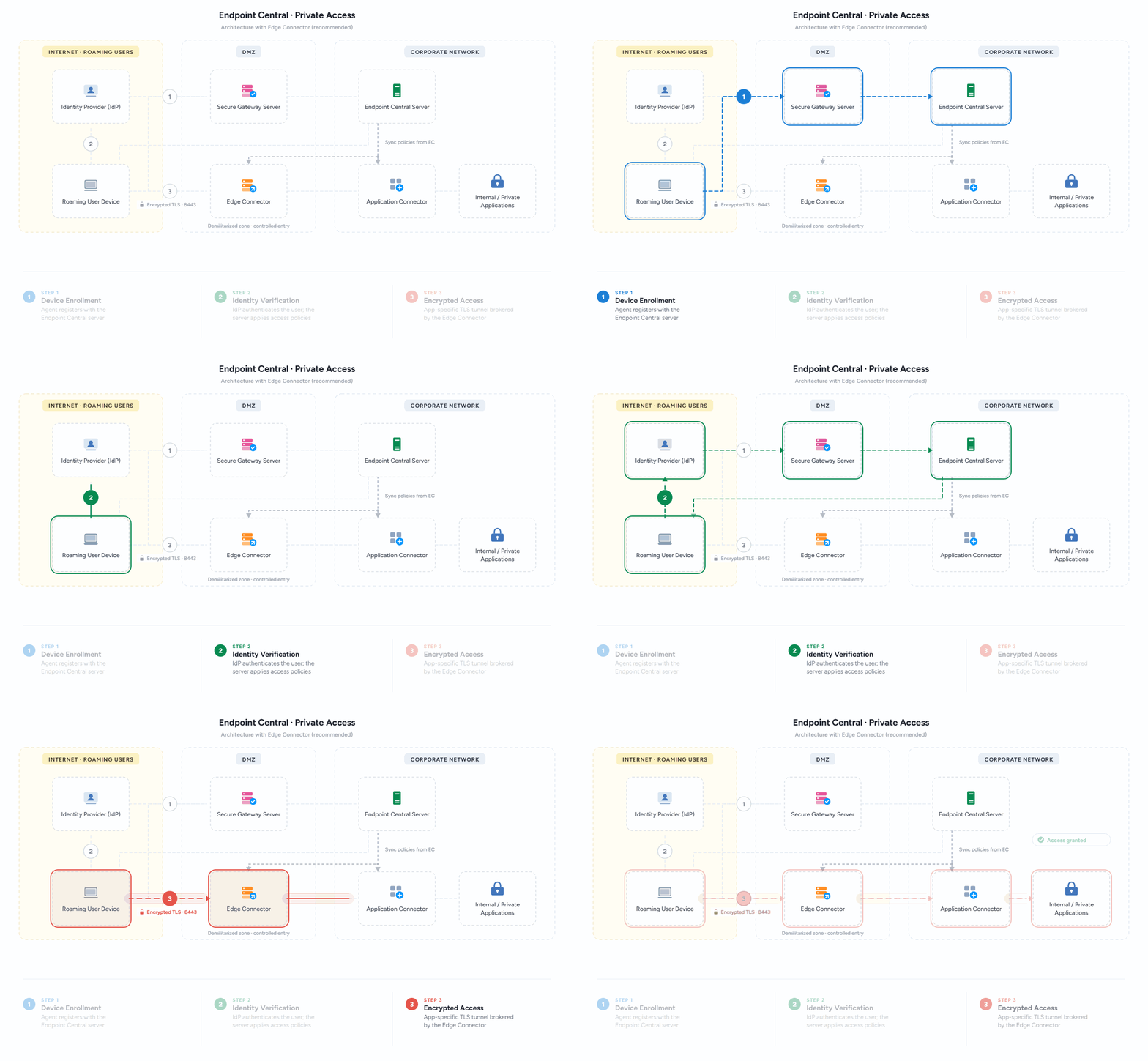
An Edge Connector in the Demilitarized Zone (DMZ) provides an extra security layer. The DMZ handles external traffic without exposing the internal network.
Edge Connector in DMZ :
When an Edge Connector is placed in the DMZ, it serves as a controlled entry point for all external traffic. Any incoming request first reaches the Edge Connector, where it is checked and validated. Only approved and validated traffic is allowed to enter the internal network through the Application Connector. This setup keeps your internal network protected, reduces exposure, and ensures that only policy-compliant requests move forward.