# HTML 5 Viewer Web Socket Secure (WSS) - Failure !
## Problem
You are trying to establish remote connection using HTML 5 Viewer in HTTPS mode and you get the message "Web Socket Secure (WSS) - Failure".
## Cause
You are trying to acess Endpoint Central server in HTTPS mode. The Self Signed/Third Party certificates configured on the server is not recognized on the Safari browser.
## Resolution
You will have to configure the Safari browser to trust/allow secure web socket connections to the Endpoint Central server.
Follow the steps mentioned below when you try to access the Endpoint Central web console from the Safari browser:
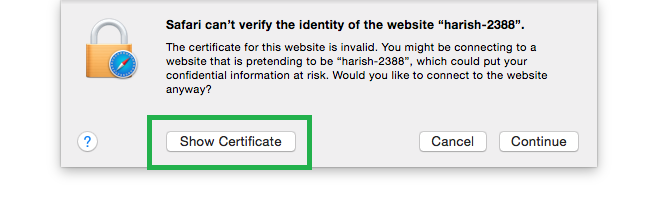
1. You can see the prompt as shown below, you will have to click **Show Certificate**
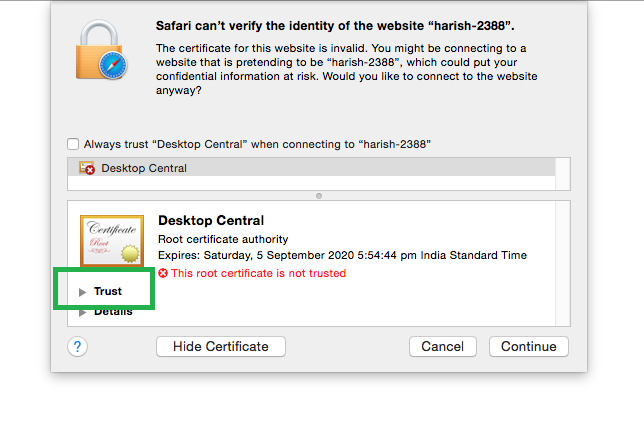
2. Click **Trust** to accept certificates
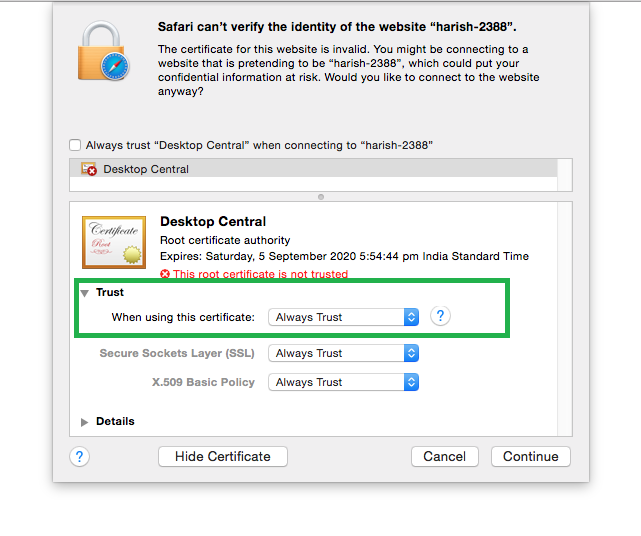
3. Choose **Always Trust** option as shown in the image and click **Continue**
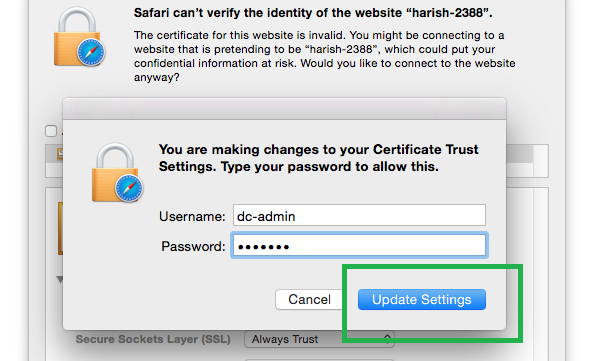
4. Click **Update Settings** to save the changes
You can now retry to establish remote connection. If problem still persists, then you can contact Endpoint Central support.
**Applies to:** Remote Desktop Management, Troubleshoot Remote Desktop, Remote Desktop Connection Problems
**Keywords:** Remote Desktop, Manage Remote Computers, Troubleshoot Remote Machines
## Other KB Articles
- [Agent Installation](https://www.manageengine.com/products/desktop-central/knowledge-base.html#agent-installation)
- [Configurations](https://www.manageengine.com/products/desktop-central/knowledge-base.html#windows-configurations)
- [Inventory Management](https://www.manageengine.com/products/desktop-central/knowledge-base.html#inventory-management)
- [Patch Management](https://www.manageengine.com/products/desktop-central/knowledge-base.html#patch-management)
- [Software Distribution](https://www.manageengine.com/products/desktop-central/knowledge-base.html#software-distribution)
- [Service Pack Installation](https://www.manageengine.com/products/desktop-central/knowledge-base.html#service-pack-installation)
- [Desktop Sharing](https://www.manageengine.com/products/desktop-central/knowledge-base.html#remote-desktop-sharing)
- [Active Directory Reports](https://www.manageengine.com/products/desktop-central/knowledge-base.html#active-directory-reports)
- [User Logon Reports](https://www.manageengine.com/products/desktop-central/knowledge-base.html#user-logon-reports)
- [Endpoint Central SP Upgrade](https://www.manageengine.com/products/desktop-central/knowledge-base.html#service-pack-upgrade)
- [Miscellaneous](https://www.manageengine.com/products/desktop-central/knowledge-base.html#miscellaneous)
- [» More](https://www.manageengine.com/products/desktop-central/knowledge-base.html)
## 24/5 Support
Support will be available 24hrs a day and five days a week (Monday through Friday), excluding USA & India public holidays.
Email: [desktopcentral-support@manageengine.com](mailto:desktopcentral-support@manageengine.com)
### Speak to us
- Join the Endpoint Central Community to get instant answers for your queries, register with our [Forum](http://forums.manageengine.com/Desktop-Central).
- Look out for the latest happenings in Desktop Management, follow our Tweets on [Twitter](http://twitter.com/DesktopCentral).
- Get to know the latest updates and Best Practices in Desktop Management through our [Blog](http://blogs.manageengine.com/desktopcentral/index.html).