IP Address Conflict

IP address conflicts arises when an IP is configured to two or more devices at the same time, making these devices unable to access your network. Detecting IP address conflicts, understanding the cause, and resolving them is crucial to ensuring problem free IP allocation and management. However, the larger your network, the more likely your devices will run into IP conflicts that can cause costly network issues. Without the right IP address management solution in place, detecting IP conflicts before they cause dire network issues can be tedious.

On this page, we will read:

How to detect IP address conflicts (with or without tools)

IP address conflicts can silently disrupt network connectivity, degrade performance, or prevent devices from accessing the internet and your local network. To detect conflicts early, IT admins should watch for symptoms like the Windows warning "Windows has detected an IP address conflict", sudden loss of network access, duplicate hostname errors, or frequent DHCP lease issues. While these indicate problems, accurate detection requires a more systematic approach.

Detecting IP conflicts manually

You can manually detect IP conflicts using commands like "arp -a" and "ping".

Example output of "arp -a" showing two different MAC addresses for the same IP:

192.168.1.100  00-14-22-01-23-45  dynamic 192.168.1.100  00-18-44-33-21-56  dynamic

If multiple MAC addresses map to the same IP, that’s a clear conflict. Similarly, repeated ping timeouts or erratic responses from a known host may suggest overlapping IP usage. However, these manual methods are time-consuming, error-prone, and not scalable for larger or dynamic networks.

Troubleshooting with IP conflict detection tools

Automated IP conflict detection tools like ManageEngine OpUtils simplify the process. OpUtils’ IP address manager continuously scans your network, flags duplicate IPs in real time, and correlates each IP with its MAC address and device details.

This provides admins with actionable insights to resolve conflicts before they impact users. Whether caused by DHCP misconfigurations or unauthorized static assignments, tools like OpUtils ensure proactive detection and minimal downtime.

Effectively detect and resolve IP conflicts with OpUtils

With ManageEngine OpUtils IP Address Manager module's active IP address conflict detection capability, you can enable hassle-free IP conflict detection and resolution. OpUtils monitors multiple network subnets and supernets, providing a centralized view into your network address space. Its proactive monitoring and automated periodic scanning tracks both your static and dynamic environments, including manual IP configurations and DHCP allocations. This helps you streamline IP address space monitoring, IP conflict detection, and troubleshooting. Be it Windows or Linux, resolving IP address conflicts swiftly is essential to maintaining smooth network operations and ensuring uninterrupted access to resources and services.

How OpUtils detects IP address conflicts

IP address conflicts arise when two or more MACs are assigned the same IP. This can happen when network admins rely on different IP allocation techniques, such as static allocation through manual IP reservation and provisioning, and dynamic IP allocation by deploying DHCP servers. Issues in this process that can easily cause an IP conflict include human errors in static IP provisioning and DHCP server glitches in dynamic allocation.

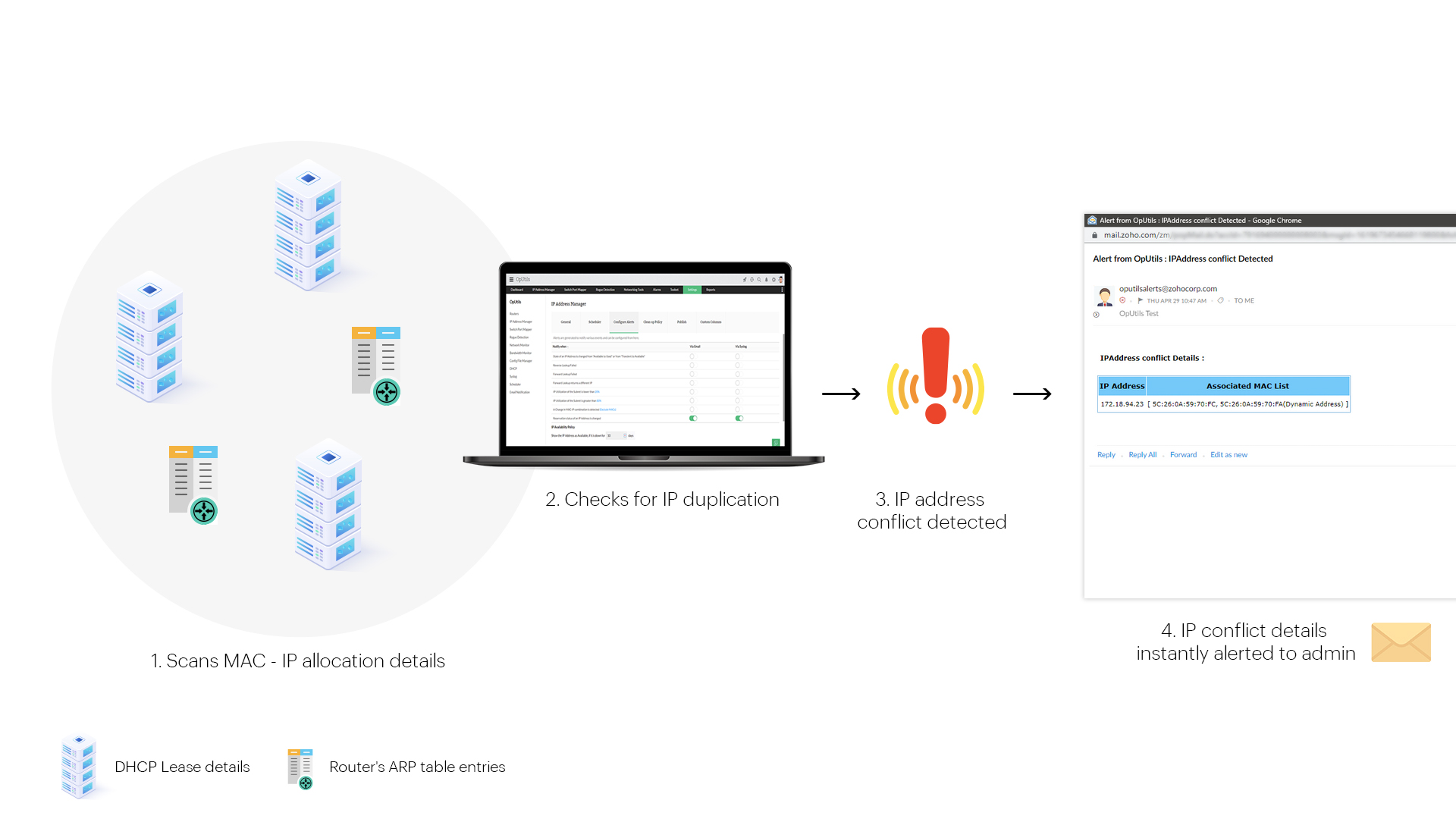
OpUtils monitors network sources, such as ARP tables, to track the MAC-IP association in your network at a given time. It compares the IP-MAC allocation reported by the monitored DHCP server leases and the IP-MAC allocation logged in the router's ARP table. OpUtils IP conflict detection capability inspects the comparison to confirm if different MACs have been associated with an unique IP. If true, then OpUtils' IP address detector marks it as a potential IP address conflict. By collecting and comparing different sources, OpUtils enables holistic tracking and detection of IP conflicts caused by both static and dynamic network components.

IP Address Conflict - ManageEngine OpUtils

Automated instant alerts on detecting IP address conflicts

It is common for network admins to reserve and statically configure IPs to business critical devices. However, due to any issue, if this IP is allocated to another MAC, the IP conflict not only affects the critical device but also its dependent devices, causing a cascade of network issues. This makes being alerted about IP conflicts in real time an important step to ensure it does not disrupt your network availability.

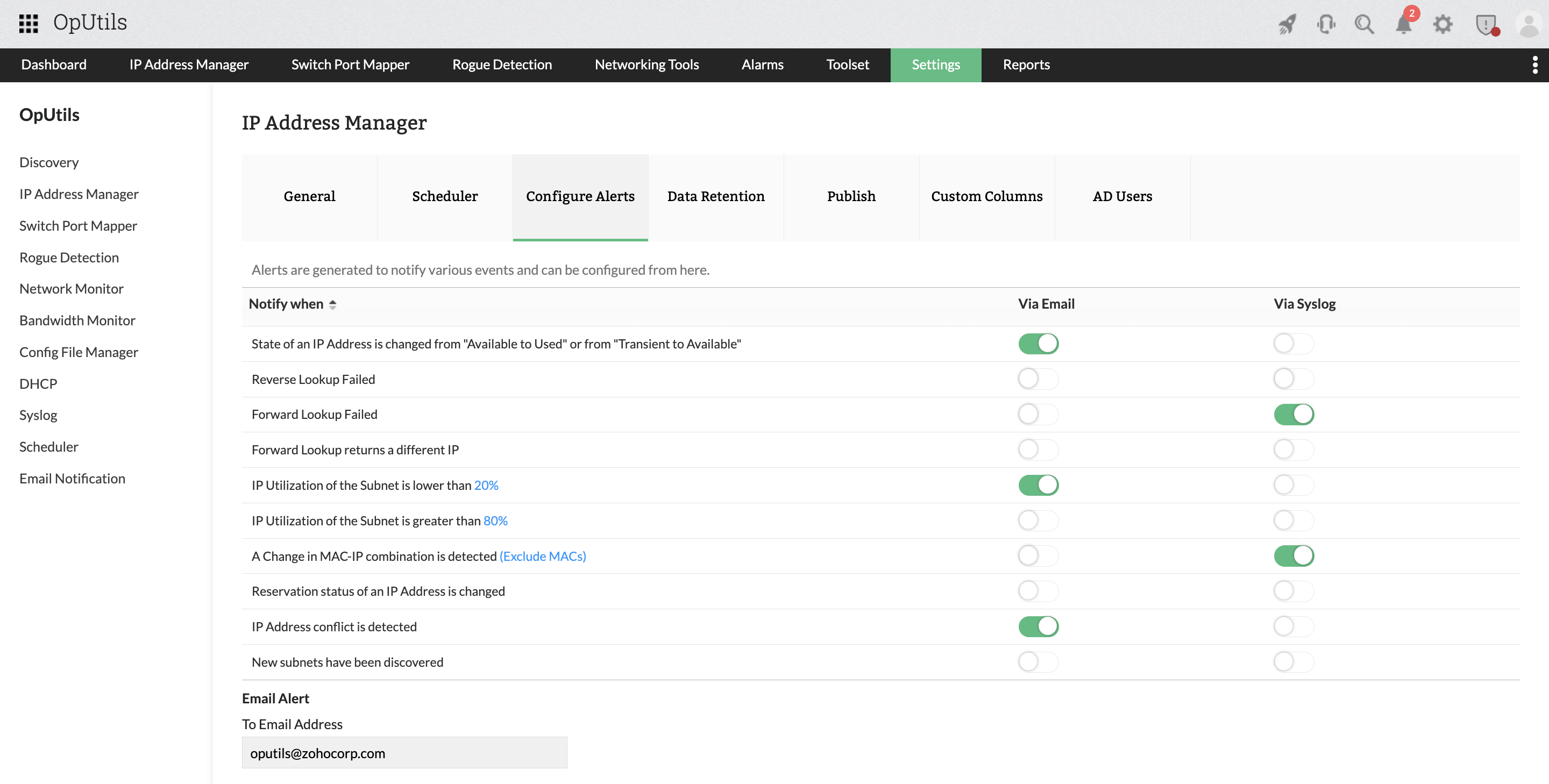
OpUtils aids you in this process with its automated alerting options. With just a click, you can enable IP conflict detection and alerting. You can also choose to be alerted via your email or syslog entries. Once enabled, OpUtils monitors your network address space for IP address conflicts and if detected, instantaneously alerts you through your preferred communication mode. Real-time alerts help you detect and tackle IP address conflicts effectively.

IP Address Conflict Detection - ManageEngine OpUtils

Insights to easily resolve IP address conflicts

The IP address conflict alert messages by OpUtils provides you with:

  • The allocated IPs in conflict
  • The list of associated MAC addresses
  • The nature of the IP–MAC allocation

This alert message sent to your email by OpUtils might look like this:
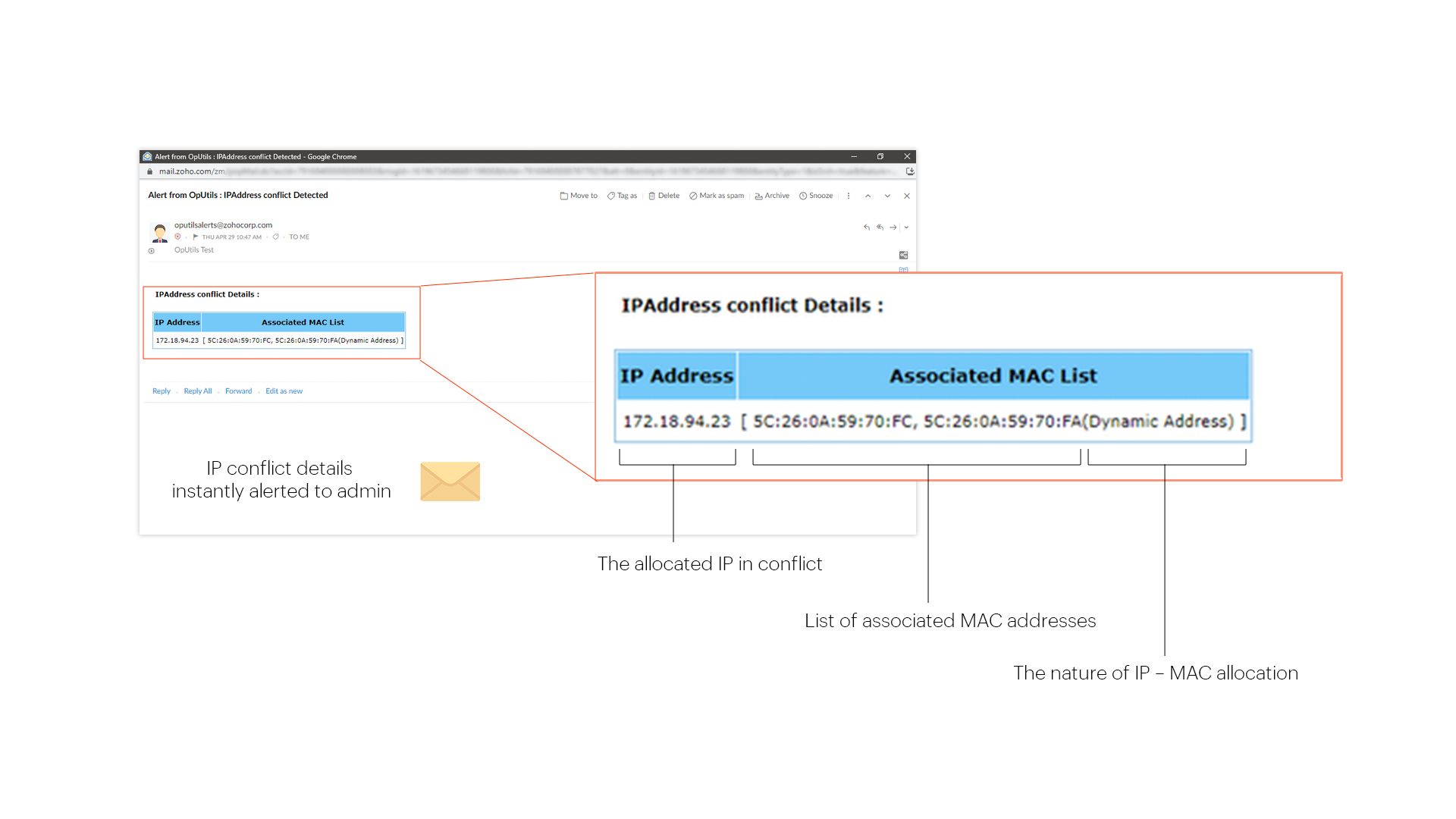
IP Address Conflict Solution - ManageEngine OpUtils

Here, the IP address conflict alert message tells that the two devices with MAC addresses 5C:26:0A:59:70:FC and 5C:26:0A:59:70:FA are in conflict for the IP address 172.1.94.23. It also tells us that, for the second MAC address 5C:26:0A:59:70:FA, the IP has been dynamically allocated.

You can further inspect the current status, reservation, DHCP scope, and subnet details of the IP address using the IP Address Manager module's IP tracking and DHCP server monitoring capabilities. This gives you actionable insights to implement necessary precautions, such as reserving IPs, to avoid IP conflicts as well as to identify the type of IP address conflict and resolve them.
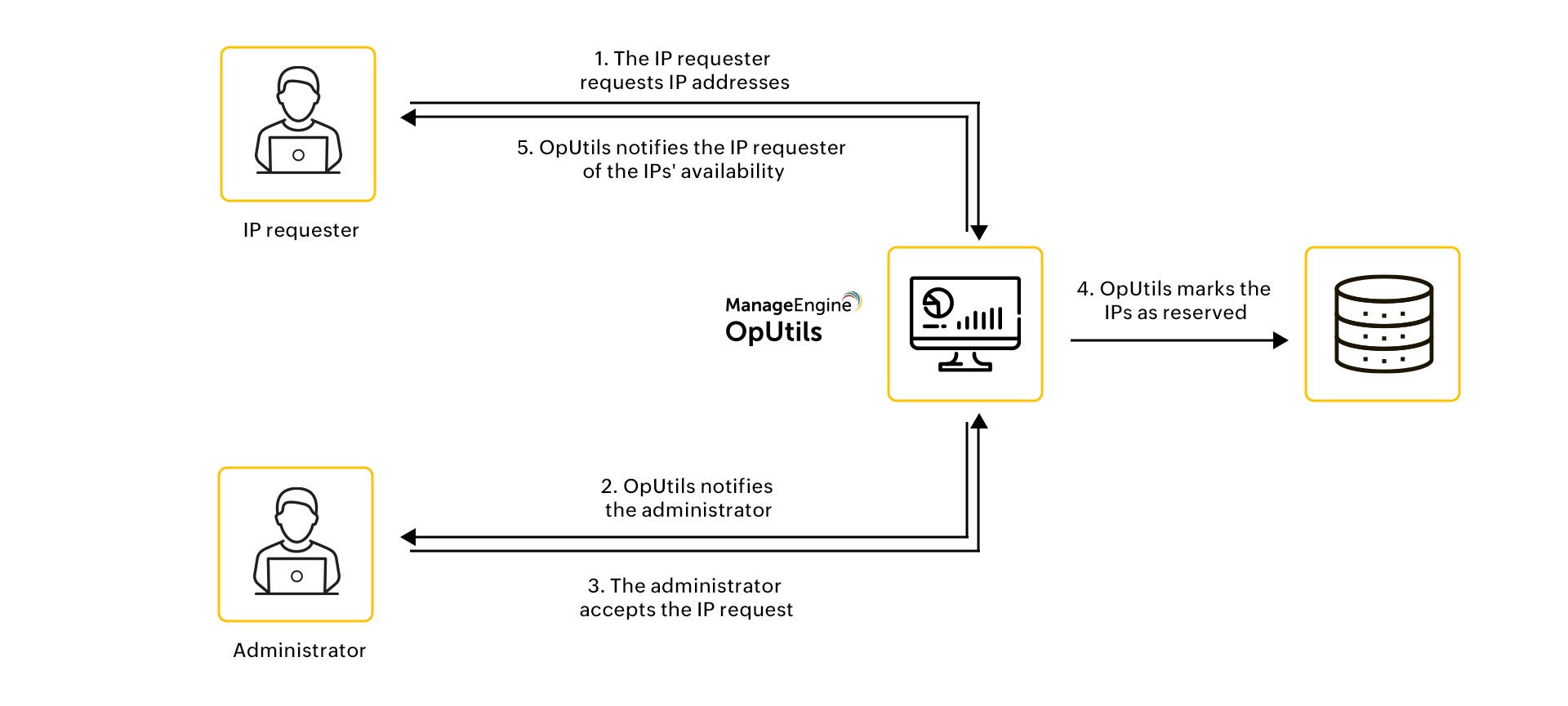

Significantly reduce IP conflicts with the built-in IP Request management tool

One of the common causes of IP address conflict is a single IP address being allocated to their managed devices manually by two or more network admins or operators. Without proper tracking in place, it is difficult to identify which network admin or operator has access to and is managing a set of IP addresses. This leads to confusion in IP address management, which causes different network admins or operators allocating the same IP address to different devices.

This is why ManageEngine OpUtils offers a built-in IP Request creation and management tool that helps network administrators and operators create, view, and track their IP addresses. This IP Request tool streamlines the process of IP address request management, and ensures network administrators are aware of which network operator has access to which IP addresses. Not only that, OpUtils also automates the process of marking the status of allocated IPs as "Reserved", which is displayed under the OpUtils' IP Address Manager module.

Windows IP Address Conflict - ManageEngine OpUtils

OpUtils' IP Address Manager: Advanced IP scanning, IP conflict detection, and more!

OpUtils' comprehensive IP address management module eliminates the hassles of conventional address space management solutions. This scalable solution tailor-fits your network environment, enabling you to scan, track, monitor, and troubleshoot your network address space with ease. Inspect IPs effectively with support for IP hierarchy tracking and in-depth insights into tracked IPs. It helps you better diagnose your IP addresses issues with its IP tools, that are offered as a part of its comprehensive network toolset. You can automate routine scans, set-up threshold-based alert criteria, and view granular network reports from the centralized console.

New to OpUtils? Schedule a personalized live demo with our product experts or download a free, 30-day trial to explore hands-on how OpUtils simplifies IP address management in your network.

Frequently asked questions on resolving IP Address Conflicts

What is IP address conflict detection?


IP address conflict happens when two or more devices compete for the same IP address within a network, potentially disrupting communication. Deploying an IP address conflict detection solution helps automate the process of identifying conflicts, reducing manual efforts and minimizing network downtime.

How to detect IP address conflict?


Detect IP address conflicts by using specialized IP address conflict detection software or network management tools with capabilities to resolve IP address conflicts. These tools actively scan the network for duplicate IP addresses using techniques such as ping tests and ARP (Address Resolution Protocol) scans to detect conflicts swiftly.

What is the best way to detect IP conflict?


Using a network IP conflict detection tool like OpUtils is the most effective way. It continuously monitors IP assignments and instantly flags duplicates. These tools poll network segments, monitor the ARP table, DHCP leases, and scan subnets to detect duplicate IP assignments.

OpUtils, for example, maintains a real-time mapping of IP-to-MAC address relationships and raises alerts when a single IP is seen with multiple MAC addresses, which is a direct indicator of a conflict. This is far more accurate and scalable than relying on manual ping or ARP checks in enterprise environments.

Can I detect IP conflicts in real time?


Yes. OpUtils detects IP conflicts in real time by scanning the network and alerting you to duplicate IPs as soon as they occur. The tool performs active and passive scans via protocols such as ICMP, SNMP, and ARP probes, and integrates with your DHCP server or switch port mapping. This enables it to:

  • Instantly detect when two devices respond to the same IP
  • Identify both MAC addresses and device details involved
  • Generate SNMP traps, syslog messages, or email alerts when a conflict occurs

Real-time detection is especially useful in dynamic networks with frequent IP changes, such as those using DHCP or BYOD environments.

How do IP address conflicts happen?


IP conflicts usually result from improper IP assignment practices or network misconfigurations. Common causes include:

  • Static IP overlap: A user manually sets a static IP within the DHCP range.
  • DHCP misconfigurations: Multiple DHCP servers assigning the same range, or overlapping scopes.
  • Device cloning or imaging: VM snapshots or disk images reused without updating IP or MAC.
  • Network segmentation errors: VLAN misconfigurations causing IP overlap across broadcast domains.
  • Mobile/IoT devices: Devices moving across subnets without releasing IPs properly.

Can IP conflict go undetected?


Yes, especially in networks without continuous monitoring. Conflicts often go unnoticed when:

  • A conflicted device is on a less critical segment (e.g., IoT, guest Wi-Fi).
  • The conflict is intermittent (e.g., two laptops turned on at different times).
  • DHCP lease times are long, delaying reassignments and detection.
  • Logs are not centralized or actively reviewed.

Simplify IP conflict detection across your network with OpUtils

Try OpUtils for free today
Detect IP conflict