Address Resolution Protocol (ARP)
AAddress Resolution Protocol (ARP) is a vital Layer 2 (data link layer) protocol in the Internet Protocol (IP) suite, designed to translate IPv4 addresses to Media Access Control (MAC) addresses enabling IP-to-MAC address mapping in local networks.
Introduced in RFC 826, ARP operates as a broadcast-based protocol that plays a key role in ensuring successful communication between devices on the same subnet by resolving hardware addresses dynamically. ARP is essential for bridging Layer 3 IP addressing with Layer 2 physical addressing, ensuring efficient packet delivery across Ethernet networks.
A brief history of ARP
First introduced in 1982 by David C. Plummer as part of RFC 826, ARP was designed to support dynamic address resolution in Ethernet-based networks. While it continues to serve as a cornerstone of IPv4 networking, it's important to note that IPv6 does not use ARP. Instead, it relies on the Neighbor Discovery Protocol (NDP) to perform similar IP-to-MAC resolution. Despite advancements in network protocols, ARP remains foundational to local IPv4 network operations.
On this page, we will explain the basics of ARP, including:
- What is Address Resolution Protocol (ARP)?
- Why is address resolution protocol important?
- How Address Resolution Protocol (ARP) works in a network?
- Types of Address Resolution Protocol
- What ARP cache is and why it’s essential for networking
- ARP spoofing prevention in modern networks
- Stay in the know of your IP address space with OpUtils
- Address Resolution Protocol (ARP) FAQs
What is Address Resolution Protocol (ARP)?
Resolving the data link layer IP addresses to the physical layer MAC addresses, ARP protocol is used by several network components to determine the target network device based on the specified IP. The Address Resolution Protocol can be used to discover the MAC address of a device on the same network as the sender. While it aids in resolving physical layer addresses, ARP operates at Layer 2 of the Open Systems Interconnection (OSI) model, which is the data link or network layer.
Why is address resolution protocol important?
Address resolution protocol (ARP) is vital in networking and used for the following reasons:
- Mapping IP address to MAC address: For a device to send data to another device on the same network, it must know the target device's MAC address. The ARP protocol maps the IP address to the target device's MAC address.
- Setting up ARP cache: The ARP cache stores the mapping data of IP addresses and the corresponding MAC addresses of devices on the network, in a table. ARP requests are broadcasted periodically to update this data table. This helps reduce network traffic and speeds up communication between network devices.
- Troubleshoot network issues: ARP cache can be used to detect and troubleshoot network connectivity issues by checking if the MAC addresses are properly linked to it's corresponding IP address.
Hence this concludes, ARP is essential for enabling communication between devices on a network and ensuring network efficiency.
How Address Resolution Protocol (ARP) works in a network?
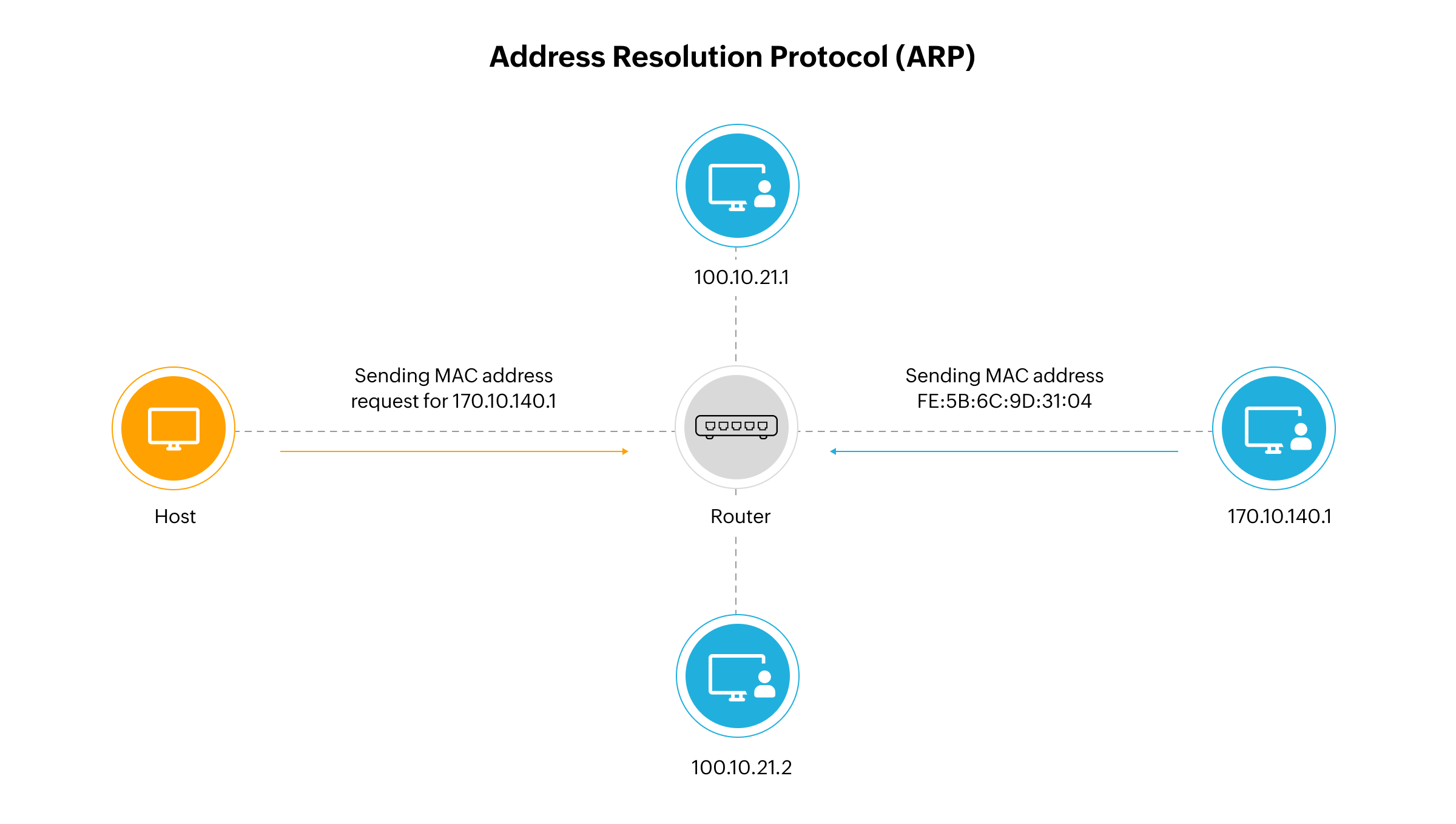
IP-to-MAC address associations form the basis for enabling communication between devices on a local network. When a device needs to send a data packet to another, it must first know the target device’s MAC address.
The device first checks its ARP cache, a temporary table that stores recently resolved IP-to-MAC mappings. If the mapping exists and hasn't expired, the device uses this information to initiate communication. Each entry in the ARP cache has a Time-To-Live (TTL) value and is automatically removed after expiration to prevent stale associations.
If the required IP-MAC mapping isn’t found in the ARP cache, the device initiates a resolution process:
- The device broadcasts an ARP request packet to all devices in the local network, asking "Who has this IP address?"
- The ARP request includes:
- The sender's MAC and IP addresses
- The target IP address (whose MAC is unknown)
- ARP packet fields like hardware type, protocol type, hardware size, protocol size, and operation code (opcode 1 for request)
- All devices receive the broadcast, but only the device with the matching IP responds.
- The matching device replies with a unicast ARP reply (opcode 2), containing its MAC address.
- The sender updates its ARP cache with this new IP-MAC mapping and proceeds to send data directly to the target device.
This entire process allows ARP to translate IP addresses into MAC addresses dynamically. ARP’s role in maintaining and refreshing the cache ensures that communication within the network remains efficient and up to date.
Types of Address Resolution Protocol
Address Resolution Protocol (ARP) has several types, each serving a distinct purpose in network communication and device discovery:
- Request ARP: Used to map an unknown MAC address to a known IP address by broadcasting an ARP request within the local network. The destination device responds with its MAC address.
- Reply ARP: A unicast response sent by the device holding the requested IP address. It provides the MAC address directly to the requesting device.
- Proxy ARP: Enables a router to respond to ARP requests on behalf of another device, allowing hosts on different subnets to communicate as if they were on the same local network. This is useful for subnet bridging and legacy device compatibility.
- Gratuitous ARP: A device sends an unsolicited ARP broadcast to announce or update its IP-MAC mapping. Commonly used for IP conflict detection, failover systems, and updating ARP caches of other devices proactively.
- Reverse ARP (RARP): Allows a device to discover its own IP address using its known MAC address. This was historically used in disk-less workstations that lacked local storage and needed to retrieve IP configuration during network boot.
- Inverse ARP (InARP): Opposite of ARP and typically used in frame relay or MPLS networks. InARP maps a known Data Link Connection Identifier (DLCI) or virtual circuit to an IP address, supporting automatic route configuration in point-to-point connections.
Together, these ARP variations enable IP-to-MAC mapping across a range of network architectures and use cases from local discovery and subnet bridging to virtual circuit setup and IP conflict prevention.
What ARP cache is and why it’s essential for networking
Network devices rely on their ARP cache to maintain known IP-MAC associations and forward data packets efficiently. Each device, whether a switch, router, or endpoint maintains a local ARP cache that stores recently resolved mappings.
These caches speed up future communication by reducing the need for frequent ARP broadcasts. A typical ARP cache entry contains:
- IP address
- MAC address
- Timestamp of last usage
- Entry type (static or dynamic)
Dynamic vs. static ARP entries
Dynamic ARP entries are created automatically when a device resolves an address via an ARP request. These entries have a Time-To-Live (TTL) and expire after a set duration or period of inactivity.
Static ARP entries are manually configured and persist until removed. They are often used in critical systems or security contexts where the MAC-IP mapping must not change.
Managing and clearing the ARP cache
To ensure accuracy and performance:
- ARP caches should be periodically refreshed to avoid outdated or incorrect mappings.
- Network admins can manually flush the ARP cache using built-in OS or device commands (e.g.,
arp -din Windows). - Insecure or misconfigured ARP caches may be vulnerable to ARP cache poisoning, where an attacker inserts false entries to intercept or disrupt traffic.
ARP spoofing: risks, attack vectors, and defenses
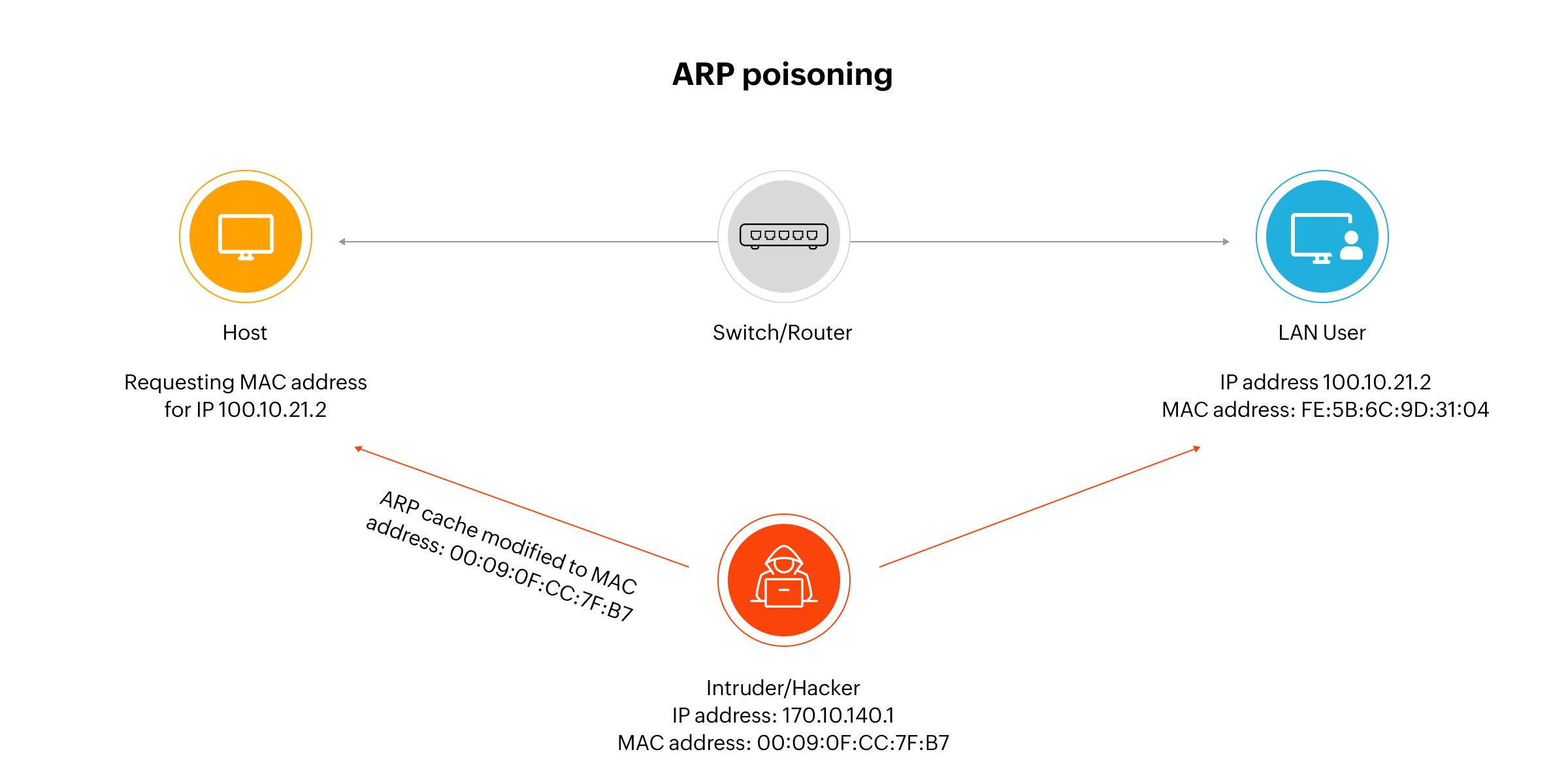
ARP cache poisoning, also known as ARP spoofing, is a deceptive technique where an attacker manipulates a device’s ARP cache to associate a trusted IP address with a rogue MAC address. This allows the attacker to intercept, reroute, or modify network traffic, compromising both confidentiality and system integrity.
To execute an ARP poisoning attack:
- The attacker listens for broadcasted ARP requests.
- They respond with a forged ARP reply, falsely claiming ownership of the requested IP address.
- The victim updates its ARP cache with the malicious IP-MAC association.
- From then on, traffic meant for the original destination is redirected to the attacker's device.
Common attacks enabled by ARP poisoning:
- Man-in-the-Middle (MITM): The attacker intercepts and modifies traffic between two devices, often without detection, allowing them to steal credentials, insert malware, or capture sensitive data.
- Denial-of-Service (DoS): Attackers flood the network with false ARP replies, causing devices to drop traffic or exhaust processing power.
- Session hijacking: By redirecting traffic, attackers can capture session cookies or authentication tokens and gain unauthorized access to apps or systems.
- DHCP starvation: By spoofing multiple MAC addresses and rapidly requesting DHCP leases, attackers can exhaust the IP pool, disrupting normal network access.
- Data exfiltration: Traffic rerouted through a rogue device can be logged and exported without users’ knowledge.
Why ARP spoofing is a serious threat in modern enterprise networks
With the rise of BYOD, IoT, and shadow IT, unmanaged or rogue devices can easily enter enterprise networks and exploit ARP spoofing to initiate more complex attacks. These threats are particularly severe in flat Layer 2 environments or when VLAN segmentation and monitoring are poorly configured.
How to defend your network against ARP spoofing:
- Dynamic ARP Inspection (DAI): Validates ARP packets against DHCP snooping bindings or manually set IP-MAC pairs.
- Network Access Control (NAC): Restricts network access to authenticated and authorized devices only.
- ARP Monitoring Tools:
arpwatchandXArp: Monitor ARP activity and alert admins to anomalies.- OpUtils’ ARP spoofing detection tool: Helps identify mismatches between known IP-MAC bindings.
- Port Security & ACLs: Limit the number of devices per port and block suspicious traffic.
- Encryption & VPNs: Add a layer of protection even if traffic is intercepted.
- Machine learning-based detection: Advanced solutions use anomaly detection algorithms like auto encoders or clustering models to detect unusual ARP patterns and spoofing attempts.
ARP cache poisoning remains one of the most stealthy and dangerous local network attacks. Deploying ARP inspection tools, enforcing access controls, and continuously monitoring ARP behavior are essential for protecting modern IP networks.
Implementation and configuration of ARP
Configuring Address Resolution Protocol (ARP) behavior is essential for maintaining accurate IP-MAC mappings, improving performance, and defending against spoofing attempts. Network admins can configure static entries, tune cache timeouts, and deploy ARP security tools across platforms.
Static ARP configuration
In environments where ARP spoofing risks are high or where critical systems must have persistent MAC mappings, static ARP entries can be manually set.
Cisco IOS example:
arp 192.168.1.10 00-1B-44-11-3A-B7 ARPAThis ensures the IP address always resolves to the correct MAC address and isn’t overridden by unsolicited ARP replies.
ARP timeout tuning:
interface FastEthernet0/0 arp timeout 600Reducing or increasing ARP cache timeout values can help optimize resolution behavior depending on network stability.
Viewing ARP entries on Windows and Linux
In Windows:
arp -aIn Linux:
ip neigh show cat /proc/net/arpAdmins can use these commands to monitor and verify IP-MAC mappings in real time.
ARP spoofing prevention in modern networks
To safeguard against spoofing, network admins should:
- Use OpUtils' ARP spoofing detection to identify IP-MAC mismatches.
- Set static ARP entries for critical systems where applicable.
- Regularly clear outdated entries to avoid relying on stale data.
- Integrate ARP monitoring into broader IP address management (IPAM) efforts for full visibility.
While advanced tools like ArpON exist in the open-source ecosystem, OpUtils offers built-in capabilities that help detect rogue activity and ensure MAC address consistency across both Windows and Linux environments.
Stay in the know of your IP address space with OpUtils
OpUtils is a comprehensive IP address management solution that offers advanced features to help you efficiently manage your network address space. With OpUtils' advanced IP scanning and IP tracking of your network's ARP logs, you can easily manage your IP addresses, subnets, and DHCP server scopes in real time, and monitor your network for potential issues.
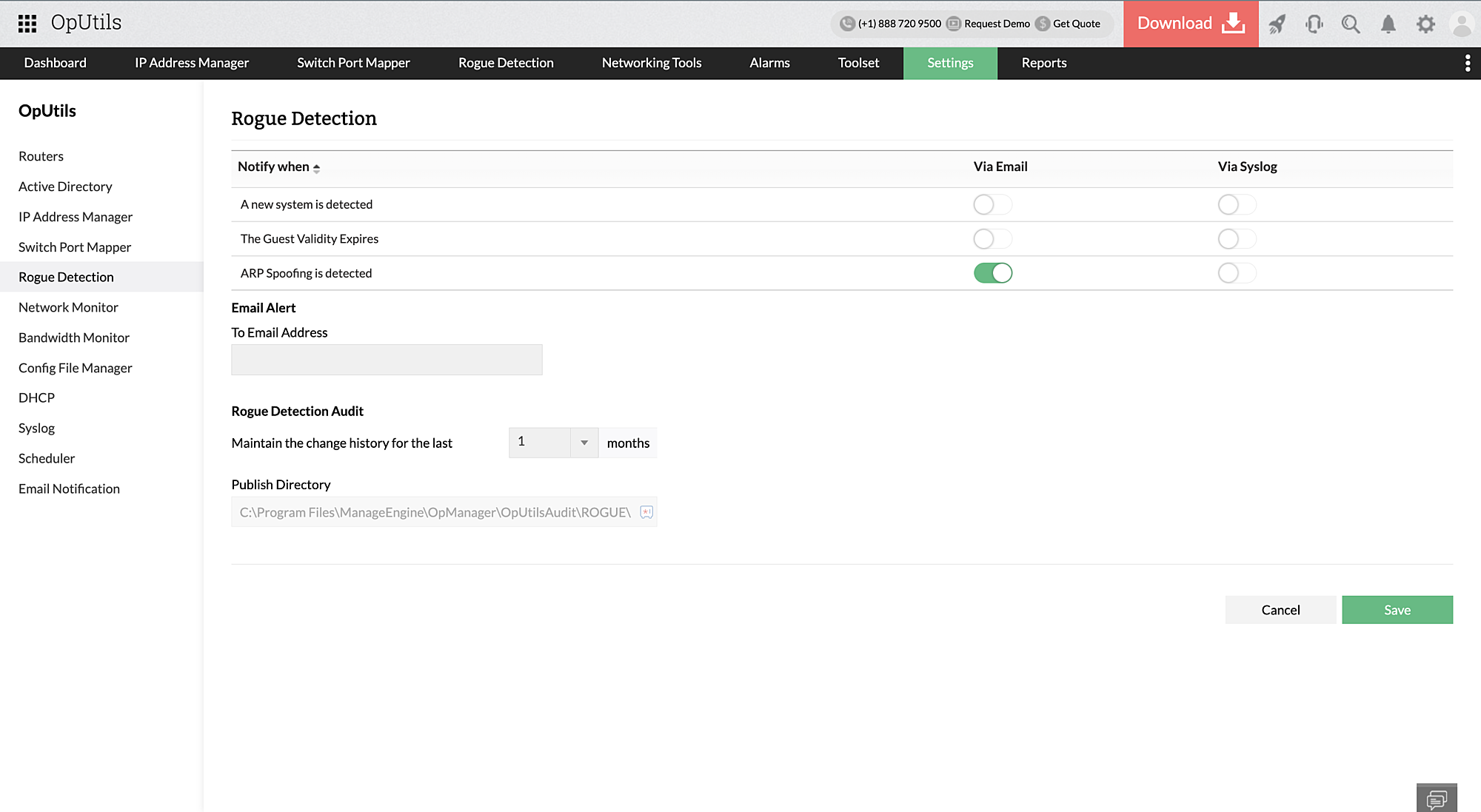
It's rogue detection and prevention module easily detects and removes rogue devices, preventing them from accessing your network. Along with throttling malicious access to your network, OpUtils enables you to detect ARP spoofing attacks in real-time and receive alerts that aid in instant ARP poisoning mitigation.
New to OpUtils? Download a free, 30-day trial or schedule a personalized demo with our product experts to learn more.
Address Resolution Protocol (ARP) FAQs
What is ARP in networking?
+What does the address resolution protocol do?
+How long does an ARP entry stay in the cache?
+What are the benefits of static vs dynamic ARP entries?
+How can I detect ARP spoofing in my network?
+How do I configure ARP security?
+What replaces ARP in IPv6 networks?
+Ensure simplified IP address management with OpUtils
Try OpUtils for free today