# How to configure audit log trimming
Audit logs often tend to fill up storage. To prevent this, it is recommended that you enable audit log trimming for site collections. The below table shows how this can be done using the native tool and SharePoint Manager Plus.
| Native SharePoint | SharePoint Manager Plus |
|---|---|
| 1. Click the **settings** icon, and select **Site settings**. If you are not at the root of your site collection, under *Site Collection Administration*, select **Go to top-level site settings**.
2. On the *Site settings* page, go to **Site Collection Administration > Site collection audit settings**.
3. In the *Audit Log Trimming* section, select **Yes** to automatically trim the audit log for your site.
4. To specify a custom retention period, enter the number of days in the text box. SharePoint Online has a range of 1 to 90 days; SharePoint Server does not have a limit.
5. If required, specify the location to save audit log reports to before the audit log is trimmed.
6. Click **Ok**. | 1. Navigate to the **Management** tab.
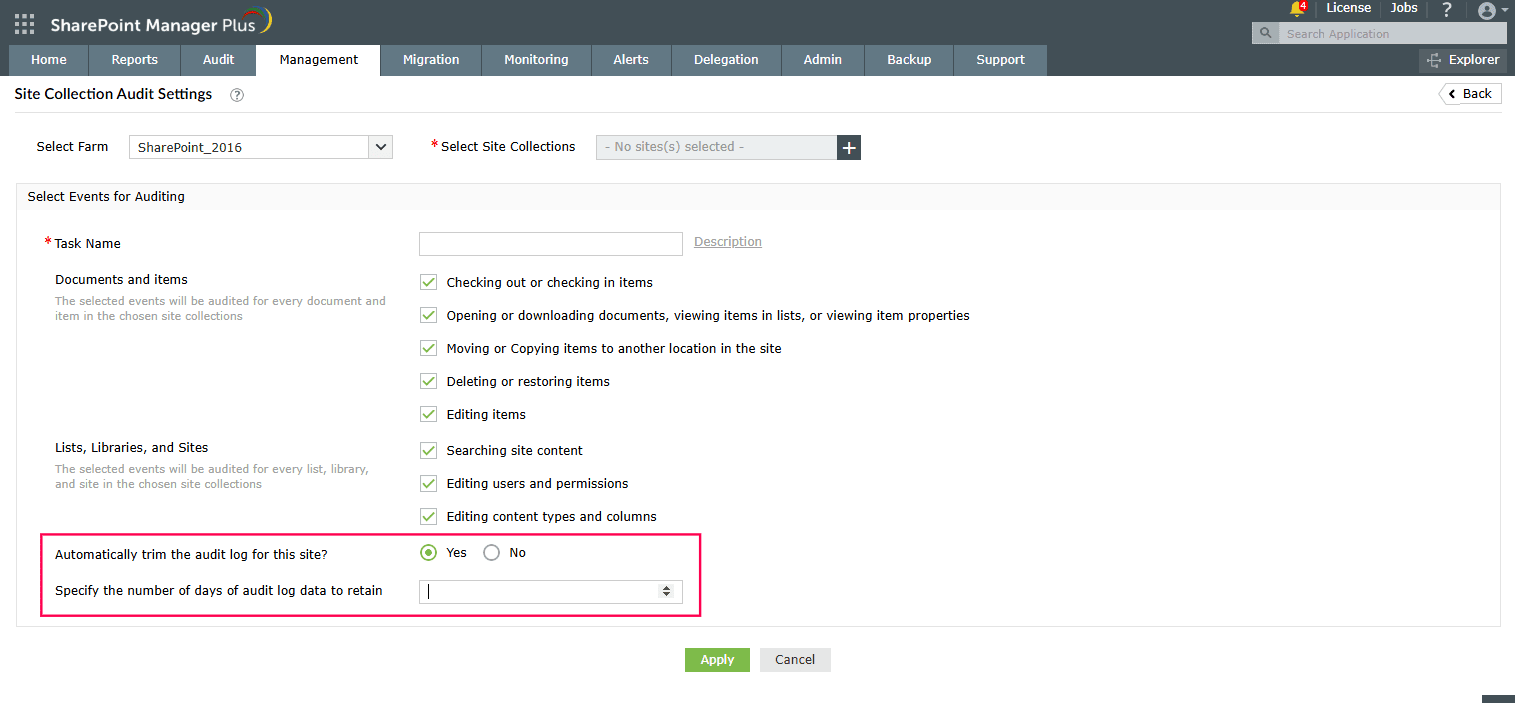
2. Under *Site Collection Administration*, select **Site Collection Audit Settings**. (You can also navigate to the **Audit** tab > **Configuration** > **Audit Settings Management**).
3. At the bottom, select **Yes** if you'd like to automatically trim the audit logs for your selected sites.
4. Specify the number of days to retain the audit log data.
5. Click **Apply**.
 |
## Limitations of using native tools to trim audit logs
- Only one site collection's settings can be configured at a time.
- Configuring audit settings requires you to be a member of the default Site Collections Administrators group or a farm administrator.
## Benefits of using SharePoint Manager Plus to trim audit logs
- **Apply configurations in bulk:** Configure audit trimming for multiple site collections at once without having to repeat the process.
- [Granular delegation](https://www.manageengine.com/sharepoint-management-reporting/sharepoint-helpdesk-delegation-tool.html): Assign auditing and management tasks to non-admin users without elevating their native privileges.
- **Log archival:** Automatically archive SharePoint's audit data in SharePoint Manager Plus' database with a flexible retention period.
- **Centralized console:** Manage audit settings, [permissions](https://www.manageengine.com/sharepoint-management-reporting/sharepoint-management-tool.html), [groups](https://www.manageengine.com/sharepoint-management-reporting/sharepoint-management-tool.html), site admins, and more from the same console without switching windows.