×
×
×
×

Frequently Asked Questions (FAQ)

Comprehensive Coverage

Where do we procure the vulnerability data for different vendors?
Our internal researchers procure vulnerability information for Windows Operating systems and other Microsoft products from Microsoft's official security guidance page, and for different Linux distros from the official security advisories of the respective vendors. For third-party products, we obtain the vulnerability data from NVD and CVE details, and the respective vendors' official security advisory pages.
What are the SLAs for new CVEs and zero-days?
  • For CVEs, support is provided within 24 hours of its disclosure.
  • For zero-days, support is provided within 7 hours of its disclosure.
How do we arrive at the recommendations for security misconfigurations?
Our internal researchers procure information regarding security misconfigurations from recommendations in STIG and CIS, and also from respective vendor websites.
What is the source of the CIS benchmarks that Endpoint Central uses for its audits?
All the CIS benchmarks that are used for Endpoint Central's audits are arrived at from the official CIS website.
What are the system requirements for the Central server?
Any of the Windows computers in your network with the requirements mentioned here can be hosted as your Central server.
How to identify servers? Are all Linux machines considered servers?
Currently, if the operating systems meet any of the following criteria, we consider them as server machines:
  • If the operating systems' name contains the keyword "server"
  • If the machine with Red Hat Enterprise Linux OS has a Server subscription
  • If the machine has Oracle Linux OS
We recommend purchasing server licenses for any Linux machine when deploying them as servers within the organization.
How to identify servers from the Endpoint Central web console?
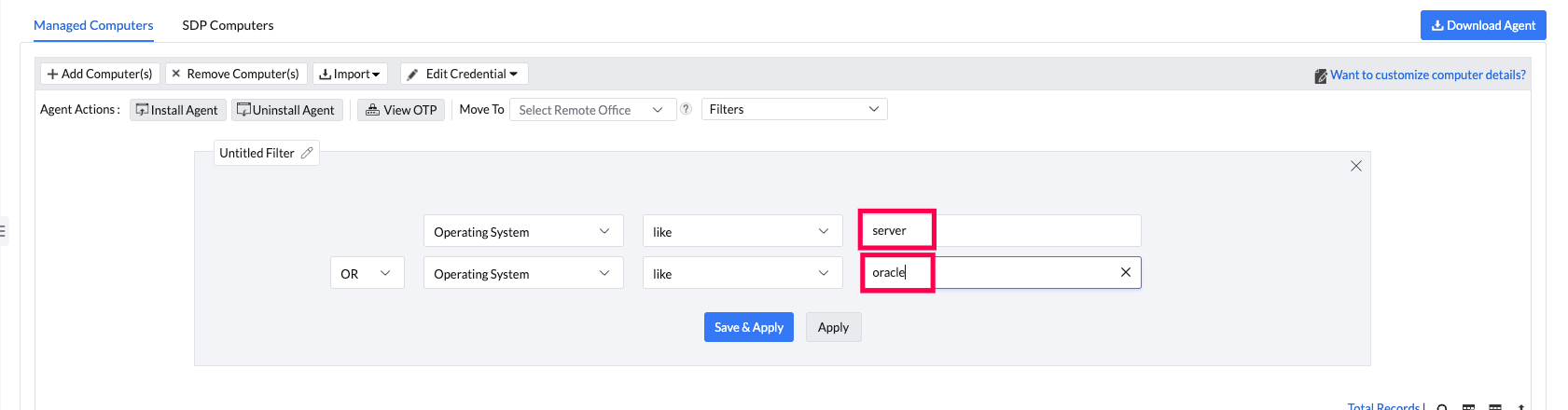
Navigate to Agent → Computers in the console interface. Create a filter for Operating System with tags "server" and "Oracle". The Red Hat Enterprise Linux OS server machines cannot be identified using the web console as its subscription has to be checked.
identify servers
How many servers can be managed with the free edition?
The free edition allows management of any number of servers, as long as the total number of endpoints does not exceed 25.

Vulnerability Detection and Remediation

How to adjust endpoint scan schedules for specific endpoints, including changing scan times and frequency to off-hours?
The product performs a patch scan under the following conditions:
  • During daily Vulnerability Database synchronization, whether automatic or manual.
  • Immediately after a patch is installed through Install Patch Configuration, APD Deployment, or Test and Approve.
  • Following a system reboot, if the reboot was required after patch installation.
  • When patches in an APD task or Test Group are either approved, not approved, or declined.
  • When a scan is manually triggered via the product console or from the Agent Tray icon.
  • After the agent is installed on a system, provided the Perform Patch Scanning option is enabled in SoM Settings.
Note: The product does not support scheduling patch scans.
You can initiate a manual scan on a local computer via Agent Tray icon → Scan → Initiate Patch Scan, or via the product console by navigating to Systems → Scan Systems. Choose the computers to be scanned and click Scan Systems. To scan all systems, click Scan All. Please note that this option is limited to a maximum of 100 computers.
Does Endpoint Central include Vulnerability Management for network LAN/WAN?
Endpoint Central does not support scanning network devices for vulnerabilities. This capability is available exclusively in the standalone Vulnerability Manager Plus product.
Why are patches also displayed under the software vulnerabilities tab?
Under software vulnerabilities, patches are displayed as a resolution to fix a known threat or vulnerability.
How does Endpoint Central enumerate vulnerabilities to prioritize response?
Common Vulnerability Scoring System (CVSS v3.0) is used to assess the severity of vulnerabilities based upon the ease of exploit and the approximated potential of impact. Scores range between 1 and 10, with 10 being most severe. Additionally, patches can be looked up using their CVE ID.
How are web servers and their vulnerabilities detected?
We detect web and database server vulnerabilities by scanning listening ports and identifying the application and its version. Vulnerabilities are identified by comparing the detected version to the vulnerability database. For further clarification on vulnerability applicability, please contact the vendor.
Note: Web/database servers will be detected only when they are actively running.
Does Endpoint Central support vulnerability detection and remediation for cURL?
Endpoint Central does not currently support patching or remediation for cURL-related vulnerabilities. If you wish to see this supported as part of a future release, kindly fill out the feature request form.
How can I add patches for applications that aren't supported by the product?
To add patches for applications that aren't supported by the product, please fill out the feature request form. This will allow us to understand your needs and potentially incorporate support for those applications in future updates. Your feedback is valuable in helping us enhance our offerings to better serve your needs.
Is installation of software supported in vulnerability management?
No. Software installation is not supported in the Vulnerability Management module. It supports vulnerability remediation (patch/hotfix deployment), not general software deployment.
How are web server vulnerabilities detected for Endpoint Central and other ManageEngine products?
For Endpoint Central and other ManageEngine products, we use CVE analysis data from our internal security experts to exclude non-applicable vulnerabilities and display only applicable ones. In the initial days after a CVE is released, vulnerabilities may be detected, but if our analysis determines they are not applicable, they will be removed in subsequent scans after a database sync.
What is the difference between Endpoint Central and Vulnerability Manager Plus?
Endpoint Central and Vulnerability Manager Plus are two distinct products from ManageEngine designed for different IT management needs. Endpoint Central is a unified endpoint management (UEM) solution focused on managing and maintaining endpoints throughout their lifecycle. It offers features such as patch management, software deployment, asset tracking, remote troubleshooting, configuration management, and mobile device management. It is ideal for IT teams looking to centrally manage a large number of diverse devices.
On the other hand, Vulnerability Manager Plus is a security-focused solution that specializes in identifying, prioritizing, and remediating vulnerabilities across the network. It provides advanced vulnerability scanning, risk-based prioritization using CVSS scores and threat intelligence, exploit detection, configuration audits, and compliance reporting. While both products include patch and vulnerability management capabilities, Endpoint Central provides more endpoint administration features, whereas Vulnerability Manager Plus focuses exclusively on vulnerability detection and risk mitigation.
Is Vulnerability Manager Plus included in the Endpoint Central Security edition?
Endpoint Central Security edition includes vulnerability management capabilities. Vulnerability Manager Plus is offered as a separate standalone product focused on advanced vulnerability detection and remediation workflows.
Does the product support Windows updates and where does it download them?
Yes, it supports Windows updates too. Patches that need to be installed are directly downloaded from the respective vendors' websites and stored in the Endpoint Central server before deploying them to computers in the network. The agents copy the required patch binaries from this server.
Why are vulnerabilities (CVE-2026-3845, CVE-2026-3846, CVE-2026-3847) still detected even after updating Mozilla Firefox (x64) to version 148.0.2?
This issue can occur due to a mismatch between the version recorded in the registry and the actual file version present on the system. While the registry reflects the updated Firefox version, older file versions may still exist on the machine.
This typically happens when Firefox is running in the background during deployment or when related processes/services are active, preventing proper file replacement. To resolve this:
  • Ensure all Firefox instances and related processes are completely closed.
  • Reopen Firefox and verify the file version details again.
  • Perform a rescan to update the vulnerability status.
Some vulnerabilities do not have patches available from ManageEngine or Microsoft. What is the option to address them?
If no official patch is available, vendor recommendations or available workarounds will be displayed to help mitigate the vulnerability. Once the vendor releases a supported patch, it will be provided within the SLA.

Comply with Specific CIS and STIG Rules

How do I track the status of security configuration deployments?
You can track the status of deployed security configurations from Deployments → Security Configurations and re-deploy any failed deployments from there.
Based on what criteria shall I filter misconfigurations?
You can filter Security Misconfigurations on the basis of:
1. Misconfigurations: Misconfiguration Name, Category, Severity, Remediation Availability, and Post Deployment Issue.
2. Systems: Computer Name, Platform, Domain Name, Branch Office, Custom Group, Operating System, Language, and Agent Live Status.

You can filter Web Server Misconfigurations on the basis of:
1. Misconfigurations: Misconfiguration Name, Category, Severity, Web Server Name, and DB Server Name.
2. Systems: Computer Name, Platform, Domain Name, Branch Office, Custom Group, Operating System, Language, and Agent Live Status.
Which platform does the security configuration management feature currently support?
The product currently supports security configuration management only for systems running on Windows OS.
How can I revert the applied secure configurations?
To revert the misconfiguration fixes applied through our product, create a Manual Deployment task using a dummy patch, such as Disable Updates Patches. You can search and select them from the Supported Patches view. Then, configure a deployment policy where the necessary custom script to revert the configuration is added as a pre- or post-deployment activity. Select this policy in the manual deployment task to deploy that dummy patch.

Compliance

What happens when a system is quarantined?
When a system is quarantined, it is isolated from the network to prevent potential security risks. Users will be notified, and administrators can take necessary actions to remediate compliance issues.
How does patching happen in a system that is quarantined from the network?
  • For On Premises, patches will be downloaded from the server as server-to-agent communication will remain active regardless of the system's quarantine status, so the patching process will happen in the usual manner.
  • For Cloud agents, patches will be downloaded directly from the vendor websites. If a system is quarantined, the URL from which the patches need to be downloaded will be temporarily allowlisted. Once the patch is downloaded, the URL will be automatically blocklisted by the quarantine policy.
Can quarantined systems be restored to normal operation?
Yes, once the compliance issues are addressed, administrators can lift the quarantine, allowing the system to resume normal operations.
Are Compliance scans different from Patch and Vulnerability scans?
Yes, compliance scans are different from Patch and Vulnerability scans. Compliance scans can be scheduled via the product console to custom groups, while Patch and Vulnerability scans happen during the following scenarios:
  • Patch Database Synchronization
  • Patch Installation
  • System Reboot
  • APD/Test Group Actions
  • Manual Scan (On-demand)
  • Agent Installation
How often should audits be conducted?
Regular audits are recommended, with the frequency determined by organizational policies. Monthly or quarterly audits are common, but more frequent daily checks may be necessary for highly dynamic environments.
Can the System Quarantine Policy be customized for specific needs?
Absolutely. The policy is highly customizable to accommodate the unique requirements of your organization. Administrators can define rules tailored to specific compliance standards and security policies.
How to cross-check CIS Compliance rule status from the console?
The console provides detailed information for each rule — including pass/fail/error status — along with the actual value found on the machine and the expected CIS-compliant value. This allows users to verify and troubleshoot compliance issues effectively.
Does CIS Compliance support database applications?
Support for database applications is part of our roadmap and will be included in a future release.
User-based rules are failing after configuration. Why?
These rules will only pass if all user accounts on the machine are configured correctly as per the rule's requirements.
How to fix CIS rule failures?
Fixes can be implemented through Domain GPO. Each rule includes a "How to Fix" section outlining the necessary steps for remediation.
Is STIG supported by the Compliance feature?
STIG is not currently supported in the Compliance feature, but it is on our roadmap. For now, customers can use CIS benchmarks compatible with STIG as a workaround. Search for CIS with STIG benchmarks in the Compliance section.
I fixed a policy, but it still shows as non-compliant. What should I do?
Ensure that the GPO is applied on the client machine. Run gpupdate /force to sync policies, then trigger a compliance scan. Also, verify the setting is reflected in the local GPO. If the rule still fails, please share the agent logs with our support team for further investigation.

Vulnerability Audit & Reports

Is there a feature to pull local logs of failed deployments from Endpoint Central?
Yes, you can pull local agent logs from remote computers and upload them to support for analysis from Support → Create Support File.
Can I create a report for systems that need patches older than 30 days?
Yes, you can create a report from Threats & Patches → Patches → Missing Patches and create a filter based on the "Release Date".
How do I track the status of High-risk software uninstallation?
You can track the status of high-risk software uninstallation from Deployments → Software Uninstallation.
How to download a vulnerability report?
By navigating to Report → Scheduled Report, you can schedule a specific vulnerability report. Alternatively, an export option is available in the top right corner of each specific table, allowing you to export the table data.
How can I create a custom report for missing patches and detected vulnerabilities that includes computer names and organizes the data by environment?
In the Detailed Software Vulnerabilities view, you can use Advanced Filters to filter machine vulnerabilities by the 'Patch Availability' criteria set to 'Not Available,' and then export the report.

Exceptions

How long will it take for Dynamic CG exclusion to reflect?
Static group exclusion happens immediately, whereas for Dynamic groups, it reflects after the next scan.

Network Devices Firmware Vulnerability Detection

What to do if discovery fails with the error: "Provided IP address(es) not in range or possibly down. Please check and try again"?
  • Ensure the device is reachable from the VMP server.
  • Ensure the prerequisites from "<server-home>/bin/nmap" are installed, specifically Npcap and vcredist. You can find these in the Control Panel as Npcap OEM and Microsoft Visual C++ 2013 Redistributable (x86) - 12.0.21005.
Why is network device discovery taking a long time?

Discovery may take time depending on the number of IP addresses provided. If the subnet contains a large number of IPs, the process could be slower. Try entering one or two known IP addresses to check if discovery is successfully identifying network devices.

What actions should I take for SNMP timeout or credential failure during scanning?
  • Ensure the device is reachable (try pinging it from the VMP server).
  • Confirm that the VMP server's IP address is added to the SNMP host list in the device's SNMP configuration.
  • Verify that the SNMP community string or password is correct and valid.
How do I troubleshoot SSH failures in network device scans?
  • Ensure that SSH is enabled and the device is reachable.
  • Verify that the correct username and password are being used.
  • Check if the correct prompt is configured by logging in to the device manually.
  • Most firmware details can be retrieved in user mode; privileged mode is rarely required. Therefore, enable credentials are typically not necessary. If you choose to provide them, please ensure they are valid.
What are the prerequisites for discovering and scanning network devices?
  • Enable SNMP (v1/v2c/v3) or SSH on the devices.
  • Ensure VMP communication over SNMP/SSH is allowed by the firewall.
  • Add appropriate credentials in VMP scan settings.
Where can I find a list of supported network devices (such as firewalls, routers, switches, ESXi Host, Linux, Windows servers, SAN, and NAS) for vulnerability scanning?

Visit the Supported Network Devices page.

What should I do if the scan reports "Unsupported Device"?

When a network device is flagged as "unsupported," it indicates that the device's firmware or model is not currently recognized by Vulnerability Manager Plus for vulnerability detection. To address this issue, follow these steps:

1. Collect Device Details:

  • Identify the vendor name (e.g., Cisco, Juniper, Fortinet).
  • Determine the model and series (e.g., Catalyst 2960, FortiGate 60E).

2. Retrieve sysObjectID:

  • Use an SNMP walk tool or MIB browser to query with the following command:
  • snmpwalk -v2c -c [community_string] [device_ip] .1.3.6.1.2.1.1.2.0
  • This helps Vulnerability Manager Plus identify the exact device family.

3. Get Firmware Version via SSH:

  • Log in to the device using PuTTY/SSH.
  • Execute the appropriate command to retrieve the firmware version (this varies by vendor, e.g., show version for Cisco).
  • Copy the output.

4. Submit the Details to Support:

  • Compile all collected details and submit them to support for further assistance.

Miscellaneous

What is the difference between Patch Manager Plus and Vulnerability Manager Plus?

Vulnerability Manager Plus is a dedicated patch management solution from Vulnerability Manager Plus that focuses solely on identifying and deploying patches for operating systems and over 1100 third-party applications across Windows, macOS, and Linux environments. It is available in both cloud and on-premises versions, making it ideal for organizations seeking a straightforward, platform-agnostic patching tool. In contrast, Vulnerability Manager Plus offers a more comprehensive security solution that includes not just all features of patch management but also vulnerability scanning and detection, security configuration audits, and compliance reporting. It is available only as an on-premises solution and is better suited for organizations looking for deeper vulnerability insights and threat-based remediation. In short, while Vulnerability Manager Plus is ideal for focused patching needs, Vulnerability Manager Plus serves as a full-fledged vulnerability management platform with integrated patching capabilities. To know more about the differences, refer to this page.

Does Vulnerability Manager Plus offer a cloud-based version?

Yes. ManageEngine Vulnerability Manager Plus is now available in both cloud and on-premises versions. You can choose the deployment model based on your organization's requirements.

What OS are supported by Vulnerability Manager Plus?

Refer to this page to know all the supported applications. Support is provided only for the mentioned.

Can Vulnerability Manager Plus be used as a SaaS solution with Patch Manager Plus Cloud as an add-on?

Vulnerability Manager Plus is now available as a SaaS (cloud) solution. However, Vulnerability Manager Plus and Patch Manager Plus Cloud continue to be separate products, and Vulnerability Manager Plus is not provided as an add-on to Patch Manager Plus Cloud.

How to renew the license for ManageEngine Vulnerability Manager Plus?

You can renew the license by filling the details in this page.

How do I apply the latest hotfix for Vulnerability Manager Plus?

You can download the latest Vulnerability Manager Plus hotfix from the Service Packs and Hotfixes page. Follow the instructions provided there to apply it to your setup.

Does Vulnerability Manager Plus supports patching for both virtual and physical servers?

Yes. We offer support based on the OS version mentioned in this page. Irrespective of the hardware.

How to view and retrieve installed software details in Vulnerability Manager Plus Professional Edition?

For each machine, under specific System summary -> Installed software tab, the installed software table will be available. Export for the same will be available in the right side top of the table.

How to configure Vulnerability Manager Plus for vulnerability checks?

Vulnerability checks require no specific configuration. Once the agents are installed, the next Vulnerability and Patch scan will automatically use the detection checks available from the Security Research Team's findings through a vulnerability database sync.

Can the product scan system configuration files for credentials and passwords?

No. As of now we do not have provision for checking the files for detecting credentials and passwords.

Can I install software using Vulnerability Manager Plus?

No. Vulnerability Manager Plus does not support general software installation. It is built for vulnerability remediation (patch and hotfix deployment), while regular software deployment should be handled through software deployment tools.