
Frequently Asked Questions
- General
- Licensing
- Connecting to Analytics Plus
- Data synchronization
- Data modeling
- Reports and dashboards
- Sharing and collaboration
- Help and Support
General
- What is ManageEngine Analytics Plus?
- Is Analytics Plus native to Jira?
- How long is the trial period, and are there any feature restrictions during the trial period?
- Can I test this app in my Jira Software Cloud application?
- What happens to my data after the free trial?
1. What is ManageEngine Analytics Plus?
ManageEngine Analytics Plus is an IT analytics solution that helps you to easily analyze your business data and create insightful reports and dashboards for informed decision-making. Analytics Plus can be set up with Jira Software Cloud in minutes and offers 150+ prebuilt reports and dashboards.
2. Is Analytics Plus native to Jira?
ManageEngine Analytics Plus is a Jira Marketplace certified app and can be accessed from the Jira Software Cloud application.
3. How long is the trial period, and are there any feature restrictions during the trial period?
Analytics Plus offers a 30-day free trial. During the trial period, you have access to all the Analytics Plus features.
4. Can I test this app in my Jira Software Cloud application?
Yes. You can test Analytics Plus for free in the Jira Software Cloud application. Refer to the Setting up ManageEngine Analytics Plus document for more details or write to us at analyticsplus-support@manageengine.com to help you get started.
5. What happens to my data after the free trial?
If you choose not to purchase a subscription at the end of your 30-day trial or if you discontinue Analytics Plus during the trial period your data will be permanently removed upon product uninstallation.
Licensing
1. Is Analytics Plus free?
You can try a free, 30-day trial of Analytics Plus from the Jira Software Cloud application. After that, you will need to subscribe to a paid plan. Click here to view the available pricing models.
2. How much does ManageEngine Analytics Plus cost?
The licensing model of the Analytics Plus app for Jira Software Cloud is based on the number of users. To learn more about the license packs, click here.
Connecting to Analytics Plus
- How to download and set up the Analytics Plus app for Jira?
- Why am I unable to launch Analytics Plus?
1. How to download and set up the Analytics Plus app for Jira?
You can easily set up the ManageEngine Analytics Plus app from the Jira Marketplace. For detailed steps on the setup process, refer this documentation.
2. Why am I unable to launch Analytics Plus?
If you face any issues while launching Analytics Plus, please write to us at analyticsplus-support@manageengine.com.
Data synchronization
- How long does it take for Jira Software Cloud data to appear in Analytics Plus?
- Why is my data not up to date in Analytics Plus?
1. How long does it take for Jira Software Cloud data to appear in Analytics Plus?
During the initial setup process, you might have to wait for around 5-10 minutes for the initial data synchronization to complete. On successful synchronization, subsequent changes in Jira Software will automatically be synchronized with Analytics Plus as per the configured schedule.
2. Why is my data not up to date in Analytics Plus?
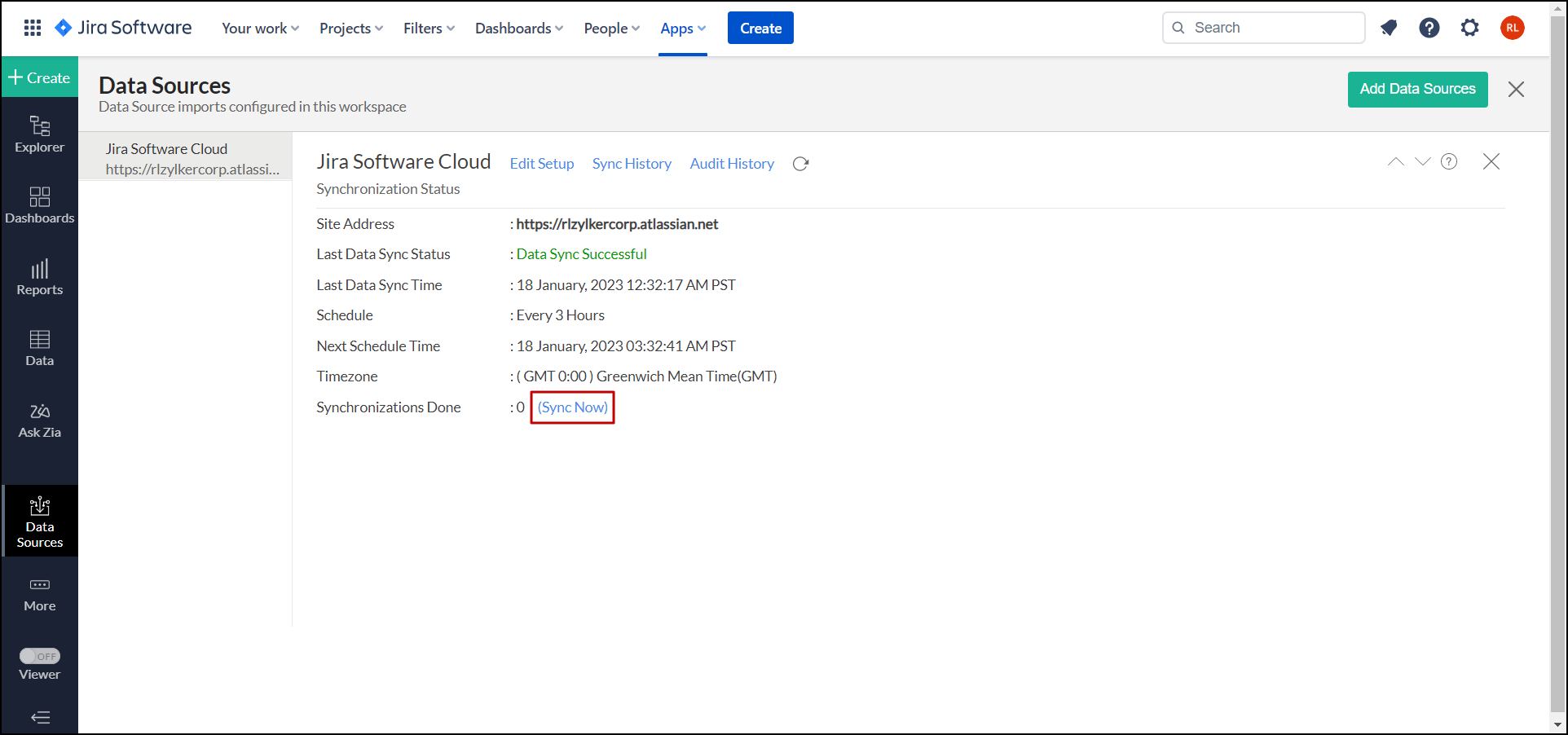
Data from the Jira Software Cloud application is synchronized with Analytics Plus based on the scheduled synchronization process. To synchronize your data instantly, follow the steps below:
- Open the Analytics Plus workspace and head to the Data Sources page.
- Click the Sync Now link on the page that appears to bring your data up to date in Analytics Plus.
Data modeling
- Does ManageEngine Analytics Plus support Relational modeling?
- Can I join tables to create reports in ManageEngine Analytics Plus?
1. Does ManageEngine Analytics Plus support Relational modeling?
Yes. Analytics Plus supports relational modeling using lookup columns. It allows you to join Jira Software Cloud data tables with parent-child relationships for advanced analysis and reporting across varied data.
2. Can I join tables to create reports in ManageEngine Analytics Plus?
Yes. Analytics Plus enables you to join tables in the following ways for efficient analysis.
- Lookup columns let you auto-join tables and create reports over the same.
- Query tables allow you to join data from multiple tables in a workspace using JOIN construct in SQL SELECT query.
Reports and dashboards
- What are the types of reports that can be created in Analytics Plus?
- Does Analytics Plus support dashboard creation?
- Are dashboards in Analytics Plus customizable?
1. What are the types of reports that can be created in Analytics Plus?
Analytics Plus supports a variety of report creation options, which include:
- Charts: Allows you to create reports in 25+ chart types. It includes Line, Multi-Line, Smooth line, Area, Bar, Stacked bar, Stacked Area, Combination, Pie, Funnel, Web, Scatter, etc.
- Pivot Tables: Allows you to create a view with data summarized in a grid both in horizontal and vertical columns (also known as Matrix Views).
- Tabular Views: Allows you to create simple table views with column grouping and sub-totals (aggregation).
- Summary Views: Allows you to create a view with summarized values and grouping.
2. Does Analytics Plus support dashboard creation?
Yes. Analytics Plus does support dashboard creation. It offers an easy-to-use drag-and-drop interface for creating dashboards in minutes. Using the dashboard, you can display a collection of reports on a single page, providing a quick at-a-glance view of your key business information for easy analysis and visualization.
3. Are dashboards in Analytics Plus customizable?
Yes. Analytics Plus offers a wide range of options to customize the dashboard design and create a visually rich dashboard quickly. Click here to learn more about dashboard customizations.
Sharing and collaboration
- Can I share my data and reports created in ManageEngine Analytics Plus with other Jira Software Cloud users?
- Can I export the reports created in Analytics Plus?
- Can I email the reports and dashboards?
- How do I use the collaboration feature in real-time?
1. Can I share my data and reports created in ManageEngine Analytics Plus with other Jira Software Cloud users?
Yes. Analytics Plus lets you share the tables, reports, dashboards, and workspaces with other Jira Software Cloud users. Use the share option, add the user's email address, and set the necessary permission to share the views. Click here to learn more.
You can also efficiently collaborate with your users by setting up real-time conversation access for shared views. Click here to learn more.
2. Can I export the reports created in Analytics Plus?
Yes. You can export the reports and dashboards created in Analytics Plus into various file formats. Analytics Plus supports the following file formats:
- CSV: Exports the underlying data of a report as a Comma Separated Value (CSV) file.
- PDF: Exports the report and dashboard in a printer-friendly Portable Document Format (PDF).
- HTML: Exports the report and dashboard as an HTML document.
- Excel (XLS): Exports the underlying data of a report as an Excel file.
- Image: Exports charts as a GIF or PNG image.
Click here to get more details about exporting views.
3. Can I email the reports and dashboards?
Yes. Analytics Plus lets you email the reports and dashboards as attachments to your users. You can also schedule the email to deliver automatically at specific intervals. Refer this documentation to learn more.
4. How do I use the collaboration feature in real-time?
Analytics Plus provides an efficient way to collaborate with your colleagues and clients by setting up real-time commenting on a shared view. Click here to learn more.
Help and Support
- Do you offer free technical support during the trial period?
- Can I get a personalized demo of the software?
- How can I request new reports or features with Analytics Plus?
1. Do you offer free technical support during the trial period?
Yes. Technical support is free for all users, even during the trial period. You can contact technical support through:
- Email: analyticsplus-support@manageengine.com
- Phone:
- United States: +1 4695016108
- United Kingdom: +44 2076602649
- Australia: +61 892100050
- India: +91-44-69656217
- Get answers straight from our community.
2. Can I get a personalized demo of the software?
Yes, please send us an e-mail at analyticsplus-support@manageengine.com. You can also use the Contact Support form found under the ManageEngine Analytics Plus app in your Jira Software application. You can also access the form from this link.
3. How can I request new reports or features with Analytics Plus?
To request additional reports or any new features, please drop us an e-mail at analyticsplus-support@manageengine.com. You can also use the Contact Support form in this link or found under the ManageEngine Analytics Plus app in the Jira Software Cloud application.