
Execute workflow
Last updated on:
In this page
Overview
The Execute workflow API allows you to automate workflow actions using tickets in ManageEngine Log360.
You can:
- Fetch a list of available workflows
- Retrieve template data for specific workflows
- Execute workflows directly using a ticketing tool connection.
Fetch all available workflows
This API allows you to fetch the list of all available workflows configured in the product console.
Request URL
Request Header
| Header name | Value | Mandatory | Description |
|---|---|---|---|
| Authorization | Bearer {{AuthToken}} | Yes | AuthToken generated from the API Settings page.
Example: Bearer abcd1234xyz |
Response
The response will be a JSON object containing the following key/value pairs:
| Parameter name | Description |
|---|---|
| workflow_list | A JSON array containing the list of all available workflows and their details in the product console. |
| message | Status of the API call to fetch all available workflows. |
Executing the API using cURL
Sample request
curl --location 'http://localhost:8095/RestAPI/v1/workflow/templates/list' \
--header 'Authorization: Bearer abcd1234xyz' \
Sample response
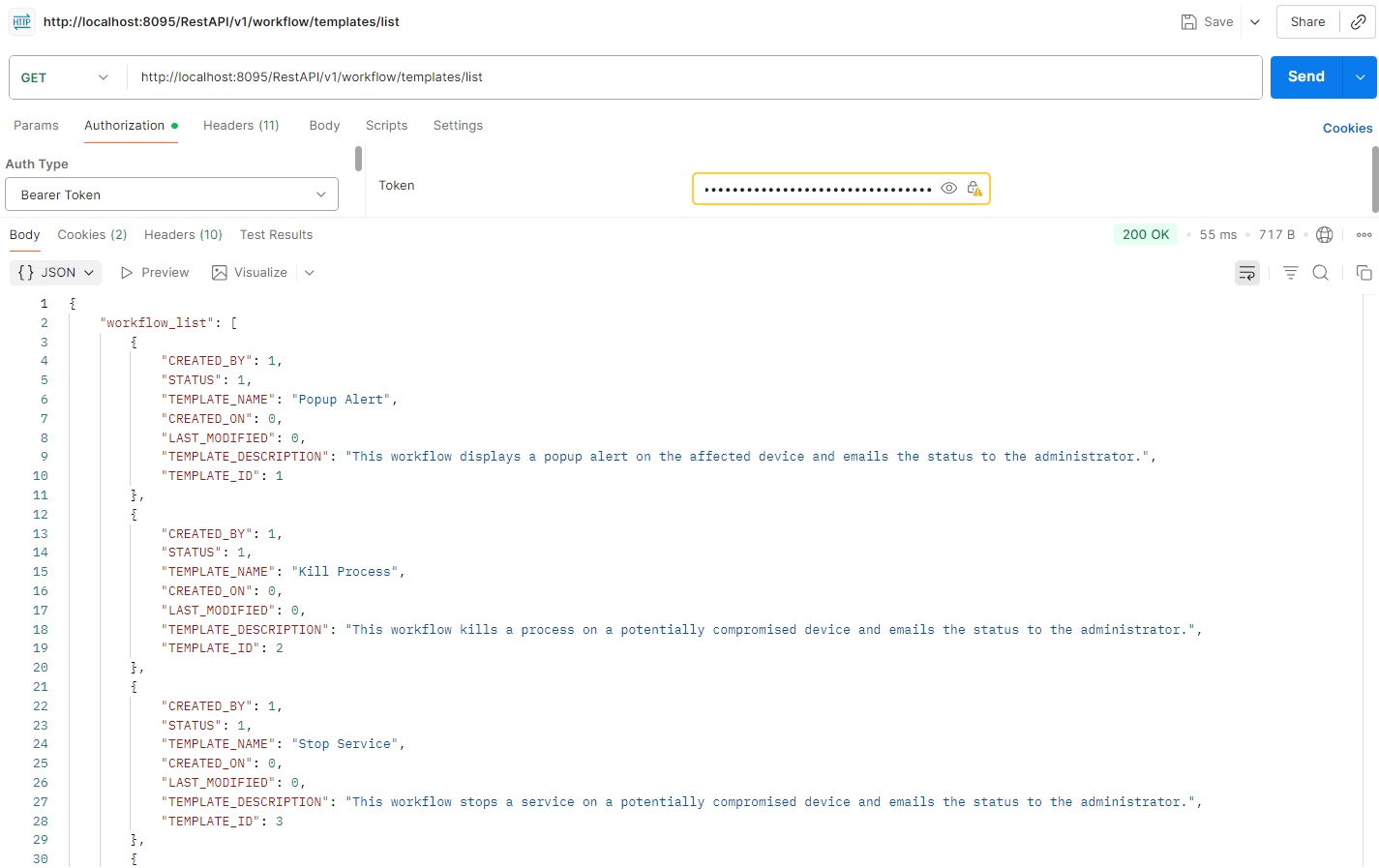
{"workflow_list":[{"CREATED_BY":1,"STATUS":1,"TEMPLATE_NAME":"Popup Alert","CREATED_ON":0,"LAST_MODIFIED":0,"TEMPLATE_DESCRIPTION":"This workflow displays a popup alert on the affected device and emails the status to the administrator.","TEMPLATE_ID":1},{"CREATED_BY":1,"
STATUS":1,"TEMPLATE_NAME":"Kill Process","CREATED_ON":0,"LAST_MODIFIED":0,"TEMPLATE_DESCRIPTION":"This workflow kills a process on a potentially compromised device and emails the status to the administrator.","TEMPLATE_ID":2},{"CREATED_BY":1,"STATUS":1,"TEMPLATE_NAME":"S
top Service","CREATED_ON":0,"LAST_MODIFIED":0,"TEMPLATE_DESCRIPTION":"This workflow stops a service on a potentially compromised device and emails the status to the administrator.","TEMPLATE_ID":3},{"CREATED_BY":1,"STATUS":1,"TEMPLATE_NAME":"Disable Computer","CREATED_ON
":0,"LAST_MODIFIED":0,"TEMPLATE_DESCRIPTION":"This workflow disables a potentially compromised computer and emails the status to the administrator.","TEMPLATE_ID":4},{"CREATED_BY":1,"STATUS":1,"TEMPLATE_NAME":"Log Off and Disable User","CREATED_ON":0,"LAST_MODIFIED":0,"T
EMPLATE_DESCRIPTION":"This workflow logs off and disables a potentially compromised user account and emails the status to the administrator.","TEMPLATE_ID":5},{"CREATED_BY":1,"STATUS":1,"TEMPLATE_NAME":"Block USB","CREATED_ON":0,"LAST_MODIFIED":0,"TEMPLATE_DESCRIPTION":"
This workflow blocks the USB port on a potentially compromised device and emails the status to the administrator.","TEMPLATE_ID":6}],"message":"Workflow List fetched successfully"}
Executing the API using Postman
Fetch template data for workflow
This API allows you to fetch detailed template data for a specific workflow.
Request URL
Request Header
| Header name | Value | Mandatory | Description |
|---|---|---|---|
| Authorization | Bearer {{AuthToken}} | Yes | AuthToken generated from the API Settings page.
Example: Bearer abcd1234xyz |
Request Parameters
| Parameter Name | Mandatory | Type | Description |
|---|---|---|---|
| template_id | Yes | Long | Template ID of the workflow whose template details needs to be fetched. |
Response
The response will be a JSON object containing the following key/value pairs:
| Parameter name | Description |
|---|---|
| workflow_details | A JSON array containing the block details of the workflow. |
| message | Status of the API call to fetch workflow template data. |
Executing the API using cURL
Sample request
curl --location 'http://localhost:8095/RestAPI/v1/workflow/template/details?template_id=1' \
--header 'Authorization: Bearer abcd1234xyz' \
Sample response
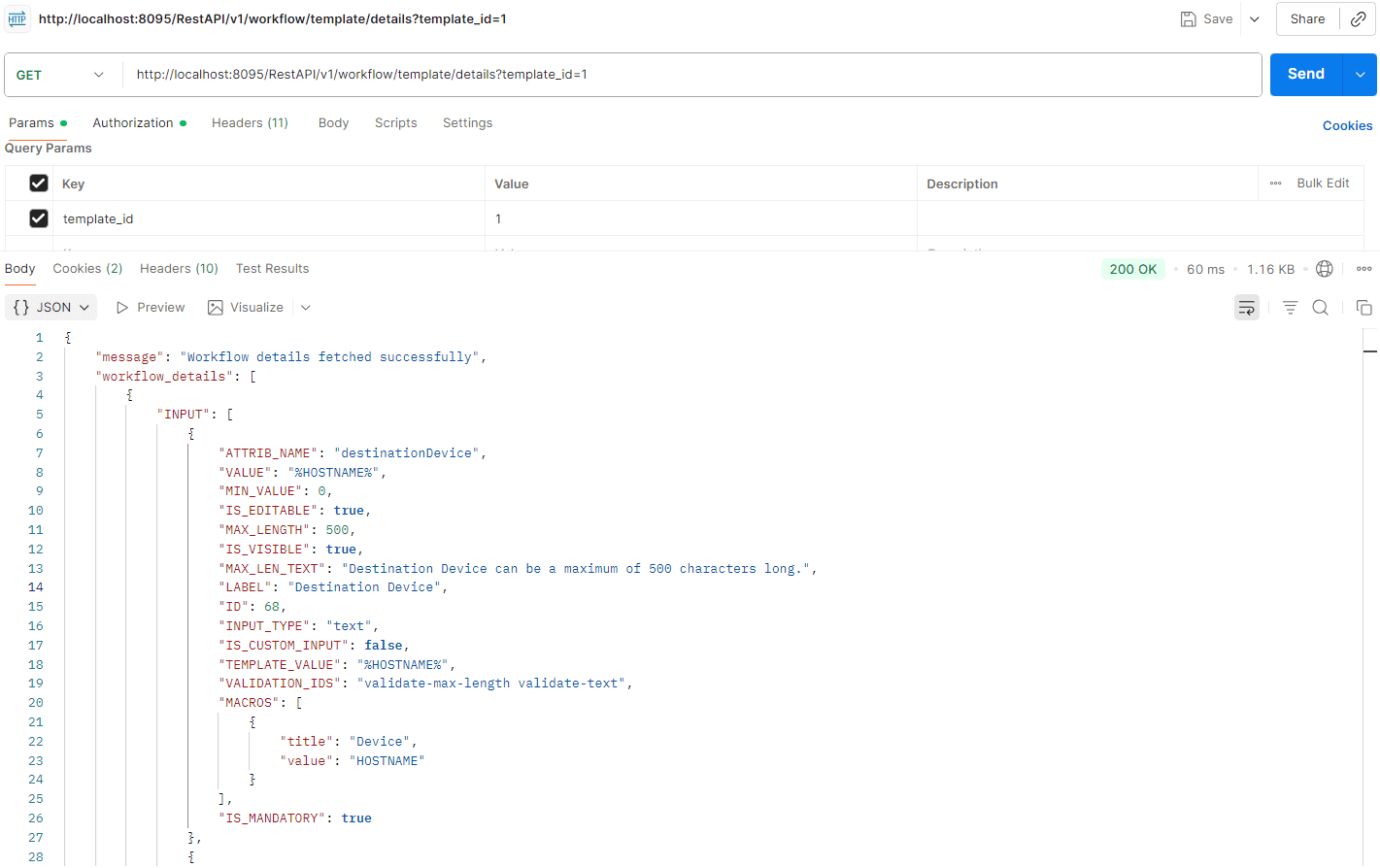
{"message":"Workflow details fetched successfully","workflow_details":[{"INPUT":[{"ATTRIB_NAME":"destinationDevice","VALUE":"%HOSTNAME%","MIN_VALUE":0,"IS_EDITABLE":true,"MAX_LENGTH":500,"IS_VISIBLE":true,"MAX_LEN_TEXT":"Destination Device can be a maximum of 500 charact
ers long.","LABEL":"Destination Device","ID":68,"INPUT_TYPE":"text","IS_CUSTOM_INPUT":false,"TEMPLATE_VALUE":"%HOSTNAME%","VALIDATION_IDS":"validate-max-length validate-text","MACROS":[{"title":"Device","value":"HOSTNAME"}],"IS_MANDATORY":true},{"HELP_TEXT":"Powershell i
s required to send sound alert on Windows machine","ATTRIB_NAME":"message","VALUE":"Incident detected on %HOSTNAME%.","MIN_VALUE":0,"IS_EDITABLE":true,"MAX_LENGTH":255,"IS_VISIBLE":true,"MAX_LEN_TEXT":"Message can be a maximum of 255 characters long.","LABEL":"Message","
ID":69,"INPUT_TYPE":"text","IS_CUSTOM_INPUT":false,"TEMPLATE_VALUE":"Incident detected on %HOSTNAME%.","VALIDATION_IDS":"validate-max-length validate-text","MACROS":[{"title":"Device","value":"HOSTNAME"},{"title":"Service Name","value":"SERVICENAME"},{"title":"Process Na
me","value":"PROCESSNAME"},{"title":"Username","value":"USERNAME"},{"title":"Alert Name","value":"ALERTNAME"}],"IS_MANDATORY":true}],"ID":1,"NAME":"Send Popup Notification"},{"INPUT":[],"ID":2,"NAME":"Popup message sent?"},{"INPUT":[{"HELP_TEXT":"Use comma to separate mu
ltiple mail IDs","ATTRIB_NAME":"toAddress","VALUE":"%ADMINEMAIL%","MIN_VALUE":0,"IS_EDITABLE":true,"MAX_LENGTH":500,"IS_VISIBLE":true,"MAX_LEN_TEXT":"To Address can be a maximum of 500 characters long.","LABEL":"To Address","ID":70,"INPUT_TYPE":"text","IS_CUSTOM_INPUT":f
alse,"TEMPLATE_VALUE":"%ADMINEMAIL%","VALIDATION_IDS":"validate-max-length ads-validate-multiple-email validate-text","MACROS":[{"title":"Admin Email","value":"ADMINEMAIL"}],"IS_MANDATORY":true},{"ATTRIB_NAME":"subject","VALUE":"Workflow status: Failed to send popup mess
age","MIN_VALUE":0,"IS_EDITABLE":true,"MAX_LENGTH":500,"IS_VISIBLE":true,"MAX_LEN_TEXT":"Mail Subject can be a maximum of 500 characters long.","LABEL":"Mail Subject","ID":71,"INPUT_TYPE":"text","IS_CUSTOM_INPUT":false,"TEMPLATE_VALUE":"Workflow status: Failed to send po
pup message","VALIDATION_IDS":"validate-max-length validate-text","MACROS":[{"title":"Device","value":"HOSTNAME"},{"title":"Service Name","value":"SERVICENAME"},{"title":"Process Name","value":"PROCESSNAME"},{"title":"Username","value":"USERNAME"},{"title":"Alert Name","
value":"ALERTNAME"}],"IS_MANDATORY":true},{"ATTRIB_NAME":"message","VALUE":"An incident was detected in the network. Details:\nAlert Name: %ALERTNAME%\nDevice Name: %HOSTNAME%\n\nFailed to send popup message to %HOSTNAME%.","MIN_VALUE":0,"IS_EDITABLE":true,"MAX_LENGTH":5
00,"IS_VISIBLE":true,"MAX_LEN_TEXT":"Mail Body can be a maximum of 500 characters long.","LABEL":"Mail Body","ID":72,"INPUT_TYPE":"textarea","IS_CUSTOM_INPUT":false,"TEMPLATE_VALUE":"An incident was detected in the network. Details:\nAlert Name: %ALERTNAME%\nDevice Name:
%HOSTNAME%\n\nFailed to send popup message to %HOSTNAME%.","VALIDATION_IDS":"validate-max-length validate-text","MACROS":[{"title":"Device","value":"HOSTNAME"},{"title":"Service Name","value":"SERVICENAME"},{"title":"Process Name","value":"PROCESSNAME"},{"title":"Userna
me","value":"USERNAME"},{"title":"Alert Name","value":"ALERTNAME"}],"IS_MANDATORY":true}],"ID":3,"NAME":"Failure Notification"},{"INPUT":[{"HELP_TEXT":"Use comma to separate multiple mail IDs","ATTRIB_NAME":"toAddress","VALUE":"%ADMINEMAIL%","MIN_VALUE":0,"IS_EDITABLE":t
rue,"MAX_LENGTH":500,"IS_VISIBLE":true,"MAX_LEN_TEXT":"To Address can be a maximum of 500 characters long.","LABEL":"To Address","ID":70,"INPUT_TYPE":"text","IS_CUSTOM_INPUT":false,"TEMPLATE_VALUE":"%ADMINEMAIL%","VALIDATION_IDS":"validate-max-length ads-validate-multipl
e-email validate-text","MACROS":[{"title":"Admin Email","value":"ADMINEMAIL"}],"IS_MANDATORY":true},{"ATTRIB_NAME":"subject","VALUE":"Workflow status: Popup message successfully sent","MIN_VALUE":0,"IS_EDITABLE":true,"MAX_LENGTH":500,"IS_VISIBLE":true,"MAX_LEN_TEXT":"Mai
l Subject can be a maximum of 500 characters long.","LABEL":"Mail Subject","ID":71,"INPUT_TYPE":"text","IS_CUSTOM_INPUT":false,"TEMPLATE_VALUE":"Workflow status: Popup message successfully sent","VALIDATION_IDS":"validate-max-length validate-text","MACROS":[{"title":"Dev
ice","value":"HOSTNAME"},{"title":"Service Name","value":"SERVICENAME"},{"title":"Process Name","value":"PROCESSNAME"},{"title":"Username","value":"USERNAME"},{"title":"Alert Name","value":"ALERTNAME"}],"IS_MANDATORY":true},{"ATTRIB_NAME":"message","VALUE":"An incident w
as detected in the network. Details:\nAlert Name: %ALERTNAME%\nDevice Name: %HOSTNAME%\n\nPopup message sent to %HOSTNAME%.","MIN_VALUE":0,"IS_EDITABLE":true,"MAX_LENGTH":500,"IS_VISIBLE":true,"MAX_LEN_TEXT":"Mail Body can be a maximum of 500 characters long.","LABEL":"M
ail Body","ID":72,"INPUT_TYPE":"textarea","IS_CUSTOM_INPUT":false,"TEMPLATE_VALUE":"An incident was detected in the network. Details:\nAlert Name: %ALERTNAME%\nDevice Name: %HOSTNAME%\n\nPopup message sent to %HOSTNAME%.","VALIDATION_IDS":"validate-max-length validate-te
xt","MACROS":[{"title":"Device","value":"HOSTNAME"},{"title":"Service Name","value":"SERVICENAME"},{"title":"Process Name","value":"PROCESSNAME"},{"title":"Username","value":"USERNAME"},{"title":"Alert Name","value":"ALERTNAME"}],"IS_MANDATORY":true}],"ID":4,"NAME":"Succ
ess Notification"}]}
Executing the API using Postman
Execute the workflow from ticket
This API allows you to execute a workflow in the product console using a ticket.
Request URL
Request Header
| Header name | Value | Mandatory | Description |
|---|---|---|---|
| Authorization | Bearer {{AuthToken}} | Yes | AuthToken generated from the API Settings page.
Example: Bearer abcd1234xyz |
Request Parameters
| Parameter Name | Mandatory | Type | Description |
|---|---|---|---|
| template_id | Yes | Long | ID of the workflow template to be executed. |
| template_name | Yes | String | Name of the workflow to be executed. |
| ticket_id | Yes | String | ID of the ticket from which the workflow is being executed. |
| tool_name | Yes | String | Name of the ticketing tool from which the workflow is being executed. |
| type | No | String | If the ticket is created from an alert, the value should be "alert". |
| custom_input | Yes | String | Workflow template block data (fetched from the previous Fetch Template Data for Workflow API). |
Response
The response will be a JSON object containing the following key/value pair.
| Parameter name | Description |
|---|---|
| workflow_details | A JSON array containing the block details of the workflow. |
| message | Status of the workflow execution. |
Executing API using cURL
Sample request
curl --location 'http://localhost:8095/RestAPI/v1/ticket/workflow/execute' \
--header 'Content-Type: application/json' \
--header 'Authorization: Bearer abcd1234xyz' \
--data '{
"template_id": 1,
"template_name": "Popup Alert",
"ticket_id": "33741",
"tool_name": "ZEN_DESK_CLOUD",
"type":"alert",
"custom_input": "{\"1\":[{\"ATTRIB_NAME\":\"destinationDevice\",\"VALUE\":\"%HOSTNAME%\",\"MIN_VALUE\":0,\"IS_EDITABLE\":true,\"MAX_LENGTH\":500,\"IS_VISIBLE\":true,\"MAX_LEN_TEXT\":\"Destination Device can be a maximum of 500 characters long.\",\"LABEL\":\"Destination Device\",\"ID\":68,\"INPUT_TYPE\":\"text\",\"IS_CUSTOM_INPUT\":false,\"TEMPLATE_VALUE\":\"%HOSTNAME%\",\"VALIDATION_IDS\":\"validate-max-length validate-text\",\"MACROS\":[{\"title\":\"Device\",\"value\":\"HOSTNAME\"}],\"IS_MANDATORY\":true},{\"HELP_TEXT\":\"Powershell is required to send sound alert on Windows machine\",\"ATTRIB_NAME\":\"message\",\"VALUE\":\"Incident detected on %HOSTNAME%.\",\"MIN_VALUE\":0,\"IS_EDITABLE\":true,\"MAX_LENGTH\":255,\"IS_VISIBLE\":true,\"MAX_LEN_TEXT\":\"Message can be a maximum of 255 characters long.\",\"LABEL\":\"Message\",\"ID\":69,\"INPUT_TYPE\":\"text\",\"IS_CUSTOM_INPUT\":false,\"TEMPLATE_VALUE\":\"Incident detected on %HOSTNAME%.\",\"VALIDATION_IDS\":\"validate-max-length validate-text\",\"MACROS\":[{\"title\":\"Device\",\"value\":\"HOSTNAME\"},{\"title\":\"Service Name\",\"value\":\"SERVICENAME\"},{\"title\":\"Process Name\",\"value\":\"PROCESSNAME\"},{\"title\":\"Username\",\"value\":\"USERNAME\"},{\"title\":\"Alert Name\",\"value\":\"ALERTNAME\"}],\"IS_MANDATORY\":true}],\"2\":[],\"3\":[{\"HELP_TEXT\":\"Use comma to separate multiple mail IDs\",\"ATTRIB_NAME\":\"toAddress\",\"VALUE\":\"%ADMINEMAIL%\",\"MIN_VALUE\":0,\"IS_EDITABLE\":true,\"MAX_LENGTH\":500,\"IS_VISIBLE\":true,\"MAX_LEN_TEXT\":\"To Address can be a maximum of 500 characters long.\",\"LABEL\":\"To Address\",\"ID\":70,\"INPUT_TYPE\":\"text\",\"IS_CUSTOM_INPUT\":false,\"TEMPLATE_VALUE\":\"%ADMINEMAIL%\",\"VALIDATION_IDS\":\"validate-max-length ads-validate-multiple-email validate-text\",\"MACROS\":[{\"title\":\"Admin Email\",\"value\":\"ADMINEMAIL\"}],\"IS_MANDATORY\":true},{\"ATTRIB_NAME\":\"subject\",\"VALUE\":\"Workflow status: Failed to send popup message\",\"MIN_VALUE\":0,\"IS_EDITABLE\":true,\"MAX_LENGTH\":500,\"IS_VISIBLE\":true,\"MAX_LEN_TEXT\":\"Mail Subject can be a maximum of 500 characters long.\",\"LABEL\":\"Mail Subject\",\"ID\":71,\"INPUT_TYPE\":\"text\",\"IS_CUSTOM_INPUT\":false,\"TEMPLATE_VALUE\":\"Workflow status: Failed to send popup message\",\"VALIDATION_IDS\":\"validate-max-length validate-text\",\"MACROS\":[{\"title\":\"Device\",\"value\":\"HOSTNAME\"},{\"title\":\"Service Name\",\"value\":\"SERVICENAME\"},{\"title\":\"Process Name\",\"value\":\"PROCESSNAME\"},{\"title\":\"Username\",\"value\":\"USERNAME\"},{\"title\":\"Alert Name\",\"value\":\"ALERTNAME\"}],\"IS_MANDATORY\":true},{\"ATTRIB_NAME\":\"message\",\"VALUE\":\"An incident was detected in the network. Details:\\nAlert Name: %ALERTNAME%\\nDevice Name: %HOSTNAME%\\n\\nFailed to send popup message to %HOSTNAME%.\",\"MIN_VALUE\":0,\"IS_EDITABLE\":true,\"MAX_LENGTH\":500,\"IS_VISIBLE\":true,\"MAX_LEN_TEXT\":\"Mail Body can be a maximum of 500 characters long.\",\"LABEL\":\"Mail Body\",\"ID\":72,\"INPUT_TYPE\":\"textarea\",\"IS_CUSTOM_INPUT\":false,\"TEMPLATE_VALUE\":\"An incident was detected in the network. Details:\\nAlert Name: %ALERTNAME%\\nDevice Name: %HOSTNAME%\\n\\nFailed to send popup message to %HOSTNAME%.\",\"VALIDATION_IDS\":\"validate-max-length validate-text\",\"MACROS\":[{\"title\":\"Device\",\"value\":\"HOSTNAME\"},{\"title\":\"Service Name\",\"value\":\"SERVICENAME\"},{\"title\":\"Process Name\",\"value\":\"PROCESSNAME\"},{\"title\":\"Username\",\"value\":\"USERNAME\"},{\"title\":\"Alert Name\",\"value\":\"ALERTNAME\"}],\"IS_MANDATORY\":true}],\"4\":[{\"HELP_TEXT\":\"Use comma to separate multiple mail IDs\",\"ATTRIB_NAME\":\"toAddress\",\"VALUE\":\"%ADMINEMAIL%\",\"MIN_VALUE\":0,\"IS_EDITABLE\":true,\"MAX_LENGTH\":500,\"IS_VISIBLE\":true,\"MAX_LEN_TEXT\":\"To Address can be a maximum of 500 characters long.\",\"LABEL\":\"To Address\",\"ID\":70,\"INPUT_TYPE\":\"text\",\"IS_CUSTOM_INPUT\":false,\"TEMPLATE_VALUE\":\"%ADMINEMAIL%\",\"VALIDATION_IDS\":\"validate-max-length ads-validate-multiple-email validate-text\",\"MACROS\":[{\"title\":\"Admin Email\",\"value\":\"ADMINEMAIL\"}],\"IS_MANDATORY\":true},{\"ATTRIB_NAME\":\"subject\",\"VALUE\":\"Workflow status: Popup message successfully sent\",\"MIN_VALUE\":0,\"IS_EDITABLE\":true,\"MAX_LENGTH\":500,\"IS_VISIBLE\":true,\"MAX_LEN_TEXT\":\"Mail Subject can be a maximum of 500 characters long.\",\"LABEL\":\"Mail Subject\",\"ID\":71,\"INPUT_TYPE\":\"text\",\"IS_CUSTOM_INPUT\":false,\"TEMPLATE_VALUE\":\"Workflow status: Popup message successfully sent\",\"VALIDATION_IDS\":\"validate-max-length validate-text\",\"MACROS\":[{\"title\":\"Device\",\"value\":\"HOSTNAME\"},{\"title\":\"Service Name\",\"value\":\"SERVICENAME\"},{\"title\":\"Process Name\",\"value\":\"PROCESSNAME\"},{\"title\":\"Username\",\"value\":\"USERNAME\"},{\"title\":\"Alert Name\",\"value\":\"ALERTNAME\"}],\"IS_MANDATORY\":true},{\"ATTRIB_NAME\":\"message\",\"VALUE\":\"An incident was detected in the network. Details:\\nAlert Name: %ALERTNAME%\\nDevice Name: %HOSTNAME%\\n\\nPopup message sent to %HOSTNAME%.\",\"MIN_VALUE\":0,\"IS_EDITABLE\":true,\"MAX_LENGTH\":500,\"IS_VISIBLE\":true,\"MAX_LEN_TEXT\":\"Mail Body can be a maximum of 500 characters long.\",\"LABEL\":\"Mail Body\",\"ID\":72,\"INPUT_TYPE\":\"textarea\",\"IS_CUSTOM_INPUT\":false,\"TEMPLATE_VALUE\":\"An incident was detected in the network. Details:\\nAlert Name: %ALERTNAME%\\nDevice Name: %HOSTNAME%\\n\\nPopup message sent to %HOSTNAME%.\",\"VALIDATION_IDS\":\"validate-max-length validate-text\",\"MACROS\":[{\"title\":\"Device\",\"value\":\"HOSTNAME\"},{\"title\":\"Service Name\",\"value\":\"SERVICENAME\"},{\"title\":\"Process Name\",\"value\":\"PROCESSNAME\"},{\"title\":\"Username\",\"value\":\"USERNAME\"},{\"title\":\"Alert Name\",\"value\":\"ALERTNAME\"}],\"IS_MANDATORY\":true}]}"
}'Sample response
Read also
This page explains how to fetch, view, and execute workflows in Log360 using REST APIs.