
Export incident using ticket
Last updated on:
In this page
Overview
The Export incident using ticket API enables you to automate the export of incidents linked to specific tickets.
This includes:
- Triggering an export request
- Checking the export's progress
- Downloading the resulting incident report as a PDF file
1. Trigger incident export
The API allows you to trigger an incident export based on the ticket.
Request URL
Request Header
| Header name | Value | Mandatory | Description |
|---|---|---|---|
| Authorization | Bearer {{AuthToken}} | Yes | AuthToken generated from the API Settings page.
e.g., Bearer abcd1234xyz |
Request Parameters
The request body must be sent in JSON format and include the following key/value parameters:
| Parameter Name | Mandatory | Type | Description |
|---|---|---|---|
| ticket_id | Yes | String | ID of the ticket whose incident needs to be exported. |
Response
The response will be a JSON object with the following key/value pairs:
| Parameter name | Description |
|---|---|
| export_id | ID of the triggered export request |
| message | Result of the update incident request. |
Executing the API using cURL
Sample request
curl --location 'http://localhost:8095/RestAPI/v1/ticket/incident/export' \ --header 'Content-Type: application/json' \
--header 'Authorization: Bearer abcd1234xyz' \ --data '{ "ticket_id": "33630" }'
Sample response
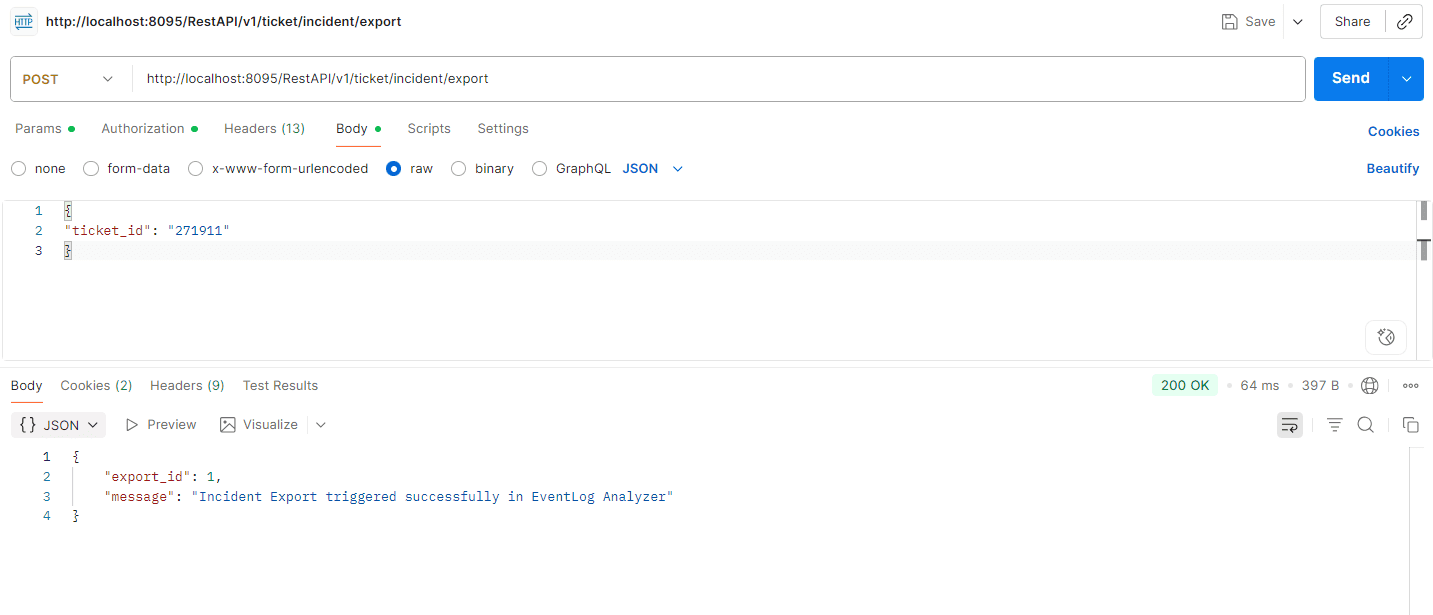
Executing the API using Postman
Get incident export status
The API allows you to fetch the status of the triggered incident export.
Request URL
Request Header
| Header name | Value | Mandatory | Description |
|---|---|---|---|
| Authorization | Bearer {{AuthToken}} | Yes | AuthToken generated from the API Settings page.
e.g., Bearer abcd1234xyz |
Request Parameters
| Parameter Name | Mandatory | Type | Description |
|---|---|---|---|
| export_id | Yes | Long | ID of the triggered incident export. |
Response
The response will be a JSON object with the following key/value pair:
| Parameter name | Description |
|---|---|
| message | Status of the triggered incident export. |
Executing the API using cURL
Sample request
curl --location 'http://localhost:8095/RestAPI/v1/incident/export/status?export_id=1' \
--header 'Authorization: Bearer abcd1234xyz'
Sample response
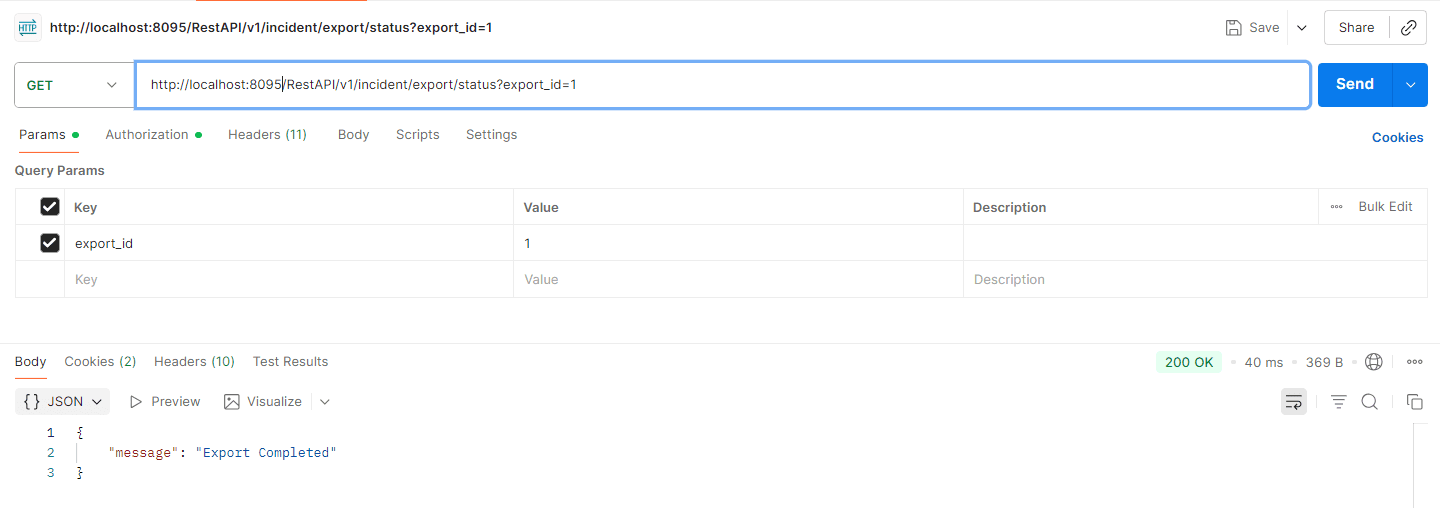
Executing the API using Postman
Download incident export as PDF
The API allows you to download the triggered export.
Request URL
Request Header
| Header name | Value | Mandatory | Description |
|---|---|---|---|
| Authorization | Bearer {{AuthToken}} | Yes | AuthToken generated from the API Settings page.
e.g., Bearer abcd1234xyz |
Request Parameters
| Parameter Name | Mandatory | Type | Description |
|---|---|---|---|
| export_id | Yes | Long | ID of the triggered incident export. |
Response
The triggered incident export will be saved as a PDF file.
Executing the API using cURL
Sample request
curl --location 'http://localhost:8095/RestAPI/v1/incident/export/download' --header 'Content-Type: application/json' --header 'Authorization: Bearer abcd1234xyz' --data '{
"export_id": "1"
}' --output export.pdf
Sample response
Check the location where the curl command is executed. The incident will be exported as a PDF named export.pdf
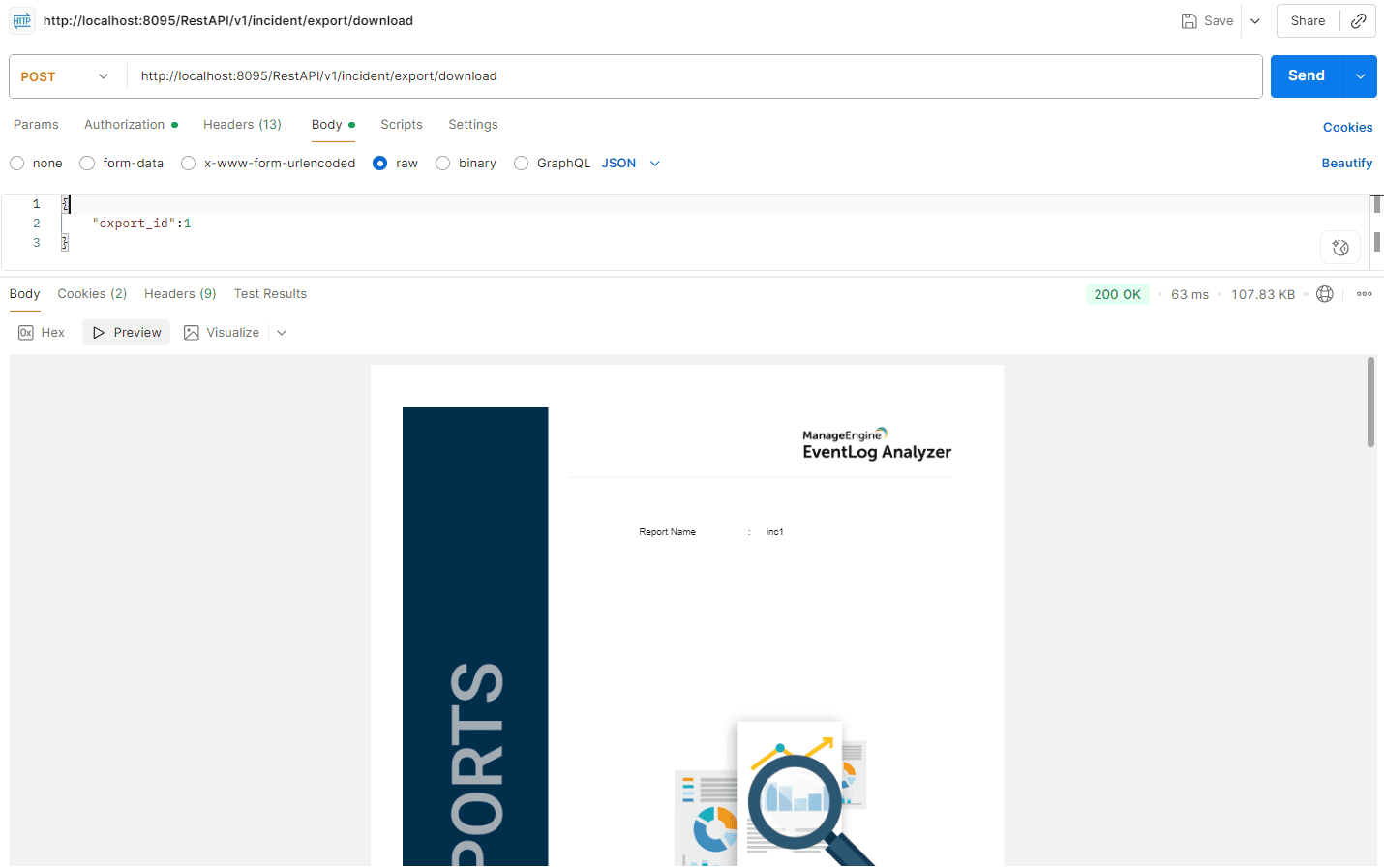
Executing the API using Postman
Read also
This page explained how to export, monitor, and download incidents associated with tickets using REST APIs.