
Working
Last updated on:
Agent - Less Log collection
- No agents/client software required for log collection : For event log collection, eventlog analyzer application does not require a separate agent to be installed on each machine from which logs are collected. Rather the agent that collects Windows event log. In this way, eventlog analyzer application performs event log collections task without introducing additional load on the devices.
- Windows event log collection: EventLog Analyzer collects events generated by Windows. Setting up EventLog Analyzer to collect and report on events from a server, is a simple process for both Windows and UNIX systems.
- Automatically collect logs for the period, ELA Log Collector process is down: This critical log collection feature ensures that the logs are not lost even during the log collector process down time.<Need to add architecture diagram>
Agent for event log collection
The EventLog Analyzer Agent simplifies the collection of event logs from Windows devices. Once installed—either automatically or manually—it runs as a service on a chosen server within the network or subnet. The installation status is shown as Success, Failed (with reason), or Retry. If automatic installation fails, manual deployment is available.
After deployment, the agent is automatically discovered by the EventLog Analyzer server. It remotely collects, pre-processes, and transmits logs to the server in real time without interruption. Each agent can support log collection from approximately 25 devices, and devices can be flexibly assigned or reassigned between agents as needed. Additionally, logs can be collected directly by the server without using agents.
If an agent is uninstalled or the host device is removed, log collection for the assigned devices seamlessly switches to agent-less mode, ensuring continuity without manual intervention.
Architecture
This section illustrates the architecture of the agent-based log collection deployment. The agent should be installed on the desired device in order to remotely collect log data from it, and then send the collected log data to the EventLog Analyzer server. Whereas, in the case of agent-less log collection, the agent resides within the EventLog Analyzer server itself, rather than being present on the remote device. To deploy the agent on a specific device, execute the 'EventLogAgent.msi' file located in lib\native directory in the installation folder.
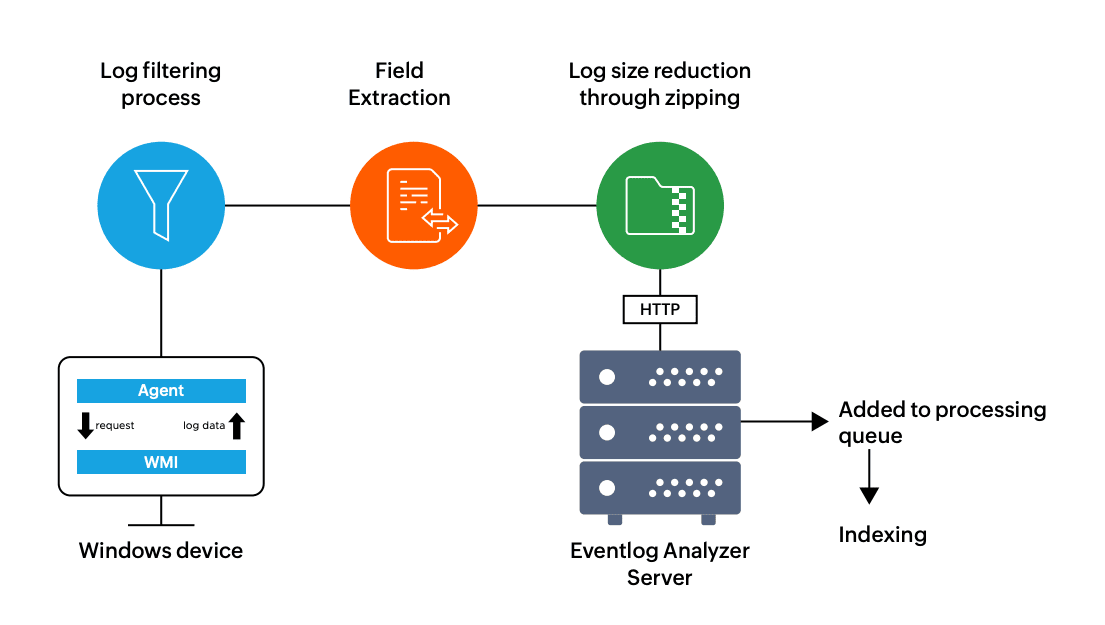
- The agent accesses the WMI infrastructure of the device internally and obtains the log data directly through WMI querying.
- Once the log data is collected, the agent does the pre-processing which includes log filtering as well as field extraction at the source, before zipping the log file and sending the log data to the EventLog Analyzer server securely through the HTTPS protocol.
- Since the log data has already been processed at this point, the server only needs to index the logs to generate the reports and alerts in real-time. This will reduce the overhead load on the server.